

The phone system that looks simplest on paper can become complicated during installation. For South Dakota businesses, business VoIP phone systems offer call-management features and flexible configurations, but rely on internet connectivity and power, so careful setup matters.
Compare VoIP with traditional phone service by looking beyond the monthly plan. Equipment, connectivity, features, and the transition process all affect whether a system fits your business’s day-to-day communication needs.
This guide explains how business VoIP works in South Dakota and how it differs from conventional phone service. You’ll learn what to consider when choosing a system, how configuration and installation typically proceed, and how planning for users, phone numbers, connectivity, testing, and training can make the transition more manageable.
Key Takeaways
- Match business calling features, such as call routing and virtual extensions, to how your team handles calls.
- Compare VoIP and traditional service by features, flexibility, call quality, and the equipment each approach requires.
- Plan for internet connectivity and power, since both affect how a VoIP system operates and what continuity measures make sense.
- Organize users, phone numbers, equipment, testing, and employee training before installation; BENDIX imaging’s VoIP Systems can support businesses planning that transition.
What is the Best Business VoIP Service in South Dakota?
The right fit is a hosted system with calling features that match your team, devices, and continuity needs. Taxes, international rates, and number-porting fees can affect quotes. A plan’s feature list alone does not determine your business’s regulatory obligations.
Business Calling Features
Business plans may combine PBX call management with conference calling, auto attendant, caller ID, call waiting, notifications, do not disturb, dial by name, on-hold music, group paging, E911, and virtual extensions. Map features to specific workflows: an auto attendant can direct callers, while dial by name helps them reach a staff member.
Feature availability depends on the platform and plan, so identify what your team needs before comparing options. If your business uses Microsoft Teams calling, include that workflow in your requirements and assess whether the proposed setup supports it.
Continuity and Emergency Calling
VoIP relies on internet connectivity and power, so interruptions can affect calling. Continuity options vary by platform and configuration. Decide what should happen to incoming calls during a connection or power disruption, such as routing them to an alternate number or voicemail, and include that behavior in setup and testing.
Review E911 alongside other calling features, and include emergency-calling setup in the deployment plan. Plan continuity before installation, when routing and user needs can be built into the system configuration.
Calling Across Office and Mobile Devices
A business system can support calls on office phones and other devices, including laptops and mobile devices. Consider how employees will use each one: a desk phone may suit a fixed reception role, while a laptop or mobile device can support staff working across locations.
Compare how each option handles caller ID, voicemail, and call transfers. With flat-rate plans, review included calling destinations and exclusions rather than relying on the label alone. Factor international rates, taxes, and number-porting fees into the quote. A clear feature and device plan helps protect productivity while giving staff practical calling flexibility.
VoIP compared with traditional phone service
For remote teams, multiple locations, and call centers, hosted VoIP can bring business calling into one shared system. The right configuration depends on how staff answer, transfer, and manage calls. A team working between Watertown and Sioux Falls, for example, may need consistent call handling across both offices, while remote employees need suitable access from their work devices.
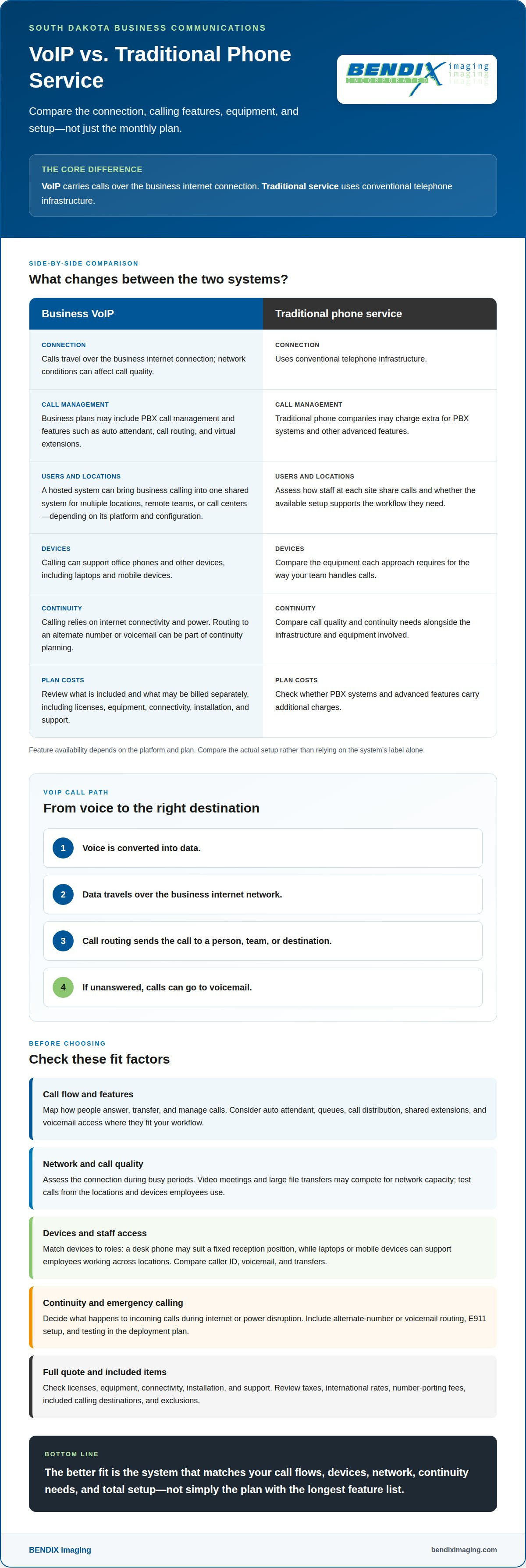
Traditional phone service uses conventional telephone infrastructure. VoIP carries calls over an internet connection and can support business call-management features. Traditional phone companies may charge extra for PBX systems and other advanced features, while business VoIP plans may include them. Compare call quality, required features, equipment, and how easily the system can adapt to your workflow.
For businesses in Brookings, Sioux Falls, Huron, or Montevideo, the choice between systems depends on more than location. Consider the number of sites, how staff share calls, and the network available at each one. A single office may need a straightforward reception setup; a multi-location operation may need shared extensions and consistent routing between teams.
Remote teams and call centers should look for a hosted platform that supports their specific call flows, user access, and management needs. A call center may need queues and call distribution; a remote team may need employees to handle business calls away from the office. A system’s usefulness depends on the platform and plan, not its label.
Customized services can scale with changing users, locations, and workflows. Before choosing, account for licenses, equipment, connectivity, installation, and support, including which items are included or billed separately. To discuss a phone setup around your communications needs, explore VoIP system options.
How Does Business VoIP in Interior, SD Work?
For a business in Watertown, Brookings, Sioux Falls, Huron, or Montevideo, business VoIP phone systems South Dakota solutions connect workplace calling to the company’s internet network. When partnering with BENDIX imaging, proper configuration determines how calls reach employees and how the system handles messages and customer contact.
Internet Connection and Call Quality
VoIP calls use the business internet connection, so network conditions can affect call quality. Video meetings or large file transfers may compete for network capacity. Assess the connection during normal busy periods and consider where employees make calls, including office workstations and laptops.
Call quality also depends on network equipment and how it handles voice traffic. Include everyday internet use when planning capacity, then test calls from the locations and devices staff actually use.
Call Routing and Voicemail
Call routing sends an incoming call to a selected person, team, or destination. For example, a business can direct its main number to a department and send unanswered calls to voicemail. Set routes around real responsibilities so callers don’t reach an unattended phone when an employee is away.
Decide who can access each voicemail box and how shared messages reach the right staff. Test the main number and a direct extension before relying on the setup.
Auto Attendant Routing
An auto attendant uses a recorded greeting and menu to direct callers. A caller might select a department or enter an employee’s extension rather than ask reception to transfer the call. Keep choices clear and ensure every option leads to a monitored destination or voicemail.
Test each menu choice from an outside phone. This catches routing errors before customers rely on the menu to reach the right team.
VoIP and PSTN Call Transmission
VoIP converts voice into data and sends it over an internet connection. The Public Switched Telephone Network, or PSTN, carries calls through traditional telephone infrastructure. The two systems can connect, allowing a VoIP user to call someone using a traditional phone.
Website chat and click-to-call can give customers more ways to start a conversation. A visitor might begin with a chat question or select a phone number to call. Include those contact paths in call-flow testing and review how the chosen plan handles any related charges.
Business phone system configuration and installation
A smooth VoIP rollout starts with an inventory of users, numbers, devices, and network needs. For a Sioux Falls office or a business with multiple locations, installation should include setup, testing, and employee preparation.
System Setup and Installation
First, the installation team maps each phone number to its users, departments, and call routes. It then plans connectivity, device placement, setup responsibilities, and number-transfer timing. This clarifies the role of each existing phone line, whether it serves reception, a direct extension, or a shared team.
Confirm which hardware the system requires. A deployment may use IP phones or an ATA adapter for compatible existing phones; routers and phones may also carry charges. Configuration should cover user accounts, call handling, and voicemail. Before launch, test incoming and outgoing calls, transfers, and each assigned device.
Employee training is part of the rollout, not an afterthought. Show staff how to sign in, transfer a call, and access voicemail on their assigned devices. A short test plan can catch an incorrect extension or routing rule before customers rely on the new system.
Porting Existing Phone Numbers
South Dakota businesses may be able to transfer existing numbers to VoIP, depending on the provider and the numbers. The provider handles the porting process; the business should plan which numbers to transfer, the timing, and any period when old and new service overlap.
Keep the current service active until the transfer is complete and the VoIP numbers work as intended. During transition testing, place incoming and outgoing calls to each ported number, then confirm that routing reaches the correct employee or department. This helps avoid a gap in customer calling.
For a coordinated rollout, plan your VoIP installation around users, equipment, number transfers, and staff training.
BENDIX imaging: VoIP Systems
BENDIX imaging provides VoIP Systems for businesses planning a new phone setup or replacing an existing system. Turn to this service when you need to align users, devices, call routing, and number transfers with daily operations. A clear configuration connects the phone system to the way your team handles customer and internal calls.
VoIP also relies on the business network and internet connection. When phone needs overlap with broader technology requirements, Managed IT Services can support the systems behind day-to-day operations. Cyber Security is also relevant when protecting business infrastructure and communications is part of the planning.
Bring your priorities, existing phone numbers, and preferred devices to the planning conversation. Contact BENDIX imaging to discuss VoIP Systems for your business.
Build a Phone System Around What Comes Next
Choosing business VoIP phone systems in South Dakota is an opportunity to shape communications around your business’s next stage, not just replace a phone line. As teams, locations, and customer expectations change, revisit how calls reach staff and how the phone setup fits the wider business network. Plan the system alongside the people and technology that depend on it.
BENDIX imaging offers VoIP Systems, supported by related services including Managed IT Services, Cyber Security, and Artificial Intelligence (AI) Consulting. These capabilities can help when phone configuration intersects with broader technology or security priorities. Bring your planned users, devices, and call-handling needs into the conversation so the next steps reflect your actual operations.
Contact BENDIX imaging to discuss a VoIP system for your business. Take the next step with a clear view of how your team needs to communicate.
Frequently Asked Questions
What are the best business VoIP phone systems available in South Dakota?
The best system is the one that fits your company’s calling needs, locations, and day-to-day operations. A small office may value straightforward call handling, while a distributed team may need to share calls across sites. Compare how the system handles your actual workflows and who manages changes as your business evolves. BENDIX imaging offers VoIP Systems for businesses.
Which VoIP providers serve businesses in Sioux Falls and other South Dakota cities?
BENDIX imaging offers VoIP Systems to businesses in Watertown, Brookings, Sioux Falls, Huron, and Montevideo. Planning starts with your locations, users, and communication needs. A multi-site setup should account for how employees at each location will access and manage business calls.
How much do business VoIP phone systems cost per user per month?
There isn’t a single per-user monthly figure that applies to every system. The total depends on the selected licenses, equipment, connectivity, installation, and support. Review the full quote and distinguish included items from separately billed ones. Number transfers, taxes, and international calling rates can also affect the overall amount, so consider them alongside the recurring plan.
What features should South Dakota businesses compare when choosing a VoIP system?
Compare features against the calls your team handles. A business receiving calls for several departments might need a menu to direct callers, while staff sharing customer inquiries may need call transfers and shared voicemail access. Also consider emergency calling, mobile use, and number transfers. Identify which functions are essential to daily operations before choosing a plan.
What internet speed and network requirements are needed for reliable business VoIP?
The internet capacity you need depends on how many employees call at once and what else the network carries. Simultaneous calls, video meetings, and large file transfers all use network resources. Consider each office and the devices employees use, then assess call performance during normal busy periods. Network equipment and connection stability also affect the experience.
How do hosted VoIP, on-premises PBX, and traditional business phone systems compare?
Hosted VoIP runs through a provider-managed platform, while an on-premises PBX uses call-management equipment located at the business. Traditional phone service relies on conventional telephone infrastructure. The main differences are where equipment and system management sit, and how each setup fits your operations. Consider who will handle system changes and how each approach supports your locations and staff.
{"@context":"https://schema.org","@type":"FAQPage","mainEntity":[{"@type":"Question","name":"What are the best business VoIP phone systems available in South Dakota?","acceptedAnswer":{"@type":"Answer","text":"The best system is the one that fits your company’s calling needs, locations, and day-to-day operations. A small office may value straightforward call handling, while a distributed team may need to share calls across sites. Compare how the system handles your actual workflows and who manages changes as your business evolves. BENDIX imaging offers VoIP Systems for businesses."}},{"@type":"Question","name":"Which VoIP providers serve businesses in Sioux Falls and other South Dakota cities?","acceptedAnswer":{"@type":"Answer","text":"BENDIX imaging offers VoIP Systems to businesses in Watertown, Brookings, Sioux Falls, Huron, and Montevideo. Planning starts with your locations, users, and communication needs. A multi-site setup should account for how employees at each location will access and manage business calls."}},{"@type":"Question","name":"How much do business VoIP phone systems cost per user per month?","acceptedAnswer":{"@type":"Answer","text":"There isn’t a single per-user monthly figure that applies to every system. The total depends on the selected licenses, equipment, connectivity, installation, and support. Review the full quote and distinguish included items from separately billed ones. Number transfers, taxes, and international calling rates can also affect the overall amount, so consider them alongside the recurring plan."}},{"@type":"Question","name":"What features should South Dakota businesses compare when choosing a VoIP system?","acceptedAnswer":{"@type":"Answer","text":"Compare features against the calls your team handles. A business receiving calls for several departments might need a menu to direct callers, while staff sharing customer inquiries may need call transfers and shared voicemail access. Also consider emergency calling, mobile use, and number transfers. Identify which functions are essential to daily operations before choosing a plan."}},{"@type":"Question","name":"What internet speed and network requirements are needed for reliable business VoIP?","acceptedAnswer":{"@type":"Answer","text":"The internet capacity you need depends on how many employees call at once and what else the network carries. Simultaneous calls, video meetings, and large file transfers all use network resources. Consider each office and the devices employees use, then assess call performance during normal busy periods. Network equipment and connection stability also affect the experience."}},{"@type":"Question","name":"How do hosted VoIP, on-premises PBX, and traditional business phone systems compare?","acceptedAnswer":{"@type":"Answer","text":"Hosted VoIP runs through a provider-managed platform, while an on-premises PBX uses call-management equipment located at the business. Traditional phone service relies on conventional telephone infrastructure. The main differences are where equipment and system management sit, and how each setup fits your operations. Consider who will handle system changes and how each approach supports your locations and staff."}}]}


