

A spoofed email can misuse your domain to make a fraudulent message appear credible. DMARC tells receiving mail servers how to handle messages that fail SPF and DKIM authentication, with a policy that can request quarantine or rejection. It does not determine on its own whether an email is spam or fraudulent.
That distinction matters: protection involves more than publishing a DNS record. Legitimate email needs to authenticate and align with the domain shown in the From field, or your policy could affect messages you want delivered. DMARC works best when you account for authorized senders before tightening enforcement.
This guide explains what DMARC does, what a record lookup can reveal, and how alignment connects SPF and DKIM to your visible sending domain. You’ll also learn what aggregate and forensic reports show, how DMARC policies differ, and why monitoring results helps you understand your email sources before tightening enforcement. With the mechanics clear, you can assess how spoofing defenses fit into your organization’s cybersecurity and network security.
Key Takeaways
- Understand how SPF and DKIM authentication help receiving mail servers handle messages that impersonate your domain.
- Use a DNS record lookup to see the published policy and understand what happens when authentication fails.
- Learn how aggregate and forensic reports can reveal sending sources and authentication results.
- See why alignment between the visible From domain and authenticated domains matters for legitimate email.
What is DMARC’s ability to protect against spoofing?
Receiving mail servers can use your published policy when SPF and DKIM authentication fail. Common setup risks include overlooking legitimate senders, misconfiguring DNS, and enforcing a strict policy before reviewing failures.
DMARC Authentication and Spoofing Protection
DMARC is an email authentication policy that helps receiving servers handle messages impersonating your domain. It uses SPF and DKIM results to guide treatment of mail that fails authentication and alignment. A quarantine policy can mark failed messages as suspicious; a reject policy can instruct servers to refuse them. This gives domain owners a way to limit spoofing, though it doesn’t independently identify spam or fraud.
SPF and DKIM Alignment
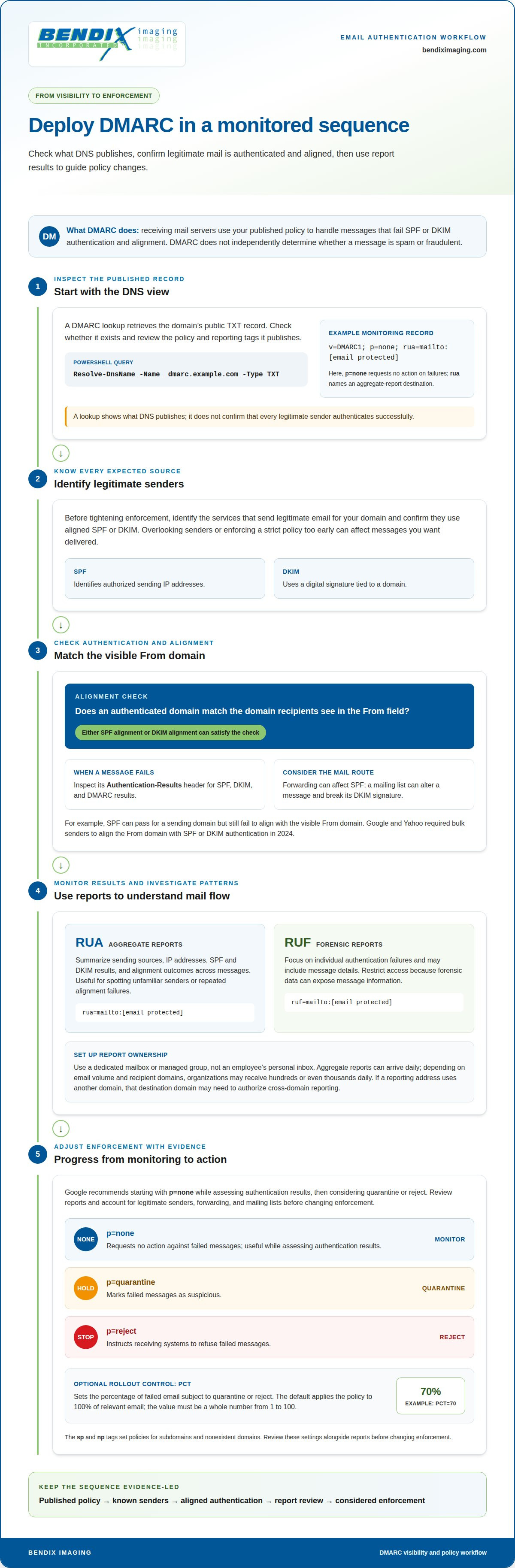
SPF identifies authorized sending IP addresses, while DKIM uses a digital signature tied to a domain. Alignment checks whether an authenticated domain matches the domain recipients see in the From field. Either SPF alignment or DKIM alignment can satisfy this check. Google and Yahoo required bulk senders to align the From domain with SPF or DKIM authentication in 2024.
For a failed message, inspect its Authentication-Results header. It can show SPF, DKIM, and DMARC results, helping distinguish an authentication failure from an alignment failure. For example, SPF may pass for a sending domain but fail to align with the visible From domain. Forwarding can also affect SPF, so consider the message’s route when interpreting results.
To troubleshoot DNS in PowerShell, query the published TXT record with Resolve-DnsName -Name _dmarc.example.com -Type TXT, replacing the example domain with yours. Review the returned policy and reporting tags, then compare them with the message header. A missing or malformed record can prevent servers from applying the intended policy. Before tightening enforcement, identify legitimate senders and confirm they use aligned SPF or DKIM. This helps reduce the risk of disrupting expected business email.
What Is a DMARC Record Lookup Tool?
A DNS lookup tool retrieves a domain’s published TXT record. A DMARC lookup can show whether the record exists and display its policy and reporting tags. For example, querying _dmarc.example.com reveals the public entry that receiving systems can read. The lookup confirms what DNS publishes, but not whether every legitimate sender authenticates successfully.
The record belongs in the domain’s DNS database. Check that the record’s tags are ordered correctly. A monitoring example is v=DMARC1; p=none; rua=mailto:dmarc@example.com. Here, the policy requests no action against failed messages, and the rua tag gives an aggregate-report destination. Without that optional tag, aggregate reports aren’t sent to a specified address.
The p tag tells receiving systems how to handle messages that fail the required checks. None requests no action, quarantine marks failures as suspicious, and reject instructs systems to refuse them. A lookup makes the published DMARC policy visible, helping administrators see whether a domain is monitoring failures or requesting enforcement.
Google recommends starting with p=none while assessing authentication results, then considering quarantine or reject. Before changing enforcement, account for legitimate senders, forwarding, and mailing lists. Forwarding may affect SPF, while a mailing list can alter a message and break its DKIM signature. A lookup displays the policy, but results and mail flow determine whether it’s appropriate to tighten enforcement.
The optional pct tag sets the percentage of failed email subject to quarantine or reject. Its default applies the policy to 100% of relevant email, and its value must be a whole number from 1 to 100. For example, pct=70 applies the stricter policy to 70% of failed email. The sp and np tags set policies for subdomains and nonexistent domains. Review these settings alongside DMARC reports before changing enforcement.
Aggregate and forensic reporting
Reports show how messages from a domain pass authentication and where failures occur. Set clear destinations so the right team can review results and investigate delivery problems.
Aggregate and Forensic Report Types
Aggregate reports summarize sending sources, IP addresses, SPF and DKIM results, and alignment outcomes across messages. Forensic reports focus on individual authentication failures and may include message details. Aggregate reports help teams monitor patterns, such as an unfamiliar sender or repeated alignment failures. Forensic reports can support an investigation of a specific failed message, but their detailed contents require careful handling.
Reporting Mailboxes and Groups
Use a dedicated mailbox or managed group for reports rather than an employee’s personal inbox. Aggregate reports can arrive daily, and organizations may receive hundreds or even thousands daily, depending on email volume and recipient domains. Assigning ownership helps teams review recurring senders, identify legitimate services, and distinguish expected failures from suspicious activity. Restrict mailbox access because forensic data can expose message information.
RUA and RUF Reporting Tags
Add rua=mailto:dmarc-reports@example.com to specify where aggregate reports should go. Add ruf=mailto:dmarc-failures@example.com to specify where forensic failure reports should go. Replace each example address with a mailbox your organization monitors. If either optional tag is omitted, that type of report won’t be sent to the specified destination.
For cross-domain reporting, the destination domain may need to publish authorization for the domain sending reports. This prevents unrelated domains from directing reports to another organization’s mailbox without permission. Confirm authorization when the reporting address uses a different domain; otherwise, the receiving system may not deliver reports there.
Plan review as part of protection, not as an inbox task with no owner. Aggregate reports typically arrive daily, while the default reporting interval is 86400 seconds. A team can group recurring SPF or DKIM failures by sending source, then resolve legitimate configuration issues before moving failed messages toward quarantine or rejection. This turns raw reports into useful monitoring.
What does DMARC domain alignment mean?
Alignment checks whether the domain authenticated by SPF or DKIM matches the domain recipients see in the message’s From field. It matters because authentication alone isn’t enough: either SPF alignment or DKIM alignment must pass for the message to meet this check.
For SPF alignment, compare the From domain with the Return-Path domain. For DKIM alignment, compare the From domain with the domain in the DKIM signature. A legitimate sender might authenticate successfully but still fail alignment if a third-party sending service uses a different domain. Receiving servers then evaluate the message against the published policy.
Both methods require SPF and/or DKIM to be configured for the sending domain before alignment can work. Publish DNS records for each domain that sends email, including domains used by business applications or email platforms. Keep the From domain consistent with the authenticated domains. Forwarding can affect SPF, while changes to a message can invalidate its DKIM signature, so review those sending paths when investigating failures.
Relaxed alignment is the default for SPF and DKIM, while strict alignment is also supported. Relaxed alignment allows related domains to match; strict alignment requires an exact match. Hosted DNS management provides a place to publish and maintain these records, but it doesn’t replace accurate sender configuration. As IT service providers like Trinity Networx, LLC emphasize when managing business technology, a wrong domain or stale record can cause legitimate email to fail checks.
BIMI and MTA-STS serve different purposes. BIMI displays a brand logo in supported inboxes and requires an enforcement policy with p=quarantine or p=reject, plus pct=100. MTA-STS addresses secure transport between mail servers, rather than sender-domain alignment. Knowing the distinction helps keep authentication, transport protection, and brand display separate.
BENDIX imaging
BENDIX imaging helps businesses connect email authentication concerns with broader cybersecurity and IT oversight. If SPF or DKIM alignment, DNS records, or report review raises questions, its Cyber Security, Network Security, and Managed IT Services offerings are relevant next steps. This support can help you consider how email safeguards fit into your wider technology environment, rather than treating one record as the whole security picture.
Consider reaching out when your team needs help understanding authentication issues or coordinating email security with other IT priorities. A clear view of your systems and sending practices can help shape the next steps.
For help with email security and IT concerns, contact BENDIX imaging.
Keep email security moving forward
A domain used for business email is part of your organization’s public identity, not merely a technical setting. Treat DMARC as part of ongoing operational planning: assign clear ownership, account for new sending platforms, and revisit controls when teams or systems change. This keeps authentication connected to how your business communicates instead of leaving a DNS entry untouched after setup.
Documenting decisions and ownership helps business leaders maintain consistent oversight, especially as departments adopt new services or change workflows. Where email safeguards intersect with broader technology planning, BENDIX imaging offers Cyber Security and Managed IT Services, alongside Artificial Intelligence (AI) Consulting. These services can support consideration of how security priorities, IT operations, and evolving tools fit together.
Choose a clear next step for managing your email security priorities. Contact BENDIX imaging today to discuss your organization’s needs and move forward with confidence.
Frequently Asked Questions
What Is DMARC?
DMARC stands for Domain-based Message Authentication, Reporting and Conformance. It’s a policy published in your domain’s DNS that tells receiving systems how to handle messages that fail email authentication and where to send reports. It works with SPF and DKIM rather than replacing them. For a business, it helps manage how other mail systems respond when someone tries to send email using its domain.
How does DMARC email security work?
Receiving mail systems evaluate authentication results and apply the policy published for the sender’s domain. A message that fails the relevant checks may be handled differently from one that passes. For example, a company can use authentication results to identify an unfamiliar email platform sending as its domain. Reviewing those sources helps teams distinguish legitimate business messages from unauthorized use.
What is DMARC and how does it work?
DMARC is a domain-level method for coordinating email authentication, reporting, and handling failed messages. The sending domain publishes its instructions in DNS, and receiving systems use them when evaluating mail. An administrator can review the domain’s DNS record and reported sending sources, then adjust authorized email systems or policy settings to address problems. It is an operational control, not an email filter by itself.
What do DMARC policies none, quarantine, and reject mean?
These settings indicate how firmly receiving systems should handle messages that fail the policy’s checks. The right choice depends on whether the organization has accounted for its legitimate email sources and how it wants failures handled. Before strengthening enforcement, teams can use authentication results to spot overlooked senders, such as an invoicing platform or a service that sends appointment notices.
How do SPF, DKIM, and DMARC work together?
SPF checks whether a sending server is authorized for a domain, while DKIM checks a cryptographic signature attached to the message. Domain alignment connects those authentication results to the sender shown in the From field. For instance, a message may pass SPF but use a domain unrelated to its visible sender. Together, these checks help receiving systems assess whether the message is authorized to represent that domain.
How do you create and publish a DMARC DNS record?
First, ensure legitimate mail sources for the domain have SPF or DKIM configured. Then create a TXT record in the domain’s DNS settings, using _dmarc as the record name and a policy value in the content. Add a reporting destination if you need reports. Save the entry, allow DNS changes to propagate, and query the record to confirm its published name and value.
{"@context":"https://schema.org","@type":"FAQPage","mainEntity":[{"@type":"Question","name":"What Is DMARC?","acceptedAnswer":{"@type":"Answer","text":"DMARC stands for Domain-based Message Authentication, Reporting and Conformance. It’s a policy published in your domain’s DNS that tells receiving systems how to handle messages that fail email authentication and where to send reports. It works with SPF and DKIM rather than replacing them. For a business, it helps manage how other mail systems respond when someone tries to send email using its domain."}},{"@type":"Question","name":"How does DMARC email security work?","acceptedAnswer":{"@type":"Answer","text":"Receiving mail systems evaluate authentication results and apply the policy published for the sender’s domain. A message that fails the relevant checks may be handled differently from one that passes. For example, a company can use authentication results to identify an unfamiliar email platform sending as its domain. Reviewing those sources helps teams distinguish legitimate business messages from unauthorized use."}},{"@type":"Question","name":"What is DMARC and how does it work?","acceptedAnswer":{"@type":"Answer","text":"DMARC is a domain-level method for coordinating email authentication, reporting, and handling failed messages. The sending domain publishes its instructions in DNS, and receiving systems use them when evaluating mail. An administrator can review the domain’s DNS record and reported sending sources, then adjust authorized email systems or policy settings to address problems. It is an operational control, not an email filter by itself."}},{"@type":"Question","name":"What do DMARC policies none, quarantine, and reject mean?","acceptedAnswer":{"@type":"Answer","text":"These settings indicate how firmly receiving systems should handle messages that fail the policy’s checks. The right choice depends on whether the organization has accounted for its legitimate email sources and how it wants failures handled. Before strengthening enforcement, teams can use authentication results to spot overlooked senders, such as an invoicing platform or a service that sends appointment notices."}},{"@type":"Question","name":"How do SPF, DKIM, and DMARC work together?","acceptedAnswer":{"@type":"Answer","text":"SPF checks whether a sending server is authorized for a domain, while DKIM checks a cryptographic signature attached to the message. Domain alignment connects those authentication results to the sender shown in the From field. For instance, a message may pass SPF but use a domain unrelated to its visible sender. Together, these checks help receiving systems assess whether the message is authorized to represent that domain."}},{"@type":"Question","name":"How do you create and publish a DMARC DNS record?","acceptedAnswer":{"@type":"Answer","text":"First, ensure legitimate mail sources for the domain have SPF or DKIM configured. Then create a TXT record in the domain’s DNS settings, using _dmarc as the record name and a policy value in the content. Add a reporting destination if you need reports. Save the entry, allow DNS changes to propagate, and query the record to confirm its published name and value."}}]}


