

The nearest result for “it solutions near me” may not be the right IT partner for your business. A nearby address doesn’t tell you whether a provider’s services fit your needs, whether it serves your town, or how support works when a problem comes up.
Looking locally makes sense. Businesses in Eastern South Dakota need clear answers, not vague promises, when comparing managed IT, break-fix support, cybersecurity, backup, compliance, and help desk options. Check service fit, accountability, and location coverage before you choose.
This guide explains how to identify the support your business needs, compare providers with practical questions, and check what to confirm before signing on. You’ll also learn how to assess security, recovery, compliance, and related technology needs without assuming every provider offers the same capabilities. BENDIX imaging is one local option for businesses evaluating managed IT and related services, including cybersecurity, backup and recovery, compliance support, managed print, and VoIP systems. Start with the questions that matter most to your operations.
Key Takeaways
- Use “it solutions near me” as a starting point, then verify that a provider’s services and coverage match your business needs.
- Compare managed IT, break-fix support, security, backup, and specialist consulting by checking each provider’s written scope and responsibilities.
- Ask practical questions about service coverage, escalation, communication, and documentation before choosing a local IT partner.
- Build a shortlist by listing critical systems, recurring technology issues, and the business impact of downtime before contacting providers.
- Explore whether BENDIX imaging’s managed IT, cybersecurity, backup, vCSO, compliance support, and AI consulting fit your business, and confirm service availability directly.
What “IT Solutions Near Me” Means for an Eastern South Dakota Business
Local business IT support is a set of services that helps a company keep workplace technology operating securely, with support arranged around its systems, risks, and needs. That may include help with recurring user problems, network security, data backup and recovery, or technology planning. The phrase it solutions near me can point you toward providers, but it doesn’t show what each one covers or whether its support model fits your business.
Start by distinguishing managed IT from one-time troubleshooting. A managed arrangement generally involves ongoing support under an agreed scope, while break-fix support addresses specific problems as they arise. Those labels aren’t a complete service description, since providers may define responsibilities differently. Read the written scope and ask who handles each issue, what’s excluded, and how security or backup needs are addressed. For a neutral overview of the support function, see this explanation of technical support.
Which IT needs are businesses usually trying to solve?
Separate day-to-day interruptions from longer-term risks. Employees may need help with access or recurring technology problems, while owners may be weighing network protection, backup and recovery, or security planning. Compliance needs call for a specific discussion about relevant requirements and provider responsibilities, not a vague promise to “handle compliance.” Also consider workplace systems: managed print may matter if printing is a regular operational burden, while VoIP may be relevant if business calling systems need attention.
Does “near me” mean a provider must be onsite?
No. A nearby map listing doesn’t confirm onsite service, response availability, or which problems can be handled remotely. Ask how the provider supports common issues, which situations may require onsite work, and how it communicates when a problem needs escalation. Confirm these details for your location rather than assuming proximity settles them.
That distinction matters whether your business is in Watertown, Brookings, Sioux Falls, Huron, or Montevideo. A provider may serve a region without offering the same delivery options or scope in every town. Before choosing, ask:
- Does your service cover our specific location and business systems?
- Which issues are handled remotely, and which may require onsite work?
- How are requests prioritized and escalated, and what communication should we expect?
- Can we review the service scope, exclusions, and responsibilities in writing?
Use the answers to compare actual support, not just distance. A local provider should be able to explain the fit plainly, and you should know what happens before you commit.
Compare Local IT Solutions by Service Scope, Security, and Support
Search results for it solutions near me can make providers look similar. Compare what each service actually covers instead. Names like “managed IT” or “cybersecurity” aren’t a complete agreement. Ask for the written scope, exclusions, and responsibilities so you know who handles each need.
| Service type | What to clarify | Questions to ask |
|---|---|---|
| Managed IT | What ongoing technology support and management are included, and what falls outside the plan? | Which systems and users are in scope? How are requests handled and escalated? |
| Break-fix support | Whether support is arranged after a specific issue occurs, and how work is authorized. | What counts as a support request? Who provides updates, and what happens if the issue recurs? |
| Security | Which systems, networks, and security responsibilities the service covers. | What security work is included, and what remains the business’s responsibility? |
| Backup and recovery | Which data is included and how recovery responsibilities are assigned. | How is a restore requested and handled? What should we expect during recovery? |
| Specialist consulting | The specific planning or advisory need, such as vCSO or compliance support. | What deliverables or guidance are provided, and what work stays with our team? |
Managed IT or break-fix support: which model fits?
Ongoing managed IT may suit a business seeking continuing technology management, while break-fix support is organized around problems as they arise. Neither model is right for every company. Consider your internal IT capacity, how often issues disrupt work, and how dependent daily operations are on technology. Then confirm exactly what the provider will do and what your staff must handle.
How should you compare security, backup, and compliance support?
Look past broad labels. Identify the systems and data included in security and backup services, who is responsible for recovery steps, and how responsibilities are documented. For compliance support, ask what guidance is provided and what remains your organization’s responsibility. Support should not be mistaken for a promise of certification or guaranteed compliance.
BENDIX imaging offers managed IT, cybersecurity, network security, data backup and recovery, vCSO, and regulatory compliance support. Compare those offerings with your needs, then confirm service scope and location coverage directly. To start that conversation, discuss your business IT needs with BENDIX imaging.
The Local IT Provider Questions That Reveal Real Fit
A provider appearing nearby in a search for it solutions near me doesn’t prove it serves your town, supports your systems, or can meet your expectations when an issue arises. Verify the details before comparing proposals. Clear answers matter more than a map pin.
What should you ask about service coverage and response?
Ask the provider to name the towns it serves and explain whether support is remote, onsite, or a combination. Don’t assume those options are available for every service or location. If your business is in Watertown, Brookings, Sioux Falls, Huron, or Montevideo, confirm coverage for your specific location directly.
Get the support model in writing. Ask the provider to define its support hours, how it prioritizes issues, and what happens when a request needs escalation. For example, find out how the process differs if one employee can’t access a system versus a problem affecting several people. Don’t rely on broad claims like “fast support” unless the agreement explains what they mean.
How can you check accountability before choosing?
Reliable support requires clear ownership. Ask who tracks requests, who follows up, and how recurring problems are reviewed. Then read the proposed agreement for scope, exclusions, onboarding steps, and termination terms. If responsibilities are unclear during the sales conversation, they may be just as unclear after you sign.
- Coverage: Which locations, users, devices, and systems are included?
- Escalation: Who takes ownership if an issue can’t be resolved at first contact?
- Communication: How will your team receive updates and know when a request is closed?
- Documentation: What service records or status information can you review?
- Agreement: What’s excluded, how does onboarding work, and how can either party end the arrangement?
References can help you test a provider’s claims, but choose relevant ones. Ask to speak with a business similar in size or operating needs, or one that uses technology comparable to yours. Ask about communication and follow-up, whether responsibilities match the written agreement, and what the reference would want clarified before starting. Treat a reference as one perspective, not a substitute for reviewing the contract.
For more context on ongoing support models and proactive technology operations, read this managed IT support guide for South Dakota businesses. Use it to sharpen your questions, then confirm each provider’s coverage and commitments in writing.
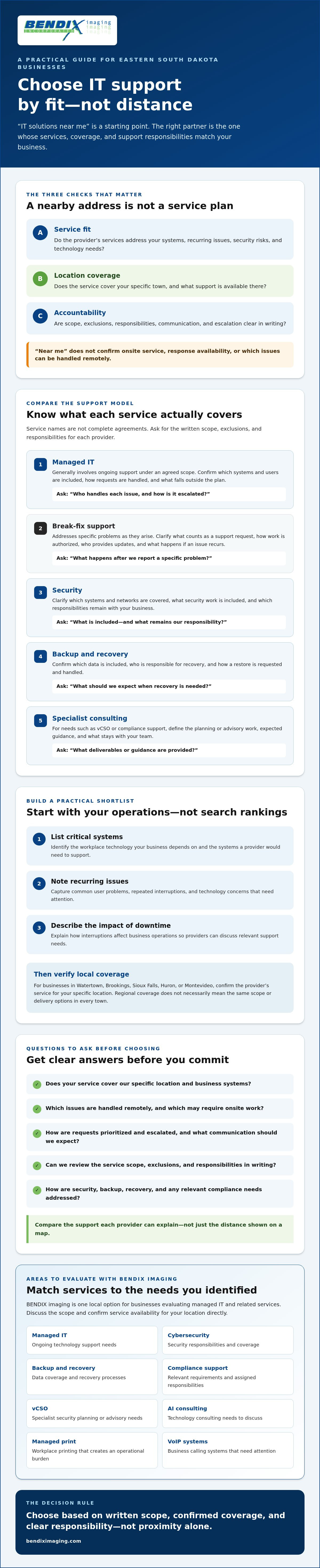
A Practical Shortlist for Businesses in Watertown, Brookings, Sioux Falls, Huron, and Montevideo
A useful shortlist starts with your business, not a provider’s sales pitch. Before searching for it solutions near me, write down the problems you need addressed, the systems they affect, and what reliable support would mean for your operations. Then take four steps: define your needs, confirm location coverage, compare written service scopes, and schedule discussions with providers that appear to fit.
How do you turn business problems into a useful shortlist?
Separate immediate operational issues from longer-term goals. Recurring access problems or interruptions may need attention now; security planning, backup review, or compliance support may be priorities to evaluate over time. Mark which services are essential today and which could become relevant later. This keeps provider conversations focused without treating every service as an urgent requirement.
If your nonprofit is evaluating ongoing technology support, review the managed IT guide for nonprofits for considerations specific to that organization type. For businesses in Watertown, the Watertown managed IT services protection guide offers additional local context.
Use the same verification process whether you’re based in Watertown, Brookings, Sioux Falls, Huron, or Montevideo. Ask each provider to confirm whether it currently serves your location and what support options are available there. A regional listing alone doesn’t establish onsite availability or a particular response arrangement.
What information should you bring to an introductory conversation?
Prepare a high-level picture of your technology environment. You don’t need a perfect inventory, but useful details help a provider understand the scale and shape of your needs. Bring notes on:
- Users and locations: Approximate staff count and the business sites needing support.
- Key systems: Important devices, networks, business applications, and data stores.
- Current support: Who handles IT now, what’s working, and where responsibility is unclear.
- Pain points: Recurring issues, interruptions, and their impact on staff or customers.
- Priorities: Known compliance obligations and security, backup, or planning concerns.
Keep the first conversation high-level. Don’t send passwords, sensitive records, or other confidential information through an unsecured contact channel. If a provider needs details for a deeper review, ask how to share them securely.
Once your shortlist is clear, discuss your business IT needs with BENDIX imaging and confirm current service fit and coverage for your location.
How BENDIX imaging Can Help You Evaluate Business IT Solutions
Once you’ve identified your priorities, check whether a provider’s actual services align with them. BENDIX imaging is a privately owned business technology provider in Eastern South Dakota, established in Watertown. Its offerings include managed IT, cybersecurity, network security, data backup and recovery, vCSO, regulatory compliance support, and AI consulting. Treat that list as a starting point for a conversation, not a guarantee that every service or support arrangement fits every business.
Which BENDIX services may match your business priorities?
If your team faces recurring technology issues, ask how BENDIX’s managed IT services may fit your support needs. If protecting business systems is a priority, discuss network security. If your concern is data resilience, ask what its backup and recovery services cover and what responsibilities your staff would retain.
Other priorities may call for a different discussion. BENDIX offers vCSO and compliance support for businesses evaluating security leadership or regulatory needs, as well as AI consulting for organizations considering how AI could fit their operations. These are service areas to explore, not promises of a particular security outcome, compliance result, or business improvement. If your needs extend beyond core IT, managed print and VoIP systems may also be relevant to a broader office technology conversation.
What is a sensible next step before making a commitment?
Bring your shortlist and ask direct questions. Describe the systems and business priorities you want to address, then confirm whether BENDIX currently serves your location and which services are available for your needs. Businesses in Watertown, Brookings, Sioux Falls, Huron, or Montevideo should verify location-specific coverage directly. Also clarify which services are in scope, how responsibilities are divided, and what support arrangements are documented. Don’t rely on a general service label to fill in those details.
Before agreeing to anything, compare the proposed scope with the criteria you’ve already set: the problems to address, systems involved, support expectations, and any relevant security or compliance concerns. If a detail is unclear, ask for it to be explained plainly and documented. A focused discussion helps you decide whether the fit is right without assuming every nearby provider offers the same coverage or service model.
Ready to discuss your business priorities and confirm what may fit? Contact BENDIX imaging to discuss business IT solutions.
Choose Your Next IT Partner with Confidence
The right local provider isn’t simply the closest one. It’s the one whose written service scope, location coverage, and support expectations match your business priorities. Use your shortlist to compare providers carefully, confirm how security, backup, and compliance support fit your needs, and ask who owns communication and follow-up.
If you’re still comparing it solutions near me, BENDIX imaging is a privately owned local provider established in Watertown, South Dakota. Its business offerings include managed IT, cybersecurity, backup and recovery, and compliance support. Discuss your requirements directly and confirm which services and support arrangements fit your location before making a decision.
Contact BENDIX imaging to discuss your business IT needs. A clear conversation is a practical next step toward choosing support that helps your business move forward with confidence.
Frequently Asked Questions
What do IT solutions for a small business include?
Small-business IT solutions can include ongoing technology management, user support, cybersecurity, network security, data backup and recovery, and planning or compliance support. The exact mix depends on the provider and your agreement. Some businesses may also need managed print or VoIP systems as part of their workplace technology. Ask which systems, users, and responsibilities are included rather than assuming a service label covers every need.
How do I find a business IT provider near me in Eastern South Dakota?
Search by your location, then confirm directly that each provider currently serves your business’s town and can address your needs. A search for it solutions near me can surface options, but it doesn’t verify service coverage or support arrangements. BENDIX imaging is an established local provider in Watertown serving businesses in Eastern South Dakota, including Watertown, Brookings, Sioux Falls, Huron, and Montevideo. Confirm current service fit for your location.
Is managed IT support better than break-fix support?
Neither model is automatically better; the right fit depends on your business’s needs and internal capacity. Managed IT is generally arranged as ongoing support, while break-fix addresses issues as they arise. Consider how often technology problems interrupt work, whether staff can manage routine IT needs, and how much your operations depend on key systems. Compare the written scope, responsibilities, and support process before choosing either approach.
What should I ask a local IT company before signing a contract?
Ask which users, locations, devices, and systems are covered, along with what’s excluded. Clarify support hours, issue priorities, escalation steps, communication, and how requests are tracked. Review onboarding requirements, contract duration, and termination terms. Ask who owns follow-up when a problem recurs. Make sure the provider documents responsibilities clearly, so your team knows what the agreement covers and what remains your responsibility.
Can one IT provider handle cybersecurity, backup, and compliance support?
Yes, a provider may offer all three, but confirm that each is included in the proposed scope and how responsibilities are divided. BENDIX imaging offers cybersecurity, network security, data backup and recovery, and regulatory compliance support, as well as managed IT and vCSO services. Ask what systems and data are covered, how recovery responsibilities work, and what compliance support includes. Support shouldn’t be treated as a guarantee of compliance or a particular outcome.
Does “IT solutions near me” mean onsite support is available?
No. A nearby search result doesn’t confirm onsite service, response availability, or whether a particular issue can be handled remotely. Ask which support options apply to your specific location and needs, and whether onsite work may be available when required. If your business is in Watertown, Brookings, Sioux Falls, Huron, or Montevideo, confirm location coverage directly. Review the provider’s written support terms rather than relying on distance alone.
What information should I prepare before contacting an IT provider?
Prepare a high-level overview of your users, locations, devices, and important business systems. Note your current support arrangement, recurring problems, and the effect those issues have on work. List security, backup, or compliance priorities you want to discuss. You don’t need a complete technical inventory for an initial conversation. Don’t send passwords or sensitive records through an unsecured contact channel; ask how to share confidential details safely if needed.
{"@context":"https://schema.org","@type":"FAQPage","mainEntity":[{"@type":"Question","name":"Which IT needs are businesses usually trying to solve?","acceptedAnswer":{"@type":"Answer","text":"Separate day-to-day interruptions from longer-term risks. Employees may need help with access or recurring technology problems, while owners may be weighing network protection, backup and recovery, or security planning. Compliance needs call for a specific discussion about relevant requirements and provider responsibilities, not a vague promise to “handle compliance.” Also consider workplace systems: managed print may matter if printing is a regular operational burden, while VoIP may be relevant if business calling systems need attention."}},{"@type":"Question","name":"Does “near me” mean a provider must be onsite?","acceptedAnswer":{"@type":"Answer","text":"No. A nearby map listing doesn’t confirm onsite service, response availability, or which problems can be handled remotely. Ask how the provider supports common issues, which situations may require onsite work, and how it communicates when a problem needs escalation. Confirm these details for your location rather than assuming proximity settles them. That distinction matters whether your business is in Watertown, Brookings, Sioux Falls, Huron, or Montevideo. A provider may serve a region without offering the same delivery options or scope in every town. Before choosing, ask: Use the answers to compare actual support, not just distance. A local provider should be able to explain the fit plainly, and you should know what happens before you commit. Search results for it solutions near me can make providers look similar. Compare what each service actually covers instead. Names like “managed IT” or “cybersecurity” aren’t a complete agreement. Ask for the written scope, exclusions, and responsibilities so you know who handles each need."}},{"@type":"Question","name":"Managed IT or break-fix support: which model fits?","acceptedAnswer":{"@type":"Answer","text":"Ongoing managed IT may suit a business seeking continuing technology management, while break-fix support is organized around problems as they arise. Neither model is right for every company. Consider your internal IT capacity, how often issues disrupt work, and how dependent daily operations are on technology. Then confirm exactly what the provider will do and what your staff must handle."}},{"@type":"Question","name":"How should you compare security, backup, and compliance support?","acceptedAnswer":{"@type":"Answer","text":"Look past broad labels. Identify the systems and data included in security and backup services, who is responsible for recovery steps, and how responsibilities are documented. For compliance support, ask what guidance is provided and what remains your organization’s responsibility. Support should not be mistaken for a promise of certification or guaranteed compliance. BENDIX imaging offers managed IT, cybersecurity, network security, data backup and recovery, vCSO, and regulatory compliance support. Compare those offerings with your needs, then confirm service scope and location coverage directly. To start that conversation, discuss your business IT needs with BENDIX imaging. A provider appearing nearby in a search for it solutions near me doesn’t prove it serves your town, supports your systems, or can meet your expectations when an issue arises. Verify the details before comparing proposals. Clear answers matter more than a map pin."}},{"@type":"Question","name":"What should you ask about service coverage and response?","acceptedAnswer":{"@type":"Answer","text":"Ask the provider to name the towns it serves and explain whether support is remote, onsite, or a combination. Don’t assume those options are available for every service or location. If your business is in Watertown, Brookings, Sioux Falls, Huron, or Montevideo, confirm coverage for your specific location directly. Get the support model in writing. Ask the provider to define its support hours, how it prioritizes issues, and what happens when a request needs escalation. For example, find out how the process differs if one employee can’t access a system versus a problem affecting several people. Don’t rely on broad claims like “fast support” unless the agreement explains what they mean."}},{"@type":"Question","name":"How can you check accountability before choosing?","acceptedAnswer":{"@type":"Answer","text":"Reliable support requires clear ownership. Ask who tracks requests, who follows up, and how recurring problems are reviewed. Then read the proposed agreement for scope, exclusions, onboarding steps, and termination terms. If responsibilities are unclear during the sales conversation, they may be just as unclear after you sign. References can help you test a provider’s claims, but choose relevant ones. Ask to speak with a business similar in size or operating needs, or one that uses technology comparable to yours. Ask about communication and follow-up, whether responsibilities match the written agreement, and what the reference would want clarified before starting. Treat a reference as one perspective, not a substitute for reviewing the contract. For more context on ongoing support models and proactive technology operations, read this managed IT support guide for South Dakota businesses. Use it to sharpen your questions, then confirm each provider’s coverage and commitments in writing. A useful shortlist starts with your business, not a provider’s sales pitch. Before searching for it solutions near me, write down the problems you need addressed, the systems they affect, and what reliable support would mean for your operations. Then take four steps: define your needs, confirm location coverage, compare written service scopes, and schedule discussions with providers that appear to fit."}},{"@type":"Question","name":"How do you turn business problems into a useful shortlist?","acceptedAnswer":{"@type":"Answer","text":"Separate immediate operational issues from longer-term goals. Recurring access problems or interruptions may need attention now; security planning, backup review, or compliance support may be priorities to evaluate over time. Mark which services are essential today and which could become relevant later. This keeps provider conversations focused without treating every service as an urgent requirement. If your nonprofit is evaluating ongoing technology support, review the managed IT guide for nonprofits for considerations specific to that organization type. For businesses in Watertown, the Watertown managed IT services protection guide offers additional local context. Use the same verification process whether you’re based in Watertown, Brookings, Sioux Falls, Huron, or Montevideo. Ask each provider to confirm whether it currently serves your location and what support options are available there. A regional listing alone doesn’t establish onsite availability or a particular response arrangement."}},{"@type":"Question","name":"What information should you bring to an introductory conversation?","acceptedAnswer":{"@type":"Answer","text":"Prepare a high-level picture of your technology environment. You don’t need a perfect inventory, but useful details help a provider understand the scale and shape of your needs. Bring notes on: Keep the first conversation high-level. Don’t send passwords, sensitive records, or other confidential information through an unsecured contact channel. If a provider needs details for a deeper review, ask how to share them securely. Once your shortlist is clear, discuss your business IT needs with BENDIX imaging and confirm current service fit and coverage for your location. Once you’ve identified your priorities, check whether a provider’s actual services align with them. BENDIX imaging is a privately owned business technology provider in Eastern South Dakota, established in Watertown. Its offerings include managed IT, cybersecurity, network security, data backup and recovery, vCSO, regulatory compliance support, and AI consulting. Treat that list as a starting point for a conversation, not a guarantee that every service or support arrangement fits every business."}},{"@type":"Question","name":"Which BENDIX services may match your business priorities?","acceptedAnswer":{"@type":"Answer","text":"If your team faces recurring technology issues, ask how BENDIX’s managed IT services may fit your support needs. If protecting business systems is a priority, discuss network security. If your concern is data resilience, ask what its backup and recovery services cover and what responsibilities your staff would retain. Other priorities may call for a different discussion. BENDIX offers vCSO and compliance support for businesses evaluating security leadership or regulatory needs, as well as AI consulting for organizations considering how AI could fit their operations. These are service areas to explore, not promises of a particular security outcome, compliance result, or business improvement. If your needs extend beyond core IT, managed print and VoIP systems may also be relevant to a broader office technology conversation."}},{"@type":"Question","name":"What is a sensible next step before making a commitment?","acceptedAnswer":{"@type":"Answer","text":"Bring your shortlist and ask direct questions. Describe the systems and business priorities you want to address, then confirm whether BENDIX currently serves your location and which services are available for your needs. Businesses in Watertown, Brookings, Sioux Falls, Huron, or Montevideo should verify location-specific coverage directly. Also clarify which services are in scope, how responsibilities are divided, and what support arrangements are documented. Don’t rely on a general service label to fill in those details. Before agreeing to anything, compare the proposed scope with the criteria you’ve already set: the problems to address, systems involved, support expectations, and any relevant security or compliance concerns. If a detail is unclear, ask for it to be explained plainly and documented. A focused discussion helps you decide whether the fit is right without assuming every nearby provider offers the same coverage or service model. Ready to discuss your business priorities and confirm what may fit? Contact BENDIX imaging to discuss business IT solutions. The right local provider isn’t simply the closest one. It’s the one whose written service scope, location coverage, and support expectations match your business priorities. Use your shortlist to compare providers carefully, confirm how security, backup, and compliance support fit your needs, and ask who owns communication and follow-up. If you’re still comparing it solutions near me, BENDIX imaging is a privately owned local provider established in Watertown, South Dakota. Its business offerings include managed IT, cybersecurity, backup and recovery, and compliance support. Discuss your requirements directly and confirm which services and support arrangements fit your location before making a decision. Contact BENDIX imaging to discuss your business IT needs. A clear conversation is a practical next step toward choosing support that helps your business move forward with confidence."}},{"@type":"Question","name":"What do IT solutions for a small business include?","acceptedAnswer":{"@type":"Answer","text":"Small-business IT solutions can include ongoing technology management, user support, cybersecurity, network security, data backup and recovery, and planning or compliance support. The exact mix depends on the provider and your agreement. Some businesses may also need managed print or VoIP systems as part of their workplace technology. Ask which systems, users, and responsibilities are included rather than assuming a service label covers every need."}},{"@type":"Question","name":"How do I find a business IT provider near me in Eastern South Dakota?","acceptedAnswer":{"@type":"Answer","text":"Search by your location, then confirm directly that each provider currently serves your business’s town and can address your needs. A search for it solutions near me can surface options, but it doesn’t verify service coverage or support arrangements. BENDIX imaging is an established local provider in Watertown serving businesses in Eastern South Dakota, including Watertown, Brookings, Sioux Falls, Huron, and Montevideo. Confirm current service fit for your location."}},{"@type":"Question","name":"Is managed IT support better than break-fix support?","acceptedAnswer":{"@type":"Answer","text":"Neither model is automatically better; the right fit depends on your business’s needs and internal capacity. Managed IT is generally arranged as ongoing support, while break-fix addresses issues as they arise. Consider how often technology problems interrupt work, whether staff can manage routine IT needs, and how much your operations depend on key systems. Compare the written scope, responsibilities, and support process before choosing either approach."}},{"@type":"Question","name":"What should I ask a local IT company before signing a contract?","acceptedAnswer":{"@type":"Answer","text":"Ask which users, locations, devices, and systems are covered, along with what’s excluded. Clarify support hours, issue priorities, escalation steps, communication, and how requests are tracked. Review onboarding requirements, contract duration, and termination terms. Ask who owns follow-up when a problem recurs. Make sure the provider documents responsibilities clearly, so your team knows what the agreement covers and what remains your responsibility."}},{"@type":"Question","name":"Can one IT provider handle cybersecurity, backup, and compliance support?","acceptedAnswer":{"@type":"Answer","text":"Yes, a provider may offer all three, but confirm that each is included in the proposed scope and how responsibilities are divided. BENDIX imaging offers cybersecurity, network security, data backup and recovery, and regulatory compliance support, as well as managed IT and vCSO services. Ask what systems and data are covered, how recovery responsibilities work, and what compliance support includes. Support shouldn’t be treated as a guarantee of compliance or a particular outcome."}},{"@type":"Question","name":"Does “IT solutions near me” mean onsite support is available?","acceptedAnswer":{"@type":"Answer","text":"No. A nearby search result doesn’t confirm onsite service, response availability, or whether a particular issue can be handled remotely. Ask which support options apply to your specific location and needs, and whether onsite work may be available when required. If your business is in Watertown, Brookings, Sioux Falls, Huron, or Montevideo, confirm location coverage directly. Review the provider’s written support terms rather than relying on distance alone."}},{"@type":"Question","name":"What information should I prepare before contacting an IT provider?","acceptedAnswer":{"@type":"Answer","text":"Prepare a high-level overview of your users, locations, devices, and important business systems. Note your current support arrangement, recurring problems, and the effect those issues have on work. List security, backup, or compliance priorities you want to discuss. You don’t need a complete technical inventory for an initial conversation. Don’t send passwords or sensitive records through an unsecured contact channel; ask how to share confidential details safely if needed."}}]}


