

What if the next IT disruption isn’t a one-off glitch, but a sign that no one clearly owns your network, devices, backups, or security? For South Dakota businesses, unclear responsibilities can turn routine issues into lost time and added risk. A practical approach to IT infrastructure management SD starts with knowing what needs managing and who is accountable for it.
Reliable technology is essential, but choosing between an internal team and an outside provider can be difficult when service scope and expectations aren’t clear. This guide offers a practical framework for identifying core infrastructure, setting expectations for ownership, communication, and reporting, and comparing support models. It also explains how network security, data backup and recovery, and strategic guidance fit into a stronger IT plan, along with questions to ask local providers. The goal is to reduce uncertainty, address recurring disruptions, and find support that fits your business.
Key Takeaways
- Identify who keeps your business systems available, secure, and recoverable, then define responsibility for each essential area of technology.
- Use a functional checklist to assess network management, devices, access controls, backups, recovery, and user support.
- Compare internal, co-managed, and fully managed IT by responsibilities, workload, oversight, and fit, not by labels alone.
- Before speaking with providers, document critical systems, business owners, locations, dependencies, and recurring support issues.
- Ask IT infrastructure management SD providers about scope, reporting, and how managed IT, security, backup, recovery, and vCSO guidance may work together.
What IT infrastructure management means for South Dakota businesses
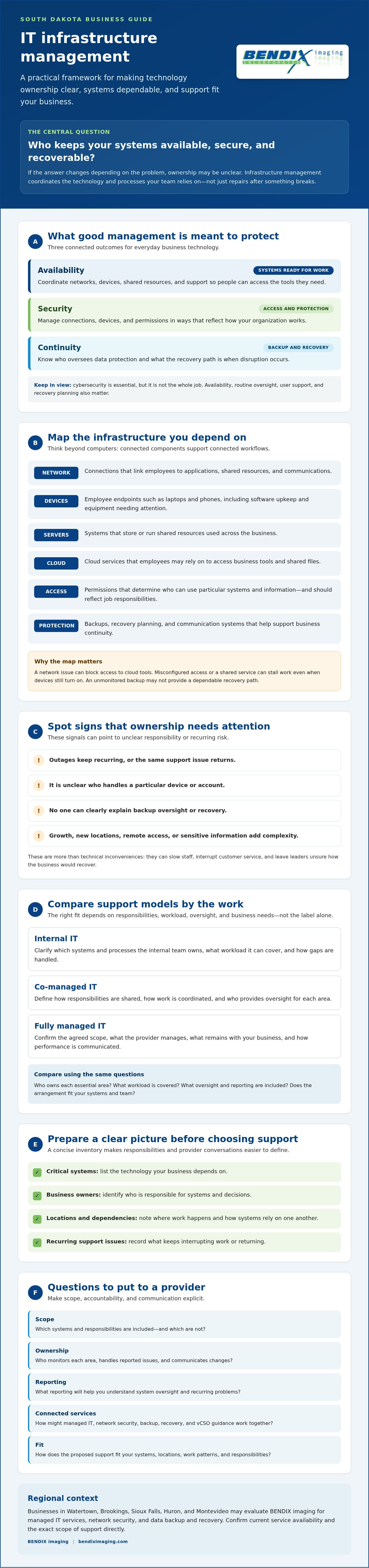
Who keeps your business systems available, secure, and recoverable when something fails? If the answer changes depending on the problem, ownership may be unclear. IT infrastructure management SD is about coordinating the technology and supporting processes your team relies on, not just fixing devices after they stop working.
IT infrastructure management is the coordinated oversight of the technology, responsibilities, and processes that support business availability, security, and continuity. It is ongoing work: keeping systems organized, understanding how they depend on one another, and planning how to respond when problems arise. Installing equipment is a one-time task. Break-fix support addresses an issue after it happens, and buying software adds a tool. None of these alone establishes who oversees the larger environment over time. For a foundational overview, see the core components of IT infrastructure.
Which systems belong to a business IT infrastructure?
Think beyond computers. A business’s infrastructure may include network connections, employee endpoints such as laptops and phones, servers that store or run shared resources, cloud services, communication systems, and data protection. Together, these components let people access information, work with colleagues, and serve customers.
Consider a small business where employees use laptops to access shared files and communicate with customers. If the network connection fails, staff may lose access to cloud tools. If access settings or a shared service are misconfigured, work can stall even though the devices still turn on. A backup that is not monitored may not provide a dependable recovery path. The practical point is that a fault in one component can disrupt connected workflows, so someone needs to understand how the pieces fit together.
When does infrastructure management become a business priority?
Look for recurring outages, the same support problem returning, uncertainty about who handles a device or account, or backup oversight that no one can clearly explain. These are more than technical inconveniences. They can slow staff, interrupt customer service, and leave leaders unsure how the business would recover from a disruption.
Planning becomes especially useful as your business grows, adds locations, supports remote access, or handles information that needs careful protection. Assign clear owners for systems and decisions before a disruption forces the issue. A local provider can help make those responsibilities easier to discuss. For businesses in Watertown, Brookings, Sioux Falls, Huron, and Montevideo, BENDIX imaging is a regional option to evaluate for managed IT services, network security, and data backup and recovery. Confirm current service availability and the exact scope of support directly.
The core components of IT infrastructure management in SD
Strong infrastructure management connects the technology employees use every day with clear responsibility for keeping it maintained and working together. Cybersecurity is essential, but it is not the whole job: infrastructure management also covers availability, routine oversight, user support, and recovery planning. For South Dakota-specific public-sector context, the state’s Bureau of Information and Telecommunications shares South Dakota's IT standards. Businesses should assess which requirements apply to their own environment.
How network, device, and access management work together
The network connects employees to business applications, shared resources, and communications. Device oversight covers the computers and other endpoints staff use, including keeping software updated and identifying equipment that needs attention. Access management determines who can use particular systems and information, and should reflect each person’s work responsibilities.
These responsibilities overlap. A well-connected network will not help an employee who cannot access a necessary application. Outdated devices or overly broad permissions can also introduce avoidable risk. The right tools and configurations depend on the organization’s systems, locations, and work patterns, so avoid one-size-fits-all promises. Agree on who monitors each area, handles reported issues, and communicates changes.
Why security, backup, and recovery belong in the same plan
Network security helps reduce exposure by managing and protecting connections, but no single control can eliminate every threat. It is one part of broader infrastructure management, alongside routine maintenance, access oversight, and user support. South Dakota’s Eastern South Dakota cybersecurity guide offers deeper security guidance.
Backup creates copies of data. Recovery is the process of restoring access to usable information and systems after loss or disruption. They are connected, but not interchangeable. A backup only supports continuity if the business can restore the data it needs and has tested that recovery process. Clarify what is backed up, who reviews backup status, how recovery is tested, and who coordinates next steps if restoration is needed. Document those responsibilities rather than assuming someone owns them.
User support is part of infrastructure management
People need a clear way to report issues and understand who will respond. Consistent support helps distinguish a user-level problem from a wider network, device, or access issue, while giving managers visibility into recurring disruptions. BENDIX imaging provides managed IT services, network security, and data backup and recovery. Businesses evaluating support can review BENDIX imaging’s managed IT services and clarify which responsibilities are included for their environment.
How to compare IT infrastructure management options in South Dakota
Choose a support model based on the work your business needs covered, the expertise available internally, and how much oversight you want to retain. Internal IT, co-managed support, and fully managed services can all work. The difference is who owns each responsibility day to day. Outsourcing does not mean surrendering visibility or business control. Ask for documented scope, clear reporting, and defined approval boundaries.
Use the same questions to assess each option. That makes gaps easier to spot and keeps the comparison focused on responsibilities rather than sales labels.
| Model | Responsibilities | Internal workload | Oversight and fit |
|---|---|---|---|
| Internal IT | Employees manage the systems and support assigned to the team. | Higher; the business staffs and directs the function. | Direct internal oversight; may fit when in-house capacity and expertise match the need. |
| Co-managed support | Internal staff and an outside provider divide agreed responsibilities. | Shared; workload depends on the written division of tasks. | Internal leaders retain a role while filling defined support or expertise gaps. |
| Fully managed services | An outside provider handles the agreed scope of ongoing IT services. | Lower for covered tasks, while business decisions and provider oversight remain internal. | Can fit organizations seeking external management, provided scope and reporting are clear. |
For more context on service models, read the managed IT support South Dakota guide. As you compare options for IT infrastructure management SD, ask providers how they document work, manage access to systems, report activity, and escalate unresolved issues. Reviewing established managed service specialists like reisinformatica.com can also help businesses understand how comprehensive IT support and infrastructure management are structured in practice.
What should an IT provider’s scope clearly define?
Get the proposed scope in writing. Check which systems and locations are covered, what maintenance and monitoring involve, and who handles network security, backups, recovery, and user support. Ask what remains your team’s responsibility. Clarify communication channels, reporting cadence, escalation procedures, access approvals, and exclusions. A clear agreement helps prevent tasks from falling between your staff and provider.
How should South Dakota businesses evaluate local fit?
Confirm that a provider currently serves your location and understands how your team works, including remote-support needs and how on-site coordination is handled, if applicable. Request examples or references relevant to your environment, and ask what evidence supports claims about response times or service levels. South Dakota businesses can also explore NIST technology solutions for SD as a regional resource. For a provider option, review BENDIX imaging’s managed IT services and confirm current service availability and scope directly.
How to assess your business infrastructure before choosing support
A provider cannot scope support accurately if key systems, owners, or recurring problems are unknown. Before comparing proposals for IT infrastructure management SD, prepare a practical snapshot of how technology supports your business. It does not need to be perfect. Mark gaps plainly instead of treating undocumented systems as protected.
Build a practical inventory of systems and responsibilities
Use this sequence to gather the information a provider will need:
1. List the systems. Record employee devices, internet and network connections, business applications, data stores, and communications services. Include each office or work location.
2. Map owners and dependencies. Note who approves user access, manages vendor relationships, and makes operational decisions. Identify which services rely on one another, such as staff needing network access to reach shared files or business applications.
3. Record support patterns. Document recurring outages, slowdowns, access problems, and unresolved issues. Note when they happen and which teams or workflows are affected.
4. Describe protection and recovery. Write down what you know about backup practices, who reviews them, and what information or systems would need to be restored first. List security concerns and any compliance obligations your organization needs to verify with appropriate experts.
5. Flag unknowns. Mark undocumented devices, unclear ownership, and unverified backup or access practices. A visible gap is easier to assess than an assumption.
A provider can scope support accurately when you share an inventory of systems, locations, dependencies, owners, recurring issues, and recovery priorities.
Set priorities and prepare provider questions
Rank systems by their importance to daily operations and the difficulty or urgency of restoring them. Ask a prospective provider how it would assess risks, document findings, explain recommended next steps, and distinguish urgent needs from longer-term improvements. Ask what information it will need from your staff and how responsibilities will be recorded.
For additional local selection considerations, review the Watertown managed IT services guide. Use your inventory to compare providers against the same needs, not broad promises. If you are evaluating managed IT services and related support, review BENDIX imaging’s services and confirm scope and availability for your location.
Choosing an accountable IT infrastructure management partner in SD
The right provider should make responsibility easier to see, not harder to track. Compare each candidate against your documented needs, then check whether its proposed scope matches what your business expects. For IT infrastructure management SD, accountability means knowing who handles each task, how work is recorded, and how decisions and issues are communicated.
What signals accountability during a provider conversation?
Ask direct questions and look for clear, specific answers. Request sample documentation or reporting where available, and compare the responses with what the provider is willing to put in writing.
- Scope: Which systems, locations, and responsibilities are included, and what remains with our team?
- Ownership: Who is responsible for documenting systems, managing access, and tracking open issues?
- Priorities: How are recommendations ranked, and how will the provider explain the reason and next steps?
- Communication: How are routine updates, proposed changes, and unresolved issues reported?
- Agreement: Where are support expectations, escalation steps, exclusions, and any response-time commitments documented?
Do not rely on verbal assurances alone. Clear service boundaries and records help your business retain oversight while making it easier to identify gaps or resolve misunderstandings.
Where BENDIX imaging may fit your evaluation
BENDIX imaging is a regional option for Eastern South Dakota businesses evaluating managed IT services. Its offerings include network security, data backup and recovery, and vCSO expertise. These services can be considered together: managed IT addresses ongoing technology support, network security focuses on protecting connections, backup and recovery address data protection and restoration planning, and vCSO guidance can contribute strategic security leadership. Confirm the precise responsibilities and deliverables for each service.
BENDIX imaging’s stated local coverage includes Watertown, Brookings, Sioux Falls, Huron, and Montevideo. Verify current availability for your specific location, along with service boundaries and any response or escalation terms, before deciding. Ask for written scope and reporting expectations so you can compare providers on equal terms.
For details about its services, review BENDIX imaging’s business IT offerings.
Put Clear IT Ownership in Place
Confident IT decisions start with knowing which systems matter, who owns each responsibility, and what your business expects from support. A written inventory and clear provider scope help expose gaps before they become operational problems. As you evaluate IT infrastructure management SD, compare internal, co-managed, and fully managed options by responsibilities, reporting, and fit, not by labels alone.
Keep security and continuity connected. Network security helps reduce exposure, while backup and recovery planning clarifies how your business can restore access to important information. Ask providers to explain their scope, document their work, and make recommendations you can evaluate.
BENDIX imaging provides managed IT and cybersecurity services to businesses in Eastern South Dakota, with offerings that include network security, data backup and recovery, and vCSO expertise. Discuss your priorities and clarify which services fit your environment. Contact BENDIX imaging to discuss your business IT needs.
Frequently Asked Questions
What does IT infrastructure management include?
IT infrastructure management includes coordinating the technology and responsibilities that keep business operations available, secure, and recoverable. It can cover networks, employee devices, servers, cloud services, communications systems, access controls, user support, and data backup and recovery. The exact scope varies by organization. For IT infrastructure management SD, start by identifying which systems your staff rely on, who owns each task, and how problems are handled.
Is IT infrastructure management the same as managed IT services?
Not exactly. IT infrastructure management describes the ongoing work of overseeing essential technology and related processes. Managed IT services are one way to assign some or all of that work to an outside provider under an agreed scope. A business may manage infrastructure internally, share duties with a provider, or outsource defined responsibilities. Compare the actual tasks, reporting, and exclusions rather than assuming every service package covers the same systems.
How do I choose an IT infrastructure management provider in South Dakota?
Choose a provider that can explain its scope, document responsibilities, describe how it manages access, and show how it reports work and escalates issues. Ask for written details on covered systems, locations, security, backup, recovery, and user support. Businesses evaluating regional support in Watertown, Brookings, Sioux Falls, Huron, or Montevideo should verify current service availability for their location and confirm any response or on-site arrangements directly.
Can a small business outsource IT infrastructure management?
Yes. A small business can outsource defined infrastructure responsibilities through managed IT services, provided the agreement clearly states what the provider handles and what remains with the business. Before deciding, list critical systems, recurring issues, internal expertise, and operational priorities. Then ask how the provider will communicate, document work, and coordinate with your staff. Outsourcing can shift agreed tasks, but business leaders should retain clear oversight of decisions and expectations.
What is the difference between co-managed and fully managed IT?
Co-managed IT divides agreed responsibilities between an internal team and an outside provider. Fully managed IT assigns the provider a broader, defined scope of ongoing support, while the business still makes its own operational decisions and oversees the relationship. Neither model automatically covers every system or task. Ask for a responsibility breakdown, including who manages security, backups, user requests, approvals, reporting, and escalation, so there are no gaps between teams.
Why should backup and recovery be part of infrastructure management?
Backup and recovery belong in the same plan because saving copies of data does not, by itself, confirm that your business can restore what it needs. Backup practices address what information is copied and who reviews the process. Recovery planning addresses how access to data and systems will be restored after disruption. Clarify which information matters most, who owns each responsibility, and how recovery is tested. Confirm the provider’s exact scope in writing.
What should I prepare before speaking with an IT provider?
Prepare a working inventory of devices, network connections, business applications, data stores, communications systems, and business locations. Note who approves access, manages vendors, and makes operational decisions. Add recurring support problems, known backup practices, recovery priorities, security concerns, and compliance obligations to verify. Mark unknowns clearly. This gives prospective providers a more accurate picture of your environment and helps you compare recommendations against the same business needs.
{"@context":"https://schema.org","@type":"FAQPage","mainEntity":[{"@type":"Question","name":"Which systems belong to a business IT infrastructure?","acceptedAnswer":{"@type":"Answer","text":"Think beyond computers. A business’s infrastructure may include network connections, employee endpoints such as laptops and phones, servers that store or run shared resources, cloud services, communication systems, and data protection. Together, these components let people access information, work with colleagues, and serve customers. Consider a small business where employees use laptops to access shared files and communicate with customers. If the network connection fails, staff may lose access to cloud tools. If access settings or a shared service are misconfigured, work can stall even though the devices still turn on. A backup that is not monitored may not provide a dependable recovery path. The practical point is that a fault in one component can disrupt connected workflows, so someone needs to understand how the pieces fit together."}},{"@type":"Question","name":"When does infrastructure management become a business priority?","acceptedAnswer":{"@type":"Answer","text":"Look for recurring outages, the same support problem returning, uncertainty about who handles a device or account, or backup oversight that no one can clearly explain. These are more than technical inconveniences. They can slow staff, interrupt customer service, and leave leaders unsure how the business would recover from a disruption. Planning becomes especially useful as your business grows, adds locations, supports remote access, or handles information that needs careful protection. Assign clear owners for systems and decisions before a disruption forces the issue. A local provider can help make those responsibilities easier to discuss. For businesses in Watertown, Brookings, Sioux Falls, Huron, and Montevideo, BENDIX imaging is a regional option to evaluate for managed IT services, network security, and data backup and recovery. Confirm current service availability and the exact scope of support directly. Strong infrastructure management connects the technology employees use every day with clear responsibility for keeping it maintained and working together. Cybersecurity is essential, but it is not the whole job: infrastructure management also covers availability, routine oversight, user support, and recovery planning. For South Dakota-specific public-sector context, the state’s Bureau of Information and Telecommunications shares South Dakota's IT standards. Businesses should assess which requirements apply to their own environment."}},{"@type":"Question","name":"What should an IT provider’s scope clearly define?","acceptedAnswer":{"@type":"Answer","text":"Get the proposed scope in writing. Check which systems and locations are covered, what maintenance and monitoring involve, and who handles network security, backups, recovery, and user support. Ask what remains your team’s responsibility. Clarify communication channels, reporting cadence, escalation procedures, access approvals, and exclusions. A clear agreement helps prevent tasks from falling between your staff and provider."}},{"@type":"Question","name":"How should South Dakota businesses evaluate local fit?","acceptedAnswer":{"@type":"Answer","text":"Confirm that a provider currently serves your location and understands how your team works, including remote-support needs and how on-site coordination is handled, if applicable. Request examples or references relevant to your environment, and ask what evidence supports claims about response times or service levels. South Dakota businesses can also explore NIST technology solutions for SD as a regional resource. For a provider option, review BENDIX imaging’s managed IT services and confirm current service availability and scope directly. A provider cannot scope support accurately if key systems, owners, or recurring problems are unknown. Before comparing proposals for IT infrastructure management SD, prepare a practical snapshot of how technology supports your business. It does not need to be perfect. Mark gaps plainly instead of treating undocumented systems as protected."}},{"@type":"Question","name":"What signals accountability during a provider conversation?","acceptedAnswer":{"@type":"Answer","text":"Ask direct questions and look for clear, specific answers. Request sample documentation or reporting where available, and compare the responses with what the provider is willing to put in writing. Do not rely on verbal assurances alone. Clear service boundaries and records help your business retain oversight while making it easier to identify gaps or resolve misunderstandings."}},{"@type":"Question","name":"What does IT infrastructure management include?","acceptedAnswer":{"@type":"Answer","text":"IT infrastructure management includes coordinating the technology and responsibilities that keep business operations available, secure, and recoverable. It can cover networks, employee devices, servers, cloud services, communications systems, access controls, user support, and data backup and recovery. The exact scope varies by organization. For IT infrastructure management SD, start by identifying which systems your staff rely on, who owns each task, and how problems are handled."}},{"@type":"Question","name":"Is IT infrastructure management the same as managed IT services?","acceptedAnswer":{"@type":"Answer","text":"Not exactly. IT infrastructure management describes the ongoing work of overseeing essential technology and related processes. Managed IT services are one way to assign some or all of that work to an outside provider under an agreed scope. A business may manage infrastructure internally, share duties with a provider, or outsource defined responsibilities. Compare the actual tasks, reporting, and exclusions rather than assuming every service package covers the same systems."}},{"@type":"Question","name":"How do I choose an IT infrastructure management provider in South Dakota?","acceptedAnswer":{"@type":"Answer","text":"Choose a provider that can explain its scope, document responsibilities, describe how it manages access, and show how it reports work and escalates issues. Ask for written details on covered systems, locations, security, backup, recovery, and user support. Businesses evaluating regional support in Watertown, Brookings, Sioux Falls, Huron, or Montevideo should verify current service availability for their location and confirm any response or on-site arrangements directly."}},{"@type":"Question","name":"Can a small business outsource IT infrastructure management?","acceptedAnswer":{"@type":"Answer","text":"Yes. A small business can outsource defined infrastructure responsibilities through managed IT services, provided the agreement clearly states what the provider handles and what remains with the business. Before deciding, list critical systems, recurring issues, internal expertise, and operational priorities. Then ask how the provider will communicate, document work, and coordinate with your staff. Outsourcing can shift agreed tasks, but business leaders should retain clear oversight of decisions and expectations."}},{"@type":"Question","name":"What is the difference between co-managed and fully managed IT?","acceptedAnswer":{"@type":"Answer","text":"Co-managed IT divides agreed responsibilities between an internal team and an outside provider. Fully managed IT assigns the provider a broader, defined scope of ongoing support, while the business still makes its own operational decisions and oversees the relationship. Neither model automatically covers every system or task. Ask for a responsibility breakdown, including who manages security, backups, user requests, approvals, reporting, and escalation, so there are no gaps between teams."}},{"@type":"Question","name":"Why should backup and recovery be part of infrastructure management?","acceptedAnswer":{"@type":"Answer","text":"Backup and recovery belong in the same plan because saving copies of data does not, by itself, confirm that your business can restore what it needs. Backup practices address what information is copied and who reviews the process. Recovery planning addresses how access to data and systems will be restored after disruption. Clarify which information matters most, who owns each responsibility, and how recovery is tested. Confirm the provider’s exact scope in writing."}},{"@type":"Question","name":"What should I prepare before speaking with an IT provider?","acceptedAnswer":{"@type":"Answer","text":"Prepare a working inventory of devices, network connections, business applications, data stores, communications systems, and business locations. Note who approves access, manages vendors, and makes operational decisions. Add recurring support problems, known backup practices, recovery priorities, security concerns, and compliance obligations to verify. Mark unknowns clearly. This gives prospective providers a more accurate picture of your environment and helps you compare recommendations against the same business needs."}}]}


