

What if your backups work, but your team still doesn’t know what to restore first? Disaster recovery planning for business needs to be more than a backup checklist. When systems go down, unclear priorities, unrealistic recovery targets, and untested steps can leave essential operations stalled just when your team needs direction most.
A useful plan is an operations playbook your people can act on. Build it around clear responsibilities, prioritized business functions, realistic recovery time and data-loss targets, and practical response steps. Then test it, update it as your business changes, and use what you learn to improve it.
This guide explains how to assess business impact, map critical systems and dependencies, set recovery objectives, and prepare for disruptions such as cyberattacks or outages. For businesses in Watertown, Brookings, Sioux Falls, Huron, and Montevideo, managed IT, data backup and recovery, cybersecurity, and vCSO expertise from BENDIX imaging can connect recovery readiness with broader business risks.
Key Takeaways
- Separate business continuity from disaster recovery: one keeps essential work moving, while the other restores affected systems and data.
- Make disaster recovery planning for business impact-led by setting restoration-time and acceptable data-loss targets for critical functions.
- Compare local restoration, cloud-based recovery, alternate work arrangements, and specialist support against your needs and internal capabilities.
- Use a practical plan template to document scope, contacts, response procedures, communications, and who can activate the plan.
- Keep the plan useful with regular testing and reviews, supported by backup oversight, security, and clear documentation of system dependencies.
Disaster Recovery Planning for Business: What the Plan Must Protect
A disaster recovery plan documents how to restore critical technology and operations after a disruption. It identifies what the business must recover, who takes action, and how affected systems and data return to use. For disaster recovery planning for business, start with the consequences of an interruption, not a list of servers: delayed customer service, missing information, stalled work, and dependencies between tasks.
A backup schedule records when copies are made; a recovery plan tells your team how to restore the business when those copies are needed. A backup is an important safeguard, but it doesn’t decide which system comes first, who authorizes recovery, or how staff serve customers while systems are unavailable. The Disaster Recovery Plan overview also explains the relationship between recovery planning, continuity, and recovery objectives.
Disaster recovery plan vs. business continuity plan
Imagine an office outage that leaves employees without access to the main business system. The continuity plan covers how essential work continues: who handles urgent requests, how employees communicate, and whether work can shift to another location or process. The recovery plan covers restoring affected technology and data so normal work can resume.
These plans intersect, but they aren’t interchangeable. A temporary staffing or facility arrangement may keep customer service moving while IT teams work through recovery procedures. Define the handoff: who tells employees what to do, who communicates with customers, and who decides when restored systems are ready to use. That coordination prevents a technical fix from being mistaken for a complete return to operations.
Which disruptions should a business plan for?
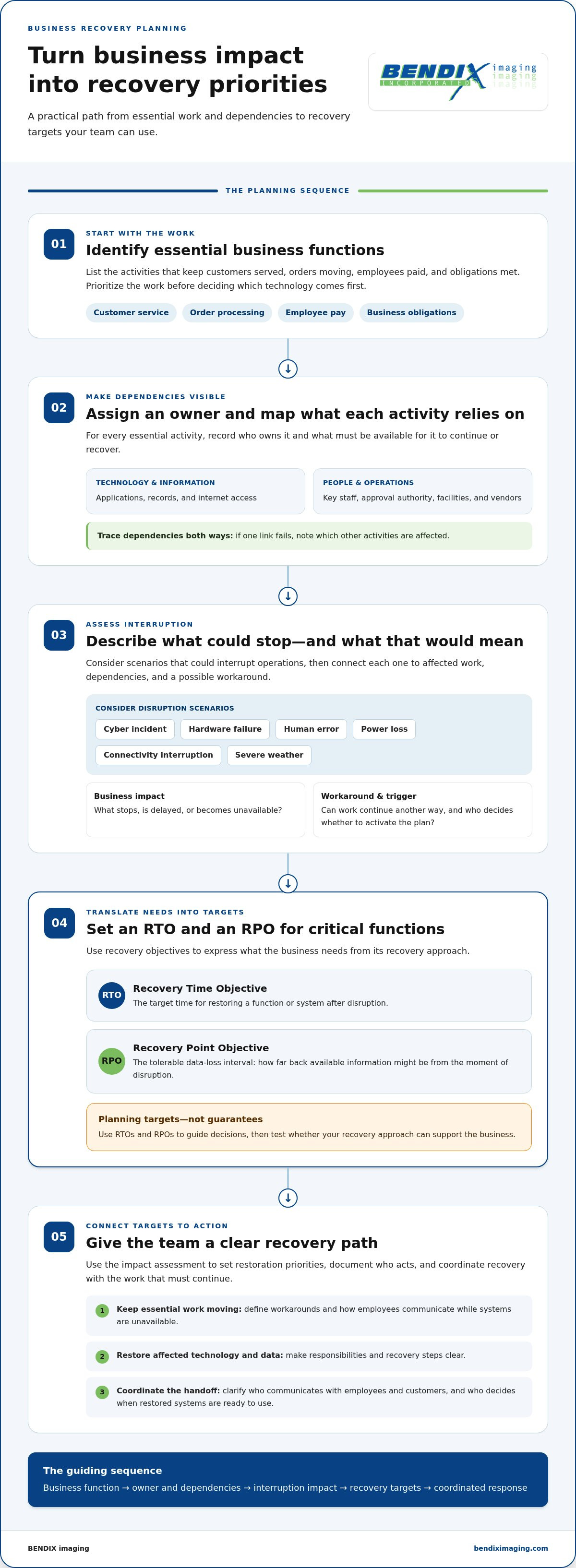
Build scenarios around what could interrupt your operations rather than assuming every business faces the same threats. Consider cyber incidents, hardware failure, human error, power loss, and connectivity interruption. For each, ask what could be affected: access to records, payment processing, communications, production, or the ability to serve customers.
For businesses in Brookings and across Eastern South Dakota, include severe weather in the assessment, along with location-specific dependencies. Consider whether staff, facilities, power, internet connectivity, or a third-party service could be affected at the same time. This is not a prediction of local incident frequency. It’s a practical check of how your operations depend on people, places, technology, and outside services.
Make the assessment concrete. For each scenario, note:
- Business impact: Which essential task stops, and who depends on it?
- Dependencies: What systems, information, staff, facilities, or outside services does that task need?
- Workaround: Can the task continue another way while recovery is underway?
- Recovery trigger: Who assesses the disruption and decides whether to activate the plan?
This assessment gives the rest of the plan a firm foundation. It connects technical recovery to the work your business must protect instead of treating every system as equally urgent.
Set Business Recovery Priorities, RTOs, and RPOs Before an Incident
Start with the work your business must perform, not the names of its servers or applications. List the functions that keep customers served, orders moving, employees paid, and obligations met. Then identify the technology, information, vendors, facilities, and people each function relies on. This business-first sequence keeps disaster recovery planning for business tied to operational needs instead of assumptions about which system matters most.
Two targets help translate those needs into recovery requirements. The recovery time objective (RTO) is the target time for restoring a function or system after disruption. The recovery point objective (RPO) is the tolerable data-loss interval, or how far back the available information might be from the moment of disruption.
RTOs and RPOs are planning targets, not guarantees; use them to guide decisions and test whether your recovery approach can support the business.
Run a business impact analysis that fits a small business
Keep the assessment practical. For each essential activity, record who owns it, what it depends on, and what happens if it stops. Consider the consequences in order: delayed work, missed obligations, customer disruption, and knock-on effects on other functions. A short, specific worksheet is more useful than an exhaustive inventory nobody can maintain.
- Activity: Name a business function, such as processing customer orders.
- Owner: Identify the person responsible for explaining its needs and approving priorities.
- Dependencies: Note required applications, records, internet access, vendors, facilities, and key staff.
- Impact: Describe what would be delayed, missed, or unavailable if the function stopped.
Trace dependencies in both directions. An order process may rely on a cloud application, internet access, customer records, and a staff member with approval authority. If one link fails, identify which other activities are affected. Make sure backup and recovery planning accounts for the information and systems those functions actually use. For backup-specific considerations, connect your targets to the business’s data backup and recovery services.
Choose realistic recovery time and data-loss targets
Set targets for each critical function, not one recovery number for the whole company. Ask how long the work can remain unavailable before consequences become unacceptable. Then decide how much recent information the business could recreate or tolerate losing. A customer-facing process and an internal reporting task may have very different tolerances.
For example, a business might need order processing restored before it can resume normal customer service, while a non-urgent report could wait. That isn’t a universal target. Document the reasoning, including customer and operational impacts, and have leadership review estimates before approving objectives. If a proposed target depends on technology or staffing the business doesn’t have, revise the target or record the capability gap as a recovery-planning action.
Use the findings to prioritize backup oversight and recovery readiness. Managed IT, data backup and recovery, and vCSO guidance can help align technical planning with business risk. BENDIX imaging’s recovery-readiness support helps Eastern South Dakota businesses connect those priorities to broader IT and risk planning.
Compare Disaster Recovery Strategies Without Assuming One Fits Every Business
Once you’ve set business recovery priorities and targets, compare approaches by how well they support those needs. Don’t choose a strategy because it sounds modern or familiar. A method that suits one company may rely on infrastructure, connectivity, staffing, or internal skills another business doesn’t have.
Your recovery strategy should follow business impact and recovery targets, not the other way around. The options below can be combined. For example, a business might use cloud-based recovery for some systems, local copies for selected data, and alternate work arrangements to keep essential tasks moving. Actual recovery time and data loss depend on the design, configuration, dependencies, and testing of the chosen approach.
Compare recovery approaches by business need
Local restoration
Recovery time: Depends on available equipment, staff, and restoration steps.
Acceptable data loss: Depends on how current the local copies are.
Complexity: Requires maintained equipment, protected copies, and documented procedures.
Internal capability: Staff need to know how to access and restore what’s required. Resources kept at the business site can be affected by the same site-level disruption as other operations.
Cloud-based recovery
Recovery time: Depends on the recovery arrangement, system dependencies, and access to resources.
Acceptable data loss: Depends on data protection and replication settings.
Complexity: Requires attention to connectivity, access controls, account recovery, and provider arrangements.
Internal capability: Someone must understand how to initiate access and coordinate recovery. Cloud storage alone doesn’t remove the need to plan for outages or access problems.
Alternate work arrangements
Recovery time: May help essential work continue while technology or facilities are restored.
Acceptable data loss: Doesn’t determine how much data can be recovered.
Complexity: Depends on staff instructions, communications, and workable alternate processes.
Internal capability: Employees need to know how to perform priority tasks and report changes. Treat this as an operational complement to technology recovery, not a replacement for it.
Specialist recovery support
Recovery time: Depends on the documented scope, dependencies, and recovery arrangement.
Acceptable data loss: Must align with the business’s data protection approach and targets.
Complexity: Requires clear responsibilities, access, escalation, and coordination procedures.
Internal capability: The business still needs an activation authority and an internal point of contact. Document what support covers and which decisions remain with your team.
Match a strategy to people, systems, and dependencies
Use your priorities to narrow the choices. A small team with limited technical capacity may need simpler procedures and clearly assigned support roles. A business that depends on several essential applications should map how those systems connect, including shared identity or internet access that could affect multiple services at once.
Include third-party vendors and communications tools in that map. If staff need a particular messaging or phone system to coordinate recovery, document an alternate way to share updates if it’s unavailable. In Brookings and across Eastern South Dakota, consider how facilities, workforce, and connectivity shape workable options. Disaster recovery planning for business is strongest when each approach fits the people who must carry it out and the operational tolerance it is meant to protect.
Build and Test a Business Disaster Recovery Plan Step by Step
A recovery plan should be easy to find, clear to follow, and specific about who makes decisions. Use this sequence to turn your priorities into an operational playbook. In disaster recovery planning for business, a document isn’t ready simply because it’s been written. Your team must be able to access it, understand its roles, and verify that recovery steps work.
Fill in the recovery plan template
Begin with the plan owner and approval date. Keep the details concise enough to use under pressure, but complete enough that someone can act if the usual decision-maker is unavailable. Assign a primary and backup owner for each responsibility, including activation decisions, technical recovery, and staff communications.
- Scope: State which locations, business functions, systems, and disruption scenarios the plan covers. Note what falls outside the plan and where related instructions are stored.
- Contacts: Record internal decision-makers, technical contacts, key vendors, and relevant service providers. Include primary and backup contacts, plus a way to reach them if normal email or phone systems are down.
- Priorities: List critical business functions, their system and vendor dependencies, and approved recovery time and data-loss targets.
- Procedures: Write the sequence for assessing the incident, protecting systems and information, restoring access, validating data, and returning work to normal. For cyber-triggered recovery, include incident containment and coordinate recovery with your security response. A cyber incident may require different steps than a hardware failure; businesses can also review this cybersecurity guidance for Eastern South Dakota.
- Communications: Identify who updates employees, customers, vendors, and leadership, what information they should share, and which alternate channels to use.
- Review: Assign an owner to keep the plan current and record when it was reviewed, tested, and approved.
Store the plan and contact details securely, with an access method available if your usual network or devices can’t be reached. Don’t put sensitive access credentials in an unsecured document. Instead, document how authorized staff can retrieve them safely during an incident.
Incident decision log: Record the time and issue reported, who has authority to activate the plan, the escalation path, decisions made and by whom, recovery actions underway, and the time and audience for each status update. A running log helps the team maintain a shared picture of events and decisions.
Test, review, and improve the plan
Start with a tabletop exercise. Walk through a realistic scenario and ask each person to explain their decisions, contacts, and next actions. Note confusion, missing information, and dependencies nobody had considered. Then schedule technical restoration tests suited to your systems and risk. Confirm that restored systems open, required data is present and usable, and staff can perform the intended task. A successful backup report alone doesn’t prove recovery will work.
Document each test’s findings, assign corrective actions to named owners, and track them to completion. Revisit the plan after changes to staff, systems, vendors, facilities, or business priorities. Work with BENDIX imaging on practical recovery readiness by aligning managed IT, backup, and cybersecurity support with your documented plan.
Turn the Recovery Plan Into Ongoing Protection With Managed IT Support
A recovery plan needs upkeep. Applications change, employees take on new responsibilities, vendors update their services, and office arrangements shift. If documentation doesn’t keep pace, response steps may point to the wrong contact, an outdated system, or an inaccessible backup. Managed IT support can help businesses maintain recovery documentation, track technology dependencies, and keep backup oversight connected to operational priorities.
This is ongoing risk management, not a promise of a particular recovery outcome. Cybersecurity and network security help address threats to systems and access. Data backup and recovery support the ability to restore information. vCSO guidance can help align technical safeguards with business priorities, risk decisions, and compliance responsibilities.
Keep recovery procedures aligned with changing technology
Review the plan after meaningful changes, not just on a calendar reminder. A new cloud application may introduce a dependency on internet access or a vendor account. A staff change may leave an approval role unassigned. A revised office arrangement could affect where employees work and how they communicate during an interruption. Update procedures and contact details as part of the change, then make sure the people responsible understand what has changed.
Coordinate recovery records with security and compliance work. Access instructions should be available to authorized people if ordinary systems are unavailable, while sensitive credentials remain protected. Backup oversight should connect to the systems and information the business has prioritized, rather than exist as a separate technical task. Businesses reviewing their day-to-day technology support can consider how managed IT services in Watertown, SD fit into that maintenance process.
Move from a draft plan to a supported recovery program
Before reviewing support needs, gather the working plan in one place. Bring together the essential functions, assigned owners, recovery targets, system and vendor dependencies, and planned test schedule. Note unresolved gaps, such as an unassigned decision role or an untested restoration step. This gives everyone a practical starting point for improving the plan; a document alone doesn’t make the business ready.
BENDIX imaging supports businesses in Watertown, Brookings, Sioux Falls, Huron, and Montevideo with managed IT, cybersecurity, network security, data backup and recovery, and vCSO expertise. Coordinating these services can help keep technical safeguards and business recovery priorities connected as the organization changes. Support can help maintain documentation, review dependencies, and align backup oversight with the needs recorded in the plan. Recovery targets remain planning objectives, not guaranteed results, and recovery arrangements should reflect the business’s systems and requirements.
Have a draft plan or a specific gap you need to address? Talk with BENDIX imaging about business recovery planning and take the next step toward a maintained recovery program.
Make Recovery Readiness Part of How You Operate
A plan earns its value through continued attention. Give someone ownership of keeping it current, and make recovery readiness part of how your business handles technology and operational change. That way, disaster recovery planning for business doesn’t sit untouched until a disruption forces the team to rely on it.
For your next step, choose one practical action: review a recovery procedure, clarify who can make an activation decision, or schedule a test that checks whether restored systems and information are usable. Managed IT support can help connect ongoing maintenance and backup oversight with cybersecurity, network security, and data recovery. The goal isn’t to assume every disruption can be prevented. It’s to make your response clearer and better aligned with how your business works.
Talk with BENDIX imaging about business recovery planning and build a stronger foundation for your next plan review. Start with what matters most, then keep improving it.
Frequently Asked Questions
What should a disaster recovery plan for a business include?
A business disaster recovery plan should include the information needed to make decisions and carry out recovery, not just technical instructions. Record who can approve actions, how to reach key contacts, where to find current procedures, and how to confirm restored information is accurate and usable. Disaster recovery planning for business should also account for vendor escalation steps and how staff will receive updates if usual communication channels are unavailable.
How often should a business test its disaster recovery plan?
Set a recurring test schedule based on the importance of the systems and the consequences of failure, then test sooner after major changes. A tabletop exercise can check whether people understand their roles, while a restoration test can verify that specific data or systems can be used. Record the date, participants, findings, and corrective actions. A test only helps if the team follows up on what didn’t work.
What is the difference between RTO and RPO in disaster recovery?
RTO is the target for how long a business function can remain unavailable before it should be restored. RPO is how much recent information the business can tolerate losing, measured as a time interval. For example, a company might need its scheduling system restored within a defined period but be able to recreate some recent entries manually. These objectives help teams compare operational needs with recovery arrangements.
Can a small business create a disaster recovery plan without an IT department?
Yes. A small business can document essential work, decision-makers, contact methods, and practical recovery steps without a dedicated IT department. Assign an internal owner to keep the plan current and identify who can provide technical guidance for systems the business relies on. Businesses in Watertown, Brookings, Sioux Falls, Huron, and Montevideo can start with a concise plan and expand it as operations or technology become more complex.
Does a data backup replace a disaster recovery plan?
No. A backup preserves information, but it doesn’t explain who should authorize restoration, which system should be addressed first, or how employees should work while access is unavailable. It also doesn’t establish whether restored data is complete and suitable for use. Treat backup as one part of recovery readiness, and make sure the plan explains how authorized staff locate, restore, and validate the information the business needs.
What happens if a business has no disaster recovery plan?
Without a plan, employees may not know who can make decisions, which work takes priority, or how to coordinate with technology vendors. That confusion can add avoidable delays and make customer communication harder during an already disruptive event. A business may also discover that contact details or recovery instructions are inaccessible when normal systems are down. Even a concise written plan gives the team a defined starting point.
How is disaster recovery planning different from cybersecurity planning?
Cybersecurity planning focuses on reducing the risk of digital threats and preparing to detect and respond to them. Disaster recovery planning addresses how the business restores systems, information, and operations after disruption, including a cyber incident. The two plans should coordinate: security steps may affect when systems are safe to restore, while recovery procedures help guide the return of essential services. Clear ownership prevents gaps between response and restoration.
{"@context":"https://schema.org","@type":"FAQPage","mainEntity":[{"@type":"Question","name":"Which disruptions should a business plan for?","acceptedAnswer":{"@type":"Answer","text":"Build scenarios around what could interrupt your operations rather than assuming every business faces the same threats. Consider cyber incidents, hardware failure, human error, power loss, and connectivity interruption. For each, ask what could be affected: access to records, payment processing, communications, production, or the ability to serve customers. For businesses in Brookings and across Eastern South Dakota, include severe weather in the assessment, along with location-specific dependencies. Consider whether staff, facilities, power, internet connectivity, or a third-party service could be affected at the same time. This is not a prediction of local incident frequency. It’s a practical check of how your operations depend on people, places, technology, and outside services. Make the assessment concrete. For each scenario, note: This assessment gives the rest of the plan a firm foundation. It connects technical recovery to the work your business must protect instead of treating every system as equally urgent. Start with the work your business must perform, not the names of its servers or applications. List the functions that keep customers served, orders moving, employees paid, and obligations met. Then identify the technology, information, vendors, facilities, and people each function relies on. This business-first sequence keeps disaster recovery planning for business tied to operational needs instead of assumptions about which system matters most. Two targets help translate those needs into recovery requirements. The recovery time objective (RTO) is the target time for restoring a function or system after disruption. The recovery point objective (RPO) is the tolerable data-loss interval, or how far back the available information might be from the moment of disruption. RTOs and RPOs are planning targets, not guarantees; use them to guide decisions and test whether your recovery approach can support the business."}},{"@type":"Question","name":"What should a disaster recovery plan for a business include?","acceptedAnswer":{"@type":"Answer","text":"A business disaster recovery plan should include the information needed to make decisions and carry out recovery, not just technical instructions. Record who can approve actions, how to reach key contacts, where to find current procedures, and how to confirm restored information is accurate and usable. Disaster recovery planning for business should also account for vendor escalation steps and how staff will receive updates if usual communication channels are unavailable."}},{"@type":"Question","name":"How often should a business test its disaster recovery plan?","acceptedAnswer":{"@type":"Answer","text":"Set a recurring test schedule based on the importance of the systems and the consequences of failure, then test sooner after major changes. A tabletop exercise can check whether people understand their roles, while a restoration test can verify that specific data or systems can be used. Record the date, participants, findings, and corrective actions. A test only helps if the team follows up on what didn’t work."}},{"@type":"Question","name":"What is the difference between RTO and RPO in disaster recovery?","acceptedAnswer":{"@type":"Answer","text":"RTO is the target for how long a business function can remain unavailable before it should be restored. RPO is how much recent information the business can tolerate losing, measured as a time interval. For example, a company might need its scheduling system restored within a defined period but be able to recreate some recent entries manually. These objectives help teams compare operational needs with recovery arrangements."}},{"@type":"Question","name":"Can a small business create a disaster recovery plan without an IT department?","acceptedAnswer":{"@type":"Answer","text":"Yes. A small business can document essential work, decision-makers, contact methods, and practical recovery steps without a dedicated IT department. Assign an internal owner to keep the plan current and identify who can provide technical guidance for systems the business relies on. Businesses in Watertown, Brookings, Sioux Falls, Huron, and Montevideo can start with a concise plan and expand it as operations or technology become more complex."}},{"@type":"Question","name":"Does a data backup replace a disaster recovery plan?","acceptedAnswer":{"@type":"Answer","text":"No. A backup preserves information, but it doesn’t explain who should authorize restoration, which system should be addressed first, or how employees should work while access is unavailable. It also doesn’t establish whether restored data is complete and suitable for use. Treat backup as one part of recovery readiness, and make sure the plan explains how authorized staff locate, restore, and validate the information the business needs."}},{"@type":"Question","name":"What happens if a business has no disaster recovery plan?","acceptedAnswer":{"@type":"Answer","text":"Without a plan, employees may not know who can make decisions, which work takes priority, or how to coordinate with technology vendors. That confusion can add avoidable delays and make customer communication harder during an already disruptive event. A business may also discover that contact details or recovery instructions are inaccessible when normal systems are down. Even a concise written plan gives the team a defined starting point."}},{"@type":"Question","name":"How is disaster recovery planning different from cybersecurity planning?","acceptedAnswer":{"@type":"Answer","text":"Cybersecurity planning focuses on reducing the risk of digital threats and preparing to detect and respond to them. Disaster recovery planning addresses how the business restores systems, information, and operations after disruption, including a cyber incident. The two plans should coordinate: security steps may affect when systems are safe to restore, while recovery procedures help guide the return of essential services. Clear ownership prevents gaps between response and restoration."}}]}


