

What good is a cloud backup if your business can’t restore the files and systems it needs? When evaluating cloud backup for business SD, storage space is only part of the decision. A synced folder or cloud-hosted app may keep work accessible, but it doesn’t automatically provide an independent, usable recovery copy.
Security, recovery speed, management effort, and cost all matter. The real test is whether your plan can bring critical operations back after accidental deletion, a cyberattack, or a local disaster. Start by identifying what needs protection, then document and test how to recover it. Don’t rely only on a report showing that backups are running.
This guide compares cloud-only, local, and hybrid backup approaches, explains which business files, systems, and cloud apps to include, and outlines how to build a recovery-ready plan. It also covers how backup decisions fit into broader IT oversight and business continuity. BENDIX imaging provides data backup and recovery alongside managed IT support for businesses across Eastern South Dakota.
Key Takeaways
- Learn why syncing and cloud storage alone may not provide an independent, recoverable backup.
- See how backup copies, version retention, monitoring, and restore tests work together to support recovery.
- Compare cloud-only, local, and hybrid approaches to find a practical fit for your business’s access and recovery needs.
- Use a readiness checklist to identify critical data, clarify recovery priorities, and spot gaps in your plan for cloud backup for business SD.
- Explore how BENDIX imaging’s managed IT and data backup and recovery services bring backup oversight into broader IT operations.
Cloud Backup for Business SD: What It Protects, and What It Does Not
Cloud backup for business SD should mean more than files stored online. It is a recoverable copy of selected business data, kept separately from the systems used every day. If a file is deleted, changed by mistake, or made inaccessible by a damaged device, that separate copy may provide a way to restore it.
Backup preserves recoverable copies; synchronization keeps locations aligned. Sync helps people access current files across devices, while backup is designed to let a business restore an earlier, usable version. A remote backup service stores copies away from the primary environment. What matters is what the service covers and whether the data can be restored.
Which business data should a cloud backup cover?
Start with business operations, not a list of devices. Identify the workflows that would stall if information disappeared, then map the files and systems they rely on. Include documents, databases, employee endpoints, servers, and business applications. Review cloud-hosted data too: being accessible online does not automatically mean it has an independent recovery copy.
For example, a small business might rely on customer records, shared work documents, financial data, and the files employees use to complete and track orders. If those records are spread across laptops, a server, and online applications, inventory each location. Record who owns the data and which work depends on it. This makes gaps easier to identify before a disruption occurs.
Does cloud storage automatically count as backup?
No. Cloud storage and file sharing provide a place to store or access files; backup is meant to preserve copies that can be recovered. The distinction matters because synchronization can carry changes from one location to another. Depending on the service configuration, an accidental deletion or unwanted edit may also appear across synced devices. A shared folder can make work easier to access without preserving the version you need.
Find out what happens when a user deletes a file, overwrites a document, or loses access to an account. Can the business retrieve an earlier version? Is that recovery copy separate from the original data? These are practical questions, not technical fine print. Include application data and system information in the review, not just files saved in familiar folders.
Build the inventory around recovery needs: what information is essential, where it lives, and what a successful restore must put back. BENDIX imaging provides data backup and recovery services that connect backup decisions with broader IT operations for businesses across Eastern South Dakota.
How Business Cloud Backup Works: Copies, Retention, and Recovery
A backup plan is an ongoing process, not a box to check. First, identify the data and systems to protect. A backup process creates an initial copy, then captures later changes according to its configuration. It retains recoverable versions, monitors jobs for problems, and provides a way to restore data when needed.
A completed backup job is not proof of recovery; only a tested restore shows whether the copy is usable. For cloud backup for business SD, this distinction keeps the focus on business continuity, not just status reports. A file may be included in a backup job yet remain difficult to retrieve if permissions, dependencies, or restore steps are unclear.
What happens during a cloud backup and restore?
After the initial copy, later backup activity captures new or changed data. The schedule and method depend on the service configuration. Recovery may involve retrieving one file, restoring a system, or bringing back a broader set of business data. Document recovery priorities so the team knows what comes first, such as restoring access to information needed to serve customers before less urgent files.
Set recovery goals with business owners as well as IT staff. The recovery point objective (RPO) is how much recent data the business can afford to lose, expressed as a time window. The recovery time objective (RTO) is how long a business function can remain unavailable before the impact becomes unacceptable. For example, a team may set a tighter recovery point for current transaction records than for older reference documents, while prioritizing a core operational system over routine archives. These priorities inform backup design; they do not guarantee a specific recovery outcome.
Ready.gov’s guidance on an IT disaster recovery plan reinforces the value of identifying critical information and planning how systems will be restored. Document who makes recovery decisions, which systems depend on one another, and the order for bringing essential work back.
How do retention and backup testing affect recoverability?
Retention describes how long recoverable versions remain available. Earlier versions can help when a file is accidentally overwritten or deleted, but no single retention period fits every business. Set retention based on operational needs, applicable obligations, and the backup service configuration. Schedule restore tests that include the data and systems that matter most.
A useful test confirms more than access to a backup console. Restore selected files or systems to an appropriate test location, check that the recovered information opens and works, and record any gaps. Use the results to update recovery steps and priorities. Test frequency depends on business requirements and configuration; repeat tests when systems or workflows change.
BENDIX imaging provides managed IT and data backup support across Eastern South Dakota, connecting backup oversight with broader IT operations.
Cloud-Only, Local, or Hybrid Backup: Compare the Business Trade-Offs
No single backup model fits every business. Choose based on how quickly important work must resume, how much data needs protection, and what your team can manage. Cloud-only backup keeps recovery copies off-site. Local backup stores copies on equipment at the business. Hybrid backup combines both, balancing off-site resilience with convenient local recovery.
| Approach | Accessibility and connectivity | Recovery options | Management and resilience |
|---|---|---|---|
| Cloud-only | Copies can be accessed remotely, but backup and restoration depend on network connectivity. Large restores may require planning around available bandwidth. | Restore selected data from off-site copies; recovery depends on the service and the amount of data involved. | Reduces the need to maintain backup hardware onsite. Protects against many local incidents, but access to copies depends on the cloud service and connectivity. |
| Local-only | Copies are available within the business environment and do not rely on internet access for local restoration. | Can provide access to locally stored recovery data, subject to available equipment and the condition of the site. | Requires onsite equipment and management. Copies at the same location may be exposed to the same local disaster as primary systems. |
| Hybrid | Combines locally available copies with off-site cloud copies, though cloud access still relies on connectivity. | May allow local recovery for selected needs and off-site recovery if local copies or systems are unavailable. | Adds more components to oversee, but separates recovery options across locations. |
Do not judge resilience by counting storage locations alone. The key is whether the copies are independent enough that one incident, compromised account, or equipment failure will not affect every copy. Consider who can access or change each copy, where it is stored, and how the business would restore from it. The NIST Cloud Computing Forensic Science program examines challenges associated with cloud environments, underscoring the need to plan for cloud security and access.
When might cloud-only backup fit a business?
Cloud-only backup may suit a business that values remote access and wants to avoid maintaining backup hardware onsite. Before choosing it, consider how the team would access copies during a connectivity disruption and whether available bandwidth supports the planned restore. Set recovery expectations around the data and workflows that matter most.
When should a business consider local or hybrid copies?
Local copies can make selected recovery data convenient to access, while hybrid backup pairs local availability with off-site protection. That combination can add flexibility, but it also means more components to manage and test. Use a disaster recovery planning for business process to rank systems and workflows, then match each priority to a workable recovery approach.
For cloud backup for business SD, compare each option against the same practical test: can your team restore the right information from a usable copy in the order business operations require? Let the answer guide the design, rather than choosing cloud or local storage based on preference alone.
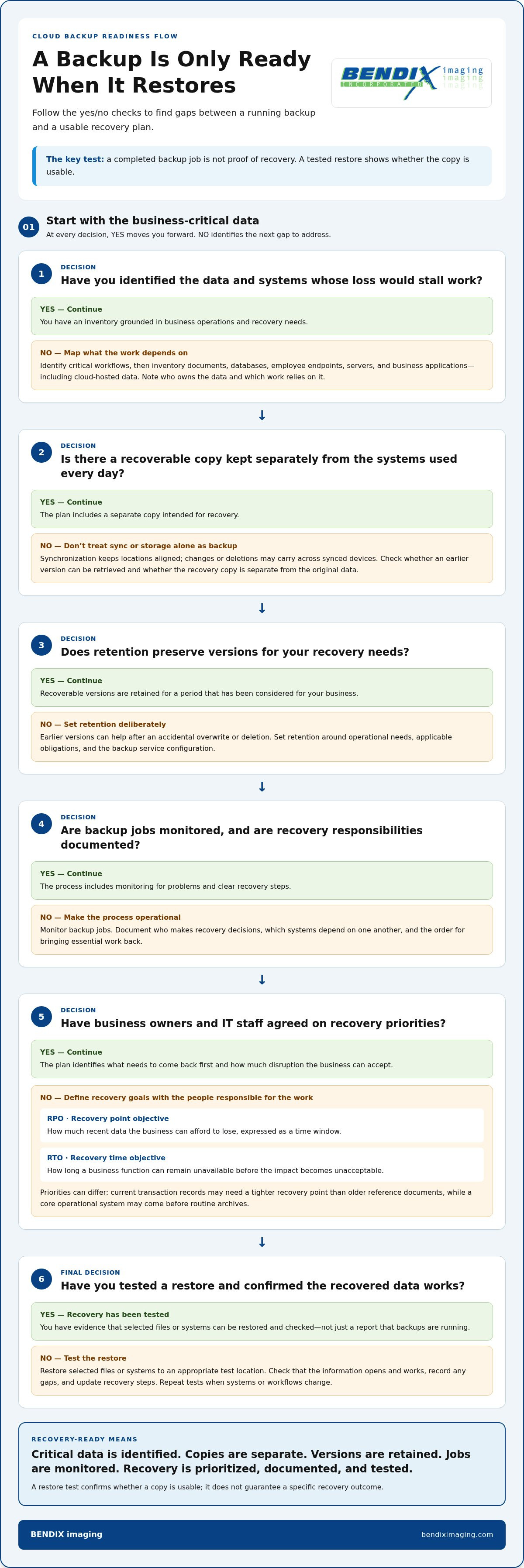
A Cloud Backup Readiness Checklist for South Dakota Businesses
If key files or systems became unavailable today, which business functions would stop first? Answer that before comparing backup options. This checklist connects protection to actual work, sets clear recovery priorities, and identifies who is responsible for keeping the plan usable.
What should a business document before choosing backup?
Start with an inventory, not a storage estimate. Include cloud applications, local systems, servers, employee devices, and the information each business-critical workflow depends on. Record a data owner and restoration priority for each. This gives decision-makers a practical view of what must be protected and what should be restored first.
- Identify essential workflows. Ask which tasks would stop if customer, financial, operational, or employee information became inaccessible. List the files and systems each task relies on.
- Name data owners and backup responsibilities. Record who understands each data set, who oversees its protection, and who reviews backup status or coordinates a restore.
- Map dependencies and locations. Note which systems rely on others to function. Include local equipment, cloud applications, and data used by employees working remotely.
- Set recovery priorities. Describe acceptable data loss and downtime in business terms. For instance, ask how much recent work a team could recreate and how long it could operate without a key system.
- Review retention and obligations. Decide how long the business needs recoverable versions to remain available. Check the regulatory, contractual, and industry obligations that apply to your organization. Requirements can vary, so do not assume one rule fits every business.
- Plan for access during disruption. Consider whether employees in Watertown, Brookings, Sioux Falls, Huron, Montevideo, or elsewhere across Eastern South Dakota can reach the data and systems they need if the office or its connection is unavailable. Account for remote access, connectivity alternatives, and who can authorize recovery.
How can teams check that backups are usable?
Schedule restore testing. Select representative files and business-critical systems, recover them to an appropriate location, and confirm the information is complete and usable. Record what worked, what took extra steps, and what needs correction. The test should reflect leadership’s recovery priorities, not merely confirm that a backup task reported success.
Assign someone to review backup status, follow up on failures, and keep recovery instructions current. If your internal team lacks the time or recovery expertise to manage these responsibilities, managed IT and data backup support can bring oversight into everyday IT operations.
BENDIX imaging provides backup and recovery support for businesses across Eastern South Dakota.
Managed Cloud Backup for Business: A Local Support Path with BENDIX imaging
Backup isn’t a set-and-forget task. Someone must track what the business depends on, confirm that responsibilities are clear, and ensure recovery fits into day-to-day IT operations. A managed approach can connect backup responsibilities to business continuity, cybersecurity, systems, and the people who use them.
What can a managed IT partner contribute to backup planning?
A partner can help map the systems that support your operations, identify time-sensitive work, and clarify who handles backup oversight and recovery coordination. That perspective matters when information is spread across cloud applications, local systems, and employee devices. It also connects backup planning with cybersecurity and broader continuity decisions, rather than treating storage as the whole solution.
BENDIX imaging provides managed IT, cybersecurity, and data backup and recovery services for businesses across Eastern South Dakota. Its regional coverage includes Watertown, Brookings, Sioux Falls, Huron, and Montevideo. Managed IT support in South Dakota connects backup needs with broader technology operations.
How can a South Dakota business take the next step?
Before discussing a plan, gather a clear snapshot of your current environment. You do not need every technical detail settled. Bring the information that explains your priorities and where uncertainty remains:
- The data and systems your essential workflows rely on.
- Where that information lives, including cloud applications and local systems.
- What backup arrangements are already in place and who oversees them.
- Which business functions need to resume first after data loss or system disruption.
- How much recent work the business could recreate and how long key operations could be unavailable.
- Any internal, contractual, or regulatory expectations that may affect protection or recovery planning.
This preparation makes the discussion more useful. It gives your team and IT partner a shared starting point for identifying gaps, clarifying responsibilities, and aligning recovery expectations with business needs. For cloud backup for business SD, the practical goal is a plan your organization can manage and put into action, not a storage choice made without a clear recovery purpose.
BENDIX imaging works with businesses across Eastern South Dakota to connect data backup and recovery with managed IT needs. Discuss your business backup and recovery needs with BENDIX imaging.
Make Recovery Readiness Part of Your Next IT Decision
Your next step does not have to be a full redesign. Start by turning unanswered questions into decisions: who owns backup oversight, which recovery priorities matter most, and how your team will confirm a restore works. A clear plan gives you a stronger basis for managing risk as your systems, staff, and business needs change.
For cloud backup for business SD, focus on a process your organization can maintain and put into action, not just a service that stores copies. BENDIX imaging connects backup and recovery planning with broader IT operations, giving responsibilities and priorities a place in the conversation.
Discuss your business backup and recovery needs with BENDIX imaging to take a practical next step toward a recovery plan that fits your business.
Frequently Asked Questions
Is cloud backup enough to protect a small business?
Cloud backup can be a valuable part of a small business’s protection plan, but it should not automatically be treated as the only safeguard. Consider what happens if staff lose access to the backup account or a critical device is compromised. Limit account access, keep recovery instructions available to authorized people, and decide whether important operations need a local copy or another fallback. The right setup depends on your risks and recovery needs.
Can cloud backup protect business data from ransomware?
Cloud backup can support recovery after ransomware, but it cannot prevent an attack or guarantee that every file is recoverable. Consider whether attackers could access or delete backup copies, and whether staff can restore data without reintroducing compromised files or systems. Coordinate backup decisions with cybersecurity measures, such as controlling account access, and define who can authorize recovery if business systems or credentials are affected.
How often should a business test cloud backup recovery?
Set a testing schedule based on how much disruption your business can tolerate, then review it when important systems or workflows change. For example, after moving a business application or changing who manages its data, test a representative recovery rather than assuming the old process still works. Record who performed the test, what was recovered, and any access or dependency problems. That history helps make future tests more meaningful.
What happens to cloud backups if the office internet goes down?
An outage may prevent staff at the office from reaching cloud services, even if remote backup copies remain intact. Businesses in Watertown, Brookings, Sioux Falls, Huron, and Montevideo should consider how employees at each location would keep essential work moving if connectivity fails. Identify tasks that can pause, local information staff may need, and an approved alternative way to access critical systems. A backup copy does not solve an internet access problem.
Does cloud backup cover Microsoft 365 or Google Workspace data automatically?
Not necessarily. Check coverage workload by workload, including the specific mailboxes, shared files, collaboration content, and user accounts the business relies on. Also consider what happens when an employee leaves, an account is removed, or ownership of shared information changes. A written coverage map can show which information has a separate recovery copy and who is responsible for restoring it, preventing assumptions about what a cloud application retains.
How much cloud storage does a business need for backups?
Estimate storage based on more than the current size of your files. Account for databases, devices, application data, ongoing changes, and the number of versions the business wants to keep. For example, a growing team that creates large project files may need a different plan from one with mostly stable documents. Review actual usage periodically and update the estimate when the business adds systems, employees, or data-heavy workflows.
Is cloud backup suitable for businesses with compliance requirements?
Cloud backup may support a business’s data-protection process, but suitability depends on the records involved and the obligations that apply to the organization. Document which records are subject to specific handling or retention expectations, then involve appropriate compliance or legal guidance. Keep evidence of backup coverage, access controls, and recovery tests so the business can review whether its practices continue to match its obligations.
{"@context":"https://schema.org","@type":"FAQPage","mainEntity":[{"@type":"Question","name":"Which business data should a cloud backup cover?","acceptedAnswer":{"@type":"Answer","text":"Start with business operations, not a list of devices. Identify the workflows that would stall if information disappeared, then map the files and systems they rely on. Include documents, databases, employee endpoints, servers, and business applications. Review cloud-hosted data too: being accessible online does not automatically mean it has an independent recovery copy. For example, a small business might rely on customer records, shared work documents, financial data, and the files employees use to complete and track orders. If those records are spread across laptops, a server, and online applications, inventory each location. Record who owns the data and which work depends on it. This makes gaps easier to identify before a disruption occurs."}},{"@type":"Question","name":"Does cloud storage automatically count as backup?","acceptedAnswer":{"@type":"Answer","text":"No. Cloud storage and file sharing provide a place to store or access files; backup is meant to preserve copies that can be recovered. The distinction matters because synchronization can carry changes from one location to another. Depending on the service configuration, an accidental deletion or unwanted edit may also appear across synced devices. A shared folder can make work easier to access without preserving the version you need. Find out what happens when a user deletes a file, overwrites a document, or loses access to an account. Can the business retrieve an earlier version? Is that recovery copy separate from the original data? These are practical questions, not technical fine print. Include application data and system information in the review, not just files saved in familiar folders. Build the inventory around recovery needs: what information is essential, where it lives, and what a successful restore must put back. BENDIX imaging provides data backup and recovery services that connect backup decisions with broader IT operations for businesses across Eastern South Dakota. A backup plan is an ongoing process, not a box to check. First, identify the data and systems to protect. A backup process creates an initial copy, then captures later changes according to its configuration. It retains recoverable versions, monitors jobs for problems, and provides a way to restore data when needed. A completed backup job is not proof of recovery; only a tested restore shows whether the copy is usable. For cloud backup for business SD, this distinction keeps the focus on business continuity, not just status reports. A file may be included in a backup job yet remain difficult to retrieve if permissions, dependencies, or restore steps are unclear."}},{"@type":"Question","name":"What happens during a cloud backup and restore?","acceptedAnswer":{"@type":"Answer","text":"After the initial copy, later backup activity captures new or changed data. The schedule and method depend on the service configuration. Recovery may involve retrieving one file, restoring a system, or bringing back a broader set of business data. Document recovery priorities so the team knows what comes first, such as restoring access to information needed to serve customers before less urgent files. Set recovery goals with business owners as well as IT staff. The recovery point objective (RPO) is how much recent data the business can afford to lose, expressed as a time window. The recovery time objective (RTO) is how long a business function can remain unavailable before the impact becomes unacceptable. For example, a team may set a tighter recovery point for current transaction records than for older reference documents, while prioritizing a core operational system over routine archives. These priorities inform backup design; they do not guarantee a specific recovery outcome. Ready.gov’s guidance on an IT disaster recovery plan reinforces the value of identifying critical information and planning how systems will be restored. Document who makes recovery decisions, which systems depend on one another, and the order for bringing essential work back."}},{"@type":"Question","name":"How do retention and backup testing affect recoverability?","acceptedAnswer":{"@type":"Answer","text":"Retention describes how long recoverable versions remain available. Earlier versions can help when a file is accidentally overwritten or deleted, but no single retention period fits every business. Set retention based on operational needs, applicable obligations, and the backup service configuration. Schedule restore tests that include the data and systems that matter most. A useful test confirms more than access to a backup console. Restore selected files or systems to an appropriate test location, check that the recovered information opens and works, and record any gaps. Use the results to update recovery steps and priorities. Test frequency depends on business requirements and configuration; repeat tests when systems or workflows change. BENDIX imaging provides managed IT and data backup support across Eastern South Dakota, connecting backup oversight with broader IT operations. No single backup model fits every business. Choose based on how quickly important work must resume, how much data needs protection, and what your team can manage. Cloud-only backup keeps recovery copies off-site. Local backup stores copies on equipment at the business. Hybrid backup combines both, balancing off-site resilience with convenient local recovery. Do not judge resilience by counting storage locations alone. The key is whether the copies are independent enough that one incident, compromised account, or equipment failure will not affect every copy. Consider who can access or change each copy, where it is stored, and how the business would restore from it. The NIST Cloud Computing Forensic Science program examines challenges associated with cloud environments, underscoring the need to plan for cloud security and access."}},{"@type":"Question","name":"When might cloud-only backup fit a business?","acceptedAnswer":{"@type":"Answer","text":"Cloud-only backup may suit a business that values remote access and wants to avoid maintaining backup hardware onsite. Before choosing it, consider how the team would access copies during a connectivity disruption and whether available bandwidth supports the planned restore. Set recovery expectations around the data and workflows that matter most."}},{"@type":"Question","name":"When should a business consider local or hybrid copies?","acceptedAnswer":{"@type":"Answer","text":"Local copies can make selected recovery data convenient to access, while hybrid backup pairs local availability with off-site protection. That combination can add flexibility, but it also means more components to manage and test. Use a disaster recovery planning for business process to rank systems and workflows, then match each priority to a workable recovery approach. For cloud backup for business SD, compare each option against the same practical test: can your team restore the right information from a usable copy in the order business operations require? Let the answer guide the design, rather than choosing cloud or local storage based on preference alone. If key files or systems became unavailable today, which business functions would stop first? Answer that before comparing backup options. This checklist connects protection to actual work, sets clear recovery priorities, and identifies who is responsible for keeping the plan usable."}},{"@type":"Question","name":"What should a business document before choosing backup?","acceptedAnswer":{"@type":"Answer","text":"Start with an inventory, not a storage estimate. Include cloud applications, local systems, servers, employee devices, and the information each business-critical workflow depends on. Record a data owner and restoration priority for each. This gives decision-makers a practical view of what must be protected and what should be restored first."}},{"@type":"Question","name":"How can teams check that backups are usable?","acceptedAnswer":{"@type":"Answer","text":"Schedule restore testing. Select representative files and business-critical systems, recover them to an appropriate location, and confirm the information is complete and usable. Record what worked, what took extra steps, and what needs correction. The test should reflect leadership’s recovery priorities, not merely confirm that a backup task reported success. Assign someone to review backup status, follow up on failures, and keep recovery instructions current. If your internal team lacks the time or recovery expertise to manage these responsibilities, managed IT and data backup support can bring oversight into everyday IT operations. BENDIX imaging provides backup and recovery support for businesses across Eastern South Dakota. Backup isn’t a set-and-forget task. Someone must track what the business depends on, confirm that responsibilities are clear, and ensure recovery fits into day-to-day IT operations. A managed approach can connect backup responsibilities to business continuity, cybersecurity, systems, and the people who use them."}},{"@type":"Question","name":"What can a managed IT partner contribute to backup planning?","acceptedAnswer":{"@type":"Answer","text":"A partner can help map the systems that support your operations, identify time-sensitive work, and clarify who handles backup oversight and recovery coordination. That perspective matters when information is spread across cloud applications, local systems, and employee devices. It also connects backup planning with cybersecurity and broader continuity decisions, rather than treating storage as the whole solution. BENDIX imaging provides managed IT, cybersecurity, and data backup and recovery services for businesses across Eastern South Dakota. Its regional coverage includes Watertown, Brookings, Sioux Falls, Huron, and Montevideo. Managed IT support in South Dakota connects backup needs with broader technology operations."}},{"@type":"Question","name":"How can a South Dakota business take the next step?","acceptedAnswer":{"@type":"Answer","text":"Before discussing a plan, gather a clear snapshot of your current environment. You do not need every technical detail settled. Bring the information that explains your priorities and where uncertainty remains: This preparation makes the discussion more useful. It gives your team and IT partner a shared starting point for identifying gaps, clarifying responsibilities, and aligning recovery expectations with business needs. For cloud backup for business SD, the practical goal is a plan your organization can manage and put into action, not a storage choice made without a clear recovery purpose. BENDIX imaging works with businesses across Eastern South Dakota to connect data backup and recovery with managed IT needs. Discuss your business backup and recovery needs with BENDIX imaging. Your next step does not have to be a full redesign. Start by turning unanswered questions into decisions: who owns backup oversight, which recovery priorities matter most, and how your team will confirm a restore works. A clear plan gives you a stronger basis for managing risk as your systems, staff, and business needs change. For cloud backup for business SD, focus on a process your organization can maintain and put into action, not just a service that stores copies. BENDIX imaging connects backup and recovery planning with broader IT operations, giving responsibilities and priorities a place in the conversation. Discuss your business backup and recovery needs with BENDIX imaging to take a practical next step toward a recovery plan that fits your business."}},{"@type":"Question","name":"Is cloud backup enough to protect a small business?","acceptedAnswer":{"@type":"Answer","text":"Cloud backup can be a valuable part of a small business’s protection plan, but it should not automatically be treated as the only safeguard. Consider what happens if staff lose access to the backup account or a critical device is compromised. Limit account access, keep recovery instructions available to authorized people, and decide whether important operations need a local copy or another fallback. The right setup depends on your risks and recovery needs."}},{"@type":"Question","name":"Can cloud backup protect business data from ransomware?","acceptedAnswer":{"@type":"Answer","text":"Cloud backup can support recovery after ransomware, but it cannot prevent an attack or guarantee that every file is recoverable. Consider whether attackers could access or delete backup copies, and whether staff can restore data without reintroducing compromised files or systems. Coordinate backup decisions with cybersecurity measures, such as controlling account access, and define who can authorize recovery if business systems or credentials are affected."}},{"@type":"Question","name":"How often should a business test cloud backup recovery?","acceptedAnswer":{"@type":"Answer","text":"Set a testing schedule based on how much disruption your business can tolerate, then review it when important systems or workflows change. For example, after moving a business application or changing who manages its data, test a representative recovery rather than assuming the old process still works. Record who performed the test, what was recovered, and any access or dependency problems. That history helps make future tests more meaningful."}},{"@type":"Question","name":"What happens to cloud backups if the office internet goes down?","acceptedAnswer":{"@type":"Answer","text":"An outage may prevent staff at the office from reaching cloud services, even if remote backup copies remain intact. Businesses in Watertown, Brookings, Sioux Falls, Huron, and Montevideo should consider how employees at each location would keep essential work moving if connectivity fails. Identify tasks that can pause, local information staff may need, and an approved alternative way to access critical systems. A backup copy does not solve an internet access problem."}},{"@type":"Question","name":"Does cloud backup cover Microsoft 365 or Google Workspace data automatically?","acceptedAnswer":{"@type":"Answer","text":"Not necessarily. Check coverage workload by workload, including the specific mailboxes, shared files, collaboration content, and user accounts the business relies on. Also consider what happens when an employee leaves, an account is removed, or ownership of shared information changes. A written coverage map can show which information has a separate recovery copy and who is responsible for restoring it, preventing assumptions about what a cloud application retains."}},{"@type":"Question","name":"How much cloud storage does a business need for backups?","acceptedAnswer":{"@type":"Answer","text":"Estimate storage based on more than the current size of your files. Account for databases, devices, application data, ongoing changes, and the number of versions the business wants to keep. For example, a growing team that creates large project files may need a different plan from one with mostly stable documents. Review actual usage periodically and update the estimate when the business adds systems, employees, or data-heavy workflows."}},{"@type":"Question","name":"Is cloud backup suitable for businesses with compliance requirements?","acceptedAnswer":{"@type":"Answer","text":"Cloud backup may support a business’s data-protection process, but suitability depends on the records involved and the obligations that apply to the organization. Document which records are subject to specific handling or retention expectations, then involve appropriate compliance or legal guidance. Keep evidence of backup coverage, access controls, and recovery tests so the business can review whether its practices continue to match its obligations."}}]}


