

What if your firewall is working, but an unknown device or compromised account still gives an attacker a way into business systems? That’s why network security for businesses can’t stop at installing a firewall. Business owners and IT managers are right to worry about who and what can access company data, especially when there’s limited time to oversee every safeguard.
Effective protection comes from layers that work together and are maintained over time. This practical guide explains how those safeguards help reduce risk, from managing devices and user access to monitoring for threats and protecting data. You’ll learn where to start, which gaps deserve attention, and how to build a security plan that supports business continuity and compliance.
We’ll also cover how managed IT and security support can help keep controls consistent when internal resources are stretched. For businesses across Eastern South Dakota, BENDIX imaging brings network security together with proactive managed IT, backup, and compliance support. The goal is clear: better visibility, stronger protection, and a plan built for the way your business operates.
Key Takeaways
- Network security for businesses depends on multiple safeguards working together, not a firewall alone.
- Compare controls by what they protect, who owns them, and how often they need review.
- Start a practical security plan by documenting devices, accounts, risks, and responsibility for follow-up.
- Security tools need ongoing management; managed IT support can help maintain safeguards and visibility as business needs change.
- Connect network protection with data recovery and compliance planning to strengthen business continuity.
What Network Security for Businesses Protects, and Why One Tool Is Not Enough
Network security for businesses protects the connected systems employees rely on to work and the information those systems handle. It includes people, policies, and technical controls that help prevent unauthorized access, identify suspicious activity, and limit disruption. Network security is the coordinated protection of the devices, connections, accounts, and data that allow a business network to operate. No single device or setting can address every risk across that network.
Network security is one part of cybersecurity. Cybersecurity covers the broader effort to protect an organization’s information and technology, including how staff handle sensitive files, how accounts are managed, and how the business prepares to recover data. Network security focuses more specifically on connections and the systems linked through them. The areas overlap: a staff member’s account, for example, can be the route to company files stored on a network or accessed through cloud services. This Network Security Overview offers further background on the discipline and its components.
Which parts of a business network need protection?
Start with everything that connects to company resources, not just the equipment in a server room. Depending on the business, that may include workstations, laptops, mobile devices, printers, servers, routers, secure Wi-Fi, cloud services, and other network-connected systems. Employee accounts and remote access also matter: they determine who can reach business resources from the office or elsewhere.
For example, a Brookings office might use staff laptops, a shared printer, Wi-Fi, cloud-hosted files, and an accounting system. That setup won’t match every Eastern South Dakota business, but it shows why a network inventory should include both physical devices and the accounts and services people use. Ask: What connects? Who uses it? What business information can it reach?
Why a firewall alone does not equal network security
A firewall helps control traffic entering or leaving a network, but it doesn’t replace the other safeguards needed to manage access and activity. It can’t, by itself, tell a manager whether every employee account still needs its permissions or whether an unfamiliar device has been added. Treat it as one layer, not a complete security plan.
Exposure can also come from overlooked equipment, weak or reused credentials, and access that remains active after someone’s role changes. These are manageable risks, not reasons to panic. Keep an accurate device and account inventory, assign responsibility for reviewing access, and establish how activity and security concerns will be checked. The aim is to understand what’s connected and who can reach what, then maintain controls as the business changes.
How Layered Network Security Controls Work Together
Each safeguard has a job. Access rules limit who can reach business resources; device protections help secure the computers and systems employees use; monitoring can flag activity that deserves review. These controls are stronger when they complement one another, so a weakness in one area doesn’t leave the entire operation relying on a single barrier. The National Security Agency describes layered network defenses and access controls in its guidance on Layered Network Security Controls.
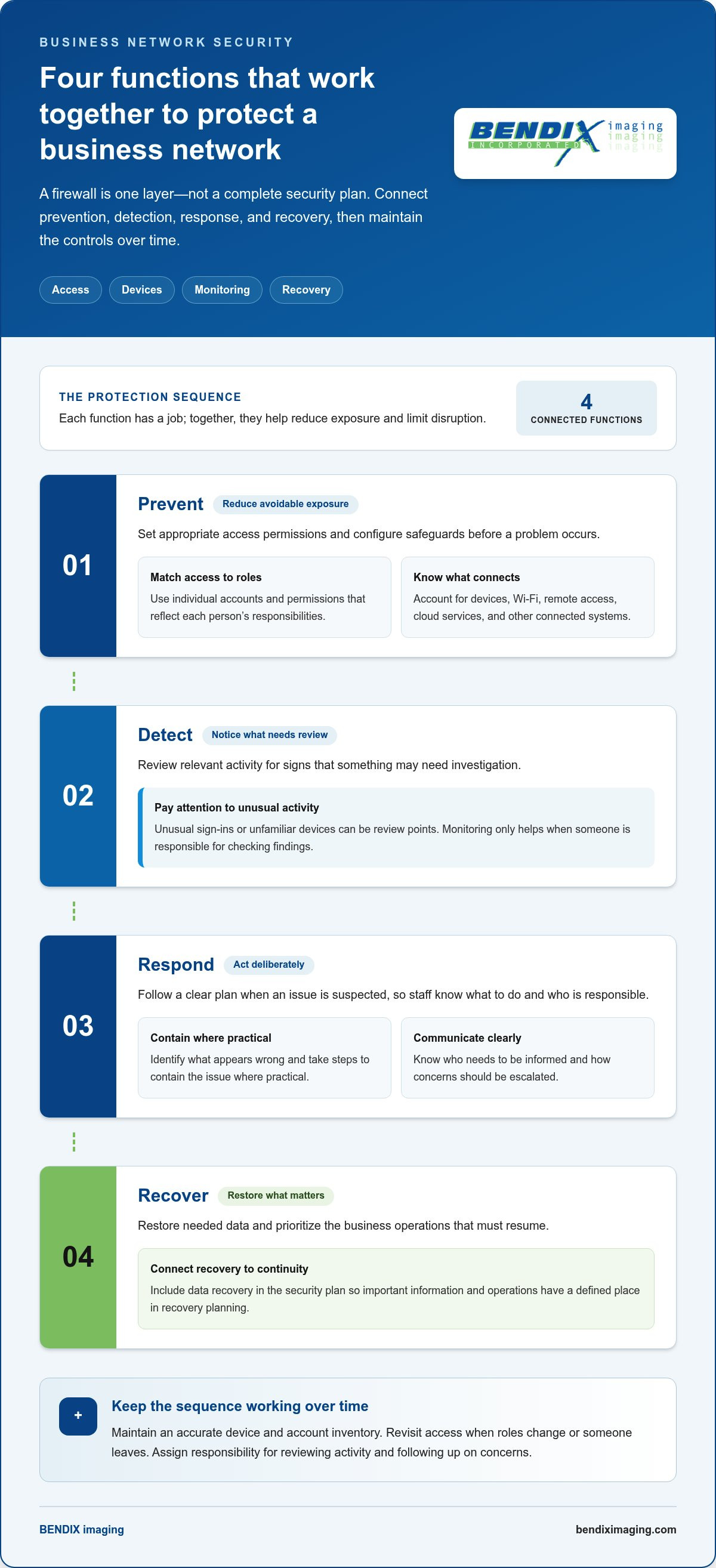
Think of protection as four connected functions: prevention, detection, response, and recovery. Together, they help a business reduce exposure, recognize potential issues, act deliberately, and restore important operations. Security tools are the components; managing them over time is the process that keeps protection aligned with the business.
- Prevent: Set appropriate access permissions and configure safeguards to reduce avoidable exposure.
- Detect: Review relevant activity for signs that something may need investigation.
- Respond: Follow a clear plan to contain a suspected issue and communicate with the people responsible.
- Recover: Restore needed data and prioritize the business operations that must resume.
Access, devices, and network boundaries
Give employees individual accounts rather than sharing credentials, and match permissions to each person’s role. When responsibilities change or someone leaves, review and adjust access so it still reflects current business needs. For organizations whose environments support it, network segmentation can separate groups of systems—such as connected facility hardware—helping limit which resources can communicate with one another. Physical protections also reinforce digital access policies; specialists like First Emirates Computers illustrate how biometric access control and CCTV surveillance systems secure the physical premises and hardware underlying business networks.
Wi-Fi configuration and remote access also deserve assessment. The right approach depends on the business’s devices, work patterns, and systems. For example, a company with staff working away from the office may need to consider how those users connect to internal resources, while an office with guest Wi-Fi should understand how that access relates to business systems. These are review points, not one-size-fits-all settings.
Monitoring, response, and recovery
Controls need follow-through. Reviewing unusual sign-in or device activity can help a team notice a potential problem and decide whether it needs investigation. Monitoring is useful only when someone is responsible for reviewing findings and knows how to escalate concerns. Set ownership in advance, so an alert doesn’t sit unnoticed or leave staff guessing about next steps.
A basic incident process gives the team direction: identify what appears wrong, contain the issue where practical, communicate with the people responsible, and recover affected systems or information. Recovery planning should account for backups, but also for business-critical operations. Identify which data and services employees need first, who coordinates restoration, and how the business will keep essential work moving while systems are brought back. BENDIX imaging’s managed IT and network security support connects technical safeguards with ongoing IT operations.
How to Compare Business Network Security Controls by Purpose
Choose safeguards by the business risk they address, not by how familiar or impressive a tool sounds. A control’s value depends on how it fits your systems, the information they handle, and who will maintain it. The table below offers a starting point for assigning responsibility and setting review rhythms. These are practical prompts, not universal schedules; adjust them to your operations and risk tolerance.
| Control | Purpose and example | Business owner | Review frequency |
|---|---|---|---|
| Firewall | Manages network traffic entering or leaving business systems. | IT lead or managed IT partner | On a planned schedule and after network changes |
| Endpoint protection | Helps address risks affecting workstations, laptops, and other supported devices. | IT lead or device administrator | As part of routine device oversight and when devices are added or changed |
| Access controls | Limit account access to the systems and information a person needs for their role. | Managers with IT support | When roles change, staff leave, and during scheduled access reviews |
| Secure Wi-Fi | Protects wireless access to business systems and helps manage who can connect. | IT lead or network administrator | On a planned schedule and when access needs change |
| Monitoring | Provides visibility into activity that may need investigation. | Assigned IT or security owner | According to the monitoring process, with alerts reviewed promptly |
| Backups | Support recovery of important data after loss or disruption. | Data or IT owner | Check backup activity routinely and test recovery on a planned schedule |
Match each control to the risk it addresses
Access controls address the risk of accounts having too much access or retaining permissions they no longer need. A firewall manages network traffic, while endpoint protection focuses on risks to individual devices. Backups support recovery when data becomes unavailable or is lost. Monitoring helps people see and review activity; it doesn’t guarantee an incident will be prevented or stopped. Network security for businesses works best when each safeguard has a clear purpose and an accountable owner.
What should a small business prioritize first?
Begin by listing important devices, user accounts, business data, and the systems or services that essential work depends on. Then identify which assets would most disrupt operations if unavailable or exposed. Prioritize safeguards around those risks, and assign a person to maintain each control. A small firm may have fewer systems than a larger organization, but it still needs clear ownership and a workable review process.
For wider planning context, the Cybersecurity Eastern South Dakota protection guide can help connect network decisions with broader business security priorities. Revisit the control mix as your staff, technology, data, or operations change. The goal isn’t to rank tools or collect them indiscriminately. It’s to match protection to the risks that matter most and keep those safeguards under active management.
A Practical Network Security Plan for Eastern South Dakota Businesses
A useful plan doesn’t start with changing settings at random. It starts with a clear picture of what the business relies on, where the most important risks sit, and who will keep safeguards current. Managers don’t need to configure network equipment themselves to lead this work. They can document the business needs and assign technical tasks to an internal IT lead or managed IT partner.
Set a baseline before changing network controls
Build a working record of the environment. For each system, note its business purpose, who uses it, how it’s accessed, and who handles support. Keep the record practical and readable, not buried in technical notes only one person understands.
- Inventory: List connected devices, employee and administrator accounts, essential applications, cloud services, and access paths such as office Wi-Fi or remote connections. Record what each item supports and who is responsible for it.
- Assess risks: Identify important data and operations, then consider what could happen if a system were unavailable, an account were misused, or information were exposed. Note existing safeguards and known limits, such as reliance on a single application or a key employee.
- Prioritize safeguards: Focus first on risks with the greatest potential effect on business operations. A system needed to serve customers or complete daily transactions may need more attention than a device with little access to important information. Document why each priority matters.
- Assign owners: Name the person responsible for business decisions and the person responsible for technical follow-through. Managers can own questions about who needs access and which work is essential; technical staff can handle configuration and maintenance.
- Review: Set a recurring time to revisit devices, accounts, safeguards, and assigned owners. Also review the record after a meaningful change, such as a new system, a staff role change, or a shift in how employees work.
Consider a small service business in Watertown that relies on staff computers, shared files, a printer, and an application for daily operations. Its manager can document which teams use each system, what work would pause if the application became unavailable, and who should be notified about access changes. The manager doesn’t need to adjust the network settings; the record gives technical support a clear basis for assessing priorities.
Turn findings into an ongoing review cycle
Make ownership explicit for access changes, policy updates, and escalation of suspected issues. Keep a simple log of review dates, identified gaps, decisions, and follow-up responsibility. That record helps the business see whether action was taken, rather than assuming a safeguard remains effective because it was once put in place.
For ongoing operational planning, the managed IT support guide for South Dakota explains how support can help maintain technology responsibilities. If customer, employee, or other sensitive information is involved, connect network planning with relevant compliance questions using the business regulatory compliance guide. It offers planning context, not legal advice.
Need help turning your inventory and priorities into a maintained security plan? Explore managed IT and network security support from BENDIX imaging for businesses across Eastern South Dakota.
When Managed Network Security Support Makes Sense for Your Business
Security tools don’t manage themselves. Someone must maintain settings, review activity, update access as roles change, and connect technical decisions to business priorities. If those tasks repeatedly fall behind, your team lacks clear visibility into devices and accounts, or security responsibilities rest with one already-busy employee, managed support may help close the operational gap.
Consider outside support if your business recognizes any of these signs:
- Security controls are in place, but no one consistently checks whether they’re working as intended.
- Staff aren’t sure who can access business systems or who should respond to a security concern.
- Technology changes faster than your team can review the security impact.
- Internal IT staff have competing responsibilities and limited time for ongoing network oversight.
Buying a tool addresses one part of the challenge. Managing security as part of IT operations means assigning responsibility, maintaining safeguards, reviewing access and activity, and adjusting the plan as the business changes. That ongoing work is central to effective network security for businesses, especially when there isn’t a dedicated internal security team.
What managed support can address
BENDIX imaging provides proactive managed IT services that include network security and data backup. This connects day-to-day technology oversight with protection and recovery planning, rather than treating each safeguard as a one-time purchase. A managed approach can also help establish ownership for routine reviews and make security concerns part of broader IT operations.
For business leaders who need strategic guidance, vCSO expertise can support security and compliance planning. That can help connect technical priorities with business risks, policies, and responsibilities. The aim is a practical plan aligned with how your organization works, not a promise that every threat can be prevented or that security can be left unattended.
Choose a next step based on your current gaps
Start with a short, useful summary of your environment. Note your key systems, the information and operations they support, current security concerns, and any tasks your team struggles to maintain. You don’t need to solve every technical issue before asking for support. A clear list helps focus the discussion on what matters most and where support could fit.
For example, a business in Sioux Falls might have reliable tools but no consistent process for reviewing user access or assigning follow-up when an alert appears. Another organization may need to connect data backup planning with the systems employees rely on to serve customers. A focused conversation can turn those operational priorities into a practical support plan, with responsibilities made clearer.
BENDIX imaging supports businesses across Eastern South Dakota, including Watertown, Brookings, Sioux Falls, Huron, and Montevideo. If your team is ready to discuss its network security needs, talk with BENDIX imaging about a practical path forward.
Make Your Next Security Decision Count
Choose one concrete next step: identify the security responsibility that’s least clear, whether it’s who reviews access, who follows up on unusual activity, or how recovery priorities are set. Assign an owner and a review date. That small commitment turns network security for businesses from a broad concern into work your team can track and improve.
If keeping those responsibilities consistent is stretching internal capacity, BENDIX imaging can help connect day-to-day IT operations with security priorities. Its managed IT services include network security and data backup, while vCSO expertise and regulatory compliance support can help inform broader planning. Businesses across Eastern South Dakota can build a support plan around their systems, concerns, and operational needs.
Start with what matters most to your organization, then strengthen the plan one practical decision at a time. Talk with BENDIX imaging about business network security and take a confident next step toward protecting your operations.
Frequently Asked Questions
What is network security for a business?
Network security for businesses is the way an organization manages access to its connected technology and the information it handles. It involves decisions about which employees can use particular systems, how devices connect, and who is responsible for maintaining protections. For example, a manager may approve access to payroll records while an IT lead handles the technical settings. Clear responsibilities help prevent security tasks from falling between roles.
Is a firewall enough to protect a business network?
No. A firewall helps manage network traffic, but it doesn’t address every way people use company systems. A staff member might access a cloud application from a laptop, or a former employee’s account might remain active after a role change. Review the full access picture, including devices, accounts, and remote connections, so protection doesn’t rely on a single control.
How can a small business secure its network?
Start by identifying which systems support essential work and who can access them. Then check whether staff have individual accounts, whether permissions match their roles, and whether important business information can be recovered if it becomes unavailable. A small retailer in Watertown, for example, could prioritize the systems needed to process sales and manage inventory, then assign an owner to review access and recovery arrangements.
What are the most important network security controls for a business?
The right controls depend on what your business does and what systems or information need protection. A company that relies on employee laptops should consider device safeguards; one handling sensitive records should pay close attention to account permissions. Firewalls, secure Wi-Fi, monitoring, and backups each serve different purposes. Prioritize based on potential impact to operations, rather than treating one tool as the universal answer.
How often should a business review its network security?
Set a regular review schedule, then revisit security whenever a meaningful change could affect access or risk. Examples include hiring or departing staff, adding a business application, changing work arrangements, or introducing connected equipment. A review can check whether accounts still belong to current staff, permissions remain appropriate, and assigned owners are clear. The schedule should be realistic enough for the business to maintain consistently.
Can managed IT services help with network security?
Yes. Managed IT services can help businesses maintain network safeguards as part of ongoing technology operations, rather than leaving each tool to be handled separately. BENDIX imaging provides managed IT and cybersecurity support, including network security and data backup. For organizations in Watertown, Brookings, Sioux Falls, Huron, and Montevideo, this can connect technical upkeep with business continuity and broader security planning.
What should a business do first after finding a network security gap?
Document what the gap involves, which systems or information may be affected, and who needs to assess it. If there are signs of active unauthorized access, escalate the concern promptly through your established incident process. Otherwise, assign an owner, evaluate the potential effect on business operations, and set a clear follow-up action. Avoid making undocumented changes that could complicate troubleshooting or leave the issue unresolved.
{"@context":"https://schema.org","@type":"FAQPage","mainEntity":[{"@type":"Question","name":"Which parts of a business network need protection?","acceptedAnswer":{"@type":"Answer","text":"Start with everything that connects to company resources, not just the equipment in a server room. Depending on the business, that may include workstations, laptops, mobile devices, printers, servers, routers, secure Wi-Fi, cloud services, and other network-connected systems. Employee accounts and remote access also matter: they determine who can reach business resources from the office or elsewhere. For example, a Brookings office might use staff laptops, a shared printer, Wi-Fi, cloud-hosted files, and an accounting system. That setup won’t match every Eastern South Dakota business, but it shows why a network inventory should include both physical devices and the accounts and services people use. Ask: What connects? Who uses it? What business information can it reach?"}},{"@type":"Question","name":"What should a small business prioritize first?","acceptedAnswer":{"@type":"Answer","text":"Begin by listing important devices, user accounts, business data, and the systems or services that essential work depends on. Then identify which assets would most disrupt operations if unavailable or exposed. Prioritize safeguards around those risks, and assign a person to maintain each control. A small firm may have fewer systems than a larger organization, but it still needs clear ownership and a workable review process. For wider planning context, the Cybersecurity Eastern South Dakota protection guide can help connect network decisions with broader business security priorities. Revisit the control mix as your staff, technology, data, or operations change. The goal isn’t to rank tools or collect them indiscriminately. It’s to match protection to the risks that matter most and keep those safeguards under active management. A useful plan doesn’t start with changing settings at random. It starts with a clear picture of what the business relies on, where the most important risks sit, and who will keep safeguards current. Managers don’t need to configure network equipment themselves to lead this work. They can document the business needs and assign technical tasks to an internal IT lead or managed IT partner."}},{"@type":"Question","name":"What is network security for a business?","acceptedAnswer":{"@type":"Answer","text":"Network security for businesses is the way an organization manages access to its connected technology and the information it handles. It involves decisions about which employees can use particular systems, how devices connect, and who is responsible for maintaining protections. For example, a manager may approve access to payroll records while an IT lead handles the technical settings. Clear responsibilities help prevent security tasks from falling between roles."}},{"@type":"Question","name":"Is a firewall enough to protect a business network?","acceptedAnswer":{"@type":"Answer","text":"No. A firewall helps manage network traffic, but it doesn’t address every way people use company systems. A staff member might access a cloud application from a laptop, or a former employee’s account might remain active after a role change. Review the full access picture, including devices, accounts, and remote connections, so protection doesn’t rely on a single control."}},{"@type":"Question","name":"How can a small business secure its network?","acceptedAnswer":{"@type":"Answer","text":"Start by identifying which systems support essential work and who can access them. Then check whether staff have individual accounts, whether permissions match their roles, and whether important business information can be recovered if it becomes unavailable. A small retailer in Watertown, for example, could prioritize the systems needed to process sales and manage inventory, then assign an owner to review access and recovery arrangements."}},{"@type":"Question","name":"What are the most important network security controls for a business?","acceptedAnswer":{"@type":"Answer","text":"The right controls depend on what your business does and what systems or information need protection. A company that relies on employee laptops should consider device safeguards; one handling sensitive records should pay close attention to account permissions. Firewalls, secure Wi-Fi, monitoring, and backups each serve different purposes. Prioritize based on potential impact to operations, rather than treating one tool as the universal answer."}},{"@type":"Question","name":"How often should a business review its network security?","acceptedAnswer":{"@type":"Answer","text":"Set a regular review schedule, then revisit security whenever a meaningful change could affect access or risk. Examples include hiring or departing staff, adding a business application, changing work arrangements, or introducing connected equipment. A review can check whether accounts still belong to current staff, permissions remain appropriate, and assigned owners are clear. The schedule should be realistic enough for the business to maintain consistently."}},{"@type":"Question","name":"Can managed IT services help with network security?","acceptedAnswer":{"@type":"Answer","text":"Yes. Managed IT services can help businesses maintain network safeguards as part of ongoing technology operations, rather than leaving each tool to be handled separately. BENDIX imaging provides managed IT and cybersecurity support, including network security and data backup. For organizations in Watertown, Brookings, Sioux Falls, Huron, and Montevideo, this can connect technical upkeep with business continuity and broader security planning."}},{"@type":"Question","name":"What should a business do first after finding a network security gap?","acceptedAnswer":{"@type":"Answer","text":"Document what the gap involves, which systems or information may be affected, and who needs to assess it. If there are signs of active unauthorized access, escalate the concern promptly through your established incident process. Otherwise, assign an owner, evaluate the potential effect on business operations, and set a clear follow-up action. Avoid making undocumented changes that could complicate troubleshooting or leave the issue unresolved."}}]}


