

What should printer fleet management solutions actually handle: simply show which devices are online, or help keep print operations visible, secure, and supported? If you’re responsible for IT, operations, or office spending, scattered device and supply costs are hard to control. A printer that goes down can stall staff, while an unmanaged device can create security and support concerns. Visibility matters, but it’s only useful when it leads to accountable day-to-day management.
This guide will help you assess your devices, identify what effective fleet management covers, and decide whether software, managed support, or a combination fits your operation. You’ll learn how to track costs and usage, reduce avoidable disruptions, and include printers in broader security planning. You’ll also find a practical way to match management to your locations, workflows, and support needs. For businesses in Eastern South Dakota, BENDIX imaging provides managed print solutions alongside printing supplies and professional iColor equipment.
Key Takeaways
- Printer fleet management solutions work best when device visibility connects to clear ownership of daily print tasks.
- Use a practical checklist to identify gaps in device records, supply coordination, support, and reporting.
- Compare software-led monitoring, managed print services, and a combined approach to find the right balance for your team's workload.
- Build a fleet improvement plan around locations, usage, supply orders, support history, and business-critical workflows.
- See how BENDIX imaging’s managed print solutions serve businesses in Watertown, Brookings, Sioux Falls, Huron, and Montevideo.
Printer Fleet Management Solutions: What Businesses Need to Control
Printer fleet management solutions coordinate a business’s devices, supplies, support, and everyday print needs. The goal is to understand how printing works across the organization, not just to keep individual machines running. That means knowing which teams rely on each device, what work it supports, how supplies are ordered, and how staff report problems.
A printer fleet solution coordinates devices, supplies, support, and user needs so print operations work as one manageable part of the business.
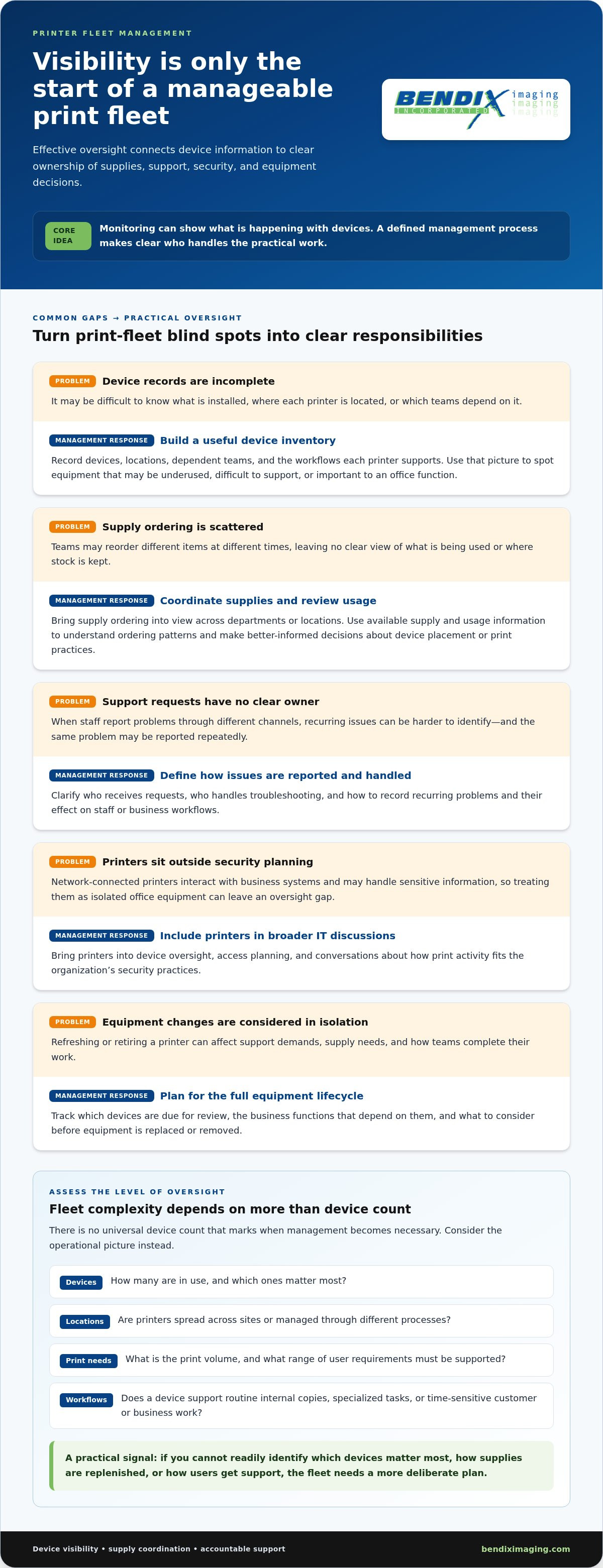
Buying printers addresses equipment needs at a point in time. Fixing a breakdown addresses one immediate problem. Neither approach gives a business a reliable picture of its whole print environment. Without oversight, staff may order supplies independently, report problems through different channels, or depend on a device that no one has planned to maintain. These gaps can delay work and make it harder to see what the fleet needs.
- A device inventory shows what’s installed, where it’s located, and which teams depend on it.
- Supply coordination brings ordering into view, making it easier to understand consumption across departments or locations.
- Consistent support processes clarify how users report problems and who is responsible for resolving them.
- Attention to user needs helps match print access and device placement to real workflows instead of habit.
Which business problems does fleet management address?
Consider a printer used to produce forms needed for daily client work. If it stops working, staff may have to pause, move to another device, or find a workaround. A machine problem can quickly become a workflow problem. Decentralized supply ordering creates another blind spot: teams may reorder different items at different times, while no one has a clear view of what’s being used or where stock is kept.
Inconsistent devices add friction, too. If one office has different equipment or support procedures from another, staff and IT may need to troubleshoot each situation differently. Coordinating device records, supply processes, and support makes common needs and recurring problems easier to identify.
When does a printer fleet become difficult to manage?
There’s no universal device count that marks the point where management becomes necessary. A small business with a few critical printers may face more operational risk than a larger office with straightforward needs. Consider the number of devices, the locations they serve, print volume, and the range of user requirements. A device used for routine internal copies creates a different dependency from one supporting time-sensitive customer or business workflows.
Complexity rises when devices are spread across sites, different people manage supply orders, or staff depend on specific printers for specialized tasks. Use those factors to judge whether current oversight is working. If you can’t readily identify which devices matter most, how supplies are replenished, or how users get support, the fleet needs a more deliberate plan.
What Effective Printer Fleet Management Solutions Should Include
A useful fleet plan makes responsibilities clear, not just device information. Before comparing options, identify what you need to see, what your team can manage internally, and where managed support could reduce staff workload. The right mix depends on your equipment, locations, print demands, and current support processes.
Fleet monitoring shows what’s happening with devices; managed print support also coordinates practical work around print operations. Visibility can reveal an issue, but it doesn’t automatically assign someone to resolve it or handle the related task.
Device visibility, supply coordination, and reporting
Start with a reliable picture of the fleet. Identify the devices in use, their locations, and the teams or workflows that rely on them. This makes it easier to spot equipment that may be underused, difficult to support, or important to a particular office function.
Supply and usage information can help managers understand ordering patterns and make better-informed decisions about device placement or print practices. The information available depends on the devices and management approach. Focus on details that answer practical questions, such as which locations need better supply coordination and where support issues recur.
Support, security, and lifecycle oversight
A defined support process gives employees a clear way to report issues and helps the organization track recurring problems. Decide who receives requests, who handles troubleshooting, and how to record the effect on staff or business workflows. Without clear ownership, the same problem can be reported repeatedly without revealing a pattern.
Network-connected printers belong in broader IT security discussions because they interact with business systems and may handle sensitive information. Include them in device oversight, access planning, and conversations about how print activity fits organizational security practices. Treat printers as part of the technology environment, not as isolated office equipment.
Plan for the full equipment lifecycle, too. A refresh or retirement decision can affect support demands, supply needs, and how teams complete their work. Record which devices are due for review, what business functions depend on them, and what to consider before equipment is replaced or removed.
Use this buyer checklist to separate essential oversight from extra features:
- Inventory: Can you identify devices, locations, and business users?
- Supplies: Is ordering coordinated, with enough usage information to guide decisions?
- Support: Are reporting and issue ownership clear to staff?
- Reporting: Does the available information help you act, rather than simply add data?
- Governance: Are security discussions and lifecycle reviews part of print planning?
For organizations weighing device visibility against hands-on coordination, BENDIX imaging’s managed print solutions connect print operations with practical business needs. Choose printer fleet management solutions that match the tasks your organization needs covered, and make ownership clear from the start.
Printer Fleet Software vs. Managed Print Services: Compare the Options
Software and managed print services address different parts of fleet management. Software can provide information about devices, while managed support can coordinate work around equipment, supplies, and print operations. The decision isn’t simply about which option has more features. It’s about who will act on the information and take responsibility for recurring tasks.
Use this comparison to identify where the workload sits. The visibility available through software depends on the platform, printer, and configuration, while managed print service arrangements differ in scope.
| Area | Software-led monitoring | Managed print services | Combined approach |
|---|---|---|---|
| Daily task ownership | Internal staff review information and decide what to do. | Print support tasks are coordinated through the service arrangement. | Teams share responsibilities, with clear boundaries needed. |
| Visibility | Information depends on the platform, devices, and setup. | Visibility depends on the service scope and its processes. | Software information can complement service coordination. |
| Supplies | Staff use available information to plan and place orders. | Supply coordination may be part of the managed arrangement. | Internal teams and service support can align ordering. |
| Support | Employees or IT staff handle reported issues. | Print-related support is coordinated through the service. | Monitoring informs response, while support helps address issues. |
| Internal workload | Staff time is needed to review, interpret, and act. | Some print administration shifts to managed support. | Work is divided according to agreed responsibilities. |
When is fleet management software enough?
Software-led management may suit an organization whose IT or office team wants direct control and has time to review device information, coordinate supplies, and follow up on problems. The key question is whether someone owns those actions. A dashboard can make information easier to access, but it won’t automatically assign a staff member to investigate an issue, place an order, or guide users through a print process.
Check that the information available fits the decisions you need to make. Monitoring and reporting capabilities depend on the platform, printer, and configuration, so assess them against your actual fleet rather than assuming every setup offers the same features.
When can managed print support make more sense?
Managed print support can make sense when print administration keeps pulling staff away from other responsibilities or when device and supply concerns need more consistent coordination. Managed print services connect equipment oversight with practical support and supply needs. Businesses that want both device information and help handling day-to-day print tasks can combine software visibility with managed support.
Choose printer fleet management solutions based on the work your team can own and the tasks it needs support with. BENDIX imaging provides managed print solutions for businesses seeking coordinated print support alongside broader technology needs. Explore BENDIX imaging’s managed print support.
How to Assess and Improve Your Printer Fleet: A Practical Plan
Start with evidence, not assumptions. A practical assessment gives you a clear view of the devices people depend on, the work they support, and the issues that deserve attention first. Use the findings to improve the current setup, then decide whether your processes, staffing, or printer fleet management solutions need to change.
- Build an inventory. Record each device, its location, the teams or users who rely on it, and its main business function. Include equipment across every office, department, or work area so shared and less-visible devices aren’t missed. Note who maintains the inventory and how updates will be recorded.
- Map critical workflows. Identify the tasks that depend on printing, such as preparing customer documents or producing internal forms. For each workflow, note the impact of an interruption and whether staff have a workable alternative. This helps distinguish a minor inconvenience from a disruption that needs prompt attention.
- Review usage and supply patterns. Gather available device usage information, supply orders, and stock practices. Look for recurring ordering problems, uneven demand, or locations where staff struggle to access supplies. The information available depends on your equipment and management approach, so use what you can reliably collect instead of assuming every device provides the same data.
- Check support history. Gather staff reports, service records, and recurring issue notes. Capture which device was involved, what users experienced, how the issue was handled, and whether it interrupted a key task. Patterns can reveal that a frequently reported problem needs a process change, not just another one-off fix.
- Rank issues by business impact. Consider workflow disruption, user effort, supply coordination, and the importance of the affected device. Don’t assume every older printer should be replaced. A device’s role, support history, and fit with current needs matter alongside its age. Prioritize changes that address a clear operational problem.
- Assign ownership and set a review cadence. Name who reviews fleet information, follows up on issues, and updates the inventory. Choose practical measures, such as recurring supply gaps, device availability for critical work, and staff time spent resolving print problems. Set a monthly or quarterly review that fits your operation, then revisit the plan when staffing, locations, or workflows change.
Keep the assessment actionable. When you identify an issue, record the next step, the person responsible, and how you’ll tell whether the change helped. This creates a working plan rather than a one-time device list, and gives operations and IT a shared reference for decisions about support, supplies, and equipment.
For broader guidance on aligning print operations with business needs, explore the managed print solutions business guide. If your review points to a need for coordinated print support, connect with BENDIX imaging about managed print.
Local Printer Fleet Management Support for Eastern South Dakota Businesses
A printer fleet review should reflect how your organization actually works: which devices staff rely on, what print tasks matter most, where supplies are needed, and how support fits into daily operations. BENDIX imaging provides managed print solutions for businesses in Eastern South Dakota, serving Watertown, Brookings, Sioux Falls, Huron, and Montevideo. Its print offering also includes printing supplies and professional iColor equipment.
Bring your assessment findings into the conversation. A device list, locations, recurring issues, and supply concerns give the review a useful starting point. Add workflows that can’t easily pause, along with who currently handles print support and supply ordering. This helps focus planning on real operational priorities instead of assumptions about what every office needs.
What local businesses should bring to a fleet review
Prepare what you know, even if some details are incomplete. Note the devices and locations, the teams that use them, repeated problems, and how supplies are ordered. Identify business-critical workflows that depend on printing and who responds when a device or supply issue disrupts them. These details help connect fleet needs with your organization’s broader managed IT support in South Dakota.
BENDIX imaging’s managed print solutions support day-to-day print operations. Printing supplies are part of that offering, along with professional iColor equipment for business printing. Start with your devices, workflows, and support responsibilities, then consider how print planning can fit your organization’s needs.
Coordinate print planning with business technology
Printers connected to a business network should be included in wider technology and security planning. A fleet review can help identify which devices are in use, where they operate, and who relies on them. Share that context with the people responsible for IT and security so print needs are considered alongside the organization’s broader technology environment. For related planning, see this Eastern South Dakota cybersecurity guide.
Effective printer fleet management solutions should fit the realities of your locations, staff, and print workflows. A thoughtful review can clarify where coordination is needed and how managed print support could complement your existing business technology. Start with the information you already have, then discuss your business print needs with BENDIX imaging.
Turn Your Fleet Review Into a Clear Next Step
Use your fleet assessment to make one deliberate decision: identify the print issue that most affects your operation and assign a clear next step. That could mean improving internal ownership, adjusting supply planning, or bringing in managed print support. The goal isn’t to add complexity. It’s to make print operations easier to manage as your business changes.
For organizations considering support, BENDIX imaging brings together managed print solutions, printing supplies, and professional iColor equipment for businesses across Eastern South Dakota. Local teams in Watertown, Brookings, Sioux Falls, Huron, and Montevideo can discuss print needs in the context of day-to-day work, rather than treating each device or supply concern in isolation.
Keep the conversation grounded in your priorities: the workflows staff depend on, the recurring issues you want addressed, and the responsibilities your team can realistically own. A focused discussion can help clarify which support approach fits your operation and how print planning connects with broader business technology.
Plan your business print support with BENDIX imaging. Take the next step with a clearer view of what your fleet needs and build a print operation that’s ready to support the work ahead.
Frequently Asked Questions
What is printer fleet management?
Printer fleet management is the ongoing coordination of business printing devices and the decisions around their use. In practice, it helps managers answer questions such as whether a device is assigned to a department, who approves changes, and how a retired printer is removed from routine use. This makes print responsibilities clearer and gives teams a consistent basis for planning instead of relying on informal knowledge held by one employee.
Do small businesses need printer fleet management solutions?
Printer fleet management solutions can help a small business when printing supports work that can’t simply wait for a device or supply issue to be sorted out. Instead of counting machines, examine how often employees interrupt other tasks to troubleshoot, locate supplies, or find another printer. If those workarounds fall to the same person or repeatedly delay customer-facing work, even a modest fleet may warrant clearer oversight.
Can printer fleet management help reduce printer downtime?
Printer fleet management can support efforts to reduce downtime by making repeat problems easier to recognize and route to someone responsible. For example, if staff repeatedly report print queue problems or supply shortages around a particular workflow, recording the timing and impact can help the business investigate the cause. Monitoring may provide useful signals, while support processes turn findings into action. It can’t guarantee uninterrupted printing; outcomes depend on equipment and follow-through.
Does printer fleet management include toner and other supplies?
Supply coordination can be part of managed print planning, and BENDIX imaging provides printing supplies for businesses. A useful practice is to record who checks stock, how staff flag a shortage, where supplies are kept, and who places orders. This can prevent duplicate requests and help teams distinguish a temporary gap from a recurring planning issue. Keep the process clear for employees who rely on printing.
Is printer fleet management software the same as managed print services?
No. Fleet software is a tool for organizing or viewing printer information, while managed print services are an ongoing service approach to print operations. A business can decide by listing tasks beside owners: who reviews device information, coordinates orders, handles recurring issues, and updates records. If internal staff can manage those tasks, software may be sufficient. If not, managed support or a combined model may better fit the operation.
Should printers be included in a business cybersecurity plan?
Yes. Include printers in cybersecurity planning because network-connected devices are part of the organization’s technology environment. In a practical review, identify who is responsible for printer oversight, how device changes are communicated to IT, and whether print-related concerns have a route into security discussions. The specific safeguards should align with equipment and internal policies. Treating printers as outside the inventory can leave ownership unclear when technology or access arrangements change.
What information should I gather before reviewing my printer fleet?
Gather a current device list and add details that support decisions: location, primary users, business purpose, recent issue patterns, and how supply requests are handled. Note exceptions, such as a device used for a specialized task, and identify the person who can explain each process. Avoid recording sensitive document contents. A concise, accurate baseline helps managers focus the review on operational needs instead of guesswork.
{"@context":"https://schema.org","@type":"FAQPage","mainEntity":[{"@type":"Question","name":"Which business problems does fleet management address?","acceptedAnswer":{"@type":"Answer","text":"Consider a printer used to produce forms needed for daily client work. If it stops working, staff may have to pause, move to another device, or find a workaround. A machine problem can quickly become a workflow problem. Decentralized supply ordering creates another blind spot: teams may reorder different items at different times, while no one has a clear view of what’s being used or where stock is kept. Inconsistent devices add friction, too. If one office has different equipment or support procedures from another, staff and IT may need to troubleshoot each situation differently. Coordinating device records, supply processes, and support makes common needs and recurring problems easier to identify."}},{"@type":"Question","name":"When does a printer fleet become difficult to manage?","acceptedAnswer":{"@type":"Answer","text":"There’s no universal device count that marks the point where management becomes necessary. A small business with a few critical printers may face more operational risk than a larger office with straightforward needs. Consider the number of devices, the locations they serve, print volume, and the range of user requirements. A device used for routine internal copies creates a different dependency from one supporting time-sensitive customer or business workflows. Complexity rises when devices are spread across sites, different people manage supply orders, or staff depend on specific printers for specialized tasks. Use those factors to judge whether current oversight is working. If you can’t readily identify which devices matter most, how supplies are replenished, or how users get support, the fleet needs a more deliberate plan. A useful fleet plan makes responsibilities clear, not just device information. Before comparing options, identify what you need to see, what your team can manage internally, and where managed support could reduce staff workload. The right mix depends on your equipment, locations, print demands, and current support processes. Fleet monitoring shows what’s happening with devices; managed print support also coordinates practical work around print operations. Visibility can reveal an issue, but it doesn’t automatically assign someone to resolve it or handle the related task."}},{"@type":"Question","name":"When is fleet management software enough?","acceptedAnswer":{"@type":"Answer","text":"Software-led management may suit an organization whose IT or office team wants direct control and has time to review device information, coordinate supplies, and follow up on problems. The key question is whether someone owns those actions. A dashboard can make information easier to access, but it won’t automatically assign a staff member to investigate an issue, place an order, or guide users through a print process. Check that the information available fits the decisions you need to make. Monitoring and reporting capabilities depend on the platform, printer, and configuration, so assess them against your actual fleet rather than assuming every setup offers the same features."}},{"@type":"Question","name":"When can managed print support make more sense?","acceptedAnswer":{"@type":"Answer","text":"Managed print support can make sense when print administration keeps pulling staff away from other responsibilities or when device and supply concerns need more consistent coordination. Managed print services connect equipment oversight with practical support and supply needs. Businesses that want both device information and help handling day-to-day print tasks can combine software visibility with managed support. Choose printer fleet management solutions based on the work your team can own and the tasks it needs support with. BENDIX imaging provides managed print solutions for businesses seeking coordinated print support alongside broader technology needs. Explore BENDIX imaging’s managed print support. Start with evidence, not assumptions. A practical assessment gives you a clear view of the devices people depend on, the work they support, and the issues that deserve attention first. Use the findings to improve the current setup, then decide whether your processes, staffing, or printer fleet management solutions need to change. Keep the assessment actionable. When you identify an issue, record the next step, the person responsible, and how you’ll tell whether the change helped. This creates a working plan rather than a one-time device list, and gives operations and IT a shared reference for decisions about support, supplies, and equipment. For broader guidance on aligning print operations with business needs, explore the managed print solutions business guide. If your review points to a need for coordinated print support, connect with BENDIX imaging about managed print. A printer fleet review should reflect how your organization actually works: which devices staff rely on, what print tasks matter most, where supplies are needed, and how support fits into daily operations. BENDIX imaging provides managed print solutions for businesses in Eastern South Dakota, serving Watertown, Brookings, Sioux Falls, Huron, and Montevideo. Its print offering also includes printing supplies and professional iColor equipment. Bring your assessment findings into the conversation. A device list, locations, recurring issues, and supply concerns give the review a useful starting point. Add workflows that can’t easily pause, along with who currently handles print support and supply ordering. This helps focus planning on real operational priorities instead of assumptions about what every office needs."}},{"@type":"Question","name":"What is printer fleet management?","acceptedAnswer":{"@type":"Answer","text":"Printer fleet management is the ongoing coordination of business printing devices and the decisions around their use. In practice, it helps managers answer questions such as whether a device is assigned to a department, who approves changes, and how a retired printer is removed from routine use. This makes print responsibilities clearer and gives teams a consistent basis for planning instead of relying on informal knowledge held by one employee."}},{"@type":"Question","name":"Do small businesses need printer fleet management solutions?","acceptedAnswer":{"@type":"Answer","text":"Printer fleet management solutions can help a small business when printing supports work that can’t simply wait for a device or supply issue to be sorted out. Instead of counting machines, examine how often employees interrupt other tasks to troubleshoot, locate supplies, or find another printer. If those workarounds fall to the same person or repeatedly delay customer-facing work, even a modest fleet may warrant clearer oversight."}},{"@type":"Question","name":"Can printer fleet management help reduce printer downtime?","acceptedAnswer":{"@type":"Answer","text":"Printer fleet management can support efforts to reduce downtime by making repeat problems easier to recognize and route to someone responsible. For example, if staff repeatedly report print queue problems or supply shortages around a particular workflow, recording the timing and impact can help the business investigate the cause. Monitoring may provide useful signals, while support processes turn findings into action. It can’t guarantee uninterrupted printing; outcomes depend on equipment and follow-through."}},{"@type":"Question","name":"Does printer fleet management include toner and other supplies?","acceptedAnswer":{"@type":"Answer","text":"Supply coordination can be part of managed print planning, and BENDIX imaging provides printing supplies for businesses. A useful practice is to record who checks stock, how staff flag a shortage, where supplies are kept, and who places orders. This can prevent duplicate requests and help teams distinguish a temporary gap from a recurring planning issue. Keep the process clear for employees who rely on printing."}},{"@type":"Question","name":"Is printer fleet management software the same as managed print services?","acceptedAnswer":{"@type":"Answer","text":"No. Fleet software is a tool for organizing or viewing printer information, while managed print services are an ongoing service approach to print operations. A business can decide by listing tasks beside owners: who reviews device information, coordinates orders, handles recurring issues, and updates records. If internal staff can manage those tasks, software may be sufficient. If not, managed support or a combined model may better fit the operation."}},{"@type":"Question","name":"Should printers be included in a business cybersecurity plan?","acceptedAnswer":{"@type":"Answer","text":"Yes. Include printers in cybersecurity planning because network-connected devices are part of the organization’s technology environment. In a practical review, identify who is responsible for printer oversight, how device changes are communicated to IT, and whether print-related concerns have a route into security discussions. The specific safeguards should align with equipment and internal policies. Treating printers as outside the inventory can leave ownership unclear when technology or access arrangements change."}},{"@type":"Question","name":"What information should I gather before reviewing my printer fleet?","acceptedAnswer":{"@type":"Answer","text":"Gather a current device list and add details that support decisions: location, primary users, business purpose, recent issue patterns, and how supply requests are handled. Note exceptions, such as a device used for a specialized task, and identify the person who can explain each process. Avoid recording sensitive document contents. A concise, accurate baseline helps managers focus the review on operational needs instead of guesswork."}}]}


