

A phone system that relies on aging equipment, struggles to support remote staff, or is becoming harder to maintain may be a reason to replace legacy office phone systems. A premise-based PBX depends on switching and control hardware at your office, so its limitations can affect reliability, flexibility, and the effort involved in making changes. The right time to replace it depends on how well it supports the way your business works.
If calls drop, simple updates take too much effort, or staff cannot work smoothly across locations, it is reasonable to ask whether the system still serves your team. Replacing it can be disruptive, so base the decision on practical signs, not pressure to upgrade for its own sake.
This article explains legacy and premise-based phone systems, the warning signs to watch for, and how remote access, reliability, and security factor into a replacement decision. You will also learn what to consider when moving to a modern business phone system, and when keeping existing equipment may still make sense.
Key Takeaways
- Spot when an aging PBX is limiting growth, making routine changes difficult, or relying on hard-to-maintain equipment.
- Assess whether staff need to use business numbers and phone features across office, remote, and mobile work.
- Consider how unsupported hardware, service interruptions, and dependence on on-site equipment affect business continuity.
- Compare security and management needs before choosing to retain, upgrade, or replace existing phone infrastructure.
- Understand the difference between a premise-based PBX and hosted phone service to make a more informed transition decision.
What are the main signs it’s time to replace a legacy phone system?
A legacy PBX depends on on-site hardware, and its limitations often become clear as costs rise or business needs change. Track expansion, support, and phone-line expenses together to determine whether the system still fits.
Expansion and Support Costs
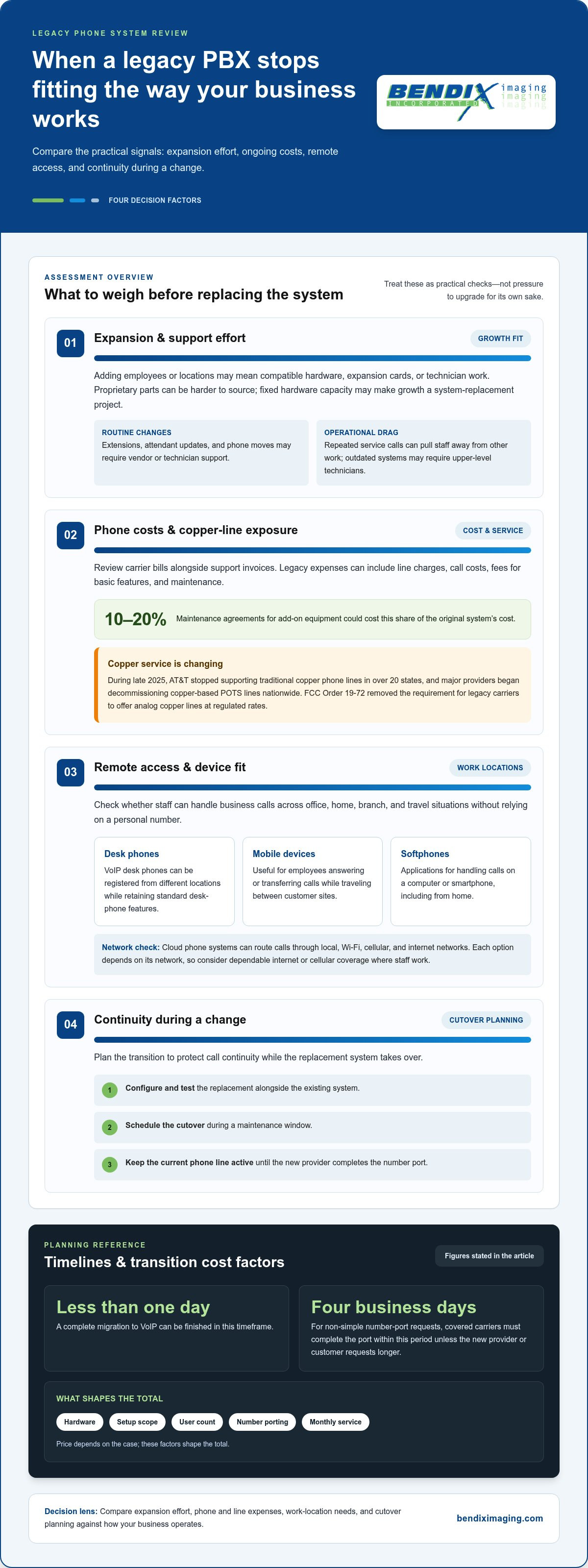
A legacy PBX scales by adding compatible hardware, expansion cards, or technician work. That becomes important when adding employees or locations turns into a project instead of a routine change. If the system requires proprietary equipment, each addition may depend on parts that are harder to source and support.
Moves, adds, and changes may require vendor or technician support, rather than an administrator making updates directly. Supporting outdated technology can require upper-level technicians, increasing labor costs. Maintenance agreements for add-on equipment could cost 10-20% of the original system’s cost, making expansion expensive before new users even make calls.
Consider the work involved in each change: adding an extension, updating an attendant, or moving a phone. Repeated service calls can pull staff away from other tasks and reduce productivity. If hardware capacity is fixed, growth may require replacing the system rather than expanding it.
Phone, Carrier, and Copper Line Expenses
Legacy phone expenses can include line charges, call costs, fees for basic features, and ongoing maintenance. Review a recent carrier bill alongside support invoices, and separate recurring phone-line costs from one-time technician work. This helps show whether familiar service is also becoming expensive.
Traditional copper lines face additional uncertainty. AT&T stopped supporting traditional copper phone lines in over 20 states during late 2025, and major providers began decommissioning copper-based POTS lines nationwide in late 2025. FCC Order 19-72 removed the requirement for legacy carriers to offer analog copper lines at regulated rates. A business still relying on these lines should account for service changes in its replacement planning.
The price depends on the case and is provided after a quote request, with hardware, setup scope, user count, number porting, and monthly service shaping the total. A complete migration to VoIP can be finished in less than one day. For non-simple number-port requests, covered carriers must complete the port within four business days unless the new provider or customer requests a longer period, according to the Office of the Federal Register, National Archives and Records Administration.
To minimize downtime, configure and thoroughly test the replacement system alongside the existing one, then schedule the cutover during a maintenance window. Keep the current phone line active until the new provider completes the number port. This sequence helps protect call continuity as the new setup takes over.
Remote access across phones and devices
A phone system should let staff handle business calls beyond the office desk. Hosted PBX and cloud PBX systems can support office users, remote staff, and mobile devices. For example, a salesperson working from home can answer a business call without routing customers to a personal number. The key question is whether the phone setup follows your team’s work locations.
Remote access can use desk phones, mobile devices, or softphones, which are applications for handling calls on a computer or smartphone. VoIP desk phones can be registered and used from different locations while retaining standard desk-phone features. A remote employee could keep familiar call controls while working from a branch office, home, or another location with network access.
Cloud phone systems can route calls through local, Wi-Fi, cellular, and internet networks. This gives employees options as they move between locations: a desk phone can serve the office, while a mobile device can handle calls away from it. Each option still depends on its network, so consider whether staff have dependable internet or cellular service where they work.
Map common work situations before selecting a system. A receptionist may need a desk phone and access to an attendant console, while a traveling manager may need to answer calls on a mobile device. A support employee might use a softphone at home and transfer calls to a coworker in the office. These examples clarify which call functions need to work across devices.
- Remote extensions: Decide which employees need an extension outside the office, such as a home-based team member who answers the same business line.
- Mobile access: Identify staff who need to answer or transfer calls while traveling between customer sites.
- Device choice: Match desk phones, computers, or smartphones to each role’s daily calling needs.
Moving from a system tied to one site also changes how managers handle everyday phone tasks. Consider how staff will sign in, find colleagues, transfer calls, and manage voicemail from each device. For example, a remote worker should know how to distinguish a business call from a personal one and where to find the right transfer option.
Build a simple user-and-device map before comparing phone infrastructure. List each role, its usual location, the device it needs, and essential features such as call transfers or voicemail. A remote access plan can help organize these requirements around how your employees actually work.
Obsolescence and reliability risks of legacy phone systems
A legacy PBX depends on physical hardware, while hosted phone systems deliver features through hosted infrastructure. Hosted systems generally offer more flexibility and fewer on-site components. Total cost depends on existing equipment, maintenance, user needs, and monthly service.
Reliability and Geographic Redundancy
Geographic redundancy means communications can rely on infrastructure beyond one office location. This matters when a local power failure or equipment problem could interrupt calls across the business.
On-premise phone hardware shuts down during an office power outage. Hosted communications can continue over cellular and local networks, giving staff another way to connect. For example, a team might route calls through cellular devices if office equipment loses power. That flexibility depends on having usable network access.
Uptime and Call Quality
Uptime describes how consistently a phone service is available, while call quality describes how clearly people can hear each other. Both affect customer conversations and internal coordination.
Some cloud phone systems offer a 99.99% uptime guarantee, which corresponds to less than five minutes of downtime per month. That figure doesn’t remove the need to assess the business network: internet congestion or weak connectivity can still affect calls. Include network capacity and call clarity in reliability planning.
Obsolescence adds a separate risk. The NEC SV8100, Vodavi, and Vertical SBX are examples of systems discontinued by their manufacturers. When equipment is no longer supported, repairs may depend on scarce expertise or replacement parts. A system that still powers on can therefore remain a weak point if a failure takes longer to address.
Legacy equipment may rely on remote dial-up modem support. Most telephone carriers no longer support modem transmission over their services, so this support route may not work. If your business relies on remote access to maintain equipment, identify how service would be restored if the connection fails.
Compare systems by identifying where a failure could occur and what happens next. An office PBX can make phone service vulnerable to failure of its on-site hardware. Hosted infrastructure reduces dependence on that single installation, but calls still rely on internet or cellular connections. Map those dependencies before deciding.
Assess call quality in practice instead of making assumptions. During a trial or system evaluation, place calls from the office, a remote location, and a mobile device. Listen for interruptions and confirm that transfers and call routing work as expected. This shows whether the network and phone setup support everyday conversations.
For a business with stable requirements and supported premise-based equipment, keeping the system may still be reasonable. If supportability, outages, or network dependencies threaten continuity, compare the cost and operational impact of retaining, upgrading, or replacing it.
Are legacy phone systems really more secure than modern solutions?
No. A physical PBX may have fewer internet connections, but outdated hardware can be difficult to maintain and secure. Modern VoIP encrypts voice traffic using enterprise-grade protocols, while internet connectivity creates additional points to protect. Security depends on how the system and its network are configured.
The main replacement options are VoIP, hosted or cloud PBX, and on-premises PBX. VoIP carries calls over internet networks; hosted PBX uses provider-hosted infrastructure, while an on-premises PBX keeps switching hardware at your location.
Look for features that support daily work: call routing, voicemail, an attendant, transfers, and mobile access. Integration with CRM or helpdesk software can display customer details alongside calls, helping staff handle inquiries without switching between separate systems.
When planning for growth, consider how each option adds users and locations. IP PBX systems can add users and phone lines over the internet without wiring work or installation fees. Hosted PBX and cloud PBX can also support office users, remote staff, and mobile devices, offering alternatives to a system limited to one site.
Compare providers using consistent criteria: contract term, included features, support process, security controls, and service-level commitments. Read the agreement for uptime definitions, exclusions, and what happens during an outage. A headline guarantee alone does not explain the service’s full responsibilities.
U.S. phone-system planning should account for emergency calling, number porting, and accessibility. Federal regulations protect customers’ right to transfer their phone number to a new carrier. Map emergency-call routing for each location, and assess whether call controls and devices meet employees’ accessibility needs.
Replacement risks include misrouted calls, exposed account credentials, and gaps during migration. Inventory phone numbers, devices, and system dependencies before planning the change. Configure and test the new system alongside the existing one, train employees on its workflows, and schedule the cutover during a maintenance window.
Protect connected communications with strong account controls and network safeguards. For example, limit system administration to authorized staff and review access when employees change roles. Working with managed IT specialists like SpaceCenter Systems can help address infrastructure risks through robust network security, while comprehensive cyber security controls support broader protection planning. Focus on effective controls rather than assuming analog equipment is automatically safer.
Definitions of legacy and premise-based phone systems
“Legacy” describes a system that relies on older technology or equipment, while “premise-based” identifies where its phone infrastructure is installed. The terms overlap, but they are not interchangeable: a premise-based PBX can still be supported and meet a business’s needs. The useful distinction is how the system works, where its components are located, and whether it supports current operations.
A premise-based PBX has switching equipment, control hardware, and related telephone components installed at a business’s office or facility. It can provide extensions, voicemail, an auto attendant, and internal call routing. For example, a receptionist might use an attendant to direct customer calls, while employees dial extensions to reach colleagues in the same building.
“Legacy” usually refers to reliance on older or proprietary equipment, not simply a system’s age. Traditional office telephones have been used for decades, and some older setups combine digital handsets, analog devices, and physical PBX hardware. A system may still function but become difficult to upgrade if replacement parts or specialist support are harder to access.
Phone systems also differ in how calls connect. Traditional analog service uses phone lines; VoIP carries voice calls over internet connections. Hosted PBX and cloud PBX provide business phone features through hosted infrastructure rather than a PBX installed at the office. An on-premises PBX keeps its core switching equipment at the business location.
Create a basic inventory of your current setup before considering an upgrade. Record the PBX location, handset types, how many phone lines connect to it, and which devices depend on analog service. Note functions such as voicemail and call routing. For instance, an analog fax machine or door phone may have different connection needs than a desk handset.
This inventory helps prevent a common mistake: assuming every premise-based system needs immediate replacement, or that every newer phone system is hosted. A business with supported hardware and stable requirements may keep its PBX. A company that needs remote access, easier expansion, or less reliance on on-site equipment may compare a hosted option with an on-premises upgrade.
Choose based on the system’s role, not its label. Ask whether existing phones and connected devices can work with the intended setup, how calls will be routed, and which telecom services remain necessary. These details clarify what must change and what can stay. To explore a VoIP system option, connect the decision to your business’s phone infrastructure and operating needs.
BENDIX imaging: Artificial Intelligence (AI) Consulting
BENDIX imaging helps businesses connect technology decisions with operational needs through Artificial Intelligence (AI) Consulting and Managed IT Services. If an aging phone system raises questions about network readiness, security, or how communications fit broader workflows, consider the full technology environment before choosing a replacement.
For a phone-system transition, Network Security and Cyber Security are relevant when reviewing the infrastructure that carries business calls and protects connected systems. AI Consulting can help assess where AI may support business processes, while Managed IT Services address broader technology management needs. The right starting point depends on the problem to solve, such as protecting network access or planning technology changes.
Contact BENDIX imaging to discuss your business technology needs, or visit bendiximaging.com.
Make Your Next Phone Decision with Confidence
Deciding whether to replace legacy office phone systems is ultimately a business-continuity decision, not just an equipment choice. Before committing, identify who will own the transition, which teams depend on phone service, and how communications should support your business as it evolves. Clear ownership helps keep the change aligned with day-to-day operations.
Start by agreeing on what success means for your organization. Leadership might prioritize easier administration, for example, while customer-facing teams need calls handled consistently. Setting these priorities helps you assess options against actual business needs rather than a feature list alone.
BENDIX imaging offers Managed IT Services, Cyber Security, and Artificial Intelligence (AI) Consulting to help businesses address related technology needs. These services can support broader planning around how systems, people, and security work together. The next step is a focused conversation about your priorities and operating requirements.
Contact BENDIX imaging today to discuss your technology needs and move forward with a clearer plan.
Frequently Asked Questions
How does a cloud-based VoIP system improve business communication?
Cloud-based VoIP can make business calling easier to coordinate across locations through a shared phone platform. For example, a business with teams in Watertown and Brookings can manage call handling centrally rather than maintaining separate office systems. VoIP can also connect calls with CRM or helpdesk tools, giving employees customer context during conversations and reducing the need to switch between disconnected systems.
What Is a Premise-Based PBX?
A premise-based PBX is a business phone system whose core switching equipment operates at the company’s facility. The term describes where the equipment is located, not whether it is old or unsupported. When assessing one, identify which components the business owns, which services come from a telecom carrier, and which devices depend on the PBX. These distinctions clarify what a future upgrade would affect.
What are the key considerations when migrating from legacy to VoIP?
Start by defining how calls should move through the business, including who answers the main number and where callers go when staff are unavailable. Then assign an internal owner to coordinate decisions across operations, IT, and customer-facing teams. Plan user access and administrative permissions before launch, too. For example, a manager may need system configuration access, while most employees only need their everyday calling functions.
What are the signs a business should replace its legacy office phone system?
A business should replace legacy office phone systems when the equipment no longer fits its operating needs or is practical to support. A clear trigger might be opening a new location and finding the current setup cannot serve both offices effectively. Weigh recurring support work, hardware supportability, and the effort required to make changes. If those demands interfere with normal operations, compare replacement options with keeping the system.
How can a business assess its network, internet bandwidth, and devices before switching to VoIP?
Review network use during busy calling periods, not just when the office is quiet. Check whether voice traffic competes with large file transfers or video meetings, and note where calls become unclear or disconnect. List each phone, headset, computer, and network connection employees use. A device-by-device review helps identify compatibility needs and potential network congestion before the changeover.
What steps are involved in migrating business phone numbers and service to a new provider?
First, document the numbers in use and identify which lines support business-critical calls. Submit the transfer through the new provider and keep the existing line active until the port is complete. For non-simple number-port requests, covered carriers must complete the port within four business days unless a longer period is requested, according to the Office of the Federal Register, National Archives and Records Administration. Coordinate the transfer with the planned service change.
{"@context":"https://schema.org","@type":"FAQPage","mainEntity":[{"@type":"Question","name":"How does a cloud-based VoIP system improve business communication?","acceptedAnswer":{"@type":"Answer","text":"Cloud-based VoIP can make business calling easier to coordinate across locations through a shared phone platform. For example, a business with teams in Watertown and Brookings can manage call handling centrally rather than maintaining separate office systems. VoIP can also connect calls with CRM or helpdesk tools, giving employees customer context during conversations and reducing the need to switch between disconnected systems."}},{"@type":"Question","name":"What Is a Premise-Based PBX?","acceptedAnswer":{"@type":"Answer","text":"A premise-based PBX is a business phone system whose core switching equipment operates at the company’s facility. The term describes where the equipment is located, not whether it is old or unsupported. When assessing one, identify which components the business owns, which services come from a telecom carrier, and which devices depend on the PBX. These distinctions clarify what a future upgrade would affect."}},{"@type":"Question","name":"What are the key considerations when migrating from legacy to VoIP?","acceptedAnswer":{"@type":"Answer","text":"Start by defining how calls should move through the business, including who answers the main number and where callers go when staff are unavailable. Then assign an internal owner to coordinate decisions across operations, IT, and customer-facing teams. Plan user access and administrative permissions before launch, too. For example, a manager may need system configuration access, while most employees only need their everyday calling functions."}},{"@type":"Question","name":"What are the signs a business should replace its legacy office phone system?","acceptedAnswer":{"@type":"Answer","text":"A business should replace legacy office phone systems when the equipment no longer fits its operating needs or is practical to support. A clear trigger might be opening a new location and finding the current setup cannot serve both offices effectively. Weigh recurring support work, hardware supportability, and the effort required to make changes. If those demands interfere with normal operations, compare replacement options with keeping the system."}},{"@type":"Question","name":"How can a business assess its network, internet bandwidth, and devices before switching to VoIP?","acceptedAnswer":{"@type":"Answer","text":"Review network use during busy calling periods, not just when the office is quiet. Check whether voice traffic competes with large file transfers or video meetings, and note where calls become unclear or disconnect. List each phone, headset, computer, and network connection employees use. A device-by-device review helps identify compatibility needs and potential network congestion before the changeover."}},{"@type":"Question","name":"What steps are involved in migrating business phone numbers and service to a new provider?","acceptedAnswer":{"@type":"Answer","text":"First, document the numbers in use and identify which lines support business-critical calls. Submit the transfer through the new provider and keep the existing line active until the port is complete. For non-simple number-port requests, covered carriers must complete the port within four business days unless a longer period is requested, according to the Office of the Federal Register, National Archives and Records Administration. Coordinate the transfer with the planned service change."}}]}


