

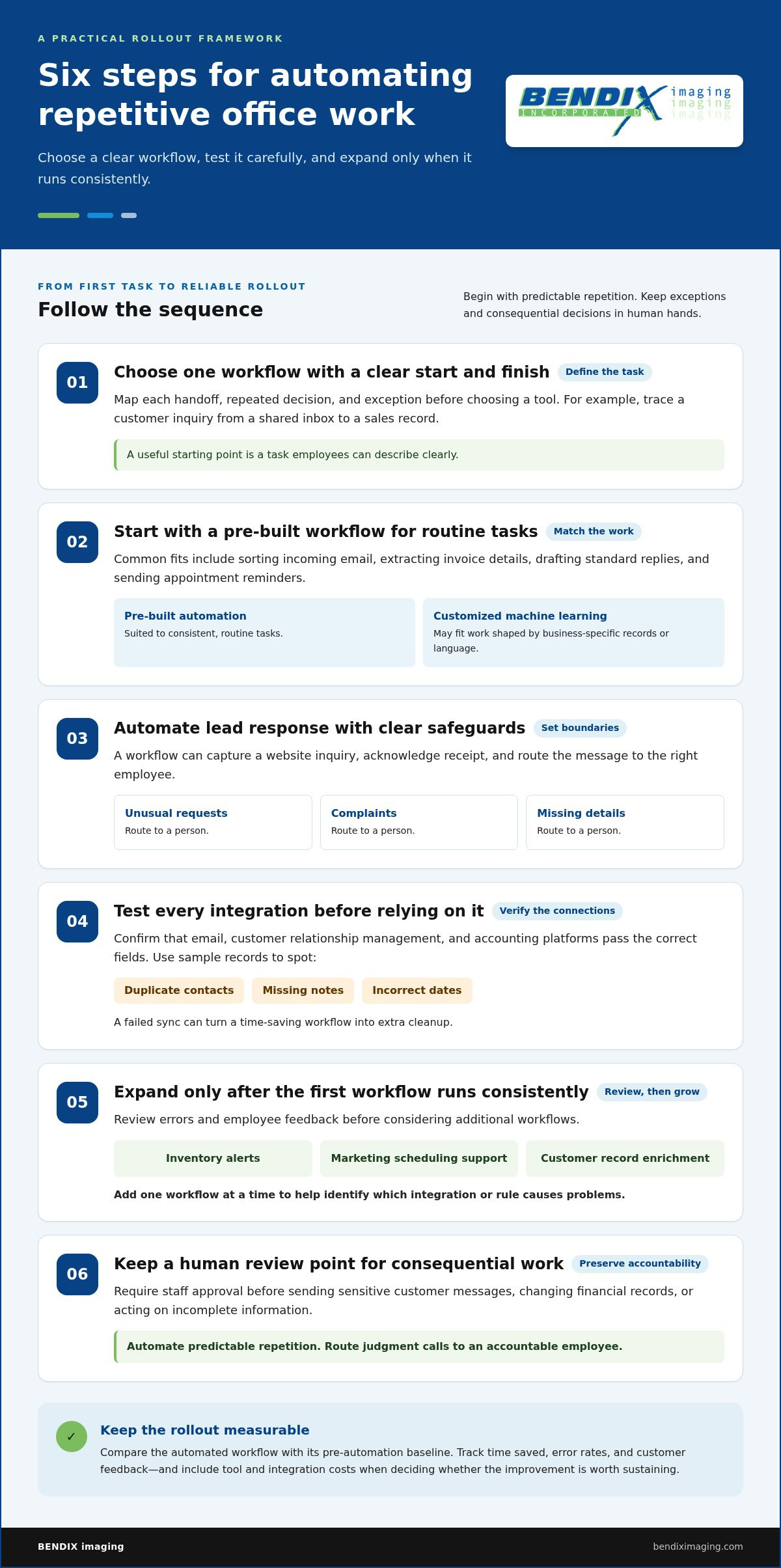
AI automation earns its place when it improves a measurable business outcome. To assess AI implementation for local companies, compare each workflow’s results with its pre-automation baseline. Track time saved, error rates, and customer feedback, and include tool and integration costs when deciding whether the improvement is worth sustaining.
It’s easy to focus on how quickly a tool completes a task. But speed alone doesn’t show whether the result is accurate, useful to customers, or reducing work for your team. Measure the overall impact, not just the automation.
This guide explains how to choose a repetitive office task with clear value, set practical measures before a pilot, and review the results before expanding. You’ll also learn what to monitor as integrations and dependencies grow, and when professional support can help you scale adoption with stronger oversight.
Key Takeaways
- Compare an automated workflow with its baseline by tracking time saved, error rates, and customer feedback.
- Start with one repetitive task that has a clear business outcome, then pilot it before expanding automation.
- Review integration accuracy, data handling, and ongoing costs as workflows grow more complex.
- Train employees on how AI supports their work, and consider professional support when multiple systems or dependencies need coordination.
How can businesses measure AI automation effectiveness?
- Set a baseline before launch. Record staff time, correction rates, and customer feedback for the current process. After launch, compare the same measures. For example, track how often an email assistant needs a human rewrite, not just how quickly it drafts. A measured approach to AI implementation for local companies ties results to a real business outcome.
- Match the tool to the industry task. Scheduling platforms can handle appointment reminders, platforms like AutoSEO automate search optimization, and document tools can extract invoice details. The best AI tools for local businesses depend on the work and the information available. Compare off-the-shelf applications with customized AI trained on business data when standard platforms miss essential context.
- Pilot a customer-facing workflow. Practical use cases include lead replies, appointment confirmations, and invoice reminders. The U.S. Environmental Protection Agency describes pilots as a way to test on a small scale, gather evidence, and adjust before wider implementation. Review completed tasks and customer responses before expanding.
- Protect information and customer trust. U.S. privacy, data security, and AI requirements depend on the information handled, industry, and customer locations. Map data flows, limit access, and keep confidential records out of unapproved tools. Voice encoding should preserve approved pronunciation and tone, not imitate someone without permission. Keep human review for sensitive conversations.
- Train employees to review and escalate. Teach staff to check AI-generated email for accuracy, tone, and customer context. Use sample messages, explain when human judgment is needed, and document corrections. The tool should support communication while employees remain accountable for customer relationships.
- Assess funding and readiness before committing. Grants, tax credits, and other U.S. funding can depend on location, business activity, and eligible expenses. Document the project purpose and costs, then review relevant programs with a qualified tax professional. For AI implementation for local companies, a readiness check should also identify who owns the workflow and its data.
AI for automating repetitive office tasks
- Choose one workflow with a clear trigger and finish. Map each handoff, repeated decision, and exception before selecting a tool. For example, document how a customer inquiry moves from a shared inbox to a sales record. This framework reveals where automation fits. A practical roadmap for AI implementation for local companies begins with a task employees can describe clearly.
- Start with a pre-built workflow for routine tasks. Common options include sorting incoming email, extracting invoice details, drafting standard replies, and sending appointment reminders. Pre-built automation suits consistent tasks, while customized machine learning may better fit work that depends on business-specific records or language.
- Automate lead response with clear safeguards. A workflow can capture a website inquiry, acknowledge receipt, and route the message to the right employee. Set boundaries for unusual requests, complaints, or missing details. Route those messages to a person instead of sending an inaccurate automated answer.
- Test every integration before relying on it. Confirm that email, customer relationship management, and accounting platforms pass the correct fields. Use sample records to catch duplicate contacts, missing notes, or incorrect dates. A failed sync can turn a time-saving workflow into extra cleanup.
- Expand only after the first workflow runs consistently. Review errors and employee feedback, then consider inventory alerts, marketing scheduling support, or customer record enrichment. Add one workflow at a time so you can identify which integration or rule causes problems.
- Keep a human review point for consequential work. Require staff approval before sending sensitive customer messages, changing financial records, or acting on incomplete information. For AI implementation for local companies, automate predictable repetition and route judgment calls to an accountable employee.
Map the task, test the connections, and expand in controlled stages. For help planning a secure rollout, explore AI implementation guidance.
When should professional support be considered for AI scaling?
Seek implementation support when workflows require multiple integrations, complex reporting, or growing dependencies. Local companies can find nearby AI consultants through local business searches and technology networks, then assess whether their expertise matches the deployment and support needs.
- Map the point where internal capacity runs short. If one or two employees manage the entire IT environment, adding AI can stretch their ability to oversee access, integrations, and troubleshooting. List operational responsibilities before expanding the rollout.
- Bring in support when systems must work together. Accounting, email, customer records, and AI tools can create fragile connections. A specialist can map data processing, test how records move, and identify failures before they disrupt routine work.
- Set clear service-level expectations. Document support scope, response procedures, escalation paths, maintenance responsibilities, and reporting. An agreement should explain how deployment issues are handled and which tasks remain with your staff.
- Use employee training as part of rollout. Ask for role-specific guidance, such as how office staff review generated messages or report incorrect outputs. Training should explain approved uses, human review points, and how employees can raise operational concerns.
- Evaluate design mockups before production use. AI-supported design mockups can help a team compare layouts or draft concepts. Treat each output as a reviewable draft, confirm brand details and accessibility, and require an accountable person to approve the final design.
- Check support quality through practical evidence. Review a proposed implementation plan for test steps, integration ownership, security controls, and staff handover. Clear deliverables make it easier to assess progress without relying on broad claims about AI capability.
- Scale only when ongoing oversight is defined. Managed IT support providers such as Carolina IT Group can help lean teams address governance policies and security checks as workflows grow. Assign an owner for permissions, updates, incident escalation, and periodic performance reviews before expanding deployment.
AI adoption support and contracting
- Define the business outcome before selecting an AI tool. Write down the task, intended result, and measure of success. For example, a support team might aim to draft consistent replies while employees retain approval. Clear outcomes keep adoption tied to business needs, not novelty.
- Set the project boundary in writing. Document which workflows are included, which systems connect, and who approves changes. A contract for an email assistant should clarify whether setup covers shared inboxes, customer records, or both. Define exclusions to prevent scope confusion.
- Identify data and access responsibilities. Specify what information the tool can process, where it moves, and who may access it. For a customer service workflow, record how sensitive messages are handled and how access is removed when staff roles change.
- Clarify model and architecture decisions. Ask for a plain-language explanation of whether the project uses an off-the-shelf model or customized configuration. Document key integrations, required resources, data dependencies, and how updates are managed. These details support reliable maintenance after deployment.
- Make employee training part of the agreement. Name the roles receiving instruction and the tasks they’ll practice. A useful session can show staff how to review generated drafts, correct errors, and escalate unusual requests. Explain that the tool is intended to assist their work, not replace them.
- Agree on acceptance criteria and handover. Define the test cases that must work before launch, such as accurate field transfer between a customer record and an email workflow. Require documentation of settings, user permissions, known limits, and support ownership.
- Plan a measured rollout. Start with one workflow, review results, then decide whether to extend adoption. Include a review schedule and named owners for performance, access, and integration changes. To discuss a practical adoption plan, connect about AI implementation support.
BENDIX imaging: Artificial Intelligence (AI) Consulting
BENDIX imaging offers Artificial Intelligence (AI) Consulting for businesses assessing where automation fits and how to scale adoption. Turn to its guidance when a promising pilot must connect with existing systems, when several workflows depend on accurate data, or when your team needs a practical path from testing to broader use.
AI adoption also calls for careful attention to the systems and information involved. BENDIX imaging offers Cyber Security and Network Security to address security considerations alongside technology decisions, while Managed IT Services can support broader IT needs. These services are relevant when AI workflows interact with business systems or handle sensitive information. Start with your intended business outcome, the task you want to improve, and the operational concerns that need attention.
To discuss your AI adoption needs, contact BENDIX imaging or visit bendiximaging.com.
Make your next AI decision deliberate
The next step is not adding another tool. It’s deciding who owns the outcome, how employees will use the workflow, and what needs protection as adoption grows. This discipline keeps AI implementation for local companies connected to real business priorities rather than turning it into a collection of disconnected experiments.
Bring your intended use case, the systems it touches, and your team’s concerns into the planning conversation. BENDIX imaging offers Artificial Intelligence (AI) Consulting, Cyber Security, and Managed IT Services to support businesses evaluating AI adoption and its wider IT considerations. Start with a clear discussion of the task you want to improve and the risks you need to manage.
Contact BENDIX imaging to discuss your AI plans. Take the next step with a focused plan your team can understand and put to work.
Frequently Asked Questions
How should a local business start with AI automation?
Start with one stable task, a named internal owner, and clear limits on what the tool may do. For example, use AI to sort incoming inquiries by topic while an employee decides how to respond. Define an exception path for unclear or sensitive messages. This gives the team a controlled way to learn before automating decisions that affect customers.
Why is integration stability important before scaling AI?
Stable integrations help keep information accurate as it moves between systems. A duplicate customer record or missed update can lead to conflicting communications and extra manual work. Before expanding, inspect sync logs, test what happens when a connection fails, and reconcile a sample of records across the systems involved. Pause expansion if errors cannot be reliably traced and corrected.
How much does AI implementation cost for a small business in the United States?
AI implementation costs depend on the specific case. Key cost drivers include tool licensing, data preparation, integration complexity, employee training, security controls, and ongoing support. A simple workflow using an existing platform has different requirements from a customized system connected to several business applications. Include continuing operational costs in the estimate, not just initial setup.
How can a small business assess its readiness for AI?
Assess readiness by checking whether a process has a clear owner, usable records, defined access permissions, and a reliable manual fallback. Businesses in Watertown, Brookings, Sioux Falls, Huron, and Montevideo can start by mapping one workflow and identifying who approves its output. If nobody owns the process or its information, address that gap before introducing automation.
What are the steps to implement AI in a local company?
Begin by naming the business outcome and choosing a workflow with an accountable owner. Then classify the information involved, set access rules, and document which outputs need human approval. Configure the tool, test routine and unusual cases, and train the staff who will use it. Record decisions and changes so the business can maintain the process as needs evolve.
How can local businesses measure AI implementation ROI?
Estimate ROI by comparing the value created with the full cost of implementation and operation. Track labor redirected to other work, reduced rework, improved completion rates, and recurring software or support expenses. For example, count the time staff spend correcting AI-assisted records alongside the time saved. Review the same measures over a consistent period, and include customer or service impacts in the assessment.
{"@context":"https://schema.org","@type":"FAQPage","mainEntity":[{"@type":"Question","name":"How should a local business start with AI automation?","acceptedAnswer":{"@type":"Answer","text":"Start with one stable task, a named internal owner, and clear limits on what the tool may do. For example, use AI to sort incoming inquiries by topic while an employee decides how to respond. Define an exception path for unclear or sensitive messages. This gives the team a controlled way to learn before automating decisions that affect customers."}},{"@type":"Question","name":"Why is integration stability important before scaling AI?","acceptedAnswer":{"@type":"Answer","text":"Stable integrations help keep information accurate as it moves between systems. A duplicate customer record or missed update can lead to conflicting communications and extra manual work. Before expanding, inspect sync logs, test what happens when a connection fails, and reconcile a sample of records across the systems involved. Pause expansion if errors cannot be reliably traced and corrected."}},{"@type":"Question","name":"How much does AI implementation cost for a small business in the United States?","acceptedAnswer":{"@type":"Answer","text":"AI implementation costs depend on the specific case. Key cost drivers include tool licensing, data preparation, integration complexity, employee training, security controls, and ongoing support. A simple workflow using an existing platform has different requirements from a customized system connected to several business applications. Include continuing operational costs in the estimate, not just initial setup."}},{"@type":"Question","name":"How can a small business assess its readiness for AI?","acceptedAnswer":{"@type":"Answer","text":"Assess readiness by checking whether a process has a clear owner, usable records, defined access permissions, and a reliable manual fallback. Businesses in Watertown, Brookings, Sioux Falls, Huron, and Montevideo can start by mapping one workflow and identifying who approves its output. If nobody owns the process or its information, address that gap before introducing automation."}},{"@type":"Question","name":"What are the steps to implement AI in a local company?","acceptedAnswer":{"@type":"Answer","text":"Begin by naming the business outcome and choosing a workflow with an accountable owner. Then classify the information involved, set access rules, and document which outputs need human approval. Configure the tool, test routine and unusual cases, and train the staff who will use it. Record decisions and changes so the business can maintain the process as needs evolve."}},{"@type":"Question","name":"How can local businesses measure AI implementation ROI?","acceptedAnswer":{"@type":"Answer","text":"Estimate ROI by comparing the value created with the full cost of implementation and operation. Track labor redirected to other work, reduced rework, improved completion rates, and recurring software or support expenses. For example, count the time staff spend correcting AI-assisted records alongside the time saved. Review the same measures over a consistent period, and include customer or service impacts in the assessment."}}]}


