

Fewer than one in four companies have scaled an agentic system into routine use, so adopting cutting edge business AI tools isn’t about chasing every new feature. It’s about finding practical ways to reduce repetitive work, support better decisions, and keep people responsible for important judgments.
If you’re weighing AI for your business, look beyond the hype. A useful tool should fit your team’s workflow, handle a clearly defined task, and protect business and customer information. Without oversight, AI can produce inaccurate content or miss the context behind a customer’s needs.
This article explains how small and midsize businesses can identify useful AI applications, integrate them into existing workflows, and apply their insights without handing over critical decisions. It also covers privacy, security, and human review, so you can assess potential productivity gains alongside the risks.
Key Takeaways
- Start with a recurring task that consumes staff time, then match an AI capability to that specific workflow.
- Integrate AI around your existing process, defining where outputs enter and where a person reviews them.
- Use AI to surface patterns and support decisions, but keep human judgment in control of consequential choices.
- Assess privacy and security alongside productivity, and consider AI consulting when you need help aligning tools with business needs.
AI adoption for small and midsize businesses
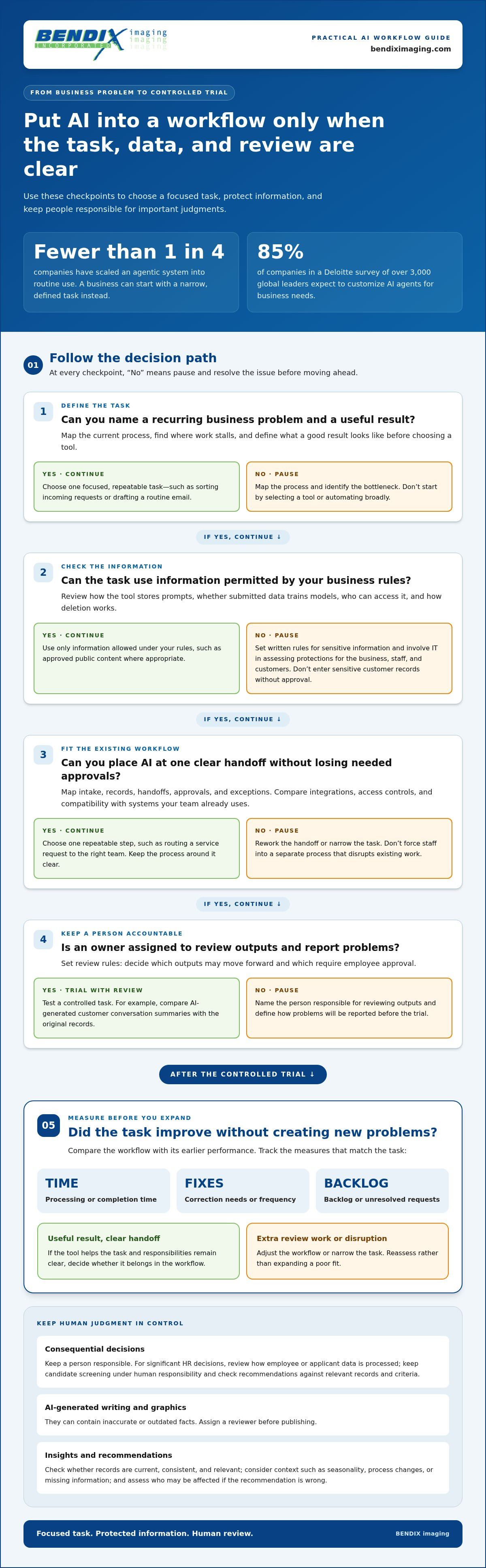
Fewer than one in four companies had scaled an agentic system into routine use. Small and midsize businesses don’t need to launch an autonomous agent across the organization to begin using AI. Start with a defined task, such as sorting incoming requests or drafting a routine email. Keep the scope narrow enough for staff to judge whether the output is useful.
Choose a business problem before choosing a tool. Map the current process, identify where work stalls, and define what a good result looks like. For example, a service team could test AI-generated summaries of customer conversations and compare them with the original records. This makes errors easier to spot and gives employees a clear role in reviewing results.
- Set a boundary: Decide which information employees may enter, such as approved public content rather than sensitive customer records.
- Assign an owner: Name the person responsible for reviewing outputs and reporting problems.
- Measure the task: Track changes in processing time, correction needs, or backlog, then decide whether the tool belongs in the workflow.
What security, privacy, and data-training policies should businesses check before adopting AI tools? Review how each tool stores prompts, whether submitted data is used to train models, who can access it, and how deletion works. Set written rules for sensitive information, and involve IT in assessing protections for the business, staff, and customers.
Use extra care with human resources. When AI supports significant HR decisions, examine how the application processes employee or applicant data, since privacy concerns may arise. Keep a person responsible for decisions such as candidate screening, and review AI recommendations against relevant records and criteria. AI-generated writing and graphics can also contain inaccurate or outdated facts, so assign a reviewer before publishing. A controlled trial helps reveal where AI can assist staff and where human judgment remains essential.
Integrating AI into existing workflows
Deloitte’s survey of over 3,000 global leaders found that 85% of companies expect to customize AI agents for business needs. That points to a practical priority: fit AI around existing workflows, rather than forcing staff into a separate process. Identify the handoffs, records, and approvals that shape a task before deciding where AI belongs.
Which AI platforms help businesses automate workflows and build AI agents? Businesses can explore platforms such as ChatGPT, Gemini, Copilot, and Claude. Automation and agent-building capabilities vary, so compare integrations, access controls, and compatibility with the systems your team already uses.
Consider an invoice workflow. AI might extract key details from an incoming document and pass them to an employee for review before they are entered into an accounting record. This handoff preserves a human checkpoint and helps catch errors before they affect later work.
- Map the process: Record how a request moves from intake to completion, including approvals and exceptions.
- Choose one handoff: Select a repeatable step, such as routing a service request to the right team.
- Set review rules: Decide which outputs can move forward and which need employee approval.
Neo Financial illustrates how automation can reshape customer service. The company reduced response times by five times and cut customer inquiries by 50% after integrating automation into its service model. Its service mix also shifted from 80% voice to a 50/50 split between chat and voice. These results show how workflow design can change both response handling and channel use.
Keep measuring the workflow after integration. Compare completion time, correction frequency, and unresolved requests with the process before automation. If AI creates extra review work or disrupts an existing handoff, adjust the workflow or narrow the task. A controlled design keeps responsibilities clear as automation becomes part of daily operations.
Using AI to improve decision-making
AI can help decision-makers spot patterns across records that are difficult to review manually. Cognitive insight AI analyzes data for patterns, including patterns in human behavior. For example, a retailer could examine purchasing records to see which products customers often buy together. Managers can use that signal to shape inventory or promotions, then compare the results with actual sales.
Security teams can also use AI-supported analysis to flag activity patterns for closer review. A change in account behavior, for instance, may warrant a closer look. The system offers a clue, not a complete explanation. Staff need to examine the surrounding context before deciding whether an event signals a real concern or normal business activity.
Build decision support around a clear question. Useful analysis connects a specific business choice with relevant data, such as customer purchases, service requests, or security records. Before acting on an AI-generated insight, consider:
- Data quality: Are the records current, consistent, and relevant to the decision?
- Context: Could seasonality, a process change, or missing information explain the pattern?
- Impact: Who is affected if the recommendation is wrong, and what review is needed?
For a purchasing decision, AI might flag a change in product demand. A manager can compare that finding with recent orders, stock levels, and customer feedback before adjusting plans. Combining machine analysis with operational knowledge makes an insight more useful than considering a recommendation on its own. Keep the source records available so reviewers can trace how the conclusion was reached.
Don’t rely solely on AI for consequential tasks. Human review helps test accuracy and protect business assets and relationships. Assign someone to challenge important recommendations, check the supporting evidence, and record the decision. This keeps AI useful without handing authority to a system that may miss context or reach an incorrect conclusion.
AI tools for business productivity
Productivity gains come from matching AI capabilities to work that consumes staff time. Process automation can handle repetitive tasks, while cognitive engagement tools, often chatbots, can respond to routine customer or employee questions. For example, a chatbot can answer a common request and route a complex issue to a staff member. Businesses evaluating cutting edge business AI tools should focus on where this support fits their daily work.
How do leading business AI tools compare in features and accuracy? ChatGPT, Gemini, Copilot, and Claude differ in integrations, controls, and output style. Accuracy depends on the task and the context provided. Compare them using the same real business prompt, then check each result against a trusted reference and have a person review it. This helps show which cutting edge business AI tools suit a particular task.
What do popular business AI tools cost, including free plans and enterprise pricing? Some tools offer free access, while paid and enterprise plans vary by features, usage limits, administrative controls, and support. For teams managing visual documentation, checking specialized software like PHOTO iD shows how plan tiers scale with inspection volume and organizational features. Compare plan terms with your team’s workload and data-handling needs rather than assuming a free tier is suitable for business use.
Generative AI can produce inaccurate or outdated facts, and generated writing or graphics may lack continuity. Automated customer interactions also can’t resolve every detailed need, and customer information may be exposed without proper security precautions. For example, a chatbot response to a complicated account issue should prompt staff review, not serve as an unsupported final decision.
Build productivity around the task, not the novelty of the tool. A document assistant might draft a meeting summary, while a chatbot handles routine employee questions. In either case, define what information the tool can access, who reviews its output, and when staff take over. Track whether the process reduces manual effort without adding correction work.
- Automate repeatable work: Use process automation for routine steps with clear inputs and outcomes.
- Support common questions: Use cognitive engagement tools for basic queries, with a path to human help.
- Review before relying: Check outputs that affect customers, records, or business decisions.
Want a clearer path from AI tools to practical workflows? Discuss your AI workflow needs.
BENDIX imaging: Artificial Intelligence (AI) Consulting
BENDIX imaging provides Artificial Intelligence (AI) Consulting for businesses assessing how AI could fit into their operations. Turn to this support when you need to connect a tool to a practical business need, consider how it fits existing systems, or weigh security alongside productivity. AI adoption isn’t only a software decision. It also affects the information employees handle and the workflows customers rely on.
Pairing AI planning with Cyber Security, Network Security, or Managed IT Services can help address the technology and protection considerations involved in adoption. Before introducing an AI assistant into a team process, for example, consider what data it may access, how staff will use its outputs, and where human review belongs. A focused assessment can clarify priorities and relevant risks without treating every new tool as the right fit.
Contact BENDIX imaging to discuss your business’s AI needs.
Make Your Next AI Move Deliberate
The next step isn’t adding another tool to your stack. Choose a business priority and decide how technology should support it. Set a clear objective, assign ownership, and keep a person accountable for decisions that affect customers or employees. This gives your team a practical basis for evaluating cutting edge business AI tools as your needs evolve.
When you need help connecting an AI opportunity to your systems and security priorities, BENDIX imaging offers Artificial Intelligence (AI) Consulting, Cyber Security, and Managed IT Services. Bring a specific workflow or concern to the conversation, such as reducing repetitive administrative work or understanding how AI fits your existing technology. Contact BENDIX imaging to discuss a practical next step for your business.
Contact BENDIX imaging today to discuss your AI plans. Take the next step with a clear goal and a practical path forward.
Frequently Asked Questions
What are the leading cutting-edge AI tools for businesses in 2026?
There’s no single tool that leads for every business task. ChatGPT, Gemini, Copilot, and Claude are examples businesses can compare for writing, analysis, and everyday assistance. Evaluate how each handles your actual tasks, connects with existing systems, and manages access to company information. The right fit depends on your workflow and safeguards, not a general ranking.
Which AI tools are best for business productivity, research, and content creation?
The best choice depends on the work. For productivity, consider tools that summarize documents or help process routine requests. For research and sourcing, dedicated workspaces like Clarami can organize information, though teams should still verify important claims against reliable source material. For content creation, generative tools can draft text or graphics, but a subject-matter reviewer should check facts, tone, and accuracy before publication. Test tools with representative work samples.
What are the top AI tools for sales, marketing, and customer support?
Sales teams can use AI to organize prospect information or draft outreach for review. Marketing teams can use generative AI to brainstorm campaign ideas and prepare content drafts. Customer support teams can use chatbots to answer common questions and route complex requests to staff. In every case, connect the tool to an approved process and review customer-facing output before it goes live.
How can a business evaluate, pilot, and roll out an AI tool effectively?
Start by defining the business task and how you’ll judge a useful result. Compare candidate tools using realistic examples, then pilot the strongest fit with a small group and clear rules for data access and human review. Record errors and workflow friction, refine the process, and train employees before wider use. Teams in Watertown, Brookings, Sioux Falls, Huron, and Montevideo can apply this approach to local business needs.
{"@context":"https://schema.org","@type":"FAQPage","mainEntity":[{"@type":"Question","name":"What are the leading cutting-edge AI tools for businesses in 2026?","acceptedAnswer":{"@type":"Answer","text":"There’s no single tool that leads for every business task. ChatGPT, Gemini, Copilot, and Claude are examples businesses can compare for writing, analysis, and everyday assistance. Evaluate how each handles your actual tasks, connects with existing systems, and manages access to company information. The right fit depends on your workflow and safeguards, not a general ranking."}},{"@type":"Question","name":"Which AI tools are best for business productivity, research, and content creation?","acceptedAnswer":{"@type":"Answer","text":"The best choice depends on the work. For productivity, consider tools that summarize documents or help process routine requests. For research, use systems that organize information, then verify important claims against reliable source material. For content creation, generative tools can draft text or graphics, but a subject-matter reviewer should check facts, tone, and accuracy before publication. Test tools with representative work samples."}},{"@type":"Question","name":"What are the top AI tools for sales, marketing, and customer support?","acceptedAnswer":{"@type":"Answer","text":"Sales teams can use AI to organize prospect information or draft outreach for review. Marketing teams can use generative AI to brainstorm campaign ideas and prepare content drafts. Customer support teams can use chatbots to answer common questions and route complex requests to staff. In every case, connect the tool to an approved process and review customer-facing output before it goes live."}},{"@type":"Question","name":"How can a business evaluate, pilot, and roll out an AI tool effectively?","acceptedAnswer":{"@type":"Answer","text":"Start by defining the business task and how you’ll judge a useful result. Compare candidate tools using realistic examples, then pilot the strongest fit with a small group and clear rules for data access and human review. Record errors and workflow friction, refine the process, and train employees before wider use. Teams in Watertown, Brookings, Sioux Falls, Huron, and Montevideo can apply this approach to local business needs."}}]}


