

A provider switch is won or lost in the handover, not the cancellation notice. An MSP transition is the planned transfer of system access, documentation, security responsibilities, and user support from one managed IT provider to another. A checklist for switching away from large national IT providers should cover contract notice terms, transition records, downtime planning, and clear responsibilities while support overlaps.
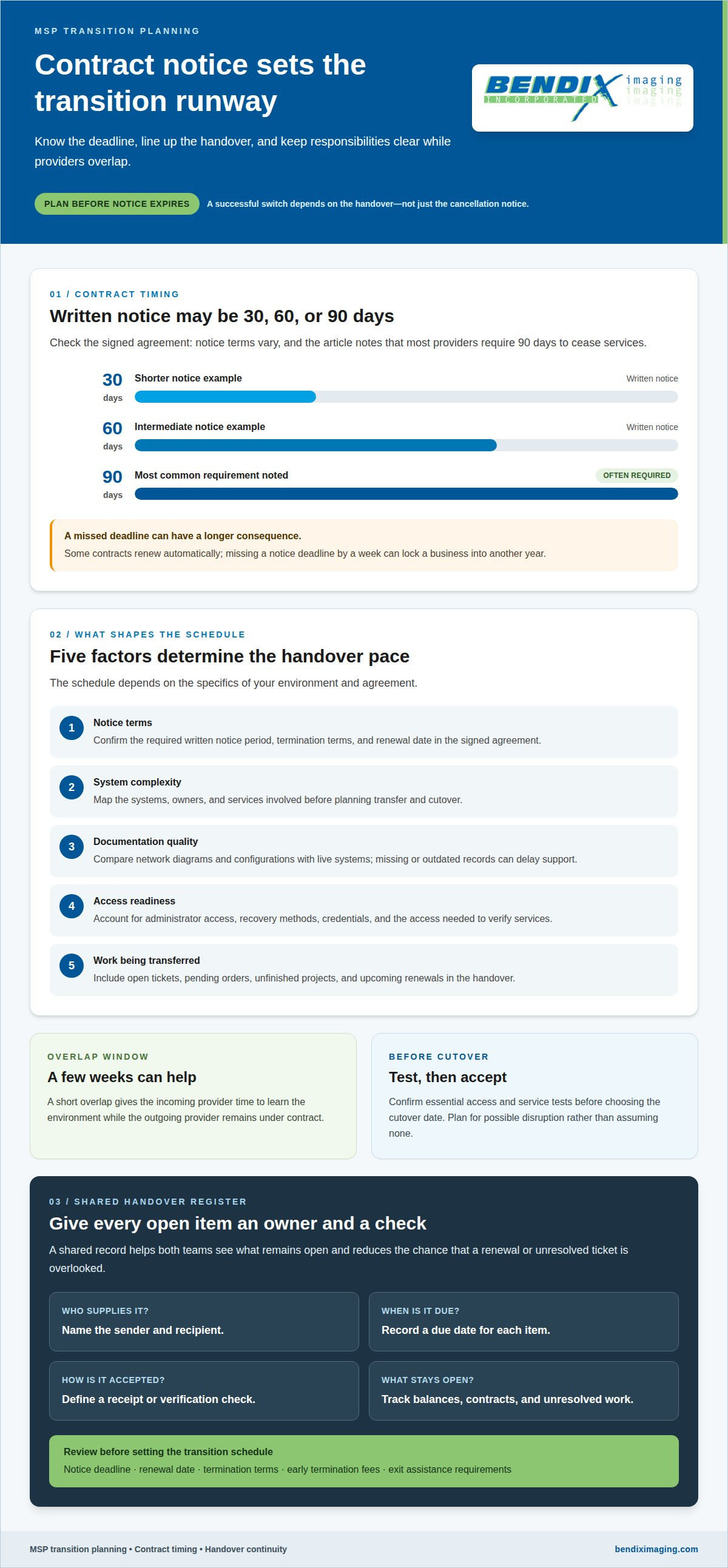
It’s reasonable to want a cleaner, more accountable support experience without putting day-to-day operations at risk. Managed IT contracts may require 30, 60, or 90 days of written notice, and a short overlap of a few weeks can give the incoming provider time to learn your environment while the outgoing provider remains under contract. The transition schedule depends on notice terms, system complexity, documentation, access, and the work being transferred. This guide walks through what to review, how to plan the handover, and how to coordinate both providers so your team knows who handles what.
Key Takeaways
- Review network diagrams, configurations, open tickets, and pending work so the incoming team can see what needs attention.
- Plan a controlled transfer of domain, cloud, network, backup, and business software access, with acceptance checks before cutover.
- Protect continuity by confirming administrator accounts, recovery methods, multifactor authentication, and backup restore capability.
- Set clear overlap rules for ticket routing, user support, and ownership of unresolved issues so nothing falls between providers.
How a new provider reviews network documentation, ticket reports, and backup evidence
A disciplined handover starts with evidence, not assumptions. The incoming team reviews available network diagrams, firewall configurations, network settings, and remote-access details. These records show how systems connect and where missing information could delay support. A checklist for switching away from large national IT providers should also track who supplies each record, its due date, and how receipt will be verified.
- Match network records to live systems. Compare diagrams and firewall configurations with current settings to spot gaps, outdated entries, or undocumented connections.
- Review ticket history and open work. Record recurring problems, unresolved tickets, pending orders, unfinished projects, and upcoming renewals so nothing disappears during the handover.
- Test backup evidence with a restore. Restore selected files to confirm they can be recovered; a green dashboard checkmark alone does not prove recovery works.
- Document onboarding findings. Capture access gaps, monitoring coverage, known risks, and immediate priorities in a written transition record for follow-up.
- Review cyber insurance details. Include the policy information and relevant security requirements in onboarding findings, then map them against current controls and responsibilities.
- Confirm contract dates and balances. List notice deadlines, renewal dates, termination terms, outstanding balances, and any exit-assistance requirements before setting the transition schedule.
Contract timing can shape the entire move. Managed IT agreements may require 30, 60, or 90 days of written notice; the checklist notes that most providers require 90 days to cease services. Some contracts renew automatically, and missing a notice deadline by a week can lock a business into another year. Confirm the termination notice period, renewal date, early termination fees, and required exit assistance in the signed agreement.
Close the review with a shared handover register. For each item, name the sender, recipient, due date, and acceptance check. Include provider contracts and outstanding balances, plus phone-service terms when numbers or services are changing. This gives both teams a clear record of what remains open and helps prevent a renewal or unresolved ticket from being overlooked during cutover.
Can a provider switch be completed without downtime?
A transition can limit interruption, but teams should plan for possible disruption rather than assume there will be none. In the United States, plan around applicable privacy, breach-notification, and compliance obligations by documenting the data being handled, authorized access, incident contacts, and retention or return instructions. The transition plan should preserve existing responsibilities, not assume they transfer automatically.
The new provider coordinates the transfer in stages: confirm the signed agreement and notice schedule, map systems and owners, arrange access, test critical services, then agree on cutover and acceptance checks. The checklist should include domain and cloud ownership, network configurations, business software, backups, secure credentials, user support, responsibilities, and rollback arrangements. The schedule depends on notice terms, system complexity, documentation quality, access, and transferred work.
- Track each system and transfer owner. Record who supplies and receives domain, cloud, network, backup, and business software access, with a due date and verification method.
- Transfer credentials securely. Keep top-level access under the organization’s control, and never send credentials in ordinary spreadsheets or email.
- Document configurations and recovery. Include network diagrams, settings, administrator accounts, backup access, and recovery methods in the handover register.
- Schedule an overlap. A few weeks can let the incoming team learn the environment while the existing provider remains under contract.
- Set cutover acceptance checks. Confirm essential access and service tests before choosing the cutover date, then plan for possible disruption.
Domain, cloud, and hosted-service records should identify the owners, administrators, and billing arrangements. For phone service, don’t terminate the existing service before initiating service with the new provider. A simple U.S. phone-number port must be processed within one business day under FCC rules, but wireline-to-wireless transfers may take a few days. A wireline number can generally be kept when changing providers within the same geographic area.
Schedule progress updates, including during the final few weeks, and hold a couple of planning meetings before cutover. CISA’s managed-service-provider security guidance can inform the transition’s security review. A managed IT transition plan can bring these access, security, and continuity checks together through managed IT planning.
What if the current provider does not cooperate?
If records arrive late, the transition team should protect business access first. The incoming provider documents delayed items, their owners, and the next action in a handover register. It should use organization-controlled administrator accounts and recovery methods, rather than relying solely on credentials held by the outgoing provider. This creates a clear record of what remains inaccessible.
Request an inventory of computers, servers, network equipment, and managed endpoints, alongside software licenses and administrative accounts. Include Microsoft 365, accounting applications, backups, and critical servers where relevant. The inventory helps identify gaps in asset coverage and shows which systems need access or recovery work before the outgoing provider disconnects.
- Confirm administrator access and recovery methods. Check account ownership, recovery options, and multifactor authentication so authorized staff retain control.
- Validate monitoring and ticket routing. Test that alerts reach the new team and support requests enter the correct queue, so unresolved issues don’t go unseen.
- Review backup coverage and restore readiness. Confirm which systems are protected, then test a restore to establish that recoverable data is available.
- Check device records and patch status. Compare the inventory with managed devices and document gaps that could affect monitoring or security.
- Change administrator passwords during cutover. Schedule changes after hours to help staff continue normal work while access is secured.
- Remove unnecessary former-provider access. Revoke accounts and remote-access permissions that are no longer required, while retaining the new team’s verified access.
If cooperation stalls, the incoming provider can help recover access through organization-owned accounts, established recovery methods, and documented administrative ownership. It should not bypass controls or assume an account belongs to the business without evidence. When a service is controlled through the organization’s own domain or billing account, the team can use those records to establish authorized access and coordinate recovery.
After handover, verify administrative access, device inventory, patch status, backup coverage, monitoring, and unresolved tickets. Record each result and any remaining dependency. This final review gives the business a practical view of what is working, what needs attention, and which former-provider permissions can be safely removed.
Agreeing provider overlap and user-support responsibilities
An overlap only helps when the agreement identifies who owns each task. The incoming and outgoing providers should map services, users, and escalation routes before the handover begins. Paying for overlapping support doesn’t mean both teams cover every service. Document the division of responsibility, including who handles incidents, routine requests, security alerts, and unfinished work.
- Assign one owner to each service. Name the provider responsible for Microsoft 365, network issues, backups, and business applications, so employees aren’t bounced between teams.
- Choose one employee support channel. Set out where staff submit requests, what information to include, and how tickets reach the assigned team.
- Define escalation and handoff rules. Record who responds when a ticket crosses provider boundaries, who updates the employee, and who keeps the ticket open until resolution.
- Coordinate vendor and carrier contacts. List the contact and account owner for phone carriers, software vendors, domain services, and other hosted systems.
- Keep shared documentation current. Maintain a responsibility matrix with service, owner, support route, access needs, and any handover dependencies.
Set the overlap period around contract terms, system complexity, and readiness for each service. For example, the outgoing team may retain responsibility for an existing network while the incoming team prepares monitoring and support workflows. The written agreement should identify when responsibility changes and which acceptance check marks that handoff. Don’t leave the changeover date implicit.
Compare service agreements by scope, support process, reporting, and the work included or billed separately. Ask what the new provider reports each month and in what format. Compare like with like: a lower headline price may cover a different set of responsibilities, while unclear ownership can leave essential work undone. Document the decision and any service exclusions.
Before launch, share the employee channel and escalation path with staff, then route a sample request to confirm the process. Clear ownership keeps user support from falling between teams. Plan your managed IT transition with a defined support and responsibility agreement.
BENDIX imaging
BENDIX imaging helps businesses bring clearer ownership and security to an IT provider transition. Its Managed IT Services support ongoing technology operations, while Cyber Security and Network Security address protection concerns that should remain visible during a change in support. For organizations assessing how technology fits their plans, Artificial Intelligence (AI) Consulting is also available.
Turn to BENDIX imaging when you need a managed IT partner to discuss your environment, priorities, and support needs. A practical conversation can help clarify which services fit your situation and which responsibilities your team wants covered as support changes. Describe the systems and transition concerns that matter most to your business as a next step.
Contact BENDIX imaging to discuss your IT support needs.
Set the next transition decision in motion
A checklist for switching away from large national IT providers can turn a complex change into a managed business decision. Align leadership, operations, and the incoming support team on what matters most: dependable day-to-day service, clear security priorities, and technology that supports future plans. Keep ownership of those priorities inside the business, so the transition serves operational needs rather than becoming a technical exercise alone.
BENDIX imaging offers Managed IT Services, Cyber Security, and Artificial Intelligence (AI) Consulting. These capabilities can support conversations about ongoing IT operations, protecting business systems, and considering where AI may fit. Bring your transition priorities and questions to that discussion, then decide on a practical path forward. Contact BENDIX imaging today to discuss your next step. A clear plan starts with a direct conversation.
Frequently Asked Questions
How long does it take to switch MSPs?
The transition schedule depends on contract notice terms, system complexity, documentation quality, access, and the work being transferred. A business with well-organized records and clear system ownership can move through planning more smoothly than one with undocumented dependencies. The incoming team should build a schedule around critical services, staff needs, and agreed acceptance checks, then adjust it as transition findings reveal outstanding work.
What Happens If the Old MSP Owns an Account?
First, distinguish an account registered to the business from one controlled under the former provider’s account. The incoming team can map ownership, administrators, billing, and recovery options for services such as a domain, cloud environment, or software platform. Keep records of account identifiers and business ownership, then use established recovery channels and authorized contacts to regain access. Avoid creating a duplicate account before confirming service dependencies.
What Should an MSP Hand Over When You Change IT Providers?
The handover should include the records the new team needs for daily operations, not just a device list. Useful items include network diagrams, firewall and network settings, remote-access details, hardware and endpoint inventories, software license information, backup arrangements, and administrative account ownership. Include open tickets, recurring issues, pending orders, unfinished projects, and renewals so the incoming team can distinguish urgent work from routine follow-up.
How to compare local managed service providers with national IT providers?
Compare the actual service scope and operating model, rather than relying on company size or location alone. For a business in Watertown, Brookings, Sioux Falls, Huron, or Montevideo, examine how the proposed team handles user support, security, reporting, onboarding, and transition coordination. BENDIX imaging provides Managed IT Services for businesses in Eastern South Dakota. Compare defined responsibilities and reporting expectations against your operational priorities.
How to review an IT provider contract, renewal date, termination notice, and early termination fees?
Review the signed agreement and amendments together, then identify the service end date, written notice method, notice deadline, automatic renewal date, termination fees, outstanding balances, and exit-assistance terms. Record the dates in a transition calendar and assign an owner to send notice. Check whether separate agreements cover phone service or other hosted systems, since their renewal and termination terms may differ from managed IT.
How to transfer domains, DNS, email, cloud accounts, software licenses, and administrator access to a new IT provider?
Transfer control in a coordinated sequence: document each service, its business owner, administrator, billing account, and dependencies, then arrange authorized access with the incoming team. Include domain registration and DNS, email, cloud platforms, software licenses, and recovery methods. Store credentials through a secure process rather than ordinary email or spreadsheets. Test essential access and service functions before changing control, so missing permissions surface before they disrupt users.
{"@context":"https://schema.org","@type":"FAQPage","mainEntity":[{"@type":"Question","name":"How long does it take to switch MSPs?","acceptedAnswer":{"@type":"Answer","text":"The transition schedule depends on contract notice terms, system complexity, documentation quality, access, and the work being transferred. A business with well-organized records and clear system ownership can move through planning more smoothly than one with undocumented dependencies. The incoming team should build a schedule around critical services, staff needs, and agreed acceptance checks, then adjust it as transition findings reveal outstanding work."}},{"@type":"Question","name":"What Happens If the Old MSP Owns an Account?","acceptedAnswer":{"@type":"Answer","text":"First, distinguish an account registered to the business from one controlled under the former provider’s account. The incoming team can map ownership, administrators, billing, and recovery options for services such as a domain, cloud environment, or software platform. Keep records of account identifiers and business ownership, then use established recovery channels and authorized contacts to regain access. Avoid creating a duplicate account before confirming service dependencies."}},{"@type":"Question","name":"What Should an MSP Hand Over When You Change IT Providers?","acceptedAnswer":{"@type":"Answer","text":"The handover should include the records the new team needs for daily operations, not just a device list. Useful items include network diagrams, firewall and network settings, remote-access details, hardware and endpoint inventories, software license information, backup arrangements, and administrative account ownership. Include open tickets, recurring issues, pending orders, unfinished projects, and renewals so the incoming team can distinguish urgent work from routine follow-up."}},{"@type":"Question","name":"How to compare local managed service providers with national IT providers?","acceptedAnswer":{"@type":"Answer","text":"Compare the actual service scope and operating model, rather than relying on company size or location alone. For a business in Watertown, Brookings, Sioux Falls, Huron, or Montevideo, examine how the proposed team handles user support, security, reporting, onboarding, and transition coordination. BENDIX imaging provides Managed IT Services for businesses in Eastern South Dakota. Compare defined responsibilities and reporting expectations against your operational priorities."}},{"@type":"Question","name":"How to review an IT provider contract, renewal date, termination notice, and early termination fees?","acceptedAnswer":{"@type":"Answer","text":"Review the signed agreement and amendments together, then identify the service end date, written notice method, notice deadline, automatic renewal date, termination fees, outstanding balances, and exit-assistance terms. Record the dates in a transition calendar and assign an owner to send notice. Check whether separate agreements cover phone service or other hosted systems, since their renewal and termination terms may differ from managed IT."}},{"@type":"Question","name":"How to transfer domains, DNS, email, cloud accounts, software licenses, and administrator access to a new IT provider?","acceptedAnswer":{"@type":"Answer","text":"Transfer control in a coordinated sequence: document each service, its business owner, administrator, billing account, and dependencies, then arrange authorized access with the incoming team. Include domain registration and DNS, email, cloud platforms, software licenses, and recovery methods. Store credentials through a secure process rather than ordinary email or spreadsheets. Test essential access and service functions before changing control, so missing permissions surface before they disrupt users."}}]}


