

Antivirus alone isn’t enough to protect a local business from ransomware. Strong ransomware protection for a local business combines layered defenses with a recovery plan: keep three copies of important data on two types of storage, with one copy offsite or isolated, and limit how far an attack can spread through your network. These steps reduce risk and help you recover; no single tool can prevent every attack.
Security software is important, but ransomware can also exploit stolen login details or spread between connected systems. Effective protection needs to address both how attackers get in and how your business will respond if they do.
This guide explains how backups, managed security, multi-factor authentication, access controls, network segmentation, and recovery planning work together. You’ll find practical steps to strengthen defenses, protect critical systems, and prepare your team to respond if ransomware reaches your business.
Key Takeaways
- Build backups that remain separate from your primary network, then test whether your business can restore from them.
- Use managed security to keep defenses maintained and spot suspicious activity before it spreads.
- Require multi-factor authentication and limit user permissions to reduce the chance that stolen credentials open the door.
- Segment your network and prepare a recovery plan so an incident is easier to contain and operations can resume in a controlled way.
1. Regular data backups and the 3-2-1 strategy
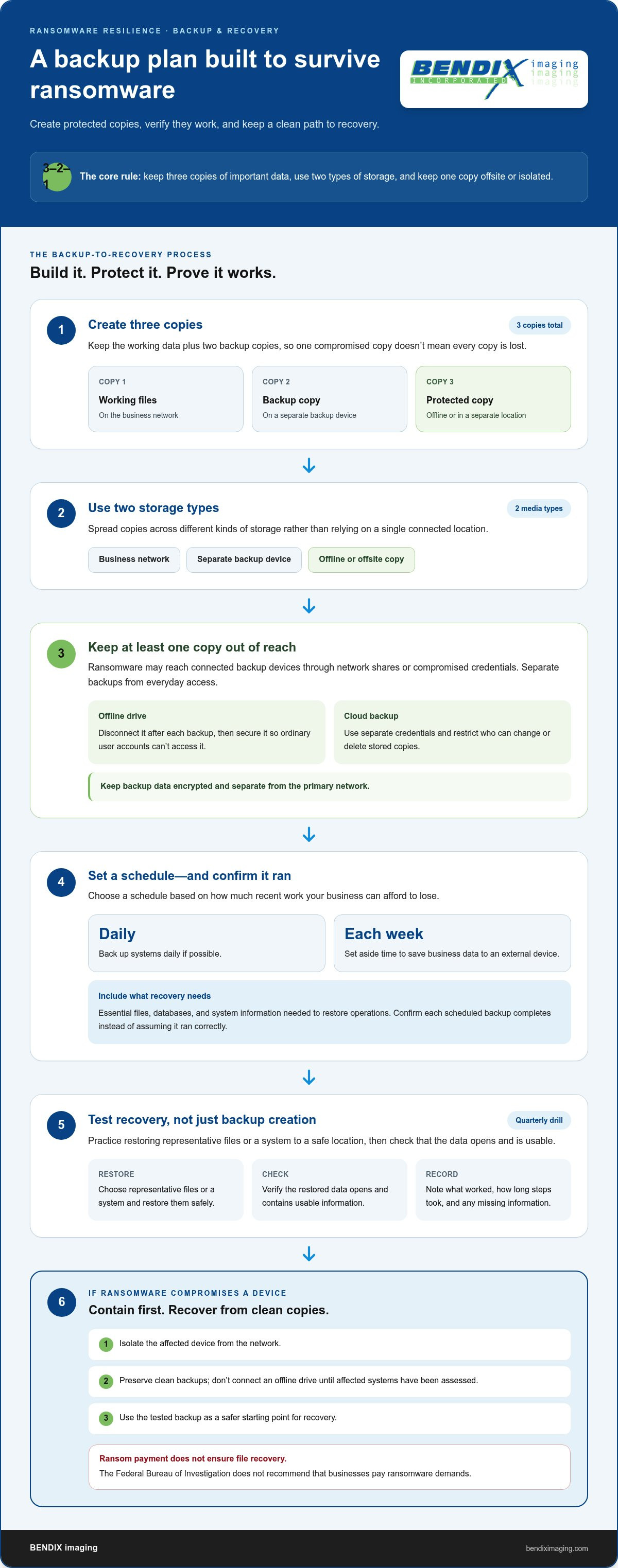
Build your backup plan around the 3-2-1 strategy: keep three copies of important business data, use two different storage media types, and store one copy offsite or air-gapped. For example, retain working files on your business network, copy them to a separate backup device, and keep another copy offline or in a separate location. This approach gives ransomware fewer paths to compromise every copy at once.
Keep backup data encrypted and separate from your primary network. A connected backup device may be exposed if ransomware reaches network shares or uses compromised credentials. Disconnect an offline drive after each backup, then secure it so ordinary user accounts can’t access it. For cloud backups, use separate credentials and restrict who can change or delete stored copies.
Set a backup schedule based on how much recent work your business can afford to lose. If possible, back up systems daily and set aside time each week to save business data to an external device. Include essential files, databases, and system information needed to restore operations. Confirm that each scheduled backup completes instead of assuming the software ran correctly.
Test recovery, not just backup creation. Conduct a restoration drill quarterly: select representative files or a system, restore them to a safe location, and check that they open and contain usable data. Record what worked, how long the steps took, and any missing information. Testing can reveal corrupted copies or access problems before a ransomware incident makes recovery urgent.
If ransomware compromises a device, isolate it from the network and preserve clean backups for recovery. Don’t connect an offline drive until the affected systems have been assessed. Paying a ransom doesn’t ensure files will be restored, and the Federal Bureau of Investigation does not recommend that businesses pay ransomware demands. A tested, isolated backup gives your recovery plan a safer starting point.
2. Managed security services for small businesses
A managed security service can help maintain security tools, apply patches, and monitor alerts, especially when employees lack time to track updates across every device. Organizations seeking flexible and scalable support can turn to providers like SolaaS Limited for tailored IT solutions that reinforce their operational defenses. Define who reviews alerts, who can isolate a device, and how incident response begins. A written process gives staff a clear first step when suspicious activity appears.
No single antivirus or endpoint tool suits every small business. Choose protection that covers the devices and operating systems employees use, updates automatically, and supports regular scans and alert review. Check that its controls can detect suspicious activity and help contain malware, rather than relying on antivirus alone.
Apply patches promptly, prioritizing internet-facing systems and software with known vulnerabilities. Automate routine updates where possible, then test critical business applications after major changes. Keep operating systems, browsers, security tools, and cloud applications current. Outdated software can give criminals an exploitable route into your network.
Cloud services don’t eliminate the need for recovery planning. Review cloud account permissions, secure administrator access, and keep recoverable copies separate from everyday accounts. Include cloud files and essential configurations in recovery exercises so your team knows which clean data to restore after an incident.
How much does ransomware protection cost for a small business? Cost depends on the case and is provided after a quote request; key factors include users, devices, systems covered, and monitoring scope.
What U.S. laws require businesses to report ransomware attacks or data breaches? Reporting duties depend on state breach-notification laws and federal requirements for specific sectors, as they apply to the affected data and business. Include a process for identifying applicable obligations in your incident response plan.
Are there free or government resources to help local businesses prevent ransomware? CISA provides public guidance, including recommendations on application allowlisting, and recommends reporting ransomware incidents. Use its guidance to inform security procedures and staff awareness.
Should a business pay a ransomware ransom, and what are the risks? The Federal Bureau of Investigation does not recommend payment, and paying doesn’t guarantee data recovery. Prepare a response plan that prioritizes containment, investigation, and clean backups.
Which cybersecurity policies and employee training help prevent ransomware? Set rules for software installation, updates, suspicious email reporting, and access to sensitive systems. Use practical exercises to teach employees to recognize threats and report concerns promptly.
Reviewing update practices, cloud access, and incident response together can reveal control gaps. Explore managed security support as part of that review.
3. Multi-factor authentication and access controls
Require multi-factor authentication for email, remote access, and cloud applications. It asks users for another verification factor beyond a password, making stolen credentials less useful to malicious actors. Apply it to administrator accounts first, then extend it to every employee account. Only 20% of small enterprises have adopted multi-factor authentication, so this control can close a common gap.
Limit privileged access to people who need it for specific tasks. Give administrators separate everyday and elevated accounts, using the everyday account for routine email and applications. Audit privileged accounts quarterly, remove access that is no longer needed, and review permissions when an employee changes roles. These steps reduce the reach of an unauthorized login.
Control remote access software before criminals can exploit it. Disable Remote Desktop Protocol (RDP) if your business doesn’t need it. If remote desktop is necessary, block direct internet access and secure connections with strong passwords and a virtual private network (VPN). CISA recommends closing direct RDP access from the internet as a defense against Akira ransomware.
Weak or reused passwords can expose sensitive accounts across multiple services. Use unique passwords for business email, remote access, and administrator accounts; store them in an approved password manager. NIST password guidelines specify a minimum length of eight characters and a maximum of 64 characters. Combine strong passwords with another factor, rather than treating password strength as the only defense.
How can small businesses secure email, remote access, and business networks against ransomware? Require multi-factor authentication for email and remote connections, restrict administrator rights, and disable unnecessary access tools. For example, a staff member checking email shouldn’t also use an administrator account. Apply these controls alongside network security measures, then review account access whenever responsibilities change.
4. Network segmentation and disaster recovery
Network segmentation divides an organization’s systems into separate zones, limiting how ransomware can spread. Separate essential business systems from guest Wi-Fi, employee devices, and internet-facing services. If a phishing email compromises a workstation, segmentation can help keep attackers from reaching shared drives or operational systems. The goal is containment, not a guarantee that every attack stops at the first boundary.
Map which devices and applications need to communicate before setting access rules. For example, a point-of-sale system may need access to payment services, but not employee file shares. Restrict traffic between zones to the connections each task requires. Review the rules when your organization adds devices or changes workflows, so old permissions don’t leave unnecessary paths open.
Pair network boundaries with a disaster recovery plan that names decision-makers and communication channels. Identify the systems that support essential operations, who can authorize isolation, and how employees will receive updates if email is unavailable. Set a recovery sequence based on business priorities, such as restoring order processing before less critical internal tools.
After a ransomware attack, disconnect affected devices from the network and isolate compromised systems. If possible, avoid shutting down affected computers to preserve evidence, and contact cybersecurity professionals. CISA recommends reporting ransomware incidents, so include reporting steps and contact responsibilities in your response plan.
Test the plan through practical exercises. Ask employees to respond to a mock phishing message, report it, and follow the incident response process. Then walk decision-makers through a scenario in which a compromised workstation tries to reach another network zone. Record delays, unclear responsibilities, and access that should be restricted. This helps small businesses identify specific gaps before an actual incident.
Strengthen your network boundaries and recovery planning with network security support tailored to your business systems.
BENDIX imaging: Artificial Intelligence (AI) Consulting
BENDIX imaging helps businesses strengthen ransomware readiness with Cyber Security, Managed IT Services, and Network Security. If your backup, access, or recovery processes need a coordinated review, these services can help address practical gaps across your technology environment.
Artificial Intelligence (AI) Consulting is another option when you’re assessing how AI fits your business operations. Keep security central: review how proposed AI use interacts with sensitive information, user access, and existing systems before adoption. A clear view of these considerations can support more informed technology decisions alongside your ransomware planning.
For a practical next step, identify the systems and recovery processes you want to improve, then contact BENDIX imaging to discuss your needs.
Turn security planning into an ongoing business practice
Ransomware protection for a local business works best when someone owns the next steps, tracks changing risks, and connects security decisions to daily operations. Choose a responsible person to coordinate priorities, document decisions, and bring unresolved gaps to leadership. That ownership helps make protective measures routine business practice, rather than leaving the plan untouched.
BENDIX imaging offers Cyber Security and Managed IT Services to help businesses address security and technology needs. Artificial Intelligence (AI) Consulting can help leaders consider AI as part of broader technology planning. Bring your priorities and concerns to a conversation about practical next steps for your business in Watertown, Brookings, Sioux Falls, Huron, or Montevideo.
Contact BENDIX imaging today to discuss your business’s security needs. A clear next step can help you move forward with confidence.
Frequently Asked Questions
Can antivirus alone stop ransomware?
No. Antivirus can help detect known malware, but it can’t address every route attackers use, such as stolen credentials or malicious activity through legitimate tools. Treat it as one layer, not your entire defense. If an employee’s account is compromised, for example, access restrictions and suspicious-login detection can help limit what the attacker can reach.
How can advanced threat detection techniques benefit small enterprises?
Advanced threat detection can flag suspicious behavior even when a file doesn’t match a known malware signature. For example, a tool may alert you when an employee account suddenly accesses unusual folders or a device rapidly changes many files. Working with managed detection specialists such as CyberOne provides the visibility needed to investigate earlier, restrict affected accounts, and contain a potential incident before it disrupts more operations.
What ransomware protection measures should small local businesses use?
Use layered controls that fit your systems and daily workflows: protect email accounts, limit software installation, keep devices updated, and teach staff how to report suspicious messages. Assign an incident lead and give employees a clear reporting path. For practical ransomware protection for a local business, make sure staff know who can authorize isolating a device and how to communicate if business email is unavailable.
How should small businesses back up data to recover from ransomware?
Plan recovery around business priorities, not just file storage. Identify which systems depend on one another, such as customer records and the application used to read them, then document a safe restoration order. During a recovery exercise, restore into a clean environment and verify that important files and workflows function before reconnecting systems. This can reveal dependencies that a file-only test misses.
{"@context":"https://schema.org","@type":"FAQPage","mainEntity":[{"@type":"Question","name":"Can antivirus alone stop ransomware?","acceptedAnswer":{"@type":"Answer","text":"No. Antivirus can help detect known malware, but it can’t address every route attackers use, such as stolen credentials or malicious activity through legitimate tools. Treat it as one layer, not your entire defense. If an employee’s account is compromised, for example, access restrictions and suspicious-login detection can help limit what the attacker can reach."}},{"@type":"Question","name":"How can advanced threat detection techniques benefit small enterprises?","acceptedAnswer":{"@type":"Answer","text":"Advanced threat detection can flag suspicious behavior even when a file doesn’t match a known malware signature. For example, a tool may alert you when an employee account suddenly accesses unusual folders or a device rapidly changes many files. That visibility can help a business investigate earlier, restrict affected accounts, and contain a potential incident before it disrupts more operations."}},{"@type":"Question","name":"What ransomware protection measures should small local businesses use?","acceptedAnswer":{"@type":"Answer","text":"Use layered controls that fit your systems and daily workflows: protect email accounts, limit software installation, keep devices updated, and teach staff how to report suspicious messages. Assign an incident lead and give employees a clear reporting path. For practical ransomware protection for a local business, make sure staff know who can authorize isolating a device and how to communicate if business email is unavailable."}},{"@type":"Question","name":"How should small businesses back up data to recover from ransomware?","acceptedAnswer":{"@type":"Answer","text":"Plan recovery around business priorities, not just file storage. Identify which systems depend on one another, such as customer records and the application used to read them, then document a safe restoration order. During a recovery exercise, restore into a clean environment and verify that important files and workflows function before reconnecting systems. This can reveal dependencies that a file-only test misses."}}]}


