

A single antivirus program can’t stop every attack. Effective cyber attack protection for SMBs combines tested backups, antivirus, firewalls, secure email, clear security policies, and staff training. Together, these safeguards make it harder for attackers to get in and help your business recover if an incident disrupts systems or data.
It’s reasonable to worry that hackers could take control of business computers, email, or connected equipment. The practical response is to reduce entry points, limit access to sensitive data, and prepare for recovery rather than rely on one tool to do everything.
This guide explains how backups, antivirus, and firewalls work together, how policies and phishing prevention can reduce risk, and when managed cybersecurity services can help coordinate protection. You’ll see which measures matter and how they support day-to-day business operations.
Key Takeaways
- Use backups alongside antivirus and firewall protection so an attack is less likely to become a lasting business disruption.
- Assess where sensitive data is stored and who can access it to identify practical security gaps.
- Help employees recognize suspicious emails and know how to respond before a phishing attempt escalates.
- Managed cybersecurity services can help coordinate protections when your team needs ongoing support with security and IT systems.
Backups, antivirus, and firewall protection
Combine device and network defenses with separate backups. If ransomware disrupts operations, tested recovery copies can help restore files and regain control.
Antivirus and Firewall Tools
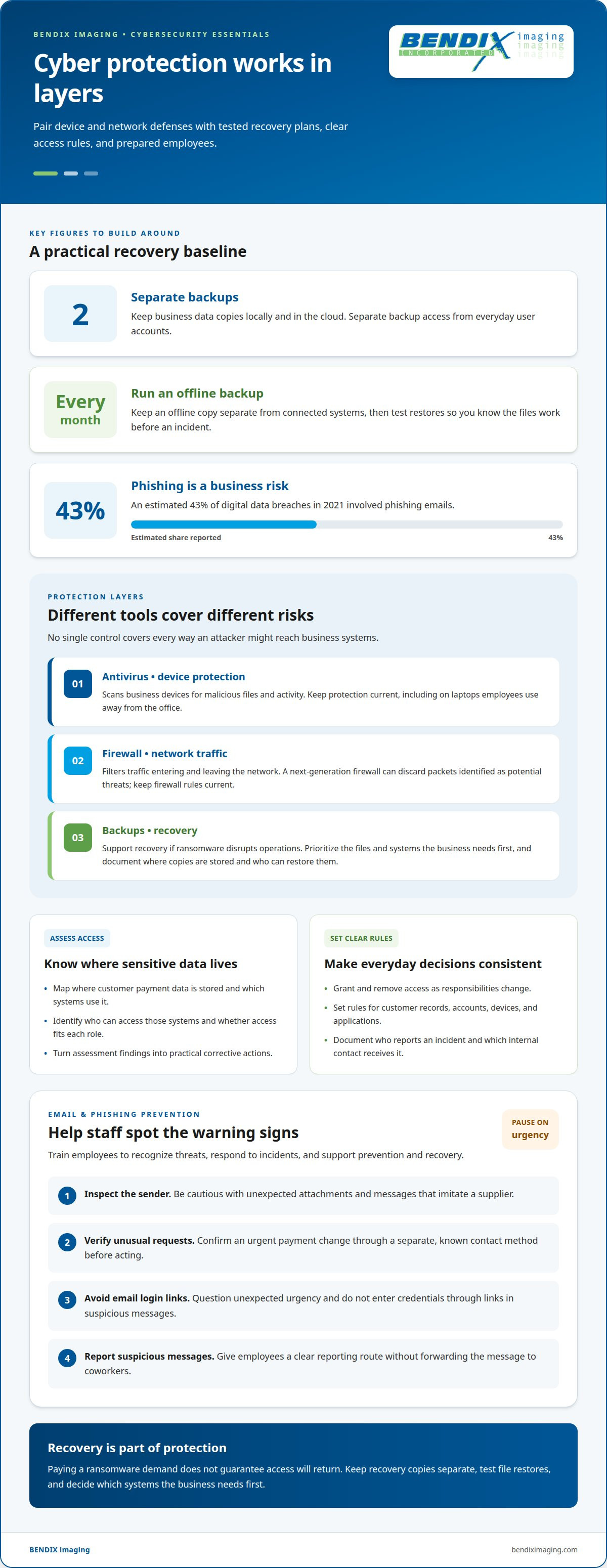
Antivirus scans business devices for malicious files and activity. A firewall filters traffic entering and leaving the network. A next-generation firewall can discard packets identified as potential threats. These tools address different risks, such as an infected laptop and suspicious network traffic. Keep antivirus protection and firewall rules current, and include laptops employees use away from the office. No single control covers every way an attacker might reach business systems.
Comparing Small-Business Security Tools
For small businesses, compare antivirus, next-generation firewall, and backup tools by their features and coverage. Antivirus protects devices, firewalls filter network traffic, and backups support recovery. Prices depend on factors such as the number of devices, storage needs, and included management features; compare those costs against the coverage each tool provides. Look for fit with your actual equipment and recovery needs, not a long list of features that won't protect your systems.
Build backup routines around both location and recoverability. Keep two separate backups of business data, with copies locally and in the cloud, and run an offline backup every month. Test the backups by restoring files so you know they work before an incident. A local copy can support recovery if cloud access is disrupted, while an offline copy helps keep a backup separate from connected systems. Decide which files and systems the business needs first, then organize recovery around those priorities.
Ransomware can block access to systems and data. Paying a demand does not guarantee access will return, so plan for recovery before an attack. Keep backup access separate from everyday user accounts, and document who can restore files and where copies are stored. For example, test whether you can recover a key working file from an offline copy. These checks reveal gaps while normal operations continue, rather than during a crisis.
Cybersecurity policies and risk assessment
Assess people, applications, and work practices alongside technical defenses. Clear policies turn those findings into consistent decisions about access, data handling, and response.
Security Assessments
A security assessment reviews vulnerabilities across employees, applications, and business practices. A gap may lie in a routine, not just in a device. Map where customer payment data is stored, which systems use it, and who can access them. For example, an employee account with more access than the role requires can expose unnecessary information. Assessment findings should identify the risk and a practical corrective action.
Cybersecurity Policies
Cybersecurity policies define how employees use accounts, devices, applications, and sensitive information. They help staff make consistent choices instead of improvising under pressure. Set rules for granting and removing access, handling customer records, and reporting suspicious activity. Limit access to sensitive data and devices to authorized people with the right credentials. Review the rules when systems or employee responsibilities change, so written guidance reflects actual work.
U.S. cybersecurity and data protection requirements depend on a business’s activities and the information it handles. The Sarbanes-Oxley Act concerns financial reporting, HIPAA concerns medical record security, and the Payment Card Industry Data Security Standard applies to businesses accepting major credit cards.
Cyber insurance policies may cover costs associated with cyberattacks, but coverage depends on the policy’s terms and covered events. Premiums also depend on the business and its coverage choices. Compare exclusions, incident-response coverage, and business interruption coverage rather than assuming policies are interchangeable.
- Record which roles need access to customer payment information.
- Remove access when responsibilities change.
- Document who reports an incident and which internal contact receives it.
Use assessment findings to update policy and access decisions, then revisit them as systems and work practices change. For a focused review of gaps in your defenses, explore cybersecurity assessment support.
Email security and phishing prevention
Email can give attackers a path to sensitive business information. Secure email practices and employee training help reduce exposure to deceptive messages and harmful links.
Email Security
Email security combines safeguards and staff practices to reduce risks from malicious messages. Email is a common route for ransomware, and one click can expose a business network. Treat unexpected attachments and login requests cautiously. For example, verify an urgent payment change through a separate, known contact method before acting. Give employees a clear way to report suspicious messages without forwarding them to coworkers.
An estimated 43% of digital data breaches in 2021 involved phishing emails. That figure makes inbox protection a business concern, not just an IT task. Review how staff identify suspicious messages and what happens after someone reports one. A defined reporting route helps the right person respond without employees guessing or deleting evidence.
Phishing Prevention
Phishing uses deceptive messages to trick people into sharing sensitive information, such as usernames, passwords, addresses, or payment details. A convincing message may imitate a supplier and ask an employee to open a link. Train staff to inspect the sender, question unexpected urgency, and avoid entering credentials through email links. These habits matter because a stolen password can expose more than one account.
Employee cybersecurity training should explain how to recognize threats, respond to an incident, and support prevention and recovery. The reported figure that 95% of successful cyberattacks are due to human error underscores why practical guidance matters. Use examples drawn from routine work, such as a delivery notice requesting a password or an executive asking for payment details. Teach employees to pause, verify through a trusted channel, and report the message.
- Report suspicious email through a defined internal route.
- Verify payment or password requests using a separate trusted channel.
- Train employees to recognize deceptive links and unexpected attachments.
Managed cybersecurity services for small businesses
Managed cybersecurity services make security an ongoing process rather than leaving every task to an already busy employee. For a small business, the value is coordinated oversight: identifying gaps, managing security controls, and helping staff understand what needs attention.
Cybersecurity software and managed security costs depend on the case and are given after a quote request. Cost factors include the number of devices, the systems covered, and the level of ongoing management required.
U.S. government cybersecurity resources for small businesses include guidance and assessment materials to help owners identify risks and organize security priorities. Use them to create an initial checklist, then assign responsibility for acting on the findings and keeping procedures current.
Outsourcing can make sense when your team lacks the time or expertise to coordinate security tasks. A study of 800 small and medium-sized businesses found that 77% anticipated outsourcing at least half of their cybersecurity needs. A managed service provider can offer 24×7 support, though the services and coverage depend on the arrangement. A business using a SIEM solution may still need security experts to staff it 24/7, so software alone doesn’t remove the need for skilled oversight.
Set clear expectations for the work. A useful service plan should identify which systems are covered, how security issues are escalated, who owns routine reviews, and how findings are reported. Established providers like ManagePoint often provide detailed security reporting to help leadership track these metrics. For example, a business might have its internal manager approve access changes while a security team monitors and investigates alerts. Defined responsibilities reduce confusion when a warning needs action.
Managed support is most useful when it closes a real capacity gap and fits the business’s systems. It does not replace informed decisions by owners and employees. Leadership still needs to set priorities and make sure staff follow security policies.
Connect your security needs with practical ongoing support by exploring managed cybersecurity services.
BENDIX imaging: Artificial Intelligence (AI) Consulting
BENDIX imaging offers Artificial Intelligence (AI) Consulting for businesses evaluating how AI could fit their operations. Consider security implications before introducing AI tools, especially if staff may use business information in new systems. BENDIX imaging’s Cyber Security and Network Security services can keep risk and existing protections part of that discussion.
Turn to BENDIX imaging when you need to connect technology decisions with practical business priorities, or when security and IT needs overlap. Managed IT Services support broader technology management, while Cyber Security and Network Security address protection needs. Start with your goals, systems, and the data your business handles. BENDIX imaging serves businesses in Watertown, Brookings, Sioux Falls, Huron, and Montevideo.
Contact BENDIX imaging to discuss your business technology needs.
Make security a continuing business priority
Strong cyber attack protection for SMBs isn’t a one-time project. Treat it as an ongoing business priority: revisit your approach when operations, staff, or technology change, and make security ownership clear. This keeps important decisions connected to how your business works instead of relying on procedures that no longer fit.
Choose a practical next step: identify the security concern most likely to disrupt your work, then decide who will lead its review. A focused conversation can turn that concern into a clearer plan. BENDIX imaging offers Artificial Intelligence (AI) Consulting, Cyber Security, and Managed IT Services to support business technology needs. Contact BENDIX imaging to discuss your priorities.
Take the next step at a pace that makes sense for your organization. Contact BENDIX imaging today to discuss your needs and move forward with greater clarity.
Frequently Asked Questions
Data Security: Can Hackers Take Control of Your Products & Equipment?
Yes, attackers can control business equipment if they compromise the accounts or network used to manage it. A connected workstation, printer, or other device can become a route to business information or operations. Include office equipment in network reviews, secure administrator access, and assign permissions by role. Businesses in Watertown, Brookings, Sioux Falls, Huron, and Montevideo should assess connected equipment alongside computers.
What percentage of cyberattacks are against small businesses?
About 43% of all cyberattacks target small businesses. This figure describes the share of attacks aimed at small businesses, not the likelihood that a particular company will be attacked. Individual exposure depends on systems, data, and security practices. Use the statistic as a reason to assess your organization’s risk, not as a prediction that an attack will occur.
Why Are SMBs Most Vulnerable To Cyberattacks?
SMBs can be attractive targets because they hold customer payment information that attackers may exploit or sell. Exposure can also stem from gaps in employee practices, applications, or access controls. For example, an account that retains access after an employee changes roles can expose information unnecessarily. Assess how data is handled and limit access to authorized people with appropriate credentials.
What are the most common cyberattacks targeting small and midsize businesses in the United States?
Phishing, ransomware, credential theft, and distributed denial-of-service attacks are key threats for SMBs. Phishing messages can trick employees into disclosing login or payment details, while ransomware can disrupt access to systems. Stolen or weak passwords can expose accounts. A DDoS attack floods a web server with fake requests. Recognizing these entry points helps businesses tailor defenses instead of relying on one tool.
What cybersecurity protections should an SMB implement first?
Effective cyber attack protection for SMBs starts with securing sign-ins and addressing known software vulnerabilities. Use multi-factor authentication, which requires more than one credential, and install software updates that include security fixes. For remote staff, a VPN encrypts data sent to and from the business network. Prioritize next steps according to which accounts, devices, and information are most important to keep available.
How can an SMB create a cybersecurity plan and incident response checklist?
Make cyber attack protection for SMBs part of a written incident plan with clear responsibilities and decisions. Identify who receives reports, who can disable an affected account or device, and who leads recovery communications. List critical systems and the people responsible for restoring access. Give employees a simple way to report suspicious activity, and review the checklist whenever systems or business processes change.
{"@context":"https://schema.org","@type":"FAQPage","mainEntity":[{"@type":"Question","name":"Data Security: Can Hackers Take Control of Your Products & Equipment?","acceptedAnswer":{"@type":"Answer","text":"Yes, attackers can control business equipment if they compromise the accounts or network used to manage it. A connected workstation, printer, or other device can become a route to business information or operations. Include office equipment in network reviews, secure administrator access, and assign permissions by role. Businesses in Watertown, Brookings, Sioux Falls, Huron, and Montevideo should assess connected equipment alongside computers."}},{"@type":"Question","name":"What percentage of cyberattacks are against small businesses?","acceptedAnswer":{"@type":"Answer","text":"About 43% of all cyberattacks target small businesses. This figure describes the share of attacks aimed at small businesses, not the likelihood that a particular company will be attacked. Individual exposure depends on systems, data, and security practices. Use the statistic as a reason to assess your organization’s risk, not as a prediction that an attack will occur."}},{"@type":"Question","name":"Why Are SMBs Most Vulnerable To Cyberattacks?","acceptedAnswer":{"@type":"Answer","text":"SMBs can be attractive targets because they hold customer payment information that attackers may exploit or sell. Exposure can also stem from gaps in employee practices, applications, or access controls. For example, an account that retains access after an employee changes roles can expose information unnecessarily. Assess how data is handled and limit access to authorized people with appropriate credentials."}},{"@type":"Question","name":"What are the most common cyberattacks targeting small and midsize businesses in the United States?","acceptedAnswer":{"@type":"Answer","text":"Phishing, ransomware, credential theft, and distributed denial-of-service attacks are key threats for SMBs. Phishing messages can trick employees into disclosing login or payment details, while ransomware can disrupt access to systems. Stolen or weak passwords can expose accounts. A DDoS attack floods a web server with fake requests. Recognizing these entry points helps businesses tailor defenses instead of relying on one tool."}},{"@type":"Question","name":"What cybersecurity protections should an SMB implement first?","acceptedAnswer":{"@type":"Answer","text":"Effective cyber attack protection for SMBs starts with securing sign-ins and addressing known software vulnerabilities. Use multi-factor authentication, which requires more than one credential, and install software updates that include security fixes. For remote staff, a VPN encrypts data sent to and from the business network. Prioritize next steps according to which accounts, devices, and information are most important to keep available."}},{"@type":"Question","name":"How can an SMB create a cybersecurity plan and incident response checklist?","acceptedAnswer":{"@type":"Answer","text":"Make cyber attack protection for SMBs part of a written incident plan with clear responsibilities and decisions. Identify who receives reports, who can disable an affected account or device, and who leads recovery communications. List critical systems and the people responsible for restoring access. Give employees a simple way to report suspicious activity, and review the checklist whenever systems or business processes change."}}]}


