

Choosing between managed IT services vs. in-house IT depends on the support, security, and day-to-day control your business needs. Managed services can provide access to broader technical expertise, while an internal team builds direct knowledge of your systems and workflows. A hybrid approach can bring both together.
Cost matters, but the comparison goes beyond salaries and service fees. Coverage gaps, security updates, data backups, and responsibility for resolving problems all affect how well each model supports your operations.
This guide compares managed, in-house, and hybrid IT across those practical decisions, so you can see where each approach fits and what trade-offs to expect. You’ll learn how to assess total costs, understand support availability, and clarify who owns key responsibilities. You’ll also see how a managed service provider can complement internal staff, from routine IT operations to specialized security and backup needs.
Key Takeaways
- Compare the full cost of internal IT, including staffing, tools, training, and coverage, rather than looking at salaries alone.
- Map who owns security updates, backups, and support so critical tasks don’t fall between teams.
- Use a co-managed model to keep business-specific knowledge in-house while adding outside expertise where your team needs it.
- Define the provider’s responsibilities clearly, from monitoring and issue response to reporting and coordination with internal staff.
Comparing IT Managed Services vs In-House IT: Which is Best?
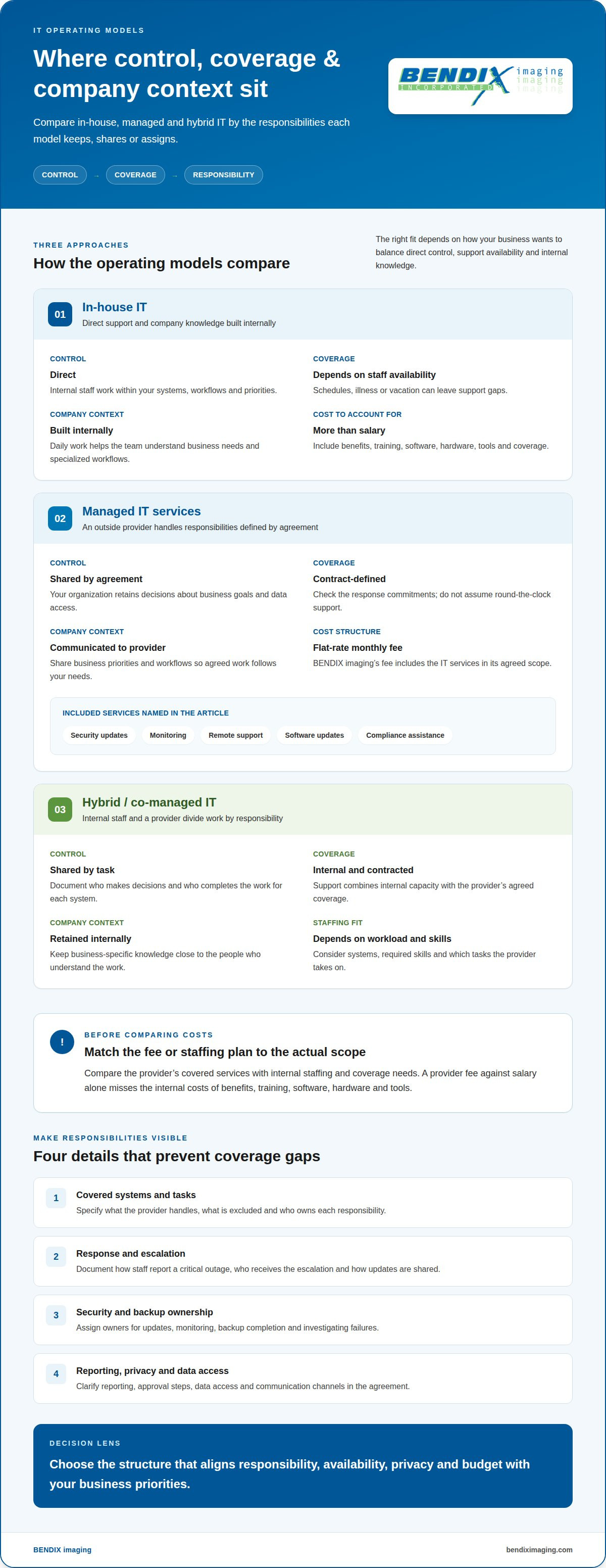
Choose the model that fits your priorities for control, company knowledge, support coverage, and operating costs. The comparison below shows how responsibilities change when IT stays in-house or is assigned to an outside provider.
In-House IT Control and Expertise
An internal IT employee learns your systems, workflows, and priorities through daily work with staff. That knowledge supports direct control and context about business needs, while allowing support to reflect internal processes. Hiring also means managing salaries, training, tools, and coverage when the employee is unavailable. If your workflows are specialized, weigh the value of internal expertise against the resources needed to maintain it.
MSP Control and Communication
A managed service provider handles agreed IT responsibilities, while your organization retains decisions about business goals and data access. Define communication channels, escalation contacts, and approval steps so the work follows your priorities. Review the agreement to understand covered systems, response commitments, exclusions, reporting, data access, and backup responsibilities. Clear terms help protect privacy and prevent confusion about who owns each task.
Response Times and Support Availability
In-house support depends on staff schedules and availability, so illness or vacation can leave a gap. Managed support follows the coverage and response commitments in its agreement; review those terms instead of assuming round-the-clock help. For a critical outage, document how staff report it, who receives the escalation, and how updates are shared. These steps make the practical difference in support coverage clear.
Managed IT and In-House Costs
Compare the full cost of each model, not a provider fee against salary alone. In-house IT involves salaries, benefits, training, software, hardware, and tools. Managed IT Services from BENDIX imaging use a flat-rate monthly fee, which includes IT services such as security updates, monitoring, remote support, software updates, and compliance assistance. Compare the scope of service with your staffing and coverage needs to see what each model includes.
| Option | Control | Coverage | Company context |
|---|---|---|---|
| In-house | Direct | Staff availability | Built internally |
| Managed | Shared by agreement | Contract-defined | Communicated to provider |
| Hybrid | Shared by task | Internal and contracted | Retained internally |
Choose the model that aligns responsibility, availability, privacy, and budget with your business priorities.
Security updates, backups, and high availability
Compare who owns each security task, how incidents reach decision-makers, and how systems are restored. For example, a patch plan should have an assigned owner, a testing step, and a process for urgent updates.
Security updates and monitoring
An internal team can tailor updates to company systems and business schedules, but must also maintain the skills and tools to monitor threats. A managed provider can supply specialized monitoring and patch management when those tasks are included in its scope. Define which systems are covered, who approves disruptive updates, and how exceptions are recorded. For a business application, test a patch before deployment, then document the result and any rollback steps.
Backups and recovery
A backup is useful only if your team can restore the right data and resume work. Set a written backup schedule, identify who monitors completion, and assign responsibility for investigating failures. Test a sample recovery, such as restoring a shared folder, and record how long it takes. Align the recovery process with business priorities, including which files employees need first after an outage.
Compliance and incident response
Make security and compliance responsibilities explicit. Internal leaders understand business priorities and should define sensitive data, approval authority, and escalation contacts. A provider can handle agreed technical work, such as network monitoring or patch deployment, and report incidents through the designated channel. Map each response step: detect, notify, contain, document, and review. This gives both teams clear roles without confusing technical support with business decision-making.
Availability and operational safeguards
High availability depends on how systems are designed, monitored, and restored, not simply on who employs IT staff. Identify critical applications, document dependencies, and decide which work can continue manually during disruption. For example, a team may need access to order records even if its main platform is unavailable. Organizations strengthening recovery planning can explore data backup and recovery support as part of their safeguards.
The Hybrid Approach: Is It the Best of Both Worlds?
A co-managed model pairs an in-house team with an outside provider, dividing IT operations by responsibility. There’s no fixed number of employees a business needs compared with a managed service provider. Staffing depends on internal workload, required skills, business systems, and which tasks the provider takes on.
Divide the Work Around Business Priorities
Keep tasks close to the people who understand the business, and assign specialized work where it fits best. For example, an in-house team can support employees and explain how a sales workflow uses company software. A managed service provider can handle agreed network operations or provide skills the internal team lacks. Document the division for each system, including who makes decisions and who does the work.
Choose a Hybrid Staffing Model
Co-managed IT doesn’t require replacing your in-house team. Define the provider’s role alongside internal responsibilities. Your team might handle routine requests and business-specific systems, while the provider supports infrastructure or security operations. If a network issue affects a business application, both teams should know who leads troubleshooting and who shares updates. This prevents duplicated effort and missed handoffs.
Keep Strategy and Operations Aligned
A hybrid IT strategy works best when operational duties support clear business priorities. Identify sensitive, proprietary, or strategically important processes, then decide which responsibilities should stay in-house. For example, retain internal ownership of a specialized approval process while assigning routine platform maintenance externally. Set regular coordination meetings, share relevant system documentation, and review progress against agreed responsibilities.
Before changing your IT model, list current tasks, assign an owner to each, and identify skills gaps. Pilot the division on a defined workflow, such as network support, then review handoffs, communication, and unresolved work. Adjust the split based on what your team can manage and where outside expertise adds capacity.
Managed service provider roles
A managed service provider takes responsibility for defined technology operations, not every business decision. Its work may include infrastructure monitoring, maintenance, and technical support, helping identify issues before they cause downtime. The agreement should clearly state which systems and tasks are covered.
Turn the service scope into clear ownership
Start with an inventory of systems and assign an owner to each task. For example, a provider might monitor network equipment while an internal manager approves changes that affect business operations. Document who can access systems, who receives alerts, and who communicates with employees during an outage. Clear ownership makes it easier to act and ensures staff know who is leading.
Use the provider’s skills deliberately
An outside team can bring specialized skills that may be difficult to maintain internally across every technology area. That expertise can help with complex infrastructure issues, but the provider needs to understand your environment. Share system diagrams, business priorities, and existing procedures. Arrange knowledge transfer for internal staff so routine decisions don’t depend on a single outside contact.
Build a practical operating rhythm around four responsibilities:
- Monitor: Review system alerts and identify emerging bottlenecks.
- Maintain: Perform agreed routine work and record completed changes.
- Escalate: Route incidents to the right decision-maker promptly.
- Report: Summarize recurring issues, open risks, and recommended actions.
These practices make a provider’s work visible and accountable. For example, a regular review can identify repeated network interruptions and assign follow-up actions. Keep strategic decisions, such as business priorities and acceptable disruption, with internal leadership. The provider can then support those decisions through the technical work defined in the agreement.
Set expectations before work begins: define scope, access, escalation paths, reporting, and how changes are approved. Discuss your managed IT needs to explore how outside support can fit your operations.
BENDIX imaging: Artificial Intelligence (AI) Consulting
BENDIX imaging’s Artificial Intelligence (AI) Consulting helps businesses assess where AI may fit their operations and technology plans. Consider it when your team is weighing automation, exploring AI tools, or deciding whether a proposed use supports business priorities. An assessment can clarify the problem to solve, the information involved, and how a change could fit existing workflows.
AI decisions also involve security and ongoing IT support. Cyber Security and Network Security address protection needs, while Managed IT Services support the broader technology environment. Consider these alongside the systems and safeguards your business relies on.
Contact BENDIX imaging to discuss your business’s AI consulting needs.
Set the next IT priorities with confidence
Turn your comparison into a practical decision by identifying the technology risks and business goals that matter most. The managed IT services vs. in-house IT choice should support your priorities, not create unclear ownership or unnecessary complexity. Start with the issue you need to solve, then decide what expertise or support would help.
BENDIX imaging provides Managed IT Services and Cyber Security for businesses assessing their IT support and protection needs. Artificial Intelligence (AI) Consulting can help your organization consider how AI fits its operations and technology plans. These services are useful starting points if you’re strengthening IT support, addressing security concerns, or evaluating AI.
Contact BENDIX imaging today to discuss your business’s IT priorities. A clear next step can help your team move forward with confidence.
Frequently Asked Questions
In-House IT: When Does It Make Sense?
In-house IT can make sense when technology is central to daily operations and the business needs close, ongoing internal ownership. An organization with 50+ servers may have enough infrastructure to justify dedicated staff. Consider whether internal employees can cover the expertise and workload required, including maintaining company-specific systems and coordinating support across departments.
Managed IT vs In-House IT: Which Approach Best Suits Your Business?
The right fit depends on how much direct involvement your team needs and which IT responsibilities it can sustain. A business with specialized workflows may value employees who understand those processes; a team that needs broader technical capabilities may prefer outside support. List essential systems, internal skills, and operational priorities, then decide who should own each responsibility.
Need Help Evaluating Your IT Options?
BENDIX imaging helps businesses in Watertown, Brookings, Sioux Falls, Huron, and Montevideo assess their IT support needs. Managed IT Services and Cyber Security are relevant when reviewing technology operations or protection. Before discussing your needs, list recurring issues, critical systems, and tasks your staff wants to keep in-house. This gives the conversation a clear business focus.
What Constitutes an In-House IT?
In-house IT means employees within an organization handle technology responsibilities as part of their roles. They may support staff devices, administer business systems, or coordinate technology decisions. For example, an internal IT employee might manage access to shared files and help a new employee get set up. Duties depend on the organization’s systems and staffing.
What Are Managed IT Services and In-House IT Teams?
Managed IT services are technology tasks handled by an outside provider under an agreed service arrangement. An in-house IT team consists of the organization’s own employees performing those tasks internally. For example, a company might assign a provider to manage defined systems while an employee coordinates internal requests. The main difference is who does the work and how responsibilities are assigned.
What Are the Pros and Cons of Managed IT Services vs In-House IT?
Managed IT services can extend a business’s access to technical skills, while in-house teams offer direct familiarity with internal workflows. The trade-off is how each model maintains responsibility and organizational knowledge. For example, an internal employee can explain why a department uses a particular system, while an outside provider handles defined technical tasks. A hybrid arrangement can retain internal context while assigning selected work externally.
{"@context":"https://schema.org","@type":"FAQPage","mainEntity":[{"@type":"Question","name":"In-House IT: When Does It Make Sense?","acceptedAnswer":{"@type":"Answer","text":"In-house IT can make sense when technology is central to daily operations and the business needs close, ongoing internal ownership. An organization with 50+ servers may have enough infrastructure to justify dedicated staff. Consider whether internal employees can cover the expertise and workload required, including maintaining company-specific systems and coordinating support across departments."}},{"@type":"Question","name":"Managed IT vs In-House IT: Which Approach Best Suits Your Business?","acceptedAnswer":{"@type":"Answer","text":"The right fit depends on how much direct involvement your team needs and which IT responsibilities it can sustain. A business with specialized workflows may value employees who understand those processes; a team that needs broader technical capabilities may prefer outside support. List essential systems, internal skills, and operational priorities, then decide who should own each responsibility."}},{"@type":"Question","name":"Need Help Evaluating Your IT Options?","acceptedAnswer":{"@type":"Answer","text":"BENDIX imaging helps businesses in Watertown, Brookings, Sioux Falls, Huron, and Montevideo assess their IT support needs. Managed IT Services and Cyber Security are relevant when reviewing technology operations or protection. Before discussing your needs, list recurring issues, critical systems, and tasks your staff wants to keep in-house. This gives the conversation a clear business focus."}},{"@type":"Question","name":"What Constitutes an In-House IT?","acceptedAnswer":{"@type":"Answer","text":"In-house IT means employees within an organization handle technology responsibilities as part of their roles. They may support staff devices, administer business systems, or coordinate technology decisions. For example, an internal IT employee might manage access to shared files and help a new employee get set up. Duties depend on the organization’s systems and staffing."}},{"@type":"Question","name":"What Are Managed IT Services and In-House IT Teams?","acceptedAnswer":{"@type":"Answer","text":"Managed IT services are technology tasks handled by an outside provider under an agreed service arrangement. An in-house IT team consists of the organization’s own employees performing those tasks internally. For example, a company might assign a provider to manage defined systems while an employee coordinates internal requests. The main difference is who does the work and how responsibilities are assigned."}},{"@type":"Question","name":"What Are the Pros and Cons of Managed IT Services vs In-House IT?","acceptedAnswer":{"@type":"Answer","text":"Managed IT services can extend a business’s access to technical skills, while in-house teams offer direct familiarity with internal workflows. The trade-off is how each model maintains responsibility and organizational knowledge. For example, an internal employee can explain why a department uses a particular system, while an outside provider handles defined technical tasks. A hybrid arrangement can retain internal context while assigning selected work externally."}}]}


