

Legal firm IT compliance starts with protecting client information. The ABA Model Rules require reasonable efforts to safeguard it, but do not prescribe specific technical controls. Law firms must translate that obligation into practical safeguards for the systems, people, and data they rely on, including when using AI tools.
That can be demanding. Confidentiality, cybersecurity risks, and privacy requirements often overlap, and a written policy alone cannot protect files if staff do not know how to follow it or systems are not managed securely. A clear, consistent approach connects technology decisions to the firm’s responsibilities.
This article explains how AI can create privacy risks, which cybersecurity frameworks may guide a firm’s safeguards, and how audits, written policies, and staff training support compliance. It also covers how managed IT and security services can help put these measures into practice, making protection an ongoing part of the firm’s operations.
Key Takeaways
- Assess AI tools before using them with client information, and clarify data handling in written agreements.
- Use managed IT and compliance support to connect security practices with your firm’s operational needs.
- Choose cybersecurity safeguards that fit the data your firm handles and the standards that apply.
- Make policies, audits, and staff training part of an ongoing process, not a one-time exercise.
What Are the Compliance and Privacy Risks of Using AI in a Law Firm?
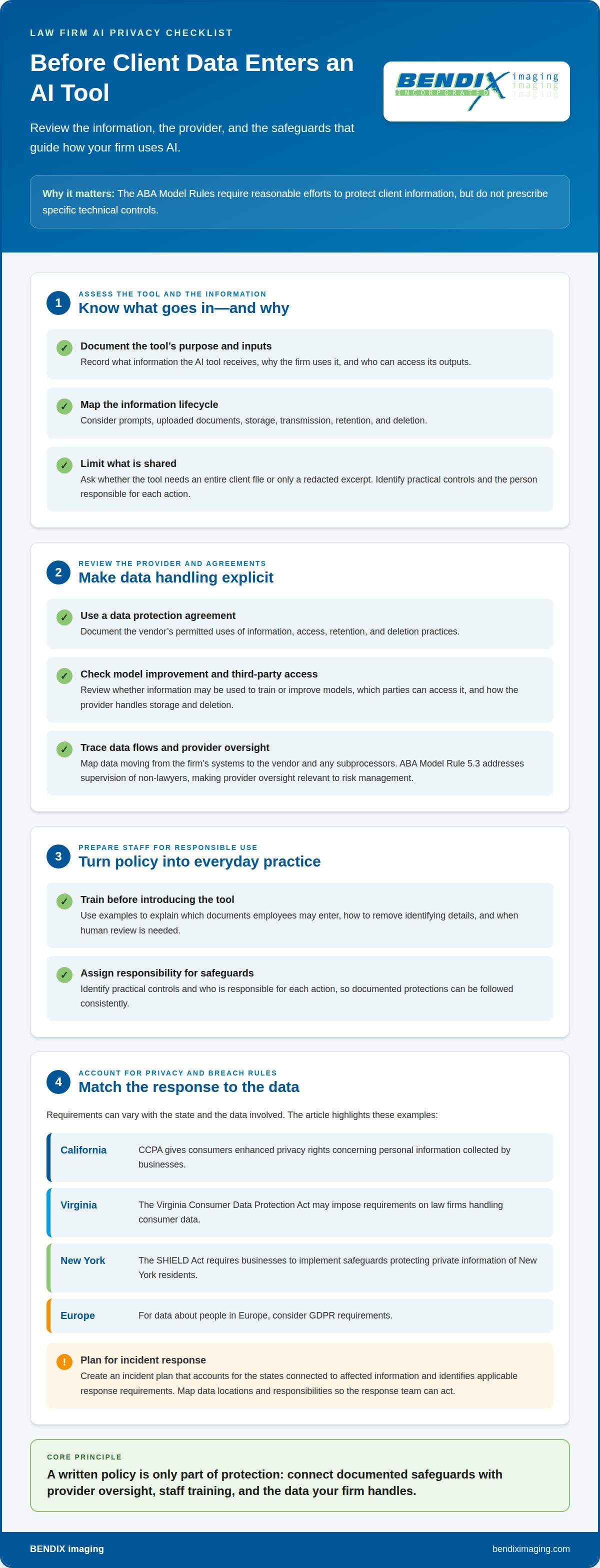
AI tools can expose client information through prompts, uploads, or third-party processing. Requirements vary according to the state and the data involved. A firm’s size also affects the systems, access points, and safeguards it needs to manage.
Privacy Impact Assessments and Data Protection Agreements
Before approving an AI tool, document what information it receives, why the firm uses it, and who can access its outputs. A privacy impact assessment can map risks across prompts, uploaded documents, storage, transmission, retention, and deletion. For example, consider whether the tool needs an entire client file or only a redacted excerpt. Identify practical controls and the person responsible for each action.
Use a data protection agreement to document how the vendor handles information, including permitted uses, access, retention, and deletion. The ABA Model Rules require reasonable efforts to protect client information but do not specify particular controls. Clear, documented safeguards therefore play an important role in protecting confidentiality.
Third-Party Privacy and Data-Sharing Agreements
Review each AI provider’s role before sharing client data. Agreements should address whether information may be used to train or improve models, which parties can access it, and how the provider handles storage and deletion. Map data flows from the firm’s systems to the vendor and any subprocessors. The ABA Model Rules address supervision of non-lawyers in Rule 5.3, making oversight of technology providers a relevant part of risk management.
Include staff training when introducing an AI tool. Use examples to explain which documents employees may enter, how to remove identifying details, and when human review is needed. For data about people in Europe, consider GDPR requirements. These steps connect AI use, third-party agreements, and privacy controls.
State Privacy and Breach Notification Requirements
State laws may apply depending on the data and the residents involved. California’s CCPA gives consumers enhanced privacy rights concerning personal information collected by businesses. The Virginia Consumer Data Protection Act may impose requirements on law firms handling consumer data. New York’s SHIELD Act requires businesses to implement safeguards to protect private information of New York residents.
For breach notification, create an incident plan that accounts for the states connected to affected information and identifies applicable response requirements. The laws described here address different privacy and safeguard concerns, so one statewide checklist may not fit every matter. Firms with international clients should also consider GDPR requirements for European residents. Map data locations and responsibilities so the response team can act.
Outsourced compliance and managed IT services
Outsourcing can connect daily technology operations with a firm’s regulatory responsibilities. A managed IT arrangement may cover user access, device management, backups, network monitoring, and support for documented security processes. Define responsibilities first: firm staff retain ownership of legal decisions, while the provider handles agreed technical tasks. For example, assign one person to approve access changes and another to record completed system updates.
Third-party due diligence should examine how a provider protects data, manages subcontractors, responds to incidents, and supports business continuity. Review the service agreement alongside its security procedures. Confirm which systems and documents the provider can access, how that access is limited, and how records are returned or removed when the work ends. These steps help firms manage vendor risk instead of assuming a contract alone provides protection.
Some firms use co-managed IT, with internal staff and an outside team sharing defined tasks. An administrator might handle routine user requests while the provider manages network security and backup monitoring. For firms needing proactive IT security and regulatory support, managed service providers like missupport.com offer structured technical oversight. Fractional CIO support can help leadership connect technology decisions to priorities, such as planning system changes or setting security goals. Document decision rights so lawyers know who approves changes affecting casework.
Managed IT services pricing for law firms depends on the scope of support, number and type of systems, security requirements, and existing infrastructure; the price is given after a quote request. Compare the work included, such as help desk support, security oversight, backup administration, and compliance documentation. A lower or higher fee alone doesn’t show whether the arrangement covers the firm’s actual obligations.
For law-firm-focused support, map each service to a practical need: protect matter files, keep staff access current, and maintain reliable systems for daily legal work. A clear service plan should identify tasks, owners, reporting, and escalation steps. If your firm needs support aligning IT operations with compliance priorities, explore managed IT planning as a next step.
What cybersecurity standards apply to law firms?
A legal firm IT compliance program should connect professional duties with safeguards suited to the firm’s data and systems. In the United States, the NIST Cybersecurity Framework offers a flexible structure for managing security risks.
Cybersecurity Frameworks and Bar Guidance
The NIST Cybersecurity Framework organizes security work around identifying, protecting, detecting, responding, and recovering. Apply those functions to practical areas such as client-file access, network protections, backup recovery, and incident procedures. The ABA Model Rules address competence in Rule 1.1 and confidentiality in Rule 1.6. Strong legal firm IT compliance translates those professional responsibilities into documented security practices without treating one framework as a universal technical mandate.
Assessments can reveal gaps, such as former staff retaining access or backup procedures that have not been tested. Pair reviews with staff exercises, including how to report a suspicious message and who coordinates the response.
Industry-Specific Regulatory Obligations
Whether a firm must meet industry-specific rules depends on its data and role. Healthcare data handled by law firms may be subject to HIPAA regulations in the United States, according to the U.S. Department of Health and Human Services. Other obligations depend on the firm’s activities and the information it processes. For example, map the data’s source, storage locations, and access before assigning applicable controls.
This approach helps firms distinguish broadly useful security practices from obligations tied to specific information or services. Record the rationale and the staff responsible for each applicable requirement.
Noncompliance Penalties and Risks
Penalties and other consequences depend on the requirement and the circumstances of a failure. U.S. law firms may face regulatory action, response obligations, interrupted legal work, or damage to client trust. A practical incident plan assigns responsibility for reporting concerns, restricting affected accounts, preserving evidence, and coordinating recovery.
Review user permissions, network protections, backup restoration, and incident procedures during cybersecurity assessments. Train lawyers and staff with concrete scenarios, such as identifying an unusual login or reporting a lost device. Document findings, assign corrective actions, and track completion so identified weaknesses are addressed.
Policies, audits, staff training, and compliance technology
A workable program assigns owners, documents procedures, and tests whether staff follow them. For attorneys, policies and training should address both professional responsibilities and everyday technology use.
Compliance Policies and Audits
Write policies for access management, acceptable technology use, incident reporting, and document retention. Retention procedures should explain how the firm keeps, archives, and disposes of records. Audits then test whether actual practices match those rules. For example, review a sample of client responses against a 24-hour rule, as one operational check, and record exceptions for follow-up.
Use compliance technology to organize policy versions, audit findings, assigned actions, and completion records. Schedule reviews after a system change or an audit finding so outdated instructions do not remain in circulation. A designated owner can track open items and document how each was resolved.
Creating an IT Compliance Program
Start by identifying the firm’s systems, information, applicable obligations, and responsible people. Then document policies, assign owners, and set review procedures. Train staff on the rules and test them through audits and monitoring. This sequence turns broad requirements into defined actions, evidence, and follow-through.
Training should use realistic examples, such as reporting a suspicious email or handling a client document on an approved system. Many jurisdictions require lawyers to dedicate part of their continuing legal education hours to ethics training. Some U.S. states require lawyers to complete 12-15 hours of continuing legal education annually, while requirements vary across jurisdictions.
Maintain the program as work changes. Review audit findings, technology updates, policy revisions, and staff training records together. Most jurisdictions require lawyers to complete a set number of continuing legal education hours each year to maintain their licenses. A compliance calendar can help track applicable training dates and internal reviews without treating one annual review as sufficient.
Need a structured approach to compliance policies and ongoing IT oversight? Get support with compliance planning and align documented requirements with day-to-day technology practices.
BENDIX imaging: Regulatory Compliance
BENDIX imaging supports legal practices with technology-related compliance through Regulatory Compliance services. Turn to this service when policies, security controls, or operational practices need a more structured approach. Managed IT Services and Cyber Security can support the firm’s technology environment, while Artificial Intelligence (AI) Consulting can help assess AI-related considerations.
Compliance work depends on the firm’s systems, information, and obligations. BENDIX imaging can help connect these factors to practical IT and security measures, giving your team a clearer foundation for managing risk. Contact BENDIX imaging to discuss your firm’s regulatory compliance needs.
Build a stronger foundation for your practice
Make legal firm IT compliance part of how your practice plans for change, not a task revisited only after a concern arises. As systems and workflows evolve, keep technology decisions connected to the firm’s priorities and responsibilities. Identify where your team needs practical support, whether that involves AI Consulting, Cyber Security, or Managed IT Services.
BENDIX imaging can help legal practices address these needs through its relevant services. Start a conversation focused on your firm’s current environment and the areas you want to strengthen. Contact BENDIX imaging today to discuss a practical path forward. With the right support, your team can move ahead with greater confidence.
Frequently Asked Questions
What Are the Main Challenges of Maintaining Law Firm Compliance?
The main challenges are identifying applicable obligations, keeping safeguards current, and applying procedures consistently across the firm. A new AI tool, client type, or data source can change the risks involved. Assign someone to review technology changes and record how each one affects the firm’s handling of client information.
How can companies keep up with regulatory change across jurisdictions?
Use a jurisdiction-by-jurisdiction tracking process rather than relying on one general policy. Record where clients and affected individuals are located, what data the firm handles, and which requirements apply. Assign an owner to review updates from relevant regulators and bar authorities, then document any policy or training changes. This creates a record of why procedures changed and who implemented them.
What Are the Key Areas of Compliance for Law Firms?
Key areas include client confidentiality, cybersecurity, privacy, records management, financial controls, and professional conduct. The relevant mix depends on the firm’s work and information. For example, firms accepting credit card payments must consider PCI requirements, while firms handling client funds need appropriate trust-account controls. Start by mapping each practice area to its data, systems, and responsible staff.
What IT compliance requirements apply to U.S. law firms?
Requirements depend on the firm’s location, data, and activities; no single technical checklist covers every practice. Privacy laws may apply to information about residents of particular states, and professional obligations require reasonable efforts to protect client information. Healthcare data handled by a firm may be subject to HIPAA, according to the U.S. Department of Health and Human Services. Document which requirements apply to each data set.
Which ABA Model Rules govern lawyers' use of technology and client data?
Relevant ABA Model Rules include Rule 1.1 on competence, Rule 1.3 on diligence, Rule 1.4 on client communication, Rule 1.6 on confidentiality, and Rule 5.3 on supervising non-lawyers. Together, these rules are relevant when lawyers select technology, manage client information, communicate about matters, or oversee vendors. Firms can connect each rule to practical procedures and staff responsibilities.
What cybersecurity controls should a law firm implement to protect client information?
Use layered safeguards, including encryption, access controls, and secure communication channels. Limit system permissions to what each role needs, remove access when responsibilities change, and protect devices used to reach client files. Maintain backups and document who handles recovery and incident response. For example, a written process can tell staff where to report a suspicious message and how the firm will restrict affected accounts.
{"@context":"https://schema.org","@type":"FAQPage","mainEntity":[{"@type":"Question","name":"What Are the Main Challenges of Maintaining Law Firm Compliance?","acceptedAnswer":{"@type":"Answer","text":"The main challenges are identifying applicable obligations, keeping safeguards current, and applying procedures consistently across the firm. A new AI tool, client type, or data source can change the risks involved. Assign someone to review technology changes and record how each one affects the firm’s handling of client information."}},{"@type":"Question","name":"How can companies keep up with regulatory change across jurisdictions?","acceptedAnswer":{"@type":"Answer","text":"Use a jurisdiction-by-jurisdiction tracking process rather than relying on one general policy. Record where clients and affected individuals are located, what data the firm handles, and which requirements apply. Assign an owner to review updates from relevant regulators and bar authorities, then document any policy or training changes. This creates a record of why procedures changed and who implemented them."}},{"@type":"Question","name":"What Are the Key Areas of Compliance for Law Firms?","acceptedAnswer":{"@type":"Answer","text":"Key areas include client confidentiality, cybersecurity, privacy, records management, financial controls, and professional conduct. The relevant mix depends on the firm’s work and information. For example, firms accepting credit card payments must consider PCI requirements, while firms handling client funds need appropriate trust-account controls. Start by mapping each practice area to its data, systems, and responsible staff."}},{"@type":"Question","name":"What IT compliance requirements apply to U.S. law firms?","acceptedAnswer":{"@type":"Answer","text":"Requirements depend on the firm’s location, data, and activities; no single technical checklist covers every practice. Privacy laws may apply to information about residents of particular states, and professional obligations require reasonable efforts to protect client information. Healthcare data handled by a firm may be subject to HIPAA, according to the U.S. Department of Health and Human Services. Document which requirements apply to each data set."}},{"@type":"Question","name":"Which ABA Model Rules govern lawyers' use of technology and client data?","acceptedAnswer":{"@type":"Answer","text":"Relevant ABA Model Rules include Rule 1.1 on competence, Rule 1.3 on diligence, Rule 1.4 on client communication, Rule 1.6 on confidentiality, and Rule 5.3 on supervising non-lawyers. Together, these rules are relevant when lawyers select technology, manage client information, communicate about matters, or oversee vendors. Firms can connect each rule to practical procedures and staff responsibilities."}},{"@type":"Question","name":"What cybersecurity controls should a law firm implement to protect client information?","acceptedAnswer":{"@type":"Answer","text":"Use layered safeguards, including encryption, access controls, and secure communication channels. Limit system permissions to what each role needs, remove access when responsibilities change, and protect devices used to reach client files. Maintain backups and document who handles recovery and incident response. For example, a written process can tell staff where to report a suspicious message and how the firm will restrict affected accounts."}}]}


