
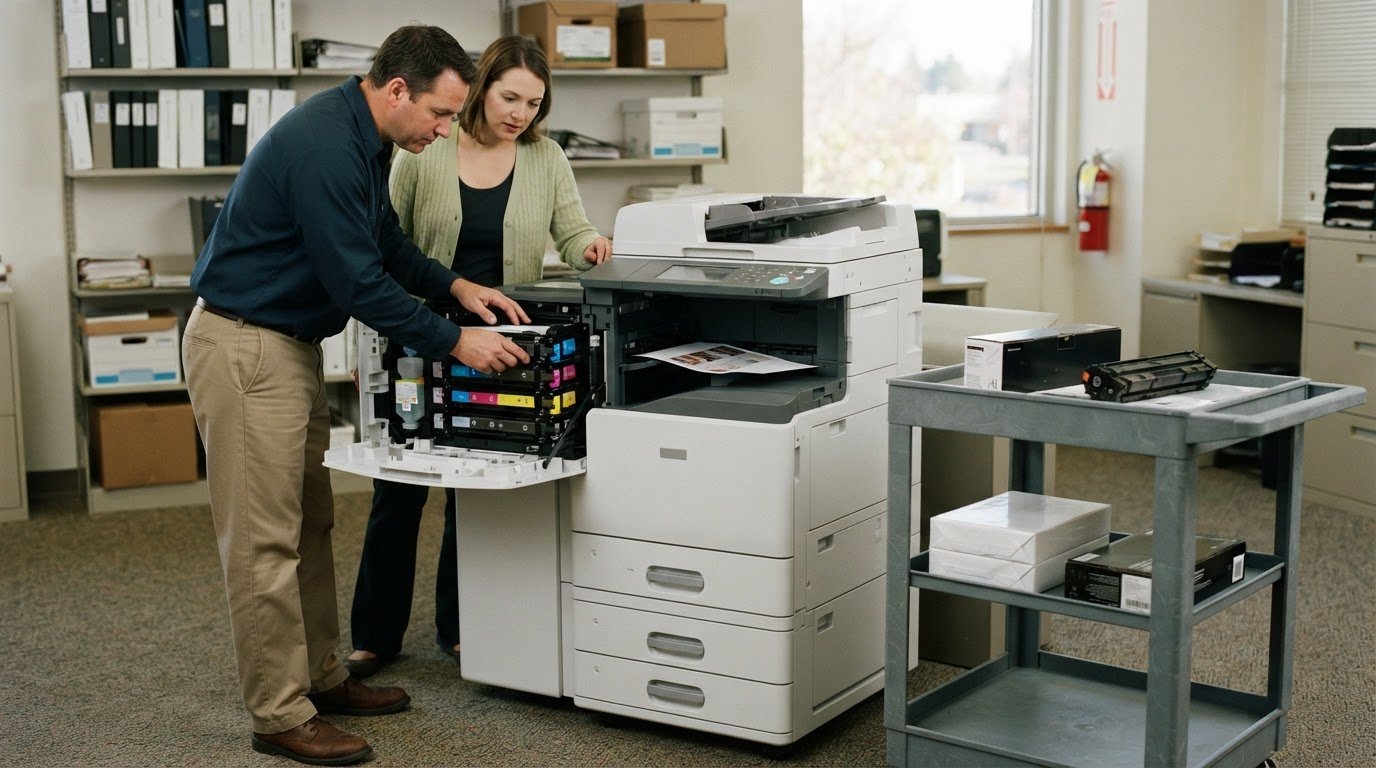
A lower purchase price doesn’t automatically mean a lower long-term bill. To estimate multifunction copier total cost of ownership, include the equipment, toner and paper, servicing and maintenance, plus energy, downtime and device management over its full lifecycle. If a plan bundles supplies or service, count each cost only once.
It’s reasonable to focus on a copier’s upfront cost, but that figure alone won’t show what your office will spend to keep it working. Purchase, service and maintenance expenses all shape the total, as do print volume, color use and service agreement terms. Compare options on equal footing, account for easily overlooked costs, and consider whether managed print can make equipment and supply expenses more manageable.
Key Takeaways
- Look beyond the equipment price: supplies, maintenance, energy, downtime, and device management all affect lifetime spending.
- Match copier capacity to your current and expected print volume, color mix, and workflow to avoid paying for the wrong fit.
- Review what service agreements include so toner, parts, and labor are counted accurately without double-counting bundled costs.
- Include less obvious expenses, such as IT integration, staff training, and downtime, when comparing the full cost of ownership.
What About Service and Maintenance Costs?
Toner, drums, paper, and repairs add recurring costs beyond the purchase price. A 10,000-page cartridge example shows why yield and coverage matter, while an agreement determines which repairs are included.
Toner Yield and Cost per Page
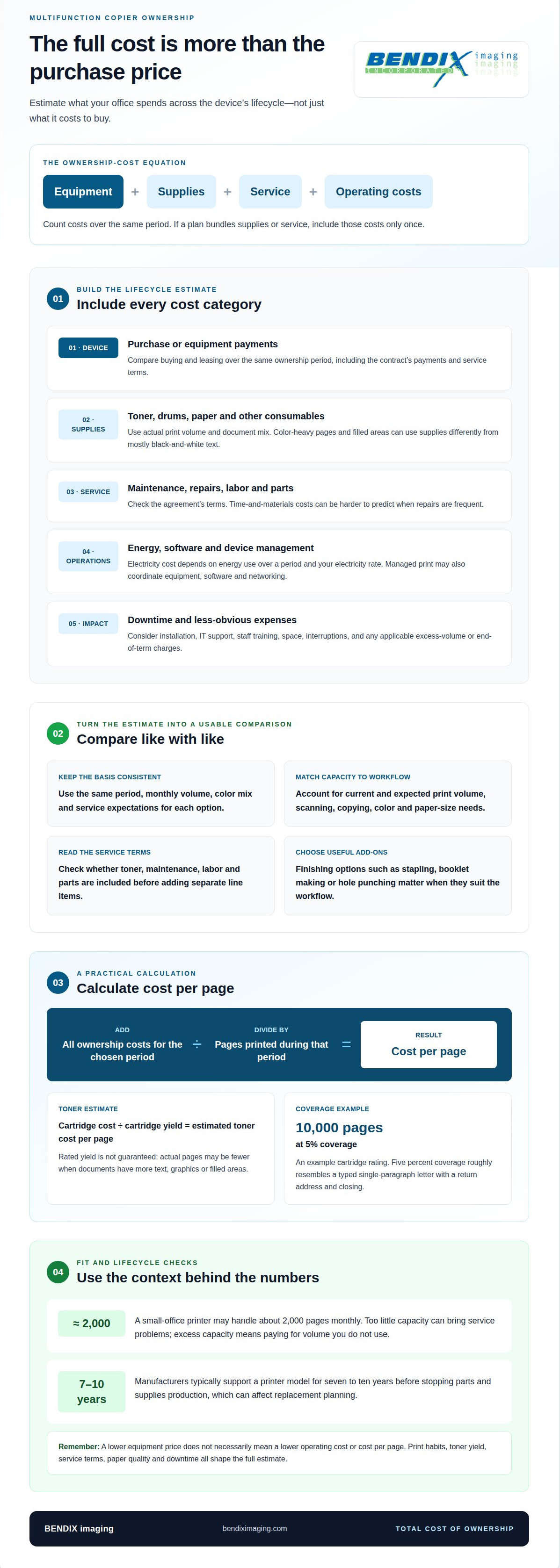
Toner yield is the estimated number of pages one cartridge can print under stated conditions. Divide the cartridge cost by its yield to estimate toner cost per page. A cartridge rated for 10,000 pages at five percent coverage may print fewer pages when documents contain more text, graphics, or filled areas. Five percent coverage roughly resembles a typed single-paragraph letter with a return address and closing. Use actual print volume and document mix when estimating supplies, rather than treating the rated yield as a guaranteed result. A machine with a lower purchase price can still cost more to operate if its toner yield is lower.
Maintenance, Repairs, and Other Consumables
Maintenance and repair costs cover the labor and parts needed to keep a copier functioning. With a time-and-materials agreement, you pay for required labor and parts, so frequent repairs can make spending harder to predict. A service agreement may bundle some costs, but the terms determine what it covers. Compare included maintenance with likely repair needs before estimating the total.
Drums, paper and other supplies also affect cost per page. Drum life and supply use depend on the copier model and how your office uses it. High-volume color documents, for example, consume supplies differently from mostly black-and-white text. Paper quality matters, too: poor-quality paper can cause service issues and interrupt work, adding costs beyond the paper itself.
Separate included costs from additional ones. If an agreement already includes toner or maintenance, don’t add those expenses again as separate line items. If you buy supplies separately, include toner, paper and drum replacement over the same period as equipment and service.
Compare the machine’s efficiency with your office’s print habits. Track monthly pages, color use and recurring repairs together for a more realistic view of how consumables and maintenance shape multifunction copier total cost of ownership over time.
How Much Does a Multifunction Printer Cost in 2026?
In 2026, a multifunction printer’s price depends on capacity, speed, and configuration. Calculate ownership cost by adding equipment, supplies, service, energy, and downtime over the same period, then divide by pages printed to estimate cost per page.
Matching Capacity to Print Volume
Copier capacity is the print volume and workload a machine is designed to handle. Match it to current demand and expected workflow, including scanning, copying, color, and paper-size needs. A small-office printer may handle about 2,000 pages monthly. Buying too little capacity can bring service problems; excess capacity means paying for volume you don’t use.
Supplies Management and Print Agreements
Supplies management coordinates toner, other consumables and maintenance to help control print expenses. A cost-per-copy agreement generally bundles toner with onsite service labor and parts, with charges based on meter readings. Managed print services can also coordinate equipment, software and networking. These arrangements may make costs easier to budget, but compare what each one includes. Don’t count toner or service twice when the agreement already covers them. A supplier-provided cartridge arrangement also shifts the risk of lower-than-expected toner yield to the supplier.
Calculating Ownership Cost and Cost per Page
Total cost of ownership adds expenses across the device’s lifecycle. For a useful comparison, use the same period, monthly volume, color mix and service expectations for each option. Add purchase or equipment payments, supplies, maintenance, software, energy and expected downtime. Include installation, excess-volume and end-of-term charges when applicable. Then divide the total by the pages printed during that period. A lower equipment price, in other words, may not mean a lower cost per page.
Use print volume and workflow needs to guide the estimate, not speed alone. For help assessing how device needs fit your print workflow, explore print cost planning.
First, what is the Total Cost of Ownership?
Total cost of ownership includes the expenses of buying and operating a copier throughout its useful life. Electricity use varies by model and workload. Estimate its cost by multiplying the energy consumed over a period by your electricity rate.
Hidden IT, Training, Space, and Downtime Costs
Hidden costs go beyond the machine itself and may include IT support, staff training, space and interruptions. Downtime can reduce productivity and revenue, so include its business impact in your estimate. The copier’s footprint matters, too: the space it occupies may affect how efficiently your office uses its floor area.
Desktop MFP Pricing and Operating Costs
The upfront price doesn’t represent monthly operating costs, which also depend on supplies, service, electricity and print volume. Compare buying with leasing over the same ownership period, including the contract’s payments and service terms. Manufacturers typically support a printer model for seven to ten years before stopping parts and supplies production, which can affect replacement planning.
Finishing Options and Add-On Costs
Finishing options add functions such as stapling, booklet making or hole punching. Choose only options that suit your office workflow. Their value depends on whether they replace manual finishing or support documents your business regularly produces.
Paper Quality and Operating Costs
Paper quality affects operating costs because poor-quality paper can cause copier service issues and reduce productivity. A jam or paper-feed problem may interrupt work and require attention, adding costs beyond the paper purchase. Consider paper use alongside supplies, maintenance and device efficiency. Managed print can help businesses manage print needs, including hardware, software and networking, as part of a broader view of operating costs.
Copier and MFP total cost of ownership
A copier’s purchase price typically represents about 40% of its total lifetime cost. The remaining expenses can accumulate through supplies, service, energy, software, and downtime, so compare the device’s full operating picture before an upgrade.
Use the same comparison period for each option. Add hardware payments or purchase cost, operating expenses and expected downtime. Keep page volume, color mix and service expectations consistent. Otherwise, a lower monthly payment or page rate may look attractive while relying on different usage assumptions.
Contract details can affect how predictable your costs are. The agreement should clearly state which charges can increase and how those increases are calculated.
Plan for the end of the equipment term, too. At lease end, a business may pay to pack and ship the copier back. An owner upgrading equipment is responsible for disposal costs. Include these expenses in the same comparison rather than treating them as a future problem.
Usage assumptions also matter. A double-sided A4 sheet is billed as two pages under the page-counting practice described for business copiers. Duplex printing can reduce paper waste, but the meter count may still reflect both printed sides. Use actual meter readings and the same monthly volume assumptions when comparing options.
A useful ownership estimate separates fixed and variable costs, then totals them across the chosen period. Check equipment, service, supplies, software, energy, downtime, and end-of-term expenses. That view helps determine whether a typical device remains economical or whether an upgrade better fits changing needs. For copier-related technology planning, discuss managed IT support.
BENDIX imaging
BENDIX imaging helps businesses consider copier costs alongside the technology and security needs surrounding the device. When print equipment must fit existing systems, managed IT services can support broader technology planning, while network security and cyber security help address risks connected to business infrastructure and data.
Turn to BENDIX imaging when your ownership estimate raises questions about how copier equipment fits into your IT environment or security approach. Understanding those connections can help you weigh operational needs alongside purchase, supply and service costs, rather than treating the copier as an isolated expense.
Contact BENDIX imaging to discuss your copier-related technology needs.
Make Your Next Copier Decision With Confidence
A useful multifunction copier total cost of ownership estimate gives your business a stronger basis for planning, but the decision also needs to fit the wider technology environment. Consider how the device supports daily work, connects with business systems and aligns with your security priorities. That broader view helps you make a deliberate choice instead of focusing only on the equipment transaction.
BENDIX imaging offers Artificial Intelligence (AI) Consulting, Cyber Security and Managed IT Services. These services address wider technology and security considerations that may matter as your business plans equipment decisions. They don’t replace a clear understanding of copier expenses, but they can be relevant when print technology intersects with your IT environment.
Ready to discuss how copier costs fit into your business technology plans? Discuss costs with BENDIX imaging. Take the next step with a clearer picture of your needs and a practical plan for moving forward.
Frequently Asked Questions
Bottom Line: How Much Should You Budget?
Budget for the full operating period, not just the copier’s purchase or lease payment. Base your budget on the equipment configuration, expected monthly print volume, color mix, supplies, service terms and end-of-term costs. A mostly black-and-white office and a color-heavy team, for instance, may have very different running costs, even with similar devices. Use your own workflow to build a realistic estimate.
How much should I pay for my copier/MFP?
Treat these as equipment lease estimates, not full operating budgets.
Toner: included or extra?
Toner may be included in a cost-per-copy agreement or purchased separately, depending on the plan. Before comparing options, identify whether the agreement includes toner, labor and parts, and whether charges depend on meter readings. For example, compare a plan that bundles toner with a separate-supply option that includes toner costs in its estimate. This keeps the comparison clear and avoids counting the same supply twice.
What to look for when buying a multifunction printer?
Choose a printer that fits the work your team actually produces. Consider print speed, monthly volume, color requirements, paper sizes, finishing needs, and how often staff scan or copy. Compare devices with matching accessories, capabilities and software upgrades, since configuration affects price. Also consider whether the device supports your office’s expected workflow as it changes, rather than choosing solely by upfront cost or speed.
What factors are included in multifunction copier total cost of ownership?
Include equipment, consumables, service, software, energy use and downtime over the period you’re evaluating. Also account for installation and end-of-term obligations where they apply. For example, a copier lease with a return requirement may bring a final expense for packing and shipping the device. Owners replacing equipment should likewise include disposal in their upgrade planning.
How much does a multifunction copier cost to buy in the United States?
Configuration and capabilities affect the purchase price, so compare equipment with equivalent options.
{"@context":"https://schema.org","@type":"FAQPage","mainEntity":[{"@type":"Question","name":"Bottom Line: How Much Should You Budget?","acceptedAnswer":{"@type":"Answer","text":"Budget for the full operating period, not just the copier’s purchase or lease payment. Base your budget on the equipment configuration, expected monthly print volume, color mix, supplies, service terms and end-of-term costs. A mostly black-and-white office and a color-heavy team, for instance, may have very different running costs, even with similar devices. Use your own workflow to build a realistic estimate."}},{"@type":"Question","name":"How much should I pay for my copier/MFP?","acceptedAnswer":{"@type":"Answer","text":"Treat these as equipment lease estimates, not full operating budgets."}},{"@type":"Question","name":"Toner: included or extra?","acceptedAnswer":{"@type":"Answer","text":"Toner may be included in a cost-per-copy agreement or purchased separately, depending on the plan. Before comparing options, identify whether the agreement includes toner, labor and parts, and whether charges depend on meter readings. For example, compare a plan that bundles toner with a separate-supply option that includes toner costs in its estimate. This keeps the comparison clear and avoids counting the same supply twice."}},{"@type":"Question","name":"What to look for when buying a multifunction printer?","acceptedAnswer":{"@type":"Answer","text":"Choose a printer that fits the work your team actually produces. Consider print speed, monthly volume, color requirements, paper sizes, finishing needs, and how often staff scan or copy. Compare devices with matching accessories, capabilities and software upgrades, since configuration affects price. Also consider whether the device supports your office’s expected workflow as it changes, rather than choosing solely by upfront cost or speed."}},{"@type":"Question","name":"What factors are included in multifunction copier total cost of ownership?","acceptedAnswer":{"@type":"Answer","text":"Include equipment, consumables, service, software, energy use and downtime over the period you’re evaluating. Also account for installation and end-of-term obligations where they apply. For example, a copier lease with a return requirement may bring a final expense for packing and shipping the device. Owners replacing equipment should likewise include disposal in their upgrade planning."}},{"@type":"Question","name":"How much does a multifunction copier cost to buy in the United States?","acceptedAnswer":{"@type":"Answer","text":"Configuration and capabilities affect the purchase price, so compare equipment with equivalent options."}}]}


