

A provider change can disrupt support before anyone notices a technical problem. A checklist for changing IT service companies should identify the contact details, communication channels, and people who need updates, including employees, clients, and customers. Assign responsibility for each update and specify when each message will go out.
It’s easy to focus on moving systems and overlook the everyday details people rely on: where to report an issue, who to contact, and what to expect during the transition. Clear, timely communication helps employees stay oriented and gives clients and customers a consistent point of contact.
Use this checklist to coordinate internal and external communications, update key contact points, and time announcements around the changeover. Prepare employees, explain the transition to clients and customers, and keep support information accurate as IT services move to a new provider.
Key Takeaways
- Plan client communications across the channels they already use, and keep key contact details consistent during the transition.
- Give employees clear guidance on what is changing, when it takes effect, and where to direct IT questions.
- Assess a new provider against your business needs, security priorities, and expectations for support before making the switch.
- Document systems, access, responsibilities, and transition tasks so important details don’t fall between providers.
Informing clients and using a transitional brand
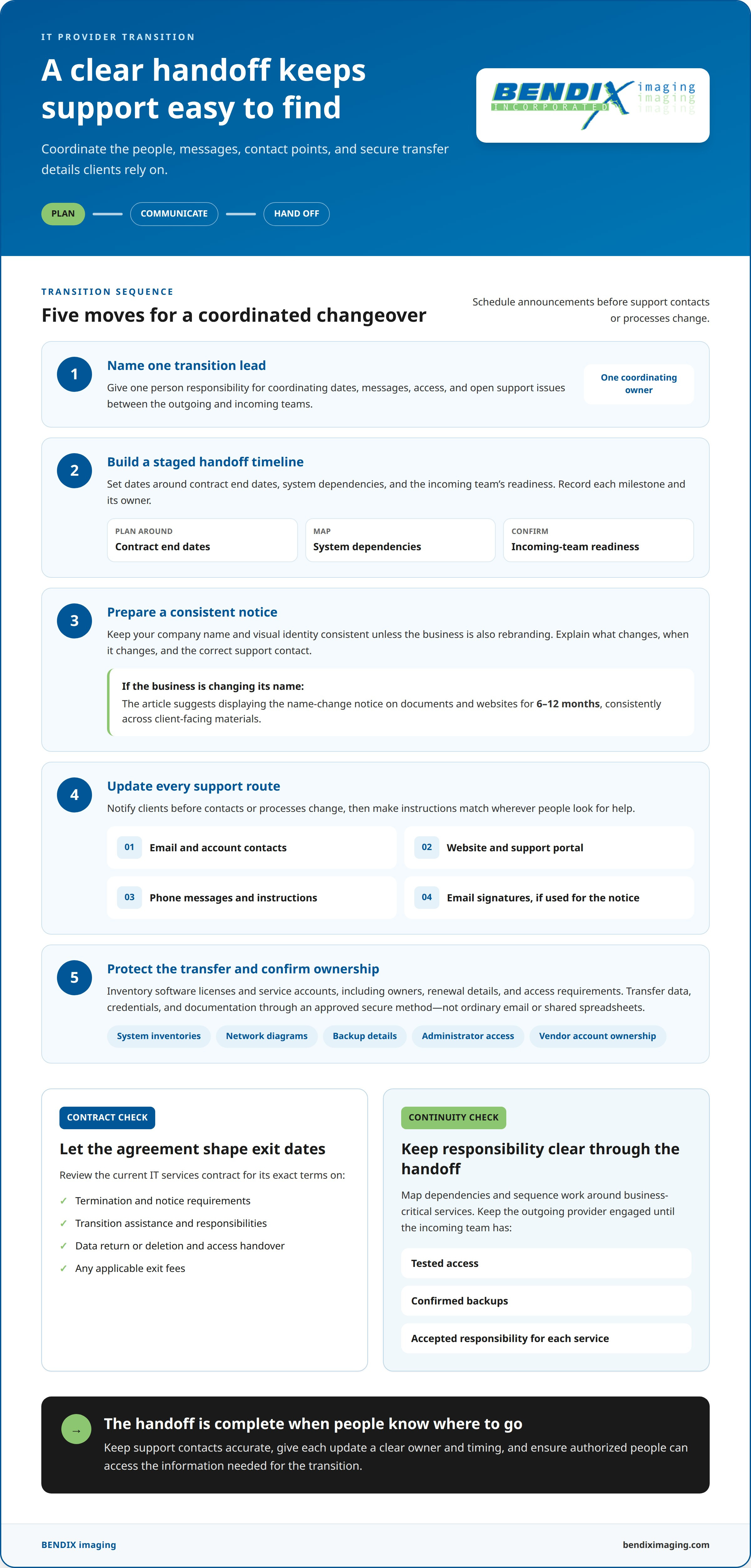
Create a clear handoff plan so clients know where to direct IT requests throughout the change. Assign one transition lead to coordinate dates, messages, access, and open support issues between the outgoing and incoming teams.
Build the timeline around contract end dates, system dependencies, and the incoming team’s readiness. Schedule the handoff in stages, record each owner and milestone, and notify clients before support contacts or processes change.
Keep your company’s name and visual identity consistent unless your business is also rebranding. A temporary transition notice on your websites, invoices, and email signatures can explain the provider change and identify the correct support contact.
- Notify clients through email and account contacts. A direct message gives them a reliable explanation of what changes, when it changes, and where to report an issue.
- Update websites, support portals, and phone messages. Matching contact details prevent clients from following outdated instructions after the handoff. For companies coordinating voice communications through Business Telecom or similar providers, updating automated attendants and call routing ensures customers immediately reach the correct support personnel.
- Inventory software licenses and service accounts. Recording the owner, renewal details, and access requirements helps prevent service interruptions or missed renewals.
- Review the current IT services contract before setting exit dates. Its termination terms, transition assistance, data-return process, and stated fees shape the handoff plan.
Transfer data, credentials, and documentation through an approved secure method, not ordinary email or shared spreadsheets. Include system inventories, network diagrams, backup details, administrator access, and vendor account ownership. Limit access to authorized people.
Reduce downtime by mapping dependencies before changing systems, then sequencing work around business-critical services. Keep the outgoing provider engaged until the incoming team has tested access, confirmed backups, and accepted responsibility for each service.
The contract should explain notice requirements, transition assistance, data return or deletion, access handover, and any applicable exit fees. Use its exact terms to agree on responsibilities and dates with both providers.
If the business is changing its name as well as its IT provider, it may consider displaying notice of the name change on documents and websites for 6-12 months. Keeping that notice consistent across client-facing materials can help clients recognize the updated identity while they adjust to the new support arrangements.
Informing customers and employees
Tell customers what is changing, when the new support process begins, and how to report an issue. Email named customer contacts directly, then reinforce the message through account notices or a customer portal. Give each message a clear subject, transition date, and contact route. If the change affects a service customers rely on, explain the practical impact in plain language.
Prepare employees before sending external announcements. Share the reason for the provider change, the transition schedule, and the new process for requesting help. Give staff specific instructions, not just a general notice. For example, explain whether to use the existing ticket portal during the handoff or follow a new route, and identify who handles urgent business issues.
- Assign an announcement owner. A communications lead can coordinate customer notices, employee updates, and approved wording across departments.
- Give managers a ready-to-use briefing. A short message with the change date, support contacts, and likely employee questions helps teams avoid conflicting answers.
- Prepare a customer-facing explanation. State what remains the same and what changes, such as the help desk address or request process.
- Set a route for questions. Direct employees and customers to a named inbox, portal, or internal contact instead of letting requests scatter.
Customers may include organizations with formal procurement or security processes, including federal agencies. Keep announcements factual, and avoid suggesting that a provider change alters contractual terms or compliance status. Route those questions to the appropriate business contact, who can respond based on the organization’s agreements and approved statements.
After sending the first notice, track questions and recurring confusion. If several employees ask where to submit tickets, revise the internal FAQ and repeat the correct steps. A coordinated IT transition plan can connect staff communications with the support handoff, so employees know where responsibility sits at each stage.
How do you assess and select a new IT service provider?
Start with your actual support needs, not a generic service list. Review the issues, recurring delays, and unresolved risks that prompted the change. Use those examples to define what the next provider needs to handle, how responsibilities should be assigned, and what a successful transition requires.
- List the systems and support tasks your business depends on. Include email, devices, networks, backups, user access, and the applications employees rely on, so proposals address real operational needs.
- Define how support requests will be received and tracked. Specify the contact route, escalation process, and updates employees need, so expectations are clear before service begins.
- Review security and recovery responsibilities. Identify who manages network safeguards, access controls, backups, and recovery planning, because unclear ownership can leave important work unattended.
- Ask for a transition plan with assigned responsibilities. It should identify what information moves, who provides it, and how the incoming team will confirm readiness.
- Compare proposed services against your written requirements. A side-by-side review helps distinguish included responsibilities from tasks that remain with your staff or other vendors.
Assess the working relationship, too. Identify the people responsible for account coordination and technical decisions, then establish how issues and planned changes will be communicated. A clear decision-making route matters when access, system changes, or business priorities need attention.
Use specific scenarios to test whether a proposal fits. For example, ask how the provider would handle a new employee needing account access, a failed backup, or a network issue affecting several staff members. The answers should explain ownership and next steps in plain language.
Before selecting a provider, compare the final scope, responsibilities, and contract terms with your documented needs. Confirm that the transition plan covers systems, access, and outstanding work. This gives decision-makers a practical basis for choosing, rather than relying on broad claims or assumptions.
What IT services and responsibilities should be documented before switching providers?
Create a handoff record showing what the outgoing provider manages, what your team owns, and what remains unresolved. Make it clear enough for someone unfamiliar with your environment to understand each service, its owner, and its dependencies.
- Record every active service and its owner. Include help desk support, network management, email, device administration, and backup oversight. This prevents an assumed responsibility from disappearing during the change.
- List business-critical hardware and systems. Note servers, workstations, network equipment, cloud platforms, and the teams that rely on them. Connect each asset to its function and support contact.
- Map third-party vendors and account ownership. Document software providers, renewal dates, billing contacts, and administrator roles. For healthcare organizations managing specialized systems such as onehealthconnect.com.au, distinguishing direct vendor responsibilities from general IT oversight prevents service gaps during a handoff.
- Document access roles and approval steps. Identify who can authorize account changes, add users, or approve system updates. Store credentials through a secure process, not in the handoff document itself.
- Describe security tools and current procedures. Record monitoring responsibilities, incident escalation routes, and any open security tasks. Clear ownership helps the incoming team understand what needs attention.
- Capture backup schedules and recovery instructions. Note which systems are protected, where recovery information is held, and who can authorize restoration. This gives the new team practical context for recovery planning.
- Track open tickets, projects, and known issues. Include status, business impact, assigned owner, and the next action. A network upgrade awaiting approval, for example, should not vanish between teams.
- Attach operating documents and their locations. Include network diagrams, configuration records, support procedures, and vendor agreements. Record where each file is stored and who can access it.
Review the inventory with the outgoing and incoming teams, then record ownership for every unresolved item. Coordinate your managed IT transition around a documented scope and clear responsibilities.
For a business changing address during a provider transition, track the required notifications alongside service responsibilities. Businesses changing address should notify the Postal Service, IRS, Office Of the Secretary Of State, financial accounts and banks, directory listings, utility companies, and insurance providers. The Internal Revenue Service says businesses changing their address should notify it using Form 8822-B, Change of Address or Responsible Party - Business. They should also notify insurance and benefits providers, payroll processors, and merchant services providers, and tell clients and customers at least one month before moving, or as soon as the new address is known.
BENDIX imaging: Managed IT Services
BENDIX imaging provides Managed IT Services for businesses in Watertown, Brookings, Sioux Falls, Huron, and Montevideo that need help coordinating technology during a provider change. Turn to this service when you want responsibilities, systems, and ongoing IT support considered together, rather than treating the handoff as an isolated task.
Security also belongs in the transition plan. Cyber Security and Network Security address protection needs, while Artificial Intelligence (AI) Consulting can help businesses assess where AI may fit their operations. The right focus depends on your business priorities and the work you need managed.
Share your documented services, known risks, and transition priorities to start a practical discussion. Contact BENDIX imaging to discuss Managed IT Services for your business.
Make the transition a stronger starting point
Use your checklist for changing IT service companies as a working document, not a file to archive after the handoff. Keep it connected to decisions about how technology should support your business, who is responsible, and which risks need attention next. This gives leaders a practical basis for reviewing priorities as operations evolve.
BENDIX imaging offers Managed IT Services, Cyber Security, and Artificial Intelligence (AI) Consulting to support business technology and security needs. Consider these services when you want ongoing IT responsibilities or specific security and AI priorities addressed as part of your plans.
Take the next step by discussing your priorities and transition needs with Contact BENDIX imaging. A clear plan can help your team move forward with confidence and keep technology aligned with the work ahead.
Frequently Asked Questions
What should be included in an IT service provider transition checklist?
Include transition milestones, decision owners, sign-off criteria, and a record of unresolved issues. A useful checklist for changing IT service companies also tracks when each task is complete and who accepts the result. For example, mark a system migration finished only after a designated employee confirms they can access it and complete a routine work task.
How do you compare IT service provider pricing and service-level agreements?
Compare each proposal with your written requirements, including support routes, escalation, and assigned responsibilities. Check which services are included and review the scope and contract terms before choosing; the material provides no pricing comparison method.
What should be tested and monitored after a new IT provider takes over?
Before the outgoing provider disengages, confirm that the incoming team can access systems, verify backups, and accept responsibility for each service. Track open tickets, known issues, and recurring questions so you can address gaps after the handoff.
{"@context":"https://schema.org","@type":"FAQPage","mainEntity":[{"@type":"Question","name":"What should be included in an IT service provider transition checklist?","acceptedAnswer":{"@type":"Answer","text":"Include transition milestones, decision owners, sign-off criteria, and a record of unresolved issues. A useful checklist for changing IT service companies also tracks when each task is complete and who accepts the result. For example, mark a system migration finished only after a designated employee confirms they can access it and complete a routine work task."}},{"@type":"Question","name":"How do you compare IT service provider pricing and service-level agreements?","acceptedAnswer":{"@type":"Answer","text":"Compare each proposal with your written requirements, including support routes, escalation, and assigned responsibilities. Check which services are included and review the scope and contract terms before choosing; the material provides no pricing comparison method."}},{"@type":"Question","name":"What should be tested and monitored after a new IT provider takes over?","acceptedAnswer":{"@type":"Answer","text":"Before the outgoing provider disengages, confirm that the incoming team can access systems, verify backups, and accept responsibility for each service. Track open tickets, known issues, and recurring questions so you can address gaps after the handoff."}}]}


