
The appliance backup vs cloud disaster recovery decision depends on what your business needs to restore and how quickly. An appliance provides a local path to recover backed-up data, while cloud disaster recovery can help restore systems and operations in a cloud environment. The right fit depends on your recovery time objective, recovery point objective, and the business impact of downtime or lost data.
Both approaches have a role, but a backup copy alone doesn’t ensure that applications, networks, and workflows can resume. This comparison explains how appliance backup and cloud disaster recovery differ, what each can and can’t do, and how recovery objectives shape the decision. It also covers business impact and when a hybrid approach may make sense for local recovery and off-site resilience.
Key Takeaways
- Match your recovery approach to how quickly each critical system must return and how much recent data your business can afford to lose.
- Separate data protection from full operational recovery: restoring files alone may not bring applications, networks, and workflows back online.
- Use business impact to prioritize workloads, map dependencies, and shape a recovery plan that reflects real operational needs.
- Test recovery procedures, not just backup jobs, so you can identify gaps before disruption puts the plan to work.
Which cloud disaster recovery solution should you choose?
Start the appliance backup vs cloud disaster recovery comparison with business impact, recovery needs, and operating demands. Assess data protection, recovery environments, testing, and downtime together.
Backup, Replication, and Recovery Testing
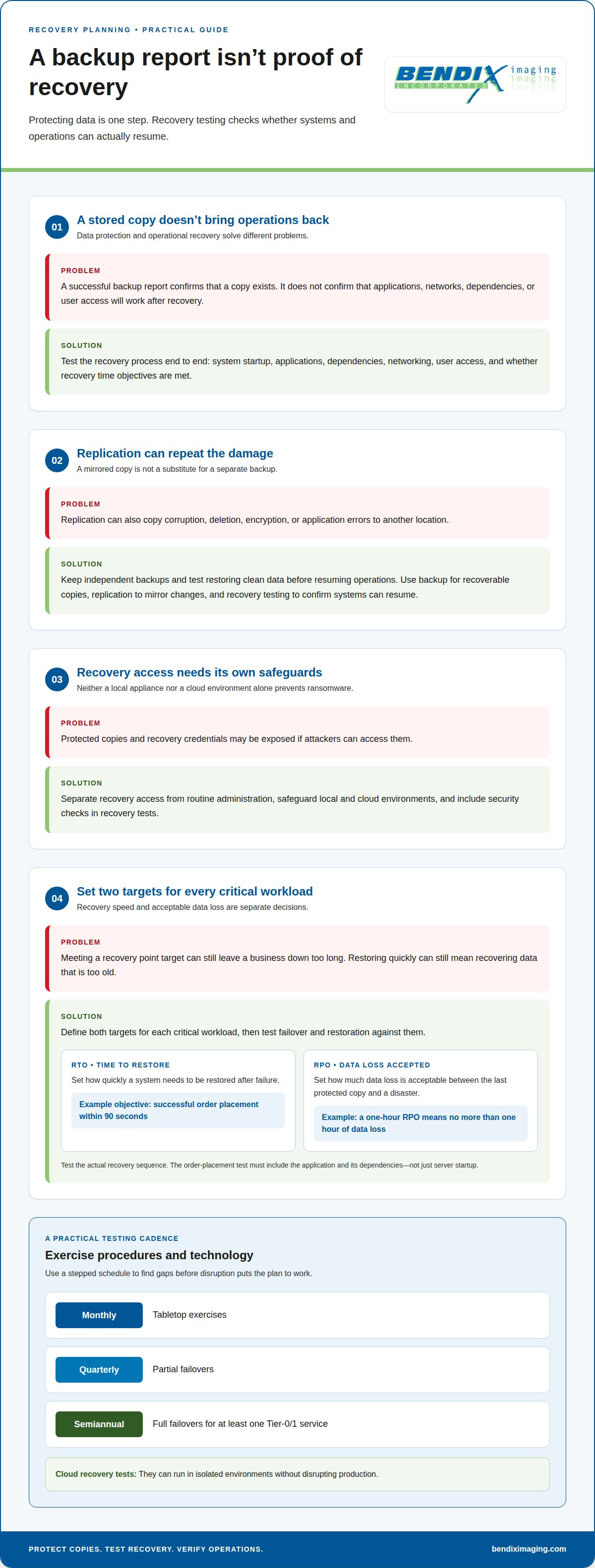
Backup stores recoverable copies, replication mirrors changes elsewhere, and testing confirms whether systems can resume. Replication can also copy corruption, deletion, encryption, or application errors, so it doesn’t replace backup. A successful backup report confirms that a copy exists, not that recovery works. Test system startup, applications, dependencies, networking, user access, and whether recovery time objectives are met.
Exercise both procedures and technology with monthly tabletop exercises, quarterly partial failovers, and semiannual full failovers for at least one Tier-0/1 service. Cloud recovery tests can run in isolated environments without disrupting production.
Security and Ransomware Risks
Security risk depends partly on whether attackers can access protected copies and recovery credentials. Local appliances and cloud environments both need safeguards against unauthorized access. Neither location alone prevents ransomware. Because replication may copy encryption or deletion, maintain independent backups and test restoring clean data before resuming operations.
Separate recovery access from routine administration, and include security checks in tests. Healthcare organizations must secure protected health information under HIPAA, according to the U.S. Department of Health and Human Services.
Workload and Business Size Fit
Workload fit depends on recovery urgency, data changes, and technical dependencies. Local appliances can suit businesses that need nearby copies for data restoration. Cloud disaster recovery can suit workloads that require off-site infrastructure to resume operations. Choose between appliance backup and cloud disaster recovery based on each critical application’s downtime impact, not business size alone.
Smaller businesses may use cloud recovery to avoid investing in infrastructure reserved for a crisis. Prioritize workloads by recovery objectives, then test whether the chosen approach meets them.
Recovery Service Cost Factors
Appliance costs include hardware capacity, deployment, maintenance, and replacement planning. Cloud disaster recovery costs depend on stored data, compute kept ready or activated during recovery, and recovery usage. Workload size, retention needs, and failover duration shape the comparison.
Separate normal operating needs from failover requirements when assessing compute, storage, data transfer, and recovery usage. Cloud infrastructure can reduce the need to invest in rarely used recovery hardware, while actual spending depends on the environment and recovery design.
Recovery Time Objectives and Recovery Point Objectives
Set recovery targets for each workload before choosing recovery infrastructure. Recovery time and acceptable data loss are separate decisions, and both shape failover design.
Recovery Time Objectives
A recovery time objective (RTO) defines how quickly a system needs to be restored after failure. Downtime affects applications differently: an order system may need to resume before a reporting tool. Assign each workload its own RTO based on operational impact, then test whether the recovery process can meet it.
Cloud disaster recovery may restore systems in minutes to hours through automated failover. That range depends on the recovery setup and workload, so test the actual sequence rather than relying on a design estimate. For example, a plan can set a testable objective of restoring successful order placement within 90 seconds. The test must include the application and its dependencies, not just server startup.
Recovery Point Objectives
A recovery point objective (RPO) defines how much data loss is acceptable between the last protected copy and a disaster. It matters because backup or replication frequency determines how recent recovered data can be. An RPO of one hour means the business can afford to lose no more than one hour of data.
Set the RPO according to how quickly each workload changes and what missing records would mean for operations. A workload that processes orders may need a tighter recovery point than an internal archive. More frequent data protection can reduce potential loss, but the recovery design must also restore usable data and connected systems.
RTO and RPO work together, but neither replaces the other. A business can meet its recovery point and still face extended downtime if infrastructure takes too long to restore. It can also restore quickly but recover data that is too old. Define both targets for each critical workload, then test failover and restoration against them. This gives decision-makers a practical basis for comparing appliance and cloud recovery designs.
Data Backup vs Disaster Recovery: What’s the Difference?
Backup preserves data copies; disaster recovery restores the systems and operations that use them. Both support resilience, but they address different failure points.
Backup Purpose and Types
A backup is a stored copy of files or datasets that lets a business restore information after deletion, corruption, or ransomware. Full backups copy all data and require the most storage and bandwidth among the types described. Incremental backups save changes since the previous incremental backup; differential backups save changes since the last full backup. Choose based on recovery needs, available bandwidth, and retention.
The 3-2-1 rule recommends three data copies on two media types, with one copy offsite. That offsite copy can help protect data if fire, flood, or theft affects the physical office.
Retention and Granular File Recovery
Retention defines how long backup copies remain available, while granular recovery restores a selected file instead of an entire environment. For example, a team might recover one deleted document without rebuilding its server. Set retention based on how long older versions may be needed and how much storage the copies require.
Cloud backup stores copies in an off-site environment, which can preserve access when local equipment is affected. In the United States, cloud recovery plans should define compliance and data residency controls. Healthcare organizations must secure protected health information under HIPAA, according to the U.S. Department of Health and Human Services.
Downtime and Potential Data Loss
Backup frequency influences potential data loss; restoration time influences downtime. A 24-hour backup interval may leave up to one full day of potential data loss, while a 15-minute interval reduces potential loss compared with less frequent protection. Neither interval determines how quickly systems return. The recovery plan must also account for restoring infrastructure and operations.
Balance the two by setting acceptable data loss and restoration time for each critical workload. A business may recover recent files yet still face extended downtime if its applications and networks aren’t ready.
Restoring Systems from Appliance Backups
After a disaster, identify a usable backup, connect the appliance or restored copy to available infrastructure, and recover the data and required systems. Then validate that applications, networks, and dependent services work. A backup appliance can support local recovery, but an appliance kept only at the affected site may also be lost to fire, flood, or theft.
Off-site copies address that physical risk. Modern appliances may support off-site backup through integrated cloud storage, but off-site data alone doesn’t restore operations. Recovery also depends on suitable infrastructure, an activation process, workload sequencing, and tested procedures.
Disaster recovery planning and business impact analysis
Build recovery around the business services that must continue, not just the server that failed. A business impact analysis helps rank workloads and set practical recovery priorities.
Business Continuity Use Cases
Business continuity planning identifies how essential work can continue when a primary system becomes unavailable. A business impact analysis ranks applications by revenue, compliance, and customer impact, then maps dependencies such as databases, messaging, identity, DNS, and external APIs.
That ranking guides recovery design. Tier 0 workloads can map to active/active or warm-standby topologies; Tier 1 workloads can map to warm-standby or pilot-light designs. For example, an order-processing service may take priority over an internal reporting tool if interruptions affect revenue and customer service.
Document each application’s recovery time objective, recovery point objective, maximum tolerable downtime, and acceptable data loss. These records connect business needs to technical recovery choices. A business continuity plan also identifies who activates recovery, which workloads come first, and how teams communicate while systems are restored.
Failover and Recovery Processes
Failover redirects operations from a failed primary environment to secondary IT infrastructure or a remote server. In cloud disaster recovery, the plan activates the recovery environment, starts required workloads, and restores network access so users can resume work. Automated steps can support the process, but the sequence must reflect application dependencies.
After the primary environment stabilizes, failback returns operations from the recovery site to the original environment. Include this path in the plan from the outset, and test both failover and failback. Replication can keep secondary systems current, but it may also copy unwanted changes, so preserve independent backups.
Use a business impact analysis to connect each workload’s priority with its recovery design. Plan your data backup and recovery around those operational priorities.
BENDIX imaging: Data Backup and Recovery
BENDIX imaging provides Data Backup and Recovery for businesses that need to protect important information and plan how to restore it. Turn to this service when your current backup approach doesn’t clearly address which data matters most, how much data loss is acceptable, or what recovery should involve after a disruption.
Connect your business priorities with your recovery objectives. Identify critical workloads, the impact of downtime, and the data your operations depend on. These details help shape a backup and recovery approach around actual business needs, rather than treating every file and system as equally urgent. BENDIX imaging supports businesses in Watertown, Brookings, Sioux Falls, Huron, and Montevideo with Cyber Security and Managed IT Services for broader technology risks.
Contact BENDIX imaging to discuss your data backup and recovery needs.
Make recovery part of business planning
A recovery strategy should evolve as your business changes. New applications, customer expectations, and operating processes can shift which systems deserve priority. Treat recovery planning as an ongoing management decision, not a document to file away after implementation. Assign clear ownership for keeping the plan aligned with business operations, security practices, and technology changes.
Choosing between appliance backup and cloud disaster recovery is also an opportunity to connect continuity planning with wider technology priorities. BENDIX imaging offers Artificial Intelligence (AI) Consulting, Cyber Security, and Managed IT Services to support businesses reviewing how technology and protection fit together. The practical next step is to discuss how your recovery needs relate to your current environment and future plans.
Contact BENDIX imaging to talk through your business’s data protection priorities. A clear plan starts with a focused conversation.
Frequently Asked Questions
What is the difference between RPO and RTO?
RTO sets the acceptable time to restore a system, while RPO sets the acceptable amount of data loss. For example, a customer database may need to return quickly, while the business can tolerate losing only records created since its last protected copy. Treat these as separate targets: meeting one doesn’t automatically mean the other is met.
What is the difference between appliance-based backup and cloud disaster recovery?
An appliance-based backup stores recovery copies on local hardware, while cloud disaster recovery uses an off-site environment to help restore systems and operations. Think of recovering a deleted spreadsheet from a local appliance versus bringing a business application back online after a site outage. The first restores data; the second addresses the infrastructure needed to resume work.
How do backup appliances and cloud disaster recovery compare in recovery time and recovery point objectives?
Neither approach has a fixed RTO or RPO. Achievable targets depend on configuration, data protection frequency, and the recovery process. A local appliance may provide a nearby copy, while cloud recovery may rely on prepared infrastructure and failover steps. Compare tested results for each critical workload, including the time needed to reconnect users and validate applications.
How much bandwidth and storage do cloud disaster recovery systems require?
Requirements depend on how much data is protected, how quickly it changes, how often copies are made, and how long versions are retained. Full backups require the most storage and bandwidth among the backup types described. Incremental backups use little bandwidth but can make recovery slower. Workload data volume and protection frequency shape the capacity needed.
Can a business combine a local backup appliance with cloud disaster recovery?
Yes. A business can keep local backup copies for nearby data restoration and use cloud infrastructure for off-site recovery. A hybrid setup uses gateways to support secure, efficient, automated data transfers between local and cloud environments. Keep backup copies distinct from replication: replication may carry accidental deletion or corrupted data to the other environment, so it doesn’t replace independent backups.
What compliance and data residency requirements affect cloud disaster recovery in the United States?
Cloud disaster recovery plans in the United States should define compliance and data residency controls. Healthcare organizations must secure protected health information under HIPAA.
{"@context":"https://schema.org","@type":"FAQPage","mainEntity":[{"@type":"Question","name":"What is the difference between RPO and RTO?","acceptedAnswer":{"@type":"Answer","text":"RTO sets the acceptable time to restore a system, while RPO sets the acceptable amount of data loss. For example, a customer database may need to return quickly, while the business can tolerate losing only records created since its last protected copy. Treat these as separate targets: meeting one doesn’t automatically mean the other is met."}},{"@type":"Question","name":"What is the difference between appliance-based backup and cloud disaster recovery?","acceptedAnswer":{"@type":"Answer","text":"An appliance-based backup stores recovery copies on local hardware, while cloud disaster recovery uses an off-site environment to help restore systems and operations. Think of recovering a deleted spreadsheet from a local appliance versus bringing a business application back online after a site outage. The first restores data; the second addresses the infrastructure needed to resume work."}},{"@type":"Question","name":"How do backup appliances and cloud disaster recovery compare in recovery time and recovery point objectives?","acceptedAnswer":{"@type":"Answer","text":"Neither approach has a fixed RTO or RPO. Achievable targets depend on configuration, data protection frequency, and the recovery process. A local appliance may provide a nearby copy, while cloud recovery may rely on prepared infrastructure and failover steps. Compare tested results for each critical workload, including the time needed to reconnect users and validate applications."}},{"@type":"Question","name":"How much bandwidth and storage do cloud disaster recovery systems require?","acceptedAnswer":{"@type":"Answer","text":"Requirements depend on how much data is protected, how quickly it changes, how often copies are made, and how long versions are retained. Full backups require the most storage and bandwidth among the backup types described. Incremental backups use little bandwidth but can make recovery slower. Workload data volume and protection frequency shape the capacity needed."}},{"@type":"Question","name":"Can a business combine a local backup appliance with cloud disaster recovery?","acceptedAnswer":{"@type":"Answer","text":"Yes. A business can keep local backup copies for nearby data restoration and use cloud infrastructure for off-site recovery. A hybrid setup uses gateways to support secure, efficient, automated data transfers between local and cloud environments. Keep backup copies distinct from replication: replication may carry accidental deletion or corrupted data to the other environment, so it doesn’t replace independent backups."}},{"@type":"Question","name":"What compliance and data residency requirements affect cloud disaster recovery in the United States?","acceptedAnswer":{"@type":"Answer","text":"Cloud disaster recovery plans in the United States should define compliance and data residency controls. Healthcare organizations must secure protected health information under HIPAA."}}]}


