Reactive IT support leaves small businesses waiting for problems to disrupt work. Proactive IT support for small businesses in Sioux Falls brings managed IT services, cybersecurity, network security, and data backup and recovery into a plan focused on protecting daily operations. The National Institute of Standards and Technology explains that business continuity plans can include data-backup services to safeguard critical information.
Reliable technology takes more than fixing a computer after it fails. The right support helps protect business data and infrastructure while keeping IT needs aligned with how your team works. This article explains what managed IT services can include, how support is delivered, what affects its scope and cost, and what to expect when choosing a professional partner in Sioux Falls.
Key Takeaways
- Managed IT support can bring everyday technology management and security needs into a coordinated service plan.
- Proactive monitoring helps identify potential IT issues early, while clear incident response helps limit disruption when problems occur.
- Support for businesses with 10 to 300 users should reflect the organization’s size, systems, security needs, and day-to-day operations.
- Consistent help desk support and local technician continuity can make it easier to resolve issues and keep teams moving.
What do managed IT services include?
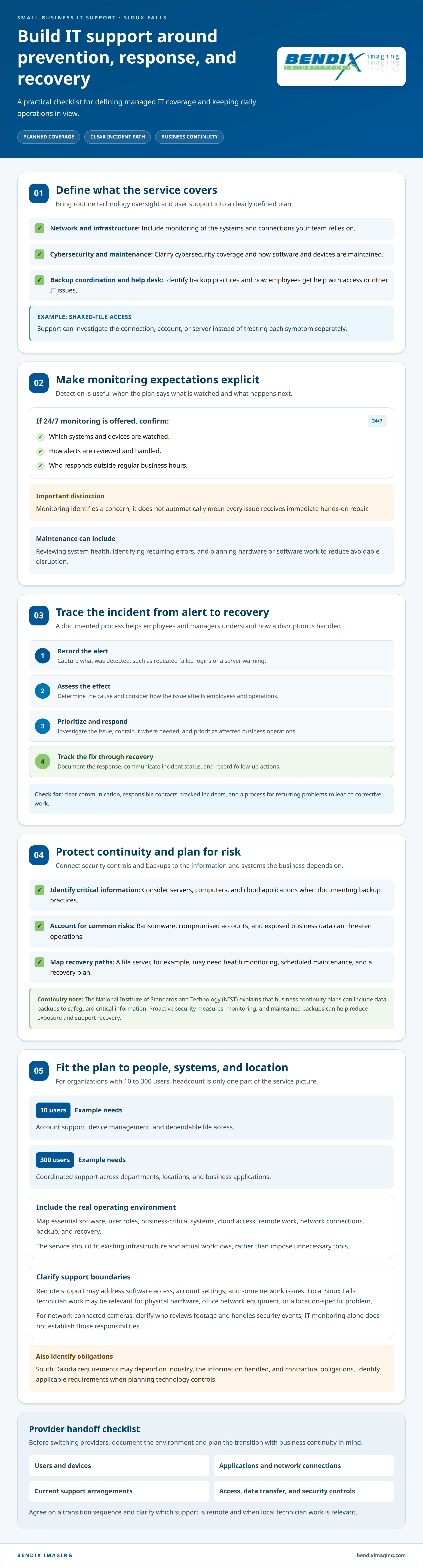
Managed IT services bring routine technology oversight and user support into a planned service. Coverage may include network and infrastructure monitoring, cybersecurity, software and device maintenance, backup coordination, and a help desk. For example, if staff can’t access a shared file, support can investigate the connection, account, or server rather than treating each symptom separately. The goal is to limit disruption and protect productivity.
Proactive monitoring looks for system warnings and unusual activity before they become larger incidents. If a provider advertises 24/7 monitoring, the service description should clarify which systems are watched, how alerts are handled, and who responds outside regular business hours. Monitoring and incident resolution are related but distinct: detection identifies a concern, while response investigates, contains, and documents it. Business continuity plans can include data backups for critical information on servers, computers, and cloud applications, according to the National Institute of Standards and Technology (NIST).
When comparing managed IT providers in Sioux Falls, look for a clearly defined scope, a documented incident process, cybersecurity coverage, backup practices, and a help desk with clear communication. Ask how the provider handles network changes, recurring issues, and support for the systems your team relies on. For small and mid-sized businesses, a useful plan should fit existing infrastructure and actual workflows, not impose unnecessary tools.
South Dakota businesses may have cybersecurity and data privacy requirements based on their industry, the information they handle, and their contractual obligations. Identify those requirements when planning technology controls. BENDIX imaging offers Regulatory Compliance through Compliance as a Service (CaaS) to support businesses managing regulatory requirements.
Common risks include ransomware, compromised accounts, and exposed business data. Ransomware can disable systems and copy files, creating both operational disruption and data-breach risk, according to NIST. Proactive security measures, monitoring, and maintained backups can help reduce exposure and support recovery.
Switching providers starts with documenting users, devices, applications, network connections, and current support arrangements. The incoming provider can then plan access, data transfer, security controls, and a transition sequence with business continuity in mind. In Greater Sioux Falls, clarify which support is remote and when local technician work is relevant, so the plan reflects how your offices operate.
Proactive monitoring and incident resolution
Monitoring helps spot warning signs before hardware or network trouble interrupts operations. A useful plan connects alerts to maintenance, investigation, and recovery steps.
Continuous Monitoring and Maintenance
A 24/7 monitoring arrangement watches designated systems beyond standard business hours. Its value depends on which devices and alerts are covered, who reviews them, and what happens when an alert appears. Ask for clear boundaries: monitoring does not automatically mean every issue receives immediate hands-on repair. Proactive maintenance can include reviewing system health, identifying recurring errors, and planning hardware or software work to reduce avoidable disruption.
Incident Monitoring and Resolution
Monitoring identifies a possible incident; resolution determines its cause and response. For example, repeated failed logins may prompt an investigation, while a server warning may require technical diagnosis. A defined process records the alert, assesses its effect on employees, prioritizes affected operations, and tracks the fix through recovery. Look for clear communication about incident status, responsible contacts, and follow-up actions, not just an alert dashboard.
Network-connected cameras are one example of equipment that may rely on a business network. When planning IT support, account for the network connections and related technology your business uses. Clarify who reviews camera footage and handles security events, since IT monitoring alone does not establish those responsibilities.
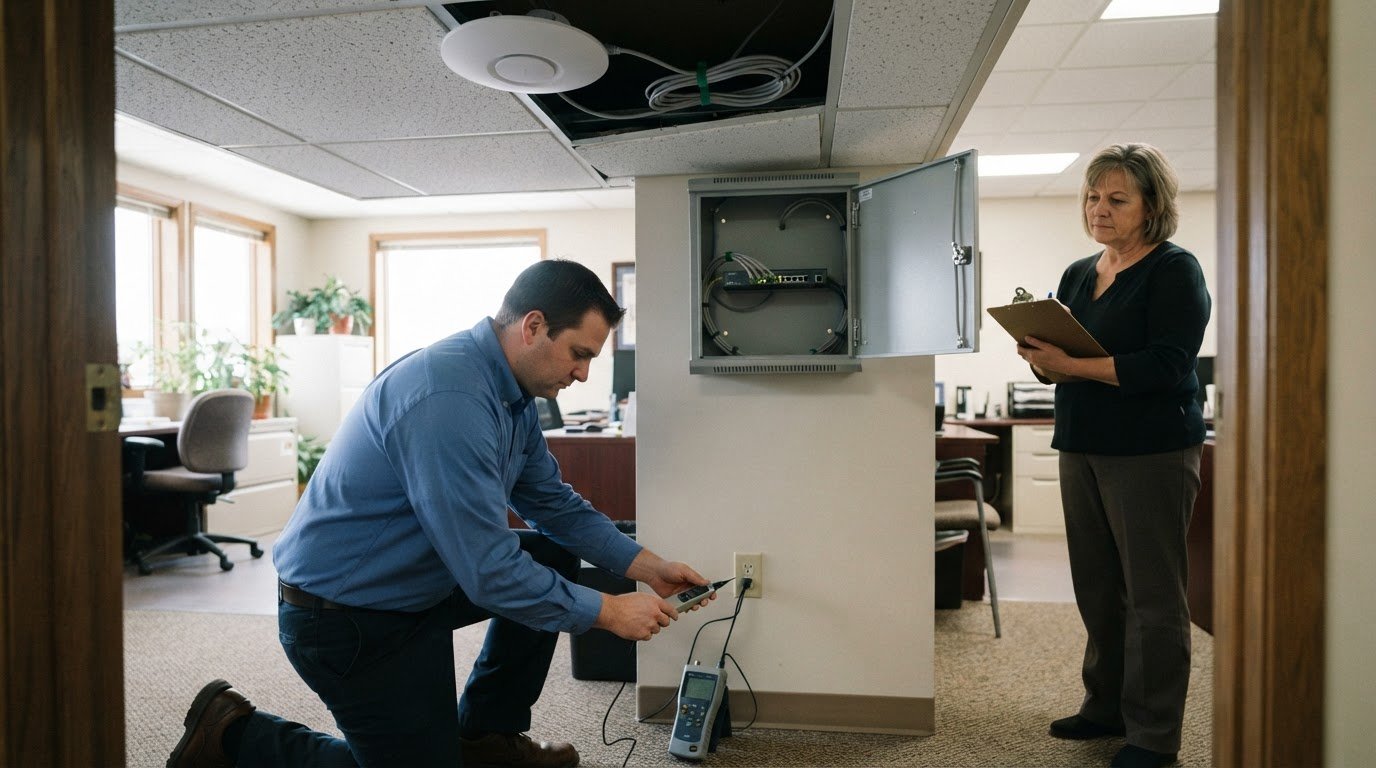
During a service review, map critical systems to their maintenance and response paths. A file server, for example, may need health monitoring, scheduled maintenance, and a recovery plan. Confirm whether alerts create tracked incidents and how recurring problems lead to corrective work. These details help employees understand where to report a disruption and give managers a clearer view of operational risks.
IT services for businesses with 10 to 300 users
Teams with 10 to 300 users need support shaped around their systems, locations, and workflows. For businesses seeking proactive IT support for small businesses in Sioux Falls, cloud access, remote work, backup, and software management all influence service needs and downtime risks. When managing application deployment and patching across workstations, cloud solutions like apptimized.com assist with automated software packaging and updates.
Business Size and Service Fit
A 10-person office may need account support, device management, and dependable file access. A 300-user organization may need coordinated support across departments, locations, and business applications. In either case, service fit depends on the environment, not headcount alone. Map essential software, user roles, and business-critical systems to define the coverage required for proactive IT support for a small business in Sioux Falls.
Cloud services can help employees access approved files and applications remotely, but they still need oversight. A sound plan accounts for user access, network connections, backup, and recovery. For example, a team relying on cloud-based accounting software needs a clear path for restoring access if accounts or connectivity fail, which is why specialized security providers like Apex Tech 4 Tax Pros focus on dedicated information security planning for financial data. Proactive monitoring can identify service or performance issues before they interrupt work.
Local Service and Remote Support
Remote support can address software access, account settings, and some network issues without an on-site visit. Local Sioux Falls service may be relevant when a problem involves physical hardware, office network equipment, or a location-specific setup. Define which issues can be handled remotely and which require an in-person response. Businesses operating across Greater Sioux Falls should include each worksite and its technology needs in the service scope.
Response Times and Service-Level Agreements
Response times and service-level agreements vary by provider and arrangement, so there’s no single local standard. An agreement should define priority levels, response targets, support hours, escalation steps, and how resolution progress is communicated. Distinguish the time to acknowledge an issue from the time to resolve it. A blocked payroll application, for example, may need a different priority from one employee’s printer problem.
Before service begins, document users, devices, locations, cloud applications, and backup responsibilities. This inventory helps shape coverage for a growing business and aligns remote support, local service, and incident priorities with daily operations.
What types of Sioux Falls businesses do you support?
Technology needs depend on how an organization serves clients, stores information, and coordinates employees. A professional office may rely on shared files and business applications, while a print-focused workplace may depend on networked equipment. For a team of 10 to 300 users, support planning starts with identifying essential systems, user roles, and daily workflows. That assessment helps connect technology decisions to real operational needs.
Continuity matters when employees need consistent help with recurring issues. A help desk should capture each request, record its status, and provide a clear path for escalation. For example, if a new employee cannot access a shared application, support can document the access issue and follow it through resolution. Local technician continuity also matters when on-site attention is needed, since familiarity with an organization’s equipment and setup can reduce repeated explanations.
Business technology logistics include planning changes that affect people, devices, and work locations. During an office move, for example, a support partner can coordinate equipment placement, network connections, and access needs before employees resume normal work. For new staff, a defined onboarding process can align accounts, approved software, and devices with job responsibilities. These practical steps help prevent avoidable delays during transitions.
Technology consulting can help leaders assess whether systems support business priorities. A growing organization might review its application needs, data backup approach, or disaster recovery planning before changing its infrastructure. Start with a clear picture of business goals, existing technology, and operational dependencies, then prioritize improvements that fit those needs. BENDIX imaging offers Artificial Intelligence (AI) Consulting to help businesses consider AI solutions.
For help aligning technology support with your organization’s needs in Sioux Falls, discuss your support priorities.
BENDIX imaging
BENDIX imaging supports businesses in Sioux Falls, Watertown, Brookings, Huron, and Montevideo with Managed IT Services, Cyber Security, Network Security, and Artificial Intelligence (AI) Consulting. Turn to the team when recurring disruptions, security concerns, or changing business needs call for coordinated technology support. Services can be discussed in the context of your organization’s priorities.
Bring forward the systems your employees rely on, the issues affecting their work, and the goals guiding your technology decisions. That context can help shape a useful discussion about IT management, security, or applying AI to business operations.
Contact BENDIX imaging to discuss your business’s IT support needs.
Put your next IT priority into motion
Choose one business priority to guide your next technology decision, such as reducing recurring disruptions or strengthening protection for important systems. A focused conversation can help connect that priority to practical support, instead of letting urgent issues dictate every decision. For proactive IT support for small businesses in Sioux Falls, start with the needs affecting your team’s work and the outcomes you want technology to support.
BENDIX imaging offers Managed IT Services, Cyber Security, and Artificial Intelligence (AI) Consulting to help businesses address technology management, protection, and planning. Share your operational concerns and the systems your team depends on to begin a conversation about support that fits your needs.
Contact BENDIX imaging to discuss your priorities and explore a practical next step. A clear plan can help you move forward with greater confidence.
Frequently Asked Questions
How does managed IT help with budgeting?
Managed IT can make technology spending easier to plan by organizing support around an agreed service scope. For BENDIX imaging, Managed IT Services use a flat-rate monthly fee, though the specific amount depends on the business’s needs. Consider which systems require management, what security coverage is needed, and whether backup or other services are part of the plan before setting a budget.
How is managed IT different from break-fix IT support?
Managed IT focuses on ongoing oversight and planned support, while break-fix support addresses issues after they disrupt work. For example, a managed approach can include regular security updates and network monitoring, rather than waiting for an employee to report a problem. That structure helps businesses plan IT responsibilities more consistently, though the exact coverage depends on the service agreement.
Is managed IT only for larger businesses?
No. Small businesses can use managed IT when they need professional oversight but don’t have enough internal capacity to handle every technology responsibility. A small office might need help coordinating user access and security updates, while a growing company may need broader systems management. The service scope should reflect the organization’s actual technology and operational needs.
What services does proactive IT support include for small businesses?
Proactive support can include Managed IT Services, Network Security, Cyber Security, and ongoing monitoring. BENDIX imaging also offers Data Backup and Recovery, a separate service for businesses considering their data protection needs. Discuss the systems and priorities involved to determine the services that fit your organization.
What proactive IT support providers serve small businesses in Sioux Falls, South Dakota?
BENDIX imaging serves business customers in Sioux Falls and nearby communities, including Watertown, Brookings, Huron, and Montevideo. Its services include Managed IT Services, Cyber Security, and Network Security. Start by identifying the technology issues affecting your operations, then discuss the support your business needs.
How much does managed IT support cost for a small business in Sioux Falls?
The cost depends on the business’s technology environment and the services included, so there isn’t one figure that fits every small business. Factors include the systems requiring management, security needs, and the scope of support. BENDIX imaging provides pricing after a quote request. Share your organization’s needs and priorities to receive a cost based on the requested service scope.
{"@context":"https://schema.org","@type":"FAQPage","mainEntity":[{"@type":"Question","name":"How does managed IT help with budgeting?","acceptedAnswer":{"@type":"Answer","text":"Managed IT can make technology spending easier to plan by organizing support around an agreed service scope. For BENDIX imaging, Managed IT Services use a flat-rate monthly fee, though the specific amount depends on the business’s needs. Consider which systems require management, what security coverage is needed, and whether backup or other services are part of the plan before setting a budget."}},{"@type":"Question","name":"How is managed IT different from break-fix IT support?","acceptedAnswer":{"@type":"Answer","text":"Managed IT focuses on ongoing oversight and planned support, while break-fix support addresses issues after they disrupt work. For example, a managed approach can include regular security updates and network monitoring, rather than waiting for an employee to report a problem. That structure helps businesses plan IT responsibilities more consistently, though the exact coverage depends on the service agreement."}},{"@type":"Question","name":"Is managed IT only for larger businesses?","acceptedAnswer":{"@type":"Answer","text":"No. Small businesses can use managed IT when they need professional oversight but don’t have enough internal capacity to handle every technology responsibility. A small office might need help coordinating user access and security updates, while a growing company may need broader systems management. The service scope should reflect the organization’s actual technology and operational needs."}},{"@type":"Question","name":"What services does proactive IT support include for small businesses?","acceptedAnswer":{"@type":"Answer","text":"Proactive support can include Managed IT Services, Network Security, Cyber Security, and ongoing monitoring. BENDIX imaging also offers Data Backup and Recovery, a separate service for businesses considering their data protection needs. Discuss the systems and priorities involved to determine the services that fit your organization."}},{"@type":"Question","name":"What proactive IT support providers serve small businesses in Sioux Falls, South Dakota?","acceptedAnswer":{"@type":"Answer","text":"BENDIX imaging serves business customers in Sioux Falls and nearby communities, including Watertown, Brookings, Huron, and Montevideo. Its services include Managed IT Services, Cyber Security, and Network Security. Start by identifying the technology issues affecting your operations, then discuss the support your business needs."}},{"@type":"Question","name":"How much does managed IT support cost for a small business in Sioux Falls?","acceptedAnswer":{"@type":"Answer","text":"The cost depends on the business’s technology environment and the services included, so there isn’t one figure that fits every small business. Factors include the systems requiring management, security needs, and the scope of support. BENDIX imaging provides pricing after a quote request. Share your organization’s needs and priorities to receive a cost based on the requested service scope."}}]}


