

Sensitive business data can escape without a hacker breaking in. A data leak is the unintentional exposure of confidential information beyond its intended environment, sometimes through a simple mistake or misconfiguration.
It’s easy to assume every data leak follows a sophisticated cyberattack. But everyday problems, such as an exposed cloud folder or misplaced device, can make customer details, employee records, credentials, and private business information accessible to others.
Understanding how a data leak happens is a practical first step toward reducing risk. This article explains how leaks differ from deliberate breaches, why exposure occurs, and which security controls can help protect information. You’ll also learn what to do if data is exposed and how access controls, encryption, monitoring, and backups contribute to a more resilient security approach.
Key Takeaways
- Learn how accidental exposure differs from a deliberate attack and why the distinction matters.
- See how access controls, encryption, staff awareness, and monitoring can reduce exposure risks.
- Recognize common causes, from cloud misconfigurations to human error, before they create wider problems.
- Understand the first steps to take after exposure and how reliable backups support recovery.
What is a data leak?
A data leak exposes confidential or sensitive information beyond its intended environment, sometimes without an attacker. A data breach can involve unauthorized access, theft, or disclosure. Knowing how a data leak occurred helps determine what information and systems need attention.
Data Leak and Breach Definitions
A data leak occurs when information becomes accessible outside its intended environment, while a data breach commonly describes information being stolen or accessed without authorization. A leak might expose customer records, employee files, login credentials, or private communications. For example, an open storage platform could expose confidential documents without anyone deliberately targeting the organization. This distinction helps teams assess the incident and choose an appropriate response.
Differences Between Leaks and Breaches
A leak can result from a configuration error or accidental disclosure; a breach often involves malicious action or unauthorized access. The terms can overlap: an attacker might exploit a vulnerability and publish stolen records, creating both a breach and a leak. By contrast, an accidentally public file may be exposed without an attacker. Identifying the pathway helps organizations decide whether to restrict access, investigate an intrusion, or address both.
HIPAA sets notification requirements for unsecured protected health information. According to the U.S. Department of Health and Human Services, Office for Civil Rights, covered entities and business associates must notify affected individuals within 60 days of discovering a breach. The same agency states that, in the United States, breaches affecting 500 or more individuals must be reported to the Office for Civil Rights and prominent media outlets. These requirements make prompt incident assessment essential when a data leak involves health information.
The effects can reach beyond exposed records. Direct costs may include investigation, containment, system restoration, and notifying individuals. Indirect effects can include disrupted operations, reduced customer confidence, reputational harm, and legal consequences. For example, leaked employee credentials may prompt password resets and a review of account access. Identifying which information was exposed and for how long helps organizations assess the impact and respond effectively to a data leak.
Security controls for data protection
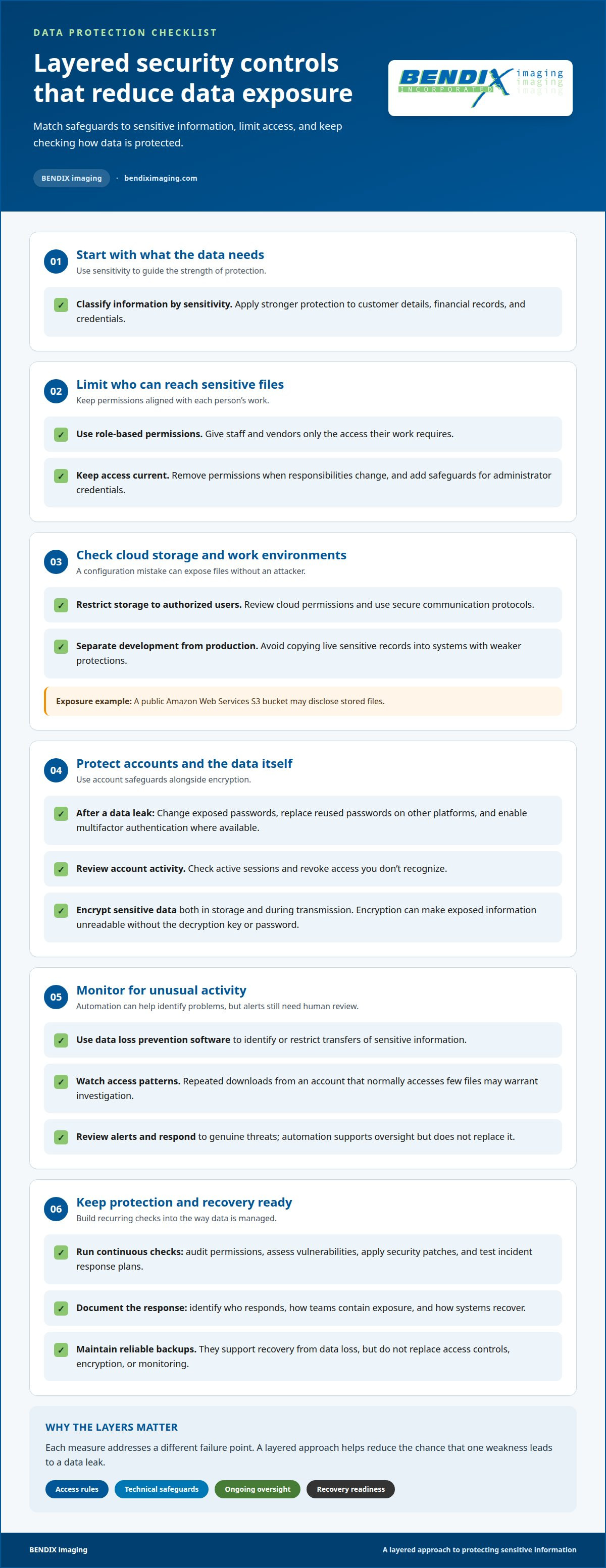
Effective data security combines clear access rules, technical safeguards, and ongoing oversight. Classify information by sensitivity, then apply stronger protection to customer details, financial records, and credentials. This helps teams match safeguards to the risks. Because a data leak can expose files through mistakes as well as attacks, controls should cover routine work and unusual activity.
How can you protect accounts after a data leak? Change exposed passwords, replace reused passwords on other platforms, and enable multifactor authentication where available. Review active sessions and revoke access you don’t recognize.
Cloud misconfigurations can expose sensitive data even when a provider has security measures in place. For example, a public Amazon Web Services S3 bucket may disclose stored files. Restrict storage access to authorized users, review permissions, and use secure communication protocols. Keep development environments separate from production data. Avoid copying live sensitive records into systems with weaker protections.
Strong safeguards also limit what each account can access. Use role-based permissions so staff and vendors receive only the access their work requires. Remove access when responsibilities change, and add safeguards for administrator credentials. Encrypt sensitive data both in storage and during transmission. Encryption can make exposed information unreadable without the decryption key or password.
Automated security tools help teams identify problems across complex systems. Data loss prevention software can identify or restrict transfers of sensitive information, while monitoring tools flag unusual access patterns. For example, repeated downloads from an account that normally accesses few files may warrant investigation. Automation supports oversight, but teams still need to review alerts and respond to genuine threats.
Build continuous checks into data protection: audit permissions, assess vulnerabilities, apply security patches, and test incident response plans. Document who responds, how teams contain exposure, and how systems recover. Reliable backups support recovery from data loss, but they don’t replace access controls, encryption, or monitoring. Each measure addresses a different failure point. A layered approach helps reduce the chance that one weakness leads to a data leak.
Causes of data leaks
Exposure can start with a technical weakness, a rushed decision, or deliberate misuse. Knowing the pathway helps teams contain threats and address the cause, not just the leaked files.
Technical Causes of Data Leaks
Technical causes include unpatched software, system vulnerabilities, exposed repositories, and cloud settings that allow public access. An attacker may exploit an unpatched storage system, while a configuration mistake can expose files without an attack. Search engines may then index information made public through a system error, making sensitive records easier to find. These pathways matter because each requires a different response, from fixing permissions to closing a vulnerability.
A 2010 example shows how one storage setting can affect a large list: a Democratic Senatorial Campaign Committee employee uploaded approximately 6.2 million email addresses to a publicly accessible Amazon S3 bucket. Another cloud storage exposure involved 48 million LocalBlox records. These cases show why teams need to track where information is stored, who can access it, and whether a repository is publicly visible.
Human Causes of Data Leaks
Human causes include accidental sharing, mishandling devices, weak security practices, and intentional insider actions. A worker who takes files home on a lost device may expose them if the device is stored insecurely. Phishing and social engineering can also trick staff into revealing credentials or opening a path for attacks. Clear procedures help employees recognize sensitive information and report suspicious requests before exposure spreads.
Insider threats can be deliberate, too. In November 2021, a former employee at a Georgia medical center downloaded private data to a personal USB drive with the intent to leak it. Vendor errors can create similar risks if external access remains after work ends. Assigning access by role, removing permissions when duties change, and documenting known threats gives teams practical steps to reduce misuse. When exposure occurs, incident plans help responders contain it and investigate whether the cause was error, compromise, or intent.
What should I do immediately if my data was leaked?
Act quickly, but preserve evidence before changing systems. A clear response can limit further exposure and help establish which records, accounts, or devices were affected.
- Contain the exposure. If a cloud folder or repository is public, restrict access and disable exposed sharing links. For a lost device, report it internally and use available management controls to block access. Avoid deleting files or logs that may help explain what happened.
- Secure affected accounts. Change exposed passwords from a trusted device, starting with the account connected to the leaked information. Replace reused passwords on other platforms, enable multifactor authentication where available, and sign out unfamiliar active sessions. If credentials were exposed, check for unexpected account changes or activity.
- Preserve details. Record when the exposure was found, which systems were involved, and what access was changed. Keep relevant alerts, messages, and system logs. For example, note whether a shared document was publicly accessible or sent to an unintended recipient.
- Assess the scope. Identify the types of information involved, the affected individuals, and how the exposure occurred. Separate confirmed findings from unanswered questions. A compromised login may require reviewing account activity, while an exposed storage folder calls for checking its permissions and access history.
- Coordinate the response. Assign an incident lead, involve the appropriate technical and business teams, and document containment actions. If customer, employee, or regulated information may be involved, route the incident through the organization’s established response and notification process. Keep communications accurate and consistent.
After immediate containment, address the underlying weakness. Revoke unnecessary permissions, patch affected systems, and monitor for renewed access or suspicious activity. A written incident record helps teams track decisions, recovery work, and remaining risks. For support strengthening safeguards after exposure, request cybersecurity assistance.
BENDIX imaging: Data Backup and Recovery
BENDIX imaging provides Data Backup and Recovery to help businesses prepare for data loss and restore operations after disruption. Turn to this service when existing backups need attention, recovery planning is unclear, or an incident raises questions about restoring critical files.
Backups support recovery, but they don’t prevent unauthorized access or fix the weakness that exposed information. Pairing recovery planning with Cyber Security and Managed IT Services can help address both resilience and protection. BENDIX imaging helps businesses consider these needs as part of their broader IT environment, with the approach shaped around the systems and data involved.
Contact BENDIX imaging to discuss Data Backup and Recovery for your business.
Make data protection part of daily operations
Security is strongest when responsibility continues after an incident closes. Give someone clear ownership of access reviews, staff awareness, and recovery planning, then revisit those practices as systems and business needs change. This keeps protection connected to daily decisions instead of treating a data leak as an isolated technical problem.
BENDIX imaging offers Cyber Security, Managed IT Services, and Artificial Intelligence (AI) Consulting to support businesses with technology and security needs in Watertown, Brookings, Sioux Falls, Huron, and Montevideo. These services can help organizations address risk within their broader IT environment and plan for changes that affect data protection. Choose a next step that fits the systems, information, and operational concerns your organization needs to address.
Contact BENDIX imaging today to discuss your business’s technology and security needs. A considered plan can help your team move forward with greater clarity and confidence.
Frequently Asked Questions
What Do Cybercriminals Look For in Leaked Data?
Cybercriminals look for information they can use to access accounts, impersonate people, or target organizations. Email addresses paired with passwords can support attempts to sign in elsewhere, especially if credentials were reused. Personal details can make phishing messages more convincing, while business documents may reveal internal processes or contacts. Treat unexpected messages that reference familiar names, accounts, or recent events with caution.
What is a data leak and how does it happen?
A data leak occurs when confidential information becomes accessible outside its intended setting. It may happen through a public cloud folder, an incorrectly shared document, or a lost device containing work files. Not every exposure begins with an attack. For instance, an employee could send a spreadsheet to the wrong recipient. The key question is which information became accessible and who could reach it.
What is the difference between a data leak and a data breach?
A data leak describes unintended exposure, while a data breach generally involves information being accessed or taken without authorization. The events can overlap: an intruder might access a company account and then publish its files. By contrast, an accidentally shared document may be exposed without an attacker. Distinguishing the event helps teams investigate whether the issue came from a mistake, an intrusion, or both.
What types of personal information are commonly exposed in data leaks?
Exposed personal information can include names, contact details, account credentials, financial records, health information, and private communications. The exact mix depends on the system or file involved. For example, a customer database may contain contact and account details, while a workplace folder could include employee records. Even an email address can help someone craft a targeted message, particularly when paired with other personal details.
How can I check whether my email or personal information was leaked?
Start by reviewing messages from organizations whose accounts or services may hold your information, and look for clear details about affected records. Check the account’s security notices and recent activity through its official app or by typing its known address yourself. Be wary of unsolicited messages claiming to reveal a leak, especially if they demand payment, passwords, or verification codes.
What are the risks of identity theft and financial fraud after a data leak?
Exposed details can help criminals impersonate you, attempt account access, or make phishing messages seem credible. Financial information may be used in fraud attempts, while personal identifiers can support identity theft. Watch for unfamiliar account activity, unexpected password-reset messages, or charges you don’t recognize. Contact the relevant financial institution or account provider through a trusted channel if you spot suspicious activity.
{"@context":"https://schema.org","@type":"FAQPage","mainEntity":[{"@type":"Question","name":"What Do Cybercriminals Look For in Leaked Data?","acceptedAnswer":{"@type":"Answer","text":"Cybercriminals look for information they can use to access accounts, impersonate people, or target organizations. Email addresses paired with passwords can support attempts to sign in elsewhere, especially if credentials were reused. Personal details can make phishing messages more convincing, while business documents may reveal internal processes or contacts. Treat unexpected messages that reference familiar names, accounts, or recent events with caution."}},{"@type":"Question","name":"What is a data leak and how does it happen?","acceptedAnswer":{"@type":"Answer","text":"A data leak occurs when confidential information becomes accessible outside its intended setting. It may happen through a public cloud folder, an incorrectly shared document, or a lost device containing work files. Not every exposure begins with an attack. For instance, an employee could send a spreadsheet to the wrong recipient. The key question is which information became accessible and who could reach it."}},{"@type":"Question","name":"What is the difference between a data leak and a data breach?","acceptedAnswer":{"@type":"Answer","text":"A data leak describes unintended exposure, while a data breach generally involves information being accessed or taken without authorization. The events can overlap: an intruder might access a company account and then publish its files. By contrast, an accidentally shared document may be exposed without an attacker. Distinguishing the event helps teams investigate whether the issue came from a mistake, an intrusion, or both."}},{"@type":"Question","name":"What types of personal information are commonly exposed in data leaks?","acceptedAnswer":{"@type":"Answer","text":"Exposed personal information can include names, contact details, account credentials, financial records, health information, and private communications. The exact mix depends on the system or file involved. For example, a customer database may contain contact and account details, while a workplace folder could include employee records. Even an email address can help someone craft a targeted message, particularly when paired with other personal details."}},{"@type":"Question","name":"How can I check whether my email or personal information was leaked?","acceptedAnswer":{"@type":"Answer","text":"Start by reviewing messages from organizations whose accounts or services may hold your information, and look for clear details about affected records. Check the account’s security notices and recent activity through its official app or by typing its known address yourself. Be wary of unsolicited messages claiming to reveal a leak, especially if they demand payment, passwords, or verification codes."}},{"@type":"Question","name":"What are the risks of identity theft and financial fraud after a data leak?","acceptedAnswer":{"@type":"Answer","text":"Exposed details can help criminals impersonate you, attempt account access, or make phishing messages seem credible. Financial information may be used in fraud attempts, while personal identifiers can support identity theft. Watch for unfamiliar account activity, unexpected password-reset messages, or charges you don’t recognize. Contact the relevant financial institution or account provider through a trusted channel if you spot suspicious activity."}}]}


