

A message can pass one email check and still fail another. DKIM and SPF help receiving mail servers assess whether a message is authorized and whether its signed content has been altered; DMARC connects those results to the domain shown in the sender’s address and sets a policy for failures. Together, they help limit spoofing, but they don’t make every message trustworthy.
It’s easy to assume an email signature remains valid wherever a message goes. In practice, changes to content covered by a DKIM signature, such as an added footer or altered message text, can cause verification to fail. This matters when legitimate email is forwarded, filtered, or modified along the way.
This guide explains what SPF, DKIM, and DMARC each check, how their results work together, and what happens when authentication fails. You’ll also learn why message changes can affect a DKIM signature, helping you understand the checks that protect business email and the delivery problems a misconfiguration can cause.
Key Takeaways
- Learn what SPF, DKIM, and DMARC each verify, and how their distinct checks fit together to help authenticate business email.
- Understand how DMARC uses aligned authentication results to guide recipients’ handling of messages that fail checks.
- See why edits to signed message content, including added footers, can cause DKIM verification to fail.
- Recognize how DNS record mistakes can disrupt legitimate email or leave a domain more exposed to spoofing.
What are DMARC, DKIM, and SPF?
SPF, DKIM, and DMARC are email authentication methods that help receiving providers assess whether a sender is legitimate. Their DNS records and results must match your domain’s actual email-sending setup.
Configuring Authentication Records in DNS
DNS authentication records tell receiving mail servers which senders your domain authorizes and how to verify messages. To configure Google Workspace or Microsoft 365, use the provider’s setup details to add the relevant SPF TXT record and DKIM public-key TXT record in your domain’s DNS. The exact record values depend on the sending service. An incorrect domain or selector can prevent DKIM verification, while an incomplete SPF record can omit an authorized sender.
Checking Authentication Results in Email Headers
Email headers show whether a receiving provider reports SPF or DKIM as passing or failing. In Gmail, open the message details and choose “Show original”; other email clients may offer a similar header view. Find the authentication results and compare the domain and DKIM selector with your DNS configuration. A missing record, typo, or selector mismatch can explain a failed result and point to a setup error.
SPF Record Rules and Lookup Limits
An SPF record lists the IP addresses of servers authorized to send email for a domain, and SPF is defined in RFC 7208. An SPF evaluation has a hard limit of 10 DNS lookups. Keep the record aligned with your real sending services; unnecessary or outdated entries can complicate evaluation, while exceeding the lookup limit can cause SPF to fail. Review every service that sends as your domain before changing the record.
Authentication Requirements and Failures
For Google and Yahoo bulk senders sending more than 5,000 emails per day, requirements that began in February 2024 include SPF, DKIM, and a DMARC policy. When SPF or DKIM fails, DMARC can direct the recipient to deliver, quarantine, or reject the message, depending on its policy. For Google Workspace or Microsoft 365, configure the provider’s supplied DNS records, then inspect message headers for authentication results.
How SPF, DKIM, and DMARC work together
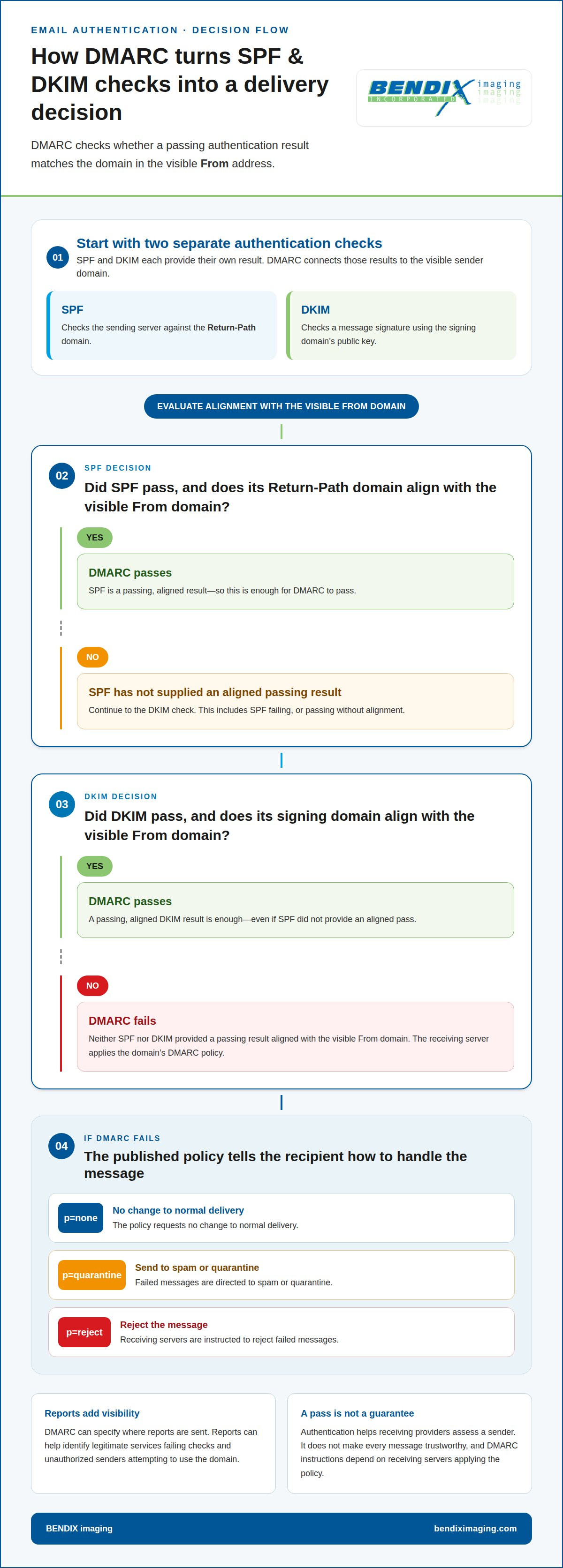
SPF and DKIM provide separate authentication results; DMARC connects them to the visible sender address. This lets receiving servers apply the domain owner’s policy and report authentication outcomes.
DMARC Alignment with the From Header
DMARC alignment checks whether a passing SPF or DKIM result matches the domain shown in the email’s visible From header. This helps distinguish legitimate messages from attacks that imitate a trusted sender. SPF checks the sending server against the Return-Path domain, not the visible From address. DKIM’s signing domain can provide the aligned result instead. Either method can satisfy DMARC when its domain aligns with the visible From domain.
For example, an email may pass SPF for a sending service but fail DMARC if that service’s domain doesn’t align with the visible From domain. A passing, aligned DKIM result can still allow DMARC to pass.
DNS Storage for Authentication Records
SPF, DKIM, and DMARC records are published as DNS TXT records associated with a domain. Each has a different role: SPF identifies authorized sending servers, DKIM makes a public key available for signature checks, and DMARC publishes the domain owner’s handling and reporting policy. Receiving servers retrieve these records during authentication.
This distinction matters when several platforms send email for one business. The records must describe the same legitimate sending setup; otherwise, a provider may see a mismatch between a message and the domain’s published instructions.
DMARC Reporting and Enforcement
DMARC tells receiving servers how to handle messages that fail aligned authentication and can specify where to send reports. These reports help domain owners identify legitimate services that fail checks and unauthorized senders trying to use the domain.
A policy can progress from p=none, which requests no change to normal delivery, to p=quarantine, which directs failed messages to spam or quarantine. With p=reject, receiving servers are instructed to reject failed messages. This progression gives administrators visibility before stronger enforcement affects delivery. Reports can reveal unexpected failures, but DMARC instructions depend on receiving servers applying the policy.
DKIM cryptographic signatures
DKIM, short for DomainKeys Identified Mail, uses public-key cryptography to attach a signature to an email. Receiving servers use the signature and the sender domain’s public key to check the message’s integrity and verify the signing domain.
DKIM Signatures and DNS Selectors
A DKIM signature includes a selector that tells receiving servers which public key to retrieve for verification. The selector appears after s= in the DKIM-Signature header; for example, the selector mail with example.com points to mail._domainkey.example.com. This identifier lets a domain use multiple DKIM keys without confusing verification.
Selectors also matter during key changes. Rotating DKIM keys approximately every 6-12 months can limit how long a key remains in use. Google requires DKIM keys of at least 1024 bits and strongly recommends 2048-bit keys for all senders. The configured selector and published public key must correspond to the signing key, or receiving servers can’t verify the signature.
Verifying Message Integrity
To verify a signature, a receiving server reads the selector from the message, retrieves its public key from DNS, and checks the signature. Because the signature covers message content and selected headers, verification tests whether those signed parts remain consistent with the sender’s cryptographic signature.
A successful check supports two specific conclusions: the signed content hasn’t changed in a way that breaks verification, and the signing domain controlled the corresponding private key. It doesn’t prove that the message is harmless or that the visible sender is trustworthy. For example, a message correctly signed by a compromised account can still contain malicious content.
Forwarding can preserve DKIM if the message remains unaltered, because the original signature can still be verified. But a change to signed content can cause the check to fail, even when the original sender was legitimate. Recipients and administrators should treat DKIM as one authentication signal, not a complete assessment of a message’s safety.
DKIM limitations when messages are modified
DKIM, or DomainKeys Identified Mail, attaches a digital signature to an email. Receiving servers use the sender’s public key to check the signed content and selected headers. If a mail gateway changes a signed part, verification can fail, even when the original sender was authorized. The practical limit is clear: a DKIM pass describes the message as received, not every change made after signing.
Common examples include a company adding a legal footer, a mailing platform rewriting links, or a gateway changing message formatting. If an alteration affects content covered by the signature, the recipient’s server may report DKIM failure. Not every edit causes failure; the result depends on whether the changed material is part of what the signature checks. This distinction helps separate a delivery configuration problem from evidence of deliberate tampering.
Forwarding shows why authentication results need context. A forwarded message may fail Sender Policy Framework checks because the forwarding server isn’t authorized by the original sender’s SPF record. DKIM can still pass if the message remains unaltered. If an intermediary adds text or changes signed content, the message can lose its DKIM pass. DMARC can pass when either SPF or DKIM passes and aligns with the visible From domain, so one intact, aligned method may still authenticate the message.
When a DKIM result fails, identify the receiving system and the path the message took. Compare the original message with the delivered copy, looking for added footers, rewritten links, or changed formatting. Then review whether the sender’s signing system or an intermediary made those changes. This helps protect email security without treating every failed digital signature as proof of an attack. Get help reviewing email security risks when message changes repeatedly disrupt authentication.
BENDIX imaging
BENDIX imaging helps businesses assess email authentication as part of their broader IT and security needs. Turn to the team when SPF or DKIM results keep failing, legitimate messages have delivery problems, or you need to consider several sending systems together. A useful review looks beyond a single DNS record to how email processes connect with your wider environment.
Through Cyber Security, Network Security, and Managed IT Services, BENDIX imaging helps businesses address technology and security concerns in context. This can help you understand how authentication supports business email protection and reduces exposure to spoofing risks.
Contact BENDIX imaging to discuss your business email security needs.
Build Email Authentication Into Your Next Change
Email authentication isn’t a one-time DNS task. Treat DKIM and SPF as part of change management whenever your business adds a sending platform, adjusts message templates, or changes email routing. Even a small operational change can affect authentication, so assign clear ownership for reviewing its impact before rollout.
That discipline gives your security planning a practical path forward. BENDIX imaging offers Cyber Security, Managed IT Services, and Artificial Intelligence (AI) Consulting to support broader technology and security needs. Include authentication concerns in that wider conversation when email behavior changes or delivery problems recur. The goal is a stable process that accounts for your systems and the people who depend on them.
As your email environment evolves, keep ownership, DNS record changes, and message-handling workflows connected. This makes authentication decisions easier to track and gives your team a clearer basis for responding to failed checks. Take the next step with Contact BENDIX imaging and keep your business email security moving forward.
Frequently Asked Questions
How does SPF work?
SPF lets a receiving mail server compare the sending server’s IP address with the sending domain’s published authorization. The server evaluates the domain in the message’s Return-Path, which may differ from the visible From address. For example, forwarding can change the sending server, causing SPF to fail even when the original sender was legitimate. SPF is one signal, not proof that an email is safe.
What Is Sender Policy Framework (SPF)?
Sender Policy Framework (SPF) is an email authentication standard that identifies which sending servers a domain authorizes. A domain owner publishes the policy in DNS so receiving servers can evaluate messages claiming that domain. SPF is defined in RFC 7208. It focuses on the sending server and Return-Path domain, so it doesn’t establish that the visible sender name or message content is trustworthy.
What is Domain-based Message Authentication, Reporting & Conformance (DMARC)?
DMARC, or Domain-based Message Authentication, Reporting, and Conformance, lets a domain owner publish instructions for messages that fail aligned SPF or DKIM checks. It can also specify where receiving systems should send authentication reports. For example, reports can help distinguish a newly added business mailing platform from an unauthorized sender imitating the company’s domain, informing how the owner manages the published policy.
What is Domainkeys Identified Mail (DKIM)?
DomainKeys Identified Mail (DKIM) adds a cryptographic signature to an email using the sender domain’s private key. A receiving server checks it against the corresponding public key published in DNS. The signature can help show whether signed message content changed after signing. A valid result doesn’t prove the message is harmless, so recipients should still assess unexpected requests, attachments, and links carefully.
Can DMARC pass with just SPF?
Yes. DMARC can pass when SPF passes and the authenticated SPF domain aligns with the domain in the visible From address. An SPF pass alone isn’t enough if those domains don’t align. For example, a third-party sending service might be authorized under its own domain but not aligned with your From domain. In that case, DMARC needs an aligned DKIM pass instead.
DKIM vs SPF: What’s the difference and do you need both?
SPF checks whether the sending server is authorized by the Return-Path domain; DKIM verifies a cryptographic signature associated with the message and signing domain. Using DKIM and SPF together is recommended because they check different parts of authentication. If forwarding changes the server and SPF fails, an intact, aligned DKIM signature may still support DMARC authentication. Neither check alone proves a message is safe.
{"@context":"https://schema.org","@type":"FAQPage","mainEntity":[{"@type":"Question","name":"How does SPF work?","acceptedAnswer":{"@type":"Answer","text":"SPF lets a receiving mail server compare the sending server’s IP address with the sending domain’s published authorization. The server evaluates the domain in the message’s Return-Path, which may differ from the visible From address. For example, forwarding can change the sending server, causing SPF to fail even when the original sender was legitimate. SPF is one signal, not proof that an email is safe."}},{"@type":"Question","name":"What Is Sender Policy Framework (SPF)?","acceptedAnswer":{"@type":"Answer","text":"Sender Policy Framework (SPF) is an email authentication standard that identifies which sending servers a domain authorizes. A domain owner publishes the policy in DNS so receiving servers can evaluate messages claiming that domain. SPF is defined in RFC 7208. It focuses on the sending server and Return-Path domain, so it doesn’t establish that the visible sender name or message content is trustworthy."}},{"@type":"Question","name":"What is Domain-based Message Authentication, Reporting & Conformance (DMARC)?","acceptedAnswer":{"@type":"Answer","text":"DMARC, or Domain-based Message Authentication, Reporting, and Conformance, lets a domain owner publish instructions for messages that fail aligned SPF or DKIM checks. It can also specify where receiving systems should send authentication reports. For example, reports can help distinguish a newly added business mailing platform from an unauthorized sender imitating the company’s domain, informing how the owner manages the published policy."}},{"@type":"Question","name":"What is Domainkeys Identified Mail (DKIM)?","acceptedAnswer":{"@type":"Answer","text":"DomainKeys Identified Mail (DKIM) adds a cryptographic signature to an email using the sender domain’s private key. A receiving server checks it against the corresponding public key published in DNS. The signature can help show whether signed message content changed after signing. A valid result doesn’t prove the message is harmless, so recipients should still assess unexpected requests, attachments, and links carefully."}},{"@type":"Question","name":"Can DMARC pass with just SPF?","acceptedAnswer":{"@type":"Answer","text":"Yes. DMARC can pass when SPF passes and the authenticated SPF domain aligns with the domain in the visible From address. An SPF pass alone isn’t enough if those domains don’t align. For example, a third-party sending service might be authorized under its own domain but not aligned with your From domain. In that case, DMARC needs an aligned DKIM pass instead."}},{"@type":"Question","name":"DKIM vs SPF: What’s the difference and do you need both?","acceptedAnswer":{"@type":"Answer","text":"SPF checks whether the sending server is authorized by the Return-Path domain; DKIM verifies a cryptographic signature associated with the message and signing domain. Using DKIM and SPF together is recommended because they check different parts of authentication. If forwarding changes the server and SPF fails, an intact, aligned DKIM signature may still support DMARC authentication. Neither check alone proves a message is safe."}}]}


