

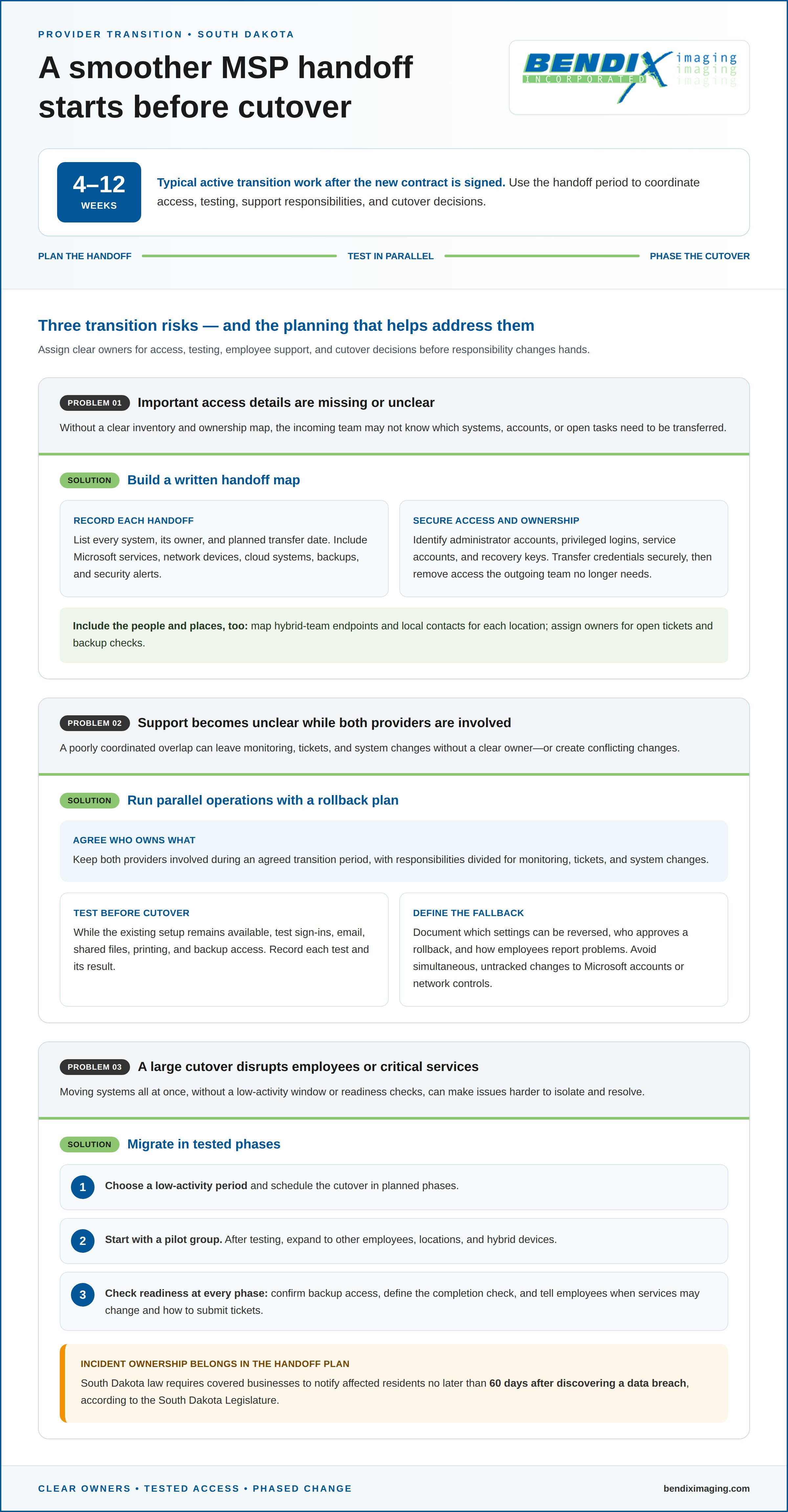
A provider change is manageable when the work is planned, but it isn’t an instant handoff. Managed IT provider transitions commonly take 4-12 weeks of active work after the new contract is signed. How to switch managed IT providers in South Dakota without avoidable disruption comes down to coordinating access, backups, systems, and support responsibilities before the cutover.
It’s reasonable to worry about downtime, lost information, or employees being left without support while providers hand over responsibility. The transition becomes harder when no one owns the timeline or important details are missing. A clear plan can reduce disruption and help your team move steadily to the new service.
This guide explains how to switch managed IT providers in South Dakota, what can complicate the change, and how to limit interruptions. You’ll learn what information to prepare, what to assess in a new provider, and how to align the transition with your business priorities so the incoming team can support the way your organization works.
Key Takeaways
- Build a written transition plan with clear owners, milestones, and employee updates to help limit disruption.
- Review contract terms, cancellation requirements, and auto-renewals early so the handoff is properly timed.
- Assess security practices, backup recovery, and support processes before transferring responsibility for your systems.
- Give the incoming MSP a clear picture of your operations and upcoming business goals so its support fits your needs.
How can a new MSP help your business avoid downtime when changing providers?
Reduce disruption by assigning clear owners for access, testing, and cutover decisions. A written plan helps coordinate each location, hybrid employee, and system handoff.
-
How Your New MSP Plans the Provider Handoff
Create a written handoff map listing each system, its owner, and the planned transfer date. Before taking responsibility, the incoming provider should identify administrator accounts, privileged logins, service accounts, and recovery keys. Transfer credentials securely, then remove access the outgoing team no longer needs. Include Microsoft services, network devices, cloud systems, backups, and security alerts. Map remote endpoints for hybrid teams and local systems and contacts for each location. Assign owners for open tickets and backup checks.
-
How Your New MSP Runs Parallel Operations and Plans Rollback
Keep both providers involved during an agreed transition period, with responsibilities clearly divided for monitoring, tickets, and system changes. The incoming provider can test sign-ins, email, shared files, printing, and backup access while the existing setup remains available. Record each test and its result. Before cutover, document which settings can be reversed, who approves a rollback, and how employees should report problems. Avoid simultaneous, untracked changes to Microsoft accounts or network controls. A clear decision process helps the team respond if a key service fails.
-
How Your New MSP Phases the Migration to Limit Downtime
Schedule the cutover during a low-activity period and move systems in planned phases. The new MSP can begin with a pilot group, then expand to other employees, locations, and hybrid devices after testing. Confirm backup access before changing systems, and define the completion check for each phase. Tell employees when services may change and how to submit tickets. South Dakota law requires covered businesses to notify affected residents no later than 60 days after discovering a data breach, according to South Dakota Legislature. Include incident ownership in the handoff plan.
Is it hard to switch managed IT providers?
The handoff takes coordination, particularly when contract deadlines overlap with technical work. A new provider can help map those obligations before you set the transition date.
Transition costs vary with the number of users, infrastructure complexity, and migration scope. Setup and migration requirements also affect the estimate, so ask for a clear proposal based on your environment.
-
Review Contract Terms and Notice Deadlines
Have the incoming MSP review the current contract’s cancellation clauses, renewal dates, and notice requirements. Notice periods of 30-90 days are common, but your contract sets the actual deadline. Check for auto-renewal language, early termination terms, and responsibilities during discovery. Avoid giving notice before aligning the end date with the planned handoff, or support may lapse while systems are still running.
-
Clarify Termination and Transition Obligations
Ask the incoming MSP to map termination duties against the transition plan. Identify who supplies system records, administrator passwords, Microsoft 365 details, and open ticket information. Include the return or transfer of company data, account access, and any equipment covered by the contract. For defense contractors, align the handoff with applicable CMMC obligations. On July 13, 2026, the Department of Defense announced a suspension of Phase II requirements scheduled for November 10, 2026; Phase I self-assessment requirements remain in place.
-
Align Contract Timing with Support Continuity
Set the new agreement’s start date before the old service ends. The incoming MSP should coordinate responsibilities for monitoring, user support, and unresolved tickets during any overlap. Managed IT transitions commonly involve 4-12 weeks of active work after signing the new contract. Use that period to clarify which provider handles each system and when. Don’t let a renewal deadline force a cutover before access and support arrangements are ready.
-
Estimate Setup and Migration Fees
Request a written scope that separates onboarding, configuration, data migration, and any ongoing managed service. Costs depend on the number of users, locations, systems, and the condition of existing documentation. Ask how changes to scope affect the estimate, and identify tasks that could delay completion. If you’re planning a provider change alongside ongoing support, managed IT services can be part of the continuity plan.
How to evaluate a new provider's security, certifications, and support
Assess documented security controls, support responsibilities, and how the transition will protect access. Compare the plan with your systems, locations, and compliance needs. Looking at established managed IT and cybersecurity frameworks, such as those detailed at cloudchoicetech.com, can help organizations benchmark what comprehensive business protections should entail during provider evaluations.
For email, cloud services, network systems, and cybersecurity tools, the incoming provider should map dependencies, stage each migration, test access and backups, then cut over in phases. For businesses in Watertown, Brookings, Sioux Falls, Huron, and Montevideo, clarify remote monitoring, escalation paths, and onsite support expectations for each location before work begins.
- Ask how the provider handles account access, incident response, security updates, and backup recovery, and request details about relevant security practices. A useful transition assessment identifies an owner for each responsibility and explains how coverage will be reviewed during the handoff, not only after cutover.
- Map user accounts, administrator privileges, and security tools before transferring responsibility. The incoming provider should identify accounts associated with the outgoing team, remove access when those duties end, and confirm that remaining access is limited to what each person needs. Test endpoint protection, identity controls, and monitoring alerts to find gaps before the outgoing provider disengages.
- Run the new monitoring and backup processes alongside existing protections during the handoff. Assign owners for reviewing alerts, checking backups, and responding to incidents, then test that alerts reach the right team. Record results and unresolved issues. This parallel review can reveal missing devices or systems before responsibility for responding changes.
- Match compliance requirements to the contract and information your organization handles. Defense contractors supporting Ellsworth Air Force Base must protect federal contract information to the standard referenced by DFARS clause 252.204-7012, which points to NIST SP 800-171, according to the U.S. Department of Defense. Have the new MSP document relevant controls and responsibilities throughout the transition.
- Review security and access at each transition milestone, including after the outgoing provider’s accounts are removed. Confirm that backups can be restored, monitoring covers remote employees, and support tickets reach assigned owners. For rural sites, establish how issues are triaged and when onsite work is needed, without leaving response expectations ambiguous.
Listening to understand business needs before transitioning
Begin with a conversation about business priorities, daily workflows, and your organization’s goals for the next six months. The incoming provider can use that context to shape a written transition plan.
- Document business priorities. Meet with business and department leaders to identify critical systems, busy periods, and recurring problems. For example, month-end finance work may need different timing from a field team’s device setup. Record these priorities so technical decisions support daily operations.
- Assess the current environment. Schedule the initial assessment for weeks 1 to 2. The new MSP reviews existing documentation, devices, applications, support tickets, and dependencies. It should identify gaps and confirm what is running before proposing changes. This discovery gives both providers a shared view of the work.
- Map vendors, licenses, and administration. List software subscriptions, renewal dates, license owners, and administrator accounts. The incoming MSP should identify which agreements transfer, which remain with the business, and who controls each vendor portal. Include Microsoft 365 and other essential services, then plan credential changes without interrupting users.
- Coordinate with the outgoing provider. Assign responsibilities for records, access, open tickets, and vendor handoffs. The new MSP should agree on practical milestones with the outgoing team and flag dependencies early. Keep the plan in writing, with owners and dates, so no transfer relies on informal assumptions.
- Set the migration pace and acceptance checks. Break the work into phases based on business impact. For each change, document who approves it, how the new setup will be tested, and what confirms completion. This keeps technical progress aligned with agreed business priorities.
- Stabilize the environment. During days 1-30, focus on gaining control and stabilizing services. The new provider tracks emerging issues, unresolved tickets, and employee feedback. Use those findings to address operational friction before making broader changes.
- Set the next review points. During days 31-60, focus on removing friction and reducing noise. During days 61-90, plan the next 12-18 months with business owners. Plan your managed IT transition around documented goals, responsibilities, and tested milestones.
BENDIX imaging
BENDIX imaging helps businesses plan managed IT transitions around their operations, security needs, and priorities. Turn to the team for support assessing your current environment, coordinating the handoff, or shaping a managed IT relationship around your business.
Managed IT Services, Cyber Security, and Network Security address core support and protection needs. If the transition raises questions about applying AI to business processes, BENDIX imaging’s AI Consulting can help you consider those opportunities in context. Priorities depend on your systems, existing agreements, and employees’ needs.
Bring your transition questions and business goals to BENDIX imaging. Contact BENDIX imaging to discuss your next steps.
Make Your Next IT Chapter More Intentional
Treat the provider change as an opportunity to set clearer expectations for technology decisions. A plan for how to switch managed IT providers in South Dakota should connect the handoff to how your business wants to operate, not simply preserve existing systems. Once responsibilities move, keep business ownership clear: identify who approves major changes, tracks unresolved needs, and ensures technology decisions support your goals.
BENDIX imaging provides Managed IT Services, Cyber Security, and Artificial Intelligence (AI) Consulting to support IT operations, protection, and technology planning. If you’re preparing for a transition or rethinking how technology supports your team, contact BENDIX imaging to clarify what matters most and what should come first.
Contact BENDIX imaging to discuss your IT needs. Take the next step with a clear view of your priorities and move forward with confidence.
Frequently Asked Questions
How long does it take to switch?
The active transition can take 3-5 weeks for a cloud-first business with fewer than 25 users, or 6-10 weeks for 25-150 users with some on-premises servers. These estimates describe different environments, not fixed deadlines. The incoming MSP needs to account for system complexity, contract notice requirements, access handoffs, and testing before setting a practical schedule.
Can a new MSP switch providers without losing your data or documentation?
Organize records and validate key information before the handoff to reduce the risk of losing track of important details. For example, compare an application inventory with available system documentation, identify missing records, and confirm that important files are readable. Document what transferred, what remains outstanding, and who owns each follow-up before the outgoing provider’s access ends.
How can a new MSP manage the switch if your current provider owns your domain or licenses?
For each domain or software license, identify the account holder, administrator, renewal terms, and vendor. If an account is held in the outgoing provider’s name, transfer depends on the vendor’s process and the applicable agreement. The incoming provider can coordinate approvals and plan alternatives for services that cannot move immediately. Do not assume ownership transfers automatically.
How can your new MSP help communicate the IT provider change to employees?
A new MSP can prepare a clear employee notice that explains what is changing, when users may notice it, and how to report an issue. For example, the message can name the new ticket channel and clarify whether Microsoft 365 sign-in steps will change. The MSP can also help managers tailor notices for office, remote, and field employees, then share updates as milestones approach.
What steps does a new MSP take to switch managed IT providers in South Dakota?
A practical way to switch managed IT providers in South Dakota is to sequence the work around ownership and business risk. First, identify critical systems and decision-makers, then coordinate records and access with the outgoing team. Schedule transfers around vendor requirements, validate essential services, and document outstanding issues so business leaders can track decisions after the handoff.
What should a South Dakota business look for when comparing managed IT providers?
Compare how providers explain support responsibilities, security oversight, backup recovery, and communication during disruptions. Ask how they prioritize work and track unresolved issues. Local requirements matter too: businesses in Watertown, Brookings, Sioux Falls, Huron, and Montevideo should understand how remote support and any necessary onsite work fit their operations and locations.
{"@context":"https://schema.org","@type":"FAQPage","mainEntity":[{"@type":"Question","name":"How long does it take to switch?","acceptedAnswer":{"@type":"Answer","text":"The active transition can take 3–5 weeks for a cloud-first business with fewer than 25 users, or 6–10 weeks for 25–150 users with some on-premises servers. These estimates describe different environments, not fixed deadlines. The incoming MSP needs to account for system complexity, contract notice requirements, access handoffs, and testing before setting a practical schedule."}},{"@type":"Question","name":"Can a new MSP switch providers without losing your data or documentation?","acceptedAnswer":{"@type":"Answer","text":"Organize records and validate key information before the handoff to reduce the risk of losing track of important details. For example, compare an application inventory with available system documentation, identify missing records, and confirm that important files are readable. Document what transferred, what remains outstanding, and who owns each follow-up before the outgoing provider’s access ends."}},{"@type":"Question","name":"How can a new MSP manage the switch if your current provider owns your domain or licenses?","acceptedAnswer":{"@type":"Answer","text":"For each domain or software license, identify the account holder, administrator, renewal terms, and vendor. If an account is held in the outgoing provider’s name, transfer depends on the vendor’s process and the applicable agreement. The incoming provider can coordinate approvals and plan alternatives for services that cannot move immediately. Do not assume ownership transfers automatically."}},{"@type":"Question","name":"How can your new MSP help communicate the IT provider change to employees?","acceptedAnswer":{"@type":"Answer","text":"A new MSP can prepare a clear employee notice that explains what is changing, when users may notice it, and how to report an issue. For example, the message can name the new ticket channel and clarify whether Microsoft 365 sign-in steps will change. The MSP can also help managers tailor notices for office, remote, and field employees, then share updates as milestones approach."}},{"@type":"Question","name":"What steps does a new MSP take to switch managed IT providers in South Dakota?","acceptedAnswer":{"@type":"Answer","text":"A practical way to switch managed IT providers in South Dakota is to sequence the work around ownership and business risk. First, identify critical systems and decision-makers, then coordinate records and access with the outgoing team. Schedule transfers around vendor requirements, validate essential services, and document outstanding issues so business leaders can track decisions after the handoff."}},{"@type":"Question","name":"What should a South Dakota business look for when comparing managed IT providers?","acceptedAnswer":{"@type":"Answer","text":"Compare how providers explain support responsibilities, security oversight, backup recovery, and communication during disruptions. Ask how they prioritize work and track unresolved issues. Local requirements matter too: businesses in Watertown, Brookings, Sioux Falls, Huron, and Montevideo should understand how remote support and any necessary onsite work fit their operations and locations."}}]}


