

Firing your IT guy is more than a staffing decision: it can create legal, payroll, and security obligations. If you’re deciding what to do next after firing your IT guy, preserve relevant records, manage access to company systems, and review the employment agreement, termination policies, and applicable state rules. A termination may raise legal concerns if it involved discrimination, retaliation, or a breach of contract or policy.
Protecting company systems quickly matters, but rushing the employment process can leave important questions unanswered.
Learn when legal counsel may be prudent, how state labor laws can affect final pay and other obligations, and what to document during the transition. Next steps depend on why the employee was let go, whether a contract or union agreement applies, and the state where they worked. Start with those facts, then coordinate the technology handoff with the legal review.
Key Takeaways
- Review the reason for termination, any employment agreement, and applicable state rules to identify when legal counsel may be needed.
- Plan a coordinated shutdown of the former administrator’s accounts, devices, and remote connections to reduce unauthorized access.
- Preserve company data and audit logs before making system changes, so important records remain available for review.
- Prioritize changing credentials and security keys the departing administrator could access, including those tied to service accounts and certificates.
Seeking legal counsel
Legal counsel is an attorney who assesses whether a termination followed employment agreements and applicable law. If you’re deciding what to do next after firing your IT guy, preserve relevant messages, performance records, policies, and the termination timeline. These materials can help an attorney assess potential discrimination, retaliation, contract issues, or failures to follow employer procedures.
Wrongful termination means a firing that violates legal protections or an applicable agreement. In the United States, discrimination, retaliation for protected reporting, and certain labor-law violations can make a termination unlawful. A person fired because of discrimination must report it to the Equal Employment Opportunity Commission (EEOC) before suing. The U.S. Department of Labor says federal law provides eligible employees of covered employers up to 12 workweeks of unpaid leave during any 12-month period for specified family and medical reasons. If the termination followed leave, a safety complaint, or a report of illegal conduct, ask an employment attorney to assess the circumstances and timeline.
A managed service provider (MSP) provides ongoing IT management, a consultant handles defined advisory or technical work, and a replacement employee works directly for the business. For organizations where the departed employee oversaw proprietary systems or custom applications, development partners like sydeso.com can step in to build and manage tailored software solutions. What to do next after firing your IT guy may depend on whether you need ongoing operations support or a limited handover. Costs vary by scope, staffing model, and support needs, so there is no single typical price.
A data-exposure review examines records that may show access, copying, deletion, or sharing. Have an authorized investigator preserve and review identity-provider, email, cloud-storage, endpoint, and network logs. Compare the activity with the employee’s usual access and the termination timeline.
An IT handover checklist records system ownership, administrator accounts, vendors, backups, network diagrams, licenses, open incidents, and recovery procedures. Request existing documentation and identify gaps before routine operations depend on undocumented knowledge.
Business continuity is the plan for keeping essential work running during an IT disruption. Name an internal decision-maker, prioritize critical systems, and document escalation steps. During an outage, record symptoms and affected services, then follow established recovery procedures while preserving relevant logs.
Revoking Access to Systems and Devices After Termination
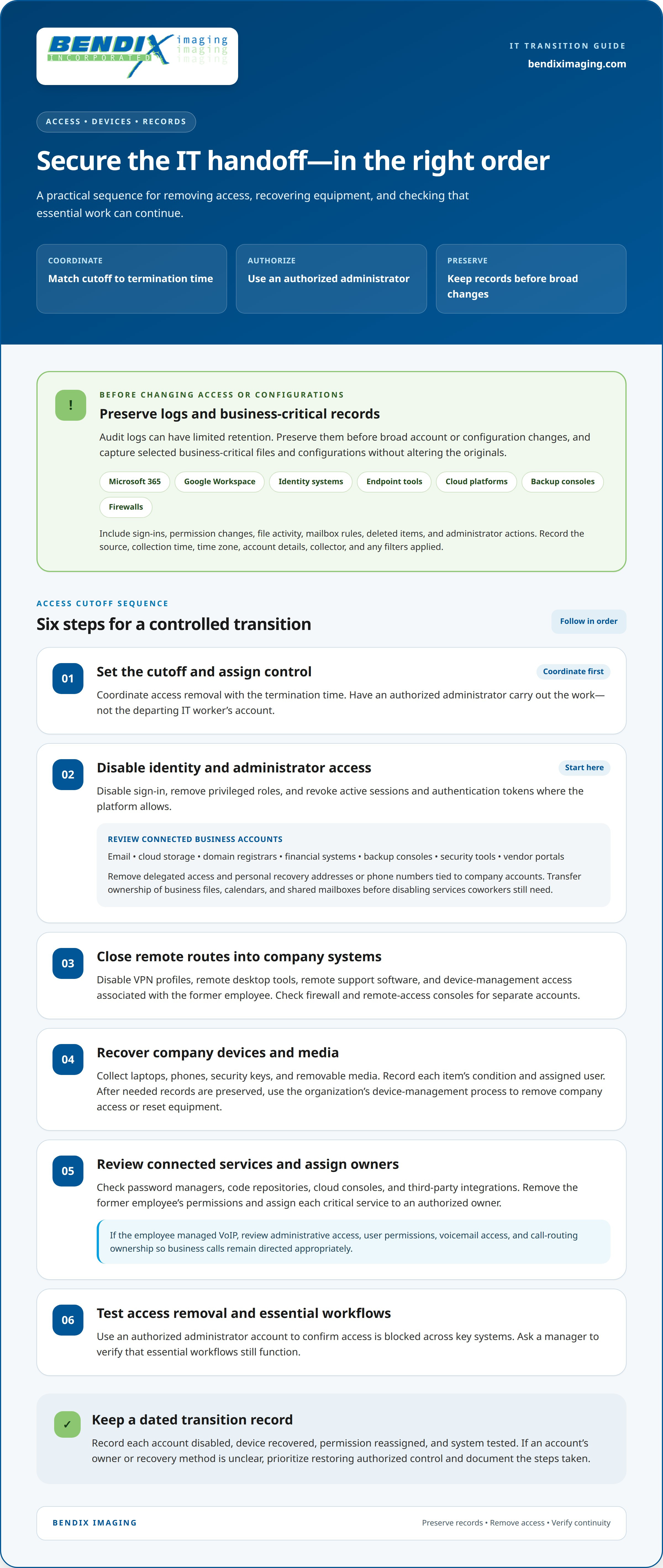
Access revocation means removing a former employee’s ability to reach company systems, accounts, and equipment. Coordinate the cutoff with the termination time, and use an authorized administrator rather than the departing IT worker’s account.
Start with identity and administrator access. Disable the employee’s sign-in account, remove privileged roles, and revoke active sessions and authentication tokens where the platform allows. Then review email, cloud storage, domain registrars, financial systems, backup consoles, security tools, and vendor portals. Remove delegated access and personal recovery addresses or phone numbers tied to company accounts. Transfer ownership of business files, calendars, and shared mailboxes before disabling services coworkers still need.
- Close remote routes. Disable VPN profiles, remote desktop tools, remote support software, and device-management access associated with the former employee. Check firewall and remote-access consoles for separate accounts.
- Recover devices. Collect company laptops, phones, security keys, and removable media. Record each item’s condition and assigned user. If equipment is damaged or requires physical refurbishment before being reassigned, technicians such as Pleasanton Computer Repair can service laptops, Macs, and mobile devices. After needed records are preserved, use the organization’s device-management process to remove company access or reset equipment.
- Review connected services. Check password managers, code repositories, cloud consoles, and third-party integrations. Remove the employee’s permissions and assign each critical service to an authorized owner.
- Test the cutoff. Use an authorized administrator account to confirm access is blocked across key systems. Ask a manager to verify that essential workflows still function.
VoIP accounts also need attention if the former administrator managed company phone settings. Review administrative access, user permissions, voicemail access, and call-routing ownership so business calls remain directed appropriately. VoIP system support can help address phone-system management as part of the transition.
Keep a dated record of every account disabled, device recovered, permission reassigned, and system tested. If you cannot secure a business account because its owner or recovery method is unclear, prioritize it and document the steps taken to restore authorized control.
How can you preserve company data and audit logs when an IT administrator leaves?
An audit log is a time-stamped record of activity in a system. Preserve it before making broad account or configuration changes, since retention settings may limit how long records remain available. A data snapshot is a point-in-time copy of selected information. Capture business-critical files and configurations without altering the originals.
Use an authorized administrator to export records from Microsoft 365, Google Workspace, identity systems, endpoint tools, cloud platforms, backup consoles, and firewalls. Include sign-ins, permission changes, file activity, mailbox rules, deleted items, and administrator actions. Keep the export’s source, collection time, time zone, and account details with the files.
- Preserve original records. Save exports in a restricted company location, separate from the former administrator’s accounts. Limit access to named custodians.
- Record collection steps. Note who exported each dataset, which system produced it, and any filters applied. This context helps reviewers interpret gaps or unusual activity.
- Protect integrity. Keep an untouched copy and create a working copy for analysis. A file hash, such as SHA-256, can help detect later changes to an exported file.
- Check retention controls. Review log-retention settings and backups in each platform. Preserve relevant records before changing policies or deleting accounts.
Create a preservation inventory that maps each source to its owner, export location, and access permissions. For example, link a cloud-storage activity export with the related identity-provider sign-in records. Matching timestamps and user identifiers can help establish the sequence of events. Keep original timestamps intact, and record any time-zone conversion separately.
If you find unusual deletion, forwarding, or access, preserve the related records before investigating further. Avoid asking the system to “clean up” suspicious activity, since changes can obscure what happened. Keep a dated log of exports, access to preserved copies, and any analysis performed. This makes later review clearer and more consistent.
How should you change passwords, API keys, certificates, and service account credentials after an IT admin leaves?
A password is a secret used to authenticate a person; an API key authorizes software to access another service. A certificate verifies identity or secures a connection, while a service account lets an application or process sign in. Inventory every credential the administrator could access, including cloud consoles, backup tools, domain services, code repositories, and vendor integrations.
Rotate credentials in a controlled sequence to keep business services running. First identify each credential’s owner, purpose, dependent systems, and recovery method. Then create replacement credentials, update authorized systems, test the connection, and revoke the old credential. For example, replace an API key in the application that uses it before disabling the previous key. Record who approved each change and which systems it affected.
- Passwords: Change privileged passwords first, including shared administrative accounts and password-vault access. Assign unique credentials to authorized people instead of reusing one team password.
- API keys: Generate a replacement through the relevant service, update dependent applications, and disable the former key after testing.
- Certificates: Identify certificates used by websites, VPNs, and internal services. Arrange replacement and deployment before revocation where an outage could interrupt operations.
- Service accounts: Change their secrets, review assigned permissions, and confirm scheduled tasks, integrations, and backups still run under authorized ownership.
Track each change in a credential register, but do not include secret values. Note the system, responsible owner, rotation status, and test result. Store replacement secrets in an access-controlled password manager, not in email or a shared document. If a credential’s dependencies are unclear, map its use before rotation to avoid disrupting connected services. Review access after the changes, and remove obsolete credentials from scripts, configuration files, and deployment tools.
Credential rotation across interconnected systems takes careful coordination. Get managed IT support for credential changes to help organize the transition and keep essential services operating.
In the United States, a person fired for reporting unsafe work practices should report the termination to the Occupational Safety and Health Administration (OSHA).
BENDIX imaging
BENDIX imaging helps businesses restore dependable IT oversight after an administrator leaves. If access controls, system ownership, or credential changes need coordinated attention, Managed IT Services can support ongoing technology operations. Cyber Security and Network Security address protection needs, while AI Consulting can help assess appropriate business uses of artificial intelligence.
Turn to BENDIX imaging when the transition reveals gaps in administration, security, or continuity and your team needs structured IT support. Share which systems are affected and your immediate priorities, such as securing accounts or clarifying ownership. BENDIX imaging can help align next steps with your business needs.
Contact BENDIX imaging to discuss IT support for your transition.
Build a More Resilient IT Operation
Use this transition to make technology ownership a business process, not the responsibility of one employee. Assign accountable owners for critical systems, document who can approve access changes, and keep operating procedures available to authorized staff. This gives future administrators a clear starting point and helps leadership make informed decisions during staffing changes.
After firing your IT guy, deciding what to do next means setting a durable direction for both people and systems. BENDIX imaging offers Managed IT Services and Cyber Security to support ongoing operations and protection, along with Artificial Intelligence (AI) Consulting for businesses assessing practical AI use. Start by identifying the gaps your team needs to address.
Discuss your IT transition with BENDIX imaging and take the next step toward a more accountable technology environment.
Frequently Asked Questions
What steps should you take immediately after firing an IT employee or contractor?
Assign an internal decision-maker and keep critical vendor relationships under company control. Review contracts and service records for renewal dates, support contacts, ownership terms, and transition obligations. For example, confirm that a cloud subscription or domain registration uses a company-controlled account, not the departing worker’s personal email. Record unresolved work and assign each item to an authorized employee or contractor.
What legal requirements apply to terminating an employee in the United States, including final pay and benefits?
There is no single final-pay deadline that applies nationwide; state rules depend on where the employee worked. For a business in Watertown, Brookings, Sioux Falls, Huron, or Montevideo, identify the employee’s work location and review the applicable South Dakota requirements. Final wages, benefit continuation, agreements, and the reason for termination can affect obligations. Consult employment counsel about the specific separation before setting expectations for payment or benefits.
Should you hire an MSP, consultant, or replacement IT employee, and what do they typically cost?
A managed service provider (MSP) provides ongoing IT management, a consultant handles defined advisory or technical work, and a replacement employee works directly for the business. Choose based on whether you need ongoing operations support or a limited handover. Costs vary by scope, staffing model, and support needs, so there is no single typical price.
{"@context":"https://schema.org","@type":"FAQPage","mainEntity":[{"@type":"Question","name":"What steps should you take immediately after firing an IT employee or contractor?","acceptedAnswer":{"@type":"Answer","text":"Assign an internal decision-maker and keep critical vendor relationships under company control. Review contracts and service records for renewal dates, support contacts, ownership terms, and transition obligations. For example, confirm that a cloud subscription or domain registration uses a company-controlled account, not the departing worker’s personal email. Record unresolved work and assign each item to an authorized employee or contractor."}},{"@type":"Question","name":"What legal requirements apply to terminating an employee in the United States, including final pay and benefits?","acceptedAnswer":{"@type":"Answer","text":"There is no single final-pay deadline that applies nationwide; state rules depend on where the employee worked. For a business in Watertown, Brookings, Sioux Falls, Huron, or Montevideo, identify the employee’s work location and review the applicable South Dakota requirements. Final wages, benefit continuation, agreements, and the reason for termination can affect obligations. Consult employment counsel about the specific separation before setting expectations for payment or benefits."}},{"@type":"Question","name":"Should you hire an MSP, consultant, or replacement IT employee, and what do they typically cost?","acceptedAnswer":{"@type":"Answer","text":"A managed service provider (MSP) provides ongoing IT management, a consultant handles defined advisory or technical work, and a replacement employee works directly for the business. Choose based on whether you need ongoing operations support or a limited handover. Costs vary by scope, staffing model, and support needs, so there is no single typical price."}}]}


