

What if the printers your team depends on are quietly draining time and money? If print spending is scattered across departments, supplies run out without warning, or downtime leaves employees waiting, it can be hard to know where the problem starts. Managed print solutions for business can bring visibility, controls, and support together, but the details matter. A service isn’t useful just because it comes with a contract. You need to know what’s covered and who’s accountable when something goes wrong.
This guide explains how managed print works, what its components may include, and how to tell whether a service fits your needs. You’ll learn which signs suggest your current print setup needs attention, from unclear device and supply costs to recurring interruptions. You’ll also get practical questions to ask about service scope, reporting, supplies, maintenance, security, and contract terms. The goal is to help you assess your needs and compare options with clear expectations, not assumptions.
Key Takeaways
- Managed print scope varies by provider, so confirm which devices, supplies, monitoring, and support are included.
- Compare managed print solutions for business with your current setup across cost visibility, supply coordination, support ownership, reporting, and staff workload.
- Before evaluating providers, inventory your print devices, users, locations, recurring issues, and essential document workflows.
- Managed services don’t automatically lower spending. Results depend on your current practices and the service scope you agree to.
- Eastern South Dakota businesses can explore BENDIX imaging’s managed print, printing supplies, and professional iColor equipment offerings.
What Are Managed Print Solutions for Business, and What Problem Do They Solve?
Managed print is a service that coordinates agreed print devices, supplies, monitoring, and support under a defined scope. The goal is to make print operations easier to oversee, not simply to add another printer to the office. In a proposal, look for a device list and a clear description of responsibilities. Monitoring, supply replenishment, reporting, repairs, and coverage for every office device aren’t automatic inclusions, so get the scope in writing before comparing options.
Look for signs that print operations need closer attention: no one knows who manages each device, teams repeatedly run out of supplies, usage isn’t tracked, or print problems remain unresolved. These issues can leave employees unsure where to report a fault and managers without a clear view of what the business is using. Managed print solutions for business may help organize these responsibilities, but the value depends on what the provider agrees to manage.
Buying or leasing a printer gives you equipment; managed print services coordinate ongoing responsibilities for the devices and support specifically named in an agreement.
How is managed print different from buying printers and toner?
A one-time equipment purchase gives your organization a printer. Your team may then handle supplies, usage oversight, and service coordination itself. Leasing changes how you pay for equipment, but doesn’t automatically include broader print management.
A managed print agreement may cover selected devices, supplies, reporting, or service. Confirm each item. Ask which devices are included, what support covers, how supplies are handled, and whether reporting or monitoring is part of the scope. Don’t treat automatic replenishment or maintenance as standard unless the provider confirms it.
Which businesses should consider managed print?
Consider it if your office has multiple devices, a growing team, or departments with recurring print demands. When devices are spread across rooms, teams, or locations, it can be harder to track who uses them, who orders supplies, and where an issue should go. A shared, clearly defined approach may make those responsibilities easier to manage.
Smaller organizations can assess the same pain points without assuming they need a minimum fleet size. Note recurring supply disruptions, unclear device responsibility, and unresolved problems. If printing runs smoothly and ownership is clear, a managed service may not be necessary. Base the decision on your workload and support needs, not a provider’s assumptions.
How Managed Print Services Coordinate Devices, Supplies, and Support
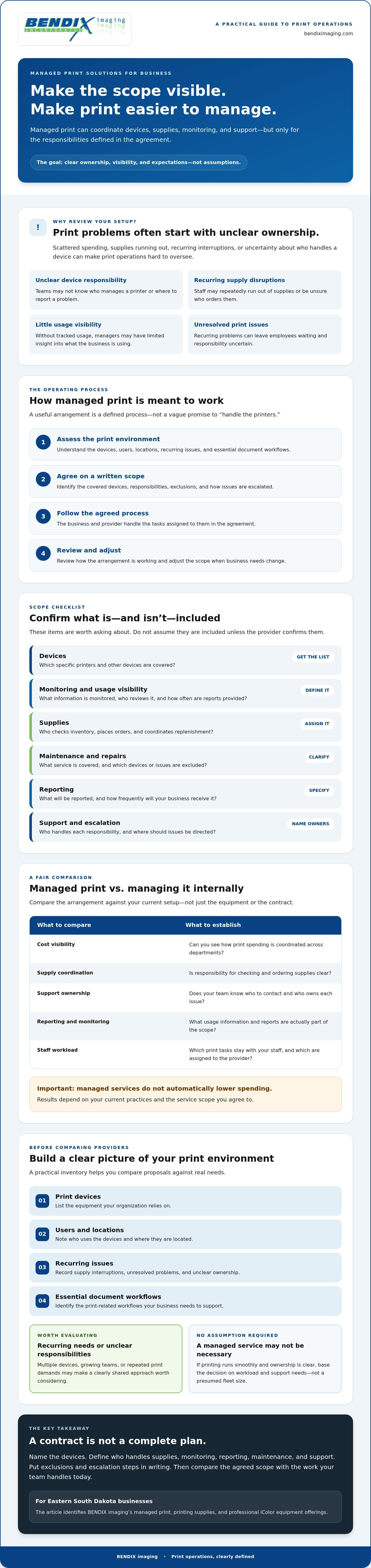
A managed print arrangement works best as a defined operating process, not a vague promise to “handle the printers.” It typically begins with an assessment of the print environment, followed by an agreement on which devices and responsibilities are in scope. From there, the provider and business follow the agreed process, review how it’s working, and adjust the scope when needs change.
That sequence matters. A business with a few shared printers may need a different arrangement from an organization managing devices across several departments. FedTech Magazine’s overview of enterprise managed print services illustrates how approaches can range from targeted infrastructure changes to broader fleet management. For your business, the right fit depends on the devices, workflows, and responsibilities you want covered.
What can a managed print agreement include?
Device inventory, usage visibility, supply coordination, maintenance, reporting, and support are all items to ask about, not automatic inclusions. Device coverage, reporting frequency, and response arrangements can differ by provider, equipment, and agreement. Request a written scope that identifies covered devices, who handles each responsibility, what’s excluded, and how issues are escalated. Clear terms help prevent gaps between what your team expects and what the provider has agreed to do.
How do supplies and device monitoring fit into the workflow?
Usage information, when available for covered devices, can help clarify which machines see regular demand and where supply planning may need attention. What can be collected depends on the devices, tools, and agreement. Ask which information is monitored, who reviews it, and how often you’ll receive reports.
Supply processes vary too. Orders might be placed manually, scheduled, or handled through another agreed process. Confirm who checks inventory, who places orders, and what your staff should do if supplies run low. Don’t assume automatic replenishment or uninterrupted availability unless those terms are explicitly confirmed.
Visibility into device use helps your business make print-management decisions based on actual demand rather than guesswork. It can inform questions such as whether usage is concentrated on a few machines or whether the current arrangement matches how teams work. Reporting is useful only if it’s available, understandable, and tied to decisions someone can act on.
Before evaluating managed print solutions for business, write down the responsibilities you want handled and the information you need to review. Businesses in Eastern South Dakota can also explore BENDIX imaging managed print services as an option for discussing their print environment. Confirm device compatibility and specific service inclusions directly with any provider.
Managed Print vs. Unmanaged Printing: What Should a Business Compare?
Managed and unmanaged printing differ mainly in who oversees the work and what responsibilities are defined. With an unmanaged setup, your staff usually coordinates devices, supplies, and troubleshooting through existing processes. A managed arrangement assigns some responsibilities to a provider, but only as specified in the agreement. Neither approach guarantees lower total spending. Results depend on your current practices, print needs, and the exact scope you choose.
Compare day-to-day responsibilities, not just a provider’s headline claim or an assumed saving. Use this table to identify what to ask about:
| Area | Unmanaged printing | Managed print arrangement |
|---|---|---|
| Visibility | Usage may be spread across devices or tracked internally, if at all. | Ask which devices can be monitored and what usage information is available. |
| Supply coordination | Staff typically checks stock and places orders through internal processes. | Confirm whether the provider coordinates supplies and how ordering works. |
| Support ownership | Employees or internal IT staff decide where to report issues and follow up. | Check which devices and problems are covered, and who handles escalation. |
| Reporting | Print activity may be recorded inconsistently or not at all. | Ask what reports are included, how often they’re provided, and who reviews them. |
| Internal workload | Staff manages the tasks that arise, from supply checks to issue tracking. | Some tasks may shift to the provider, depending on written responsibilities. |
Is managed print just a printer lease?
No. Equipment financing may be part of an arrangement, but managed print describes service and oversight, not simply how a printer is paid for. Ask whether each device is owned, leased, or retained under your current arrangement. Then review how fees, supplies, device changes, and termination are handled. Keep equipment terms separate from service terms so you can see what you’re committing to.
Which print outcomes should you measure?
Before comparing managed print solutions for business, establish a baseline using records you already have. Track device availability, supply-related interruptions, print volume, support requests, and staff time spent managing print tasks. Use the same reporting period before and after a change, and agree on who will review the results and what action they can take. Without a baseline, claims about savings, productivity, or improved service are difficult to verify.
Compare written inclusions and exclusions side by side. Ask what happens when a device is changed, an issue falls outside the agreed scope, or your print needs shift. Clear terms help you judge whether provider support addresses real workload and visibility gaps, rather than relying on broad promises.
How to Assess Your Business Print Environment Before Choosing a Provider
Prepare before you compare providers. A clear picture of your devices, workflows, and recurring problems helps you identify what support you need and spot gaps in a proposal. Don’t fill missing records with guesses. Mark what you know, what you can verify, and what still needs follow-up.
Use this assessment to organize the conversation:
- 1. Inventory devices. Record each printer or multifunction device’s make, model, location, age, ownership status, and primary users where available.
- 2. Map users and locations. Note which departments or teams rely on each device, including equipment shared across offices or work areas.
- 3. Document recurring issues. Track jams, downtime, supply shortages, support requests, and workarounds. Record what happened without assuming the cause.
- 4. Review current processes. Gather available usage, supply, service, and purchasing records. Flag missing or incomplete information rather than estimating figures.
- 5. Confirm essential workflows. Ask teams which devices they depend on and whether scanning, document sharing, or specialized output is part of their daily work.
This groundwork gives you a practical basis for evaluating managed print solutions for business. It also helps prevent a device replacement or service proposal from overlooking a workflow employees depend on.
What information should you gather about your print fleet?
Build a device list with the details you have, then verify what’s missing. Include specialized output requirements and note which equipment is essential to daily operations. Keep a simple issue log with dates, symptoms, and the effect on work. That record can help a provider understand the problem without treating an unconfirmed cause as fact. Before discussing replacements, confirm that proposed devices are compatible with your needs.
What questions should you ask a managed print provider?
Ask for a written explanation of which devices, supplies, support tasks, and reports are included or excluded. Clarify service hours, response commitments, escalation routes, contract changes, and exit provisions. Ask how usage data is accessed, protected, retained, and shared, and who can review it. Don’t rely on verbal assumptions; request clear answers in the proposal or agreement.
Use your assessment to compare providers on the same terms: device compatibility, service scope, reporting, security practices, and agreement conditions. For businesses in Eastern South Dakota, discuss your print environment with BENDIX imaging and confirm which devices and service options fit your needs.
Explore Managed Print Solutions for Eastern South Dakota Businesses
Businesses in Eastern South Dakota can consider a local provider when they want to discuss how print equipment, supplies, and responsibilities fit day-to-day operations. BENDIX imaging serves businesses in Watertown, Brookings, Sioux Falls, Huron, and Montevideo. Its confirmed print-related offerings include managed print, printing supplies, and professional iColor equipment.
A local point of contact can make it easier to discuss your print environment and clarify who to contact with questions. Location alone doesn’t confirm device compatibility, service coverage, response arrangements, or which tasks are included. Ask the provider to spell out those details for your equipment and business locations.
When does local print support make a difference?
Local support may be worth exploring if your team wants a clear point of contact for discussing print needs, supplies, or equipment. Before choosing a provider, verify which devices and manufacturers they can support, what locations are covered, and how support requests are handled. Get the relevant responsibilities and expectations in writing. That gives your team a clearer basis for deciding whether the proposed arrangement fits.
Printers also connect to office systems and may involve user access or document workflows. If those connections raise broader security questions, review this guide to cybersecurity in Eastern South Dakota. For print environments that intersect with wider technology operations, the managed IT support guide offers additional context.
What is a sensible next step for evaluating managed print?
Before speaking with a provider, gather your device list, recurring problems, supply and service records, and the workflows your teams rely on. Note gaps in the information instead of filling them with estimates. Then ask which devices can be supported and what managed print, supply, or equipment options may match your needs. This preparation keeps the conversation specific without assuming a particular outcome or savings.
If you’re considering managed print solutions for business in Eastern South Dakota, ask BENDIX imaging about its managed print, printing supplies, and professional iColor equipment offerings. Use the discussion to confirm service fit, device compatibility, and written scope before deciding on next steps.
Take the Next Step Toward Better Print Oversight
A print setup is easier to manage when you know which devices are in use, where costs and responsibilities sit, and what support an agreement covers. Before choosing managed print solutions for business, document recurring issues and compare written inclusions, exclusions, reporting, and contract terms. A managed arrangement isn’t automatically the right fit or a guaranteed source of savings; it should address needs you can identify and measure.
BENDIX imaging serves businesses across Eastern South Dakota and offers managed print, printing supplies, and professional iColor equipment. Start with a practical conversation about your current devices, workflows, and requirements. Confirm compatibility and service scope before making a decision.
Contact BENDIX imaging to discuss your business print environment. With clear information and the right questions, you can make a confident choice about what your business needs next.
Frequently Asked Questions
What are managed print solutions for business?
Managed print solutions for business are services that coordinate agreed print devices and related responsibilities under a defined scope. Depending on the agreement, a provider may take on selected tasks involving supplies, usage information, reporting, or support. The service isn’t the same from every provider. Before signing, confirm which devices and responsibilities are covered, what’s excluded, and who handles print issues.
What is usually included in managed print services?
There’s no universal package. An agreement may address device inventory, supply coordination, usage monitoring, reporting, maintenance, or support, but each item needs to be confirmed. Coverage can depend on the provider, devices, and tools in place. Ask for a written scope that lists included and excluded equipment, responsibilities, reporting details, support arrangements, and escalation steps so your team knows what to expect.
Is managed print the same as leasing a printer?
No. Leasing describes an equipment arrangement, while managed print refers to service and oversight for responsibilities defined in an agreement. A managed print arrangement may involve leased equipment, but it may also cover devices a business already owns. Ask whether each device is owned, leased, or otherwise retained, and review how service fees, supplies, equipment changes, and ending the agreement are handled.
How can managed print services help control business printing costs?
Managed print may improve cost visibility by helping a business understand device use, supply needs, and print activity, if those items are included. That information can help identify patterns to review, such as underused devices or recurring supply purchases. It doesn’t guarantee lower spending. Compare costs using current records as a baseline, and check that proposed changes and reporting are clearly explained in the agreement.
Can a managed print provider support printers a business already owns?
Possibly, but support for existing equipment depends on the provider’s capabilities and the agreement. Share the make, model, location, and ownership status, then ask the provider to confirm compatibility. Clarify which services apply to each device and whether any equipment is excluded. BENDIX imaging offers managed print, but businesses should verify supported devices and specific service options directly.
Is managed print suitable for a small business?
It can be worth assessing for a small business, but there’s no need to assume a minimum fleet size or that every organization needs a managed service. Start with practical questions: Are supply interruptions recurring? Is device ownership unclear? Do print issues take staff away from other work? If printing is easy to oversee and problems are rare, your current approach may already fit your needs.
How should a business choose a managed print provider?
Start by documenting your devices, workflows, recurring issues, and available usage or purchasing records. Compare written proposals for device compatibility, included tasks, exclusions, reporting, security practices, support arrangements, and contract terms. Ask how usage data is handled and how issues are escalated. For businesses in Watertown, Brookings, Sioux Falls, Huron, or Montevideo, confirm local coverage directly with the provider, including which locations and devices are supported.
{"@context":"https://schema.org","@type":"FAQPage","mainEntity":[{"@type":"Question","name":"How is managed print different from buying printers and toner?","acceptedAnswer":{"@type":"Answer","text":"A one-time equipment purchase gives your organization a printer. Your team may then handle supplies, usage oversight, and service coordination itself. Leasing changes how you pay for equipment, but doesn’t automatically include broader print management. A managed print agreement may cover selected devices, supplies, reporting, or service. Confirm each item. Ask which devices are included, what support covers, how supplies are handled, and whether reporting or monitoring is part of the scope. Don’t treat automatic replenishment or maintenance as standard unless the provider confirms it."}},{"@type":"Question","name":"Which businesses should consider managed print?","acceptedAnswer":{"@type":"Answer","text":"Consider it if your office has multiple devices, a growing team, or departments with recurring print demands. When devices are spread across rooms, teams, or locations, it can be harder to track who uses them, who orders supplies, and where an issue should go. A shared, clearly defined approach may make those responsibilities easier to manage. Smaller organizations can assess the same pain points without assuming they need a minimum fleet size. Note recurring supply disruptions, unclear device responsibility, and unresolved problems. If printing runs smoothly and ownership is clear, a managed service may not be necessary. Base the decision on your workload and support needs, not a provider’s assumptions. A managed print arrangement works best as a defined operating process, not a vague promise to “handle the printers.” It typically begins with an assessment of the print environment, followed by an agreement on which devices and responsibilities are in scope. From there, the provider and business follow the agreed process, review how it’s working, and adjust the scope when needs change. That sequence matters. A business with a few shared printers may need a different arrangement from an organization managing devices across several departments. FedTech Magazine’s overview of enterprise managed print services illustrates how approaches can range from targeted infrastructure changes to broader fleet management. For your business, the right fit depends on the devices, workflows, and responsibilities you want covered."}},{"@type":"Question","name":"What can a managed print agreement include?","acceptedAnswer":{"@type":"Answer","text":"Device inventory, usage visibility, supply coordination, maintenance, reporting, and support are all items to ask about, not automatic inclusions. Device coverage, reporting frequency, and response arrangements can differ by provider, equipment, and agreement. Request a written scope that identifies covered devices, who handles each responsibility, what’s excluded, and how issues are escalated. Clear terms help prevent gaps between what your team expects and what the provider has agreed to do."}},{"@type":"Question","name":"How do supplies and device monitoring fit into the workflow?","acceptedAnswer":{"@type":"Answer","text":"Usage information, when available for covered devices, can help clarify which machines see regular demand and where supply planning may need attention. What can be collected depends on the devices, tools, and agreement. Ask which information is monitored, who reviews it, and how often you’ll receive reports. Supply processes vary too. Orders might be placed manually, scheduled, or handled through another agreed process. Confirm who checks inventory, who places orders, and what your staff should do if supplies run low. Don’t assume automatic replenishment or uninterrupted availability unless those terms are explicitly confirmed. Visibility into device use helps your business make print-management decisions based on actual demand rather than guesswork. It can inform questions such as whether usage is concentrated on a few machines or whether the current arrangement matches how teams work. Reporting is useful only if it’s available, understandable, and tied to decisions someone can act on. Before evaluating managed print solutions for business, write down the responsibilities you want handled and the information you need to review. Businesses in Eastern South Dakota can also explore BENDIX managed print services as an option for discussing their print environment. Confirm device compatibility and specific service inclusions directly with any provider. Managed and unmanaged printing differ mainly in who oversees the work and what responsibilities are defined. With an unmanaged setup, your staff usually coordinates devices, supplies, and troubleshooting through existing processes. A managed arrangement assigns some responsibilities to a provider, but only as specified in the agreement. Neither approach guarantees lower total spending. Results depend on your current practices, print needs, and the exact scope you choose. Compare day-to-day responsibilities, not just a provider’s headline claim or an assumed saving. Use this table to identify what to ask about:"}},{"@type":"Question","name":"Is managed print just a printer lease?","acceptedAnswer":{"@type":"Answer","text":"No. Equipment financing may be part of an arrangement, but managed print describes service and oversight, not simply how a printer is paid for. Ask whether each device is owned, leased, or retained under your current arrangement. Then review how fees, supplies, device changes, and termination are handled. Keep equipment terms separate from service terms so you can see what you’re committing to."}},{"@type":"Question","name":"Which print outcomes should you measure?","acceptedAnswer":{"@type":"Answer","text":"Before comparing managed print solutions for business, establish a baseline using records you already have. Track device availability, supply-related interruptions, print volume, support requests, and staff time spent managing print tasks. Use the same reporting period before and after a change, and agree on who will review the results and what action they can take. Without a baseline, claims about savings, productivity, or improved service are difficult to verify. Compare written inclusions and exclusions side by side. Ask what happens when a device is changed, an issue falls outside the agreed scope, or your print needs shift. Clear terms help you judge whether provider support addresses real workload and visibility gaps, rather than relying on broad promises. Prepare before you compare providers. A clear picture of your devices, workflows, and recurring problems helps you identify what support you need and spot gaps in a proposal. Don’t fill missing records with guesses. Mark what you know, what you can verify, and what still needs follow-up. Use this assessment to organize the conversation: This groundwork gives you a practical basis for evaluating managed print solutions for business. It also helps prevent a device replacement or service proposal from overlooking a workflow employees depend on."}},{"@type":"Question","name":"What information should you gather about your print fleet?","acceptedAnswer":{"@type":"Answer","text":"Build a device list with the details you have, then verify what’s missing. Include specialized output requirements and note which equipment is essential to daily operations. Keep a simple issue log with dates, symptoms, and the effect on work. That record can help a provider understand the problem without treating an unconfirmed cause as fact. Before discussing replacements, confirm that proposed devices are compatible with your needs."}},{"@type":"Question","name":"What questions should you ask a managed print provider?","acceptedAnswer":{"@type":"Answer","text":"Ask for a written explanation of which devices, supplies, support tasks, and reports are included or excluded. Clarify service hours, response commitments, escalation routes, contract changes, and exit provisions. Ask how usage data is accessed, protected, retained, and shared, and who can review it. Don’t rely on verbal assumptions; request clear answers in the proposal or agreement. Use your assessment to compare providers on the same terms: device compatibility, service scope, reporting, security practices, and agreement conditions. For businesses in Eastern South Dakota, discuss your print environment with BENDIX imaging and confirm which devices and service options fit your needs. Businesses in Eastern South Dakota can consider a local provider when they want to discuss how print equipment, supplies, and responsibilities fit day-to-day operations. BENDIX imaging serves businesses in Watertown, Brookings, Sioux Falls, Huron, and Montevideo. Its confirmed print-related offerings include managed print, printing supplies, and professional iColor equipment. A local point of contact can make it easier to discuss your print environment and clarify who to contact with questions. Location alone doesn’t confirm device compatibility, service coverage, response arrangements, or which tasks are included. Ask the provider to spell out those details for your equipment and business locations."}},{"@type":"Question","name":"When does local print support make a difference?","acceptedAnswer":{"@type":"Answer","text":"Local support may be worth exploring if your team wants a clear point of contact for discussing print needs, supplies, or equipment. Before choosing a provider, verify which devices and manufacturers they can support, what locations are covered, and how support requests are handled. Get the relevant responsibilities and expectations in writing. That gives your team a clearer basis for deciding whether the proposed arrangement fits. Printers also connect to office systems and may involve user access or document workflows. If those connections raise broader security questions, review this guide to cybersecurity in Eastern South Dakota. For print environments that intersect with wider technology operations, the managed IT support guide offers additional context."}},{"@type":"Question","name":"What is a sensible next step for evaluating managed print?","acceptedAnswer":{"@type":"Answer","text":"Before speaking with a provider, gather your device list, recurring problems, supply and service records, and the workflows your teams rely on. Note gaps in the information instead of filling them with estimates. Then ask which devices can be supported and what managed print, supply, or equipment options may match your needs. This preparation keeps the conversation specific without assuming a particular outcome or savings. If you’re considering managed print solutions for business in Eastern South Dakota, ask BENDIX imaging about its managed print, printing supplies, and professional iColor equipment offerings. Use the discussion to confirm service fit, device compatibility, and written scope before deciding on next steps. A print setup is easier to manage when you know which devices are in use, where costs and responsibilities sit, and what support an agreement covers. Before choosing managed print solutions for business, document recurring issues and compare written inclusions, exclusions, reporting, and contract terms. A managed arrangement isn’t automatically the right fit or a guaranteed source of savings; it should address needs you can identify and measure. BENDIX imaging serves businesses across Eastern South Dakota and offers managed print, printing supplies, and professional iColor equipment. Start with a practical conversation about your current devices, workflows, and requirements. Confirm compatibility and service scope before making a decision. Contact BENDIX imaging to discuss your business print environment. With clear information and the right questions, you can make a confident choice about what your business needs next."}},{"@type":"Question","name":"What are managed print solutions for business?","acceptedAnswer":{"@type":"Answer","text":"Managed print solutions for business are services that coordinate agreed print devices and related responsibilities under a defined scope. Depending on the agreement, a provider may take on selected tasks involving supplies, usage information, reporting, or support. The service isn’t the same from every provider. Before signing, confirm which devices and responsibilities are covered, what’s excluded, and who handles print issues."}},{"@type":"Question","name":"What is usually included in managed print services?","acceptedAnswer":{"@type":"Answer","text":"There’s no universal package. An agreement may address device inventory, supply coordination, usage monitoring, reporting, maintenance, or support, but each item needs to be confirmed. Coverage can depend on the provider, devices, and tools in place. Ask for a written scope that lists included and excluded equipment, responsibilities, reporting details, support arrangements, and escalation steps so your team knows what to expect."}},{"@type":"Question","name":"Is managed print the same as leasing a printer?","acceptedAnswer":{"@type":"Answer","text":"No. Leasing describes an equipment arrangement, while managed print refers to service and oversight for responsibilities defined in an agreement. A managed print arrangement may involve leased equipment, but it may also cover devices a business already owns. Ask whether each device is owned, leased, or otherwise retained, and review how service fees, supplies, equipment changes, and ending the agreement are handled."}},{"@type":"Question","name":"How can managed print services help control business printing costs?","acceptedAnswer":{"@type":"Answer","text":"Managed print may improve cost visibility by helping a business understand device use, supply needs, and print activity, if those items are included. That information can help identify patterns to review, such as underused devices or recurring supply purchases. It doesn’t guarantee lower spending. Compare costs using current records as a baseline, and check that proposed changes and reporting are clearly explained in the agreement."}},{"@type":"Question","name":"Can a managed print provider support printers a business already owns?","acceptedAnswer":{"@type":"Answer","text":"Possibly, but support for existing equipment depends on the provider’s capabilities and the agreement. Share the make, model, location, and ownership status, then ask the provider to confirm compatibility. Clarify which services apply to each device and whether any equipment is excluded. BENDIX imaging offers managed print, but businesses should verify supported devices and specific service options directly."}},{"@type":"Question","name":"Is managed print suitable for a small business?","acceptedAnswer":{"@type":"Answer","text":"It can be worth assessing for a small business, but there’s no need to assume a minimum fleet size or that every organization needs a managed service. Start with practical questions: Are supply interruptions recurring? Is device ownership unclear? Do print issues take staff away from other work? If printing is easy to oversee and problems are rare, your current approach may already fit your needs."}},{"@type":"Question","name":"How should a business choose a managed print provider?","acceptedAnswer":{"@type":"Answer","text":"Start by documenting your devices, workflows, recurring issues, and available usage or purchasing records. Compare written proposals for device compatibility, included tasks, exclusions, reporting, security practices, support arrangements, and contract terms. Ask how usage data is handled and how issues are escalated. For businesses in Watertown, Brookings, Sioux Falls, Huron, or Montevideo, confirm local coverage directly with the provider, including which locations and devices are supported."}}]}


