

A security tool can’t make a medical office HIPAA-ready on its own. HIPAA compliance IT services should support a documented process for protecting electronic protected health information, not just install software and check a box. If you’re unsure which safeguards matter or whether your IT provider understands its role, that concern is justified: technology is only one part of your office’s HIPAA responsibilities.
You need clear answers, reliable controls, and records you can review when questions arise. This guide explains how IT safeguards support HIPAA responsibilities, how to assess risks such as unauthorized access, phishing, and data loss, and what to ask when comparing support options. It also outlines evidence to request, from written procedures to records of ongoing maintenance, so you can evaluate the work rather than rely on assurances. Use the steps ahead to build a practical, prioritized work plan for your medical office and identify where an IT provider may be able to help.
Key Takeaways
- Understand why HIPAA compliance IT services support a documented process, not a guarantee of compliance.
- Use a risk-based approach to identify how your office can prevent unauthorized access, detect issues, and recover operations.
- Compare IT support options by clarifying responsibilities, documentation, escalation steps, and review cadence.
- Build a practical readiness plan by inventorying systems, assigning owners, addressing risks, and scheduling reviews.
- Assess how managed IT, cybersecurity, backup, compliance support, and vCSO expertise may support your practice’s IT work.
What HIPAA Compliance IT Services Do for a Medical Office
HIPAA compliance IT services are technical and operational support that helps a medical office protect electronic protected health information (ePHI), manage technology-related risks, and maintain evidence of safeguards. They can help put protections into practice, but they don’t certify or guarantee that an office complies with HIPAA. Compliance also depends on the practice’s decisions, policies, workforce practices, and oversight of vendors.
Think of a clinic’s electronic health record, email, workstations, and backups as connected parts of one system. Access controls and network security can help limit exposure, while documented procedures guide staff on handling information and escalating concerns. Training and clear ownership matter too. Even a well-configured system can be undermined by shared credentials, unsafe handling of information, or uncertainty about what to do when something goes wrong. For a broader approach to identifying and managing obligations, see this regulatory compliance risk management guide.
Which HIPAA rules matter to a medical office’s IT?
The Security Rule sets standards for protecting the confidentiality, integrity, and availability of ePHI. The Privacy Rule governs how protected health information is used and disclosed, including information in electronic and other forms. The Breach Notification Rule addresses notifications after breaches of unsecured protected health information. Together, these rules explain why technical controls, office procedures, and incident handling need to work together. The Health Insurance Portability and Accountability Act (HIPAA) includes the Privacy and Security Rules. The U.S. Department of Health and Human Services’ Office for Civil Rights (OCR) administers and enforces HIPAA.
What does an IT provider do, and not do?
An IT provider’s role depends on the services it agrees to deliver and its relationship to the practice. Its work may include configuring access controls, managing network security, maintaining backups, and coordinating technical response when a security issue arises. Ask for the scope in writing: who handles each task, what records are maintained, and how concerns are escalated. If a vendor’s work or access makes it a business associate, the practice should determine whether a business associate agreement is required and address that before sharing protected information.
The provider supports the practice; it doesn’t replace leadership’s responsibility to oversee policies, workforce practices, risk decisions, and vendor relationships. The office should retain ownership of its compliance program and check that contracted work matches its needs. Treat assurances as a starting point, not as evidence. Request documentation of responsibilities and completed work, then review it with the people accountable for the practice’s HIPAA obligations.
How HIPAA IT Safeguards Protect Electronic Health Information
Effective safeguards work together to prevent unauthorized access, detect suspicious activity, and restore systems when something goes wrong. They shouldn’t come from a generic checklist alone. HHS states that risk analysis helps a covered entity identify risks and vulnerabilities to ePHI and determine appropriate security measures. A documented risk analysis is therefore a starting point for deciding which protections fit your office’s systems, workflows, and exposure.
The HIPAA Security Rule describes administrative, physical, and technical safeguards for protecting ePHI. For a medical office, HIPAA compliance IT services can help put technical protections into practice. The practice’s assessment of risk and choice of safeguards should still reflect its own environment.
Access, devices, networks, and secure system use
Start by mapping who can reach each system and what they can do. Give staff individual accounts and permissions suited to their roles, then update or disable access when job duties change or someone leaves. Use appropriate authentication, secure remote access, and protections for endpoints such as laptops and workstations. Maintain software and network configurations, and review whether devices or connections create unnecessary exposure.
Technology needs clear rules and informed users. Train staff to recognize suspicious messages, protect credentials, and report unusual activity promptly. Written procedures should explain approved ways to access health information and identify whom to contact when something seems wrong. A control staff don’t understand or follow may not work as intended.
Backups, monitoring, and incident response
Backups are useful only if they’re protected and can support recovery. Set recovery objectives based on the practice’s operational needs, then test restoration periodically rather than assuming files are usable because a backup job completed. Account for dependencies such as clinical applications, network access, and the information needed to resume essential work. A backup plan supports continuity, but it doesn’t by itself establish HIPAA compliance.
Logging and monitoring can help surface unusual account activity, failed access attempts, or unexpected system changes. Records can also support an investigation. Agree in advance on how the IT provider will alert designated practice contacts, what information it will preserve, and who will document decisions and actions. The practice should retain oversight of incident assessment and any required notification decisions. Technical support can inform the response, but it doesn’t replace the practice’s role.
To review how managed IT, cybersecurity, network security, and backup support might fit your safeguards, discuss your medical office’s IT needs with BENDIX imaging. Before work begins, confirm the proposed scope, documentation, and incident coordination responsibilities.
How to Compare HIPAA Compliance IT Services and Provider Responsibilities
Don’t compare providers by tool lists alone. Compare who will do the work, what evidence they’ll keep, and how responsibilities will be reviewed. In-house IT, a managed service provider (MSP), or a shared-responsibility arrangement can each work, provided the practice can see where responsibilities begin and end.
| Area | In-house IT | Managed service provider | Shared responsibility |
|---|---|---|---|
| Scope | Practice defines and manages IT duties internally. | Provider delivers the specific services listed in its agreement. | Practice and provider divide tasks by system or control. |
| Named responsibilities | Assign an internal owner for each task. | Name provider and practice contacts for each responsibility. | Document who owns each task and who approves changes. |
| Documentation | Keep records of configurations, access reviews, and completed work. | Confirm which reports, tickets, and security records the provider supplies. | Agree where records are stored and who maintains them. |
| Escalation and review | Set an internal reporting path and review schedule. | Confirm how incidents are escalated and how often services are reviewed. | Define handoffs, decision-makers, and a shared review cadence. |
Questions to ask before choosing an IT partner
Ask which systems and information the provider can access, manage, or support. Then request clear descriptions of access controls, backup responsibilities, incident escalation, and the documentation you’ll receive. Ask what is excluded, who approves changes, and how often responsibilities and safeguards are reviewed. These questions turn broad promises into a scope you can assess. The managed IT support guide for South Dakota offers additional context for evaluating support arrangements.
Business associate agreements and shared accountability
HHS generally defines a business associate as a person or organization that performs certain functions or services on behalf of a covered entity involving protected health information. Whether a vendor qualifies depends on the actual relationship and work performed, not simply its industry label. Assess what information the vendor can access and how it uses or handles that information. When a business associate agreement (BAA) is required, it sets permitted uses and disclosures and other obligations. A signed agreement doesn’t replace due diligence, risk management, or ongoing oversight.
Before signing, check that the agreement and service scope align, including incident reporting, subcontractor arrangements where relevant, and responsibilities for records. The AMA HIPAA compliance resources can help medical practices find additional guidance. For HIPAA compliance IT services, choose an arrangement the practice can monitor and document, rather than one that leaves accountability unclear.
A Practical HIPAA IT Readiness Plan for Eastern South Dakota Practices
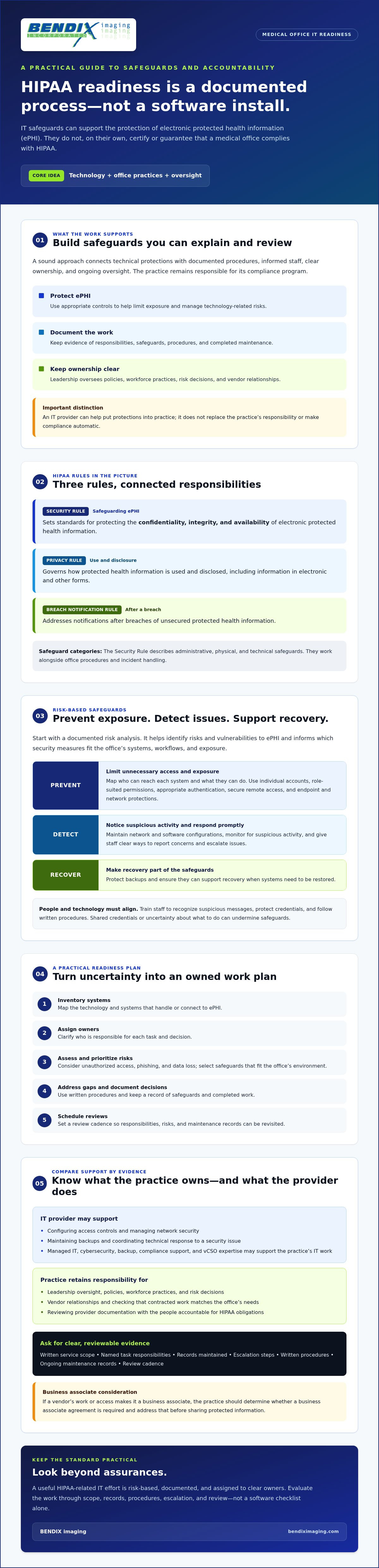
Turn risk findings into assigned work, not a binder that sits untouched. This six-step plan can help a medical office organize HIPAA-related IT work around its actual systems, staff, locations, and support arrangements. Practice leadership should guide priorities and involve qualified legal or compliance advisers when policy or interpretation questions arise.
Start with an inventory and risk-based review
Build a current picture of where electronic health information is stored, used, and shared. Include clinical systems, email, computers and mobile devices, remote access, backups, vendors, and every office location. Then assess likely threats, existing protections, gaps, and the possible effect of disruption on patient care and office operations.
- Inventory systems and data flows. Record devices, applications, users, vendors, and locations that handle health information.
- Assess risks. Identify weaknesses and threats, then consider the likelihood and operational impact of each risk.
- Assign owners. Name a practice decision-maker and responsible people for each technical or administrative task.
- Remediate in priority order. Address the highest risks first, including access to clinical systems and email, endpoint protection, remote connections, backup reliability, and vendor access.
- Document decisions and evidence. Track findings, chosen actions, owners, target dates, completed work, and any accepted risks with the rationale.
- Review and update. Revisit the plan as systems, staffing, vendors, locations, or workflows change.
Make the plan fit the practice. A small office with limited internal IT capacity may need clear escalation contacts and defined provider responsibilities. A practice operating across locations should account for each site’s devices, connectivity, and access needs. HIPAA compliance IT services can help coordinate technical work, but leadership remains responsible for setting priorities and checking that the plan reflects office operations.
Turn findings into documented, repeatable work
Set review intervals that suit your risks and document when each review is due. Include user accounts and permissions, software updates, backups, vendors with access to health information, and incident procedures. Test recovery by restoring data, and check incident communication by confirming staff know whom to contact and what details to record. Capture results, gaps, owners, and follow-up actions. The Eastern South Dakota cybersecurity protection guide offers additional context for building practical protections.
Need help organizing your practice’s next steps? Discuss your medical office’s IT readiness needs with BENDIX imaging and clarify the available support scope and documentation.
How BENDIX imaging Can Support HIPAA-Related IT Work
BENDIX imaging serves businesses in Eastern South Dakota, including Watertown, Brookings, Sioux Falls, Huron, and Montevideo. Its offerings include managed IT, cybersecurity, network security, data backup and recovery, regulatory compliance support, and vCSO expertise. These services may help a medical office coordinate technical safeguards and IT operations with its documented priorities.
That support is not a HIPAA certification or a guarantee of compliance. The practice remains responsible for its compliance decisions and oversight. Treat the provider relationship as a defined working arrangement: identify the gaps you need help addressing, agree on who owns each task, and confirm what records and ongoing support are included. HIPAA compliance IT services are most useful when their agreed scope fits the office’s systems and responsibilities.
Match support to the practice’s actual needs
Use your risk findings to guide the conversation. Managed IT and network security may support technical priorities such as maintaining systems and controlling access. Ask how data backup and recovery are scoped, what the practice must manage, and whether recovery processes and documentation are included. Don’t assume that having backups means your office has a tested recovery plan.
vCSO expertise may offer a strategic resource for organizing security priorities and oversight, depending on the engagement scope. Clarify whether the work includes recommendations, planning, review, or other specific activities before relying on it. A small clinic with limited internal IT capacity may need a different division of responsibilities than a practice with staff handling technology internally.
What to clarify before engaging a provider
Request a written description of services and exclusions. Confirm who is responsible for each task, which systems the provider can access, how concerns are escalated, and what documentation the practice will receive. Ask how ongoing work and changes are reviewed. Clear answers make it easier to compare the proposed support with your risk-management plan and identify responsibilities that remain with your staff.
Assess the actual relationship and information access to determine whether a business associate agreement (BAA) is appropriate. Confirm directly whether BENDIX imaging will sign a BAA when applicable, and verify the precise HIPAA-related services and documentation available. Establish these details before sharing protected health information or assuming a particular task is covered.
Medical offices in the region can discuss managed IT and compliance support with BENDIX imaging, including their systems, identified gaps, responsibilities, and support expectations.
Make Your HIPAA IT Plan Clear and Actionable
Protecting electronic health information takes more than choosing security tools. A medical office needs a documented, risk-based plan, clear ownership of IT responsibilities, and safeguards that are reviewed as systems and operations change. The right HIPAA compliance IT services can support that work, but they don’t replace the practice’s responsibility to oversee its compliance program.
Start with your highest-priority systems, identify gaps, assign owners, and record how each issue will be addressed. When comparing providers, look beyond broad assurances. Confirm the written service scope, documentation practices, escalation process, and whether a business associate agreement applies to the relationship.
BENDIX imaging serves businesses across Eastern South Dakota, including Watertown, Brookings, Sioux Falls, Huron, and Montevideo. Its offerings include managed IT, cybersecurity, network security, backup and recovery, regulatory compliance support, and vCSO expertise. Discuss the specific scope and support your practice needs, without assuming any provider can guarantee compliance. Discuss your medical office’s IT and compliance support needs with BENDIX imaging. With clear priorities and accountable partners, your practice can take its next steps with confidence.
Frequently Asked Questions
What are HIPAA compliance IT services?
HIPAA compliance IT services are technical and operational support that helps a medical office protect electronic protected health information and manage technology-related risks. Depending on the agreed scope, support may include managed IT, network security, cybersecurity, backup and recovery, and documentation of technical work. These services support the practice’s compliance efforts, but they aren’t a certification or guarantee. The office still needs to oversee its policies, staff practices, and compliance responsibilities.
Does hiring an IT provider make a medical office HIPAA compliant?
No. Hiring an IT provider doesn’t by itself make a medical office HIPAA compliant. A provider may help implement and maintain technical safeguards, but the practice must oversee its risk management, policies, workforce practices, and vendors. Ask for a written scope showing what the provider handles, what remains the practice’s responsibility, and what evidence is supplied. Treat broad claims of guaranteed compliance cautiously, and involve qualified compliance or legal advisers when needed.
Does an IT company need to sign a business associate agreement?
It depends on the company’s role and access to protected health information. If it performs services on behalf of the practice that involve creating, receiving, maintaining, or transmitting that information, a business associate relationship may apply and a written business associate agreement may be required. Assess the actual services and data access rather than relying on a vendor’s label. Confirm the agreement’s scope and terms with appropriate legal or compliance advisers before sharing information.
What IT safeguards should a medical office review first?
Start with safeguards protecting the systems and accounts that handle patient information: clinical applications, email, user access, workstations, remote connections, network security, and backups. Check whether each user has appropriate permissions and whether accounts are updated when roles change. Review how suspicious activity is reported and how data can be restored. Prioritize using your documented risk analysis, since the most urgent gaps depend on your office’s systems, workflows, and exposure.
How often should a medical office review HIPAA-related IT risks?
There isn’t one review schedule that fits every office. Set a documented cadence based on your systems and risks, and revisit the assessment when significant changes occur, such as adopting a new clinical system, changing vendors, adding a location, or changing remote access. Practices in Watertown, Brookings, Sioux Falls, Huron, and Montevideo can tailor reviews to their staffing, connectivity, and support arrangements. Record findings, owners, and follow-up actions.
Can cloud services be used to store electronic health information?
Yes, cloud services can be used to store electronic health information, but the practice must assess the service and its responsibilities rather than assume the cloud is automatically secure or compliant. Review how the information is protected, who can access it, how it’s backed up and recovered, and how incidents are handled. For organizations evaluating secure, business-grade infrastructure, visit ManagePoint to learn about dedicated cloud environments. If the provider’s role makes it a business associate, address the required agreement and responsibilities before using the service for protected information.
What should a HIPAA IT service agreement include?
A HIPAA IT service agreement should clearly identify covered systems, services, exclusions, and which party owns each task. Specify how access, backups, documentation, incident escalation, and service changes are handled, along with review expectations and points of contact. If the relationship requires a business associate agreement, confirm that it is in place and aligns with the services. Ask what records you’ll receive so the practice can track work and oversee its responsibilities.
{"@context":"https://schema.org","@type":"FAQPage","mainEntity":[{"@type":"Question","name":"Which HIPAA rules matter to a medical office’s IT?","acceptedAnswer":{"@type":"Answer","text":"The Security Rule sets standards for protecting the confidentiality, integrity, and availability of ePHI. The Privacy Rule governs how protected health information is used and disclosed, including information in electronic and other forms. The Breach Notification Rule addresses notifications after breaches of unsecured protected health information. Together, these rules explain why technical controls, office procedures, and incident handling need to work together. The Health Insurance Portability and Accountability Act (HIPAA) includes the Privacy and Security Rules. The U.S. Department of Health and Human Services’ Office for Civil Rights (OCR) administers and enforces HIPAA."}},{"@type":"Question","name":"What does an IT provider do, and not do?","acceptedAnswer":{"@type":"Answer","text":"An IT provider’s role depends on the services it agrees to deliver and its relationship to the practice. Its work may include configuring access controls, managing network security, maintaining backups, and coordinating technical response when a security issue arises. Ask for the scope in writing: who handles each task, what records are maintained, and how concerns are escalated. If a vendor’s work or access makes it a business associate, the practice should determine whether a business associate agreement is required and address that before sharing protected information. The provider supports the practice; it doesn’t replace leadership’s responsibility to oversee policies, workforce practices, risk decisions, and vendor relationships. The office should retain ownership of its compliance program and check that contracted work matches its needs. Treat assurances as a starting point, not as evidence. Request documentation of responsibilities and completed work, then review it with the people accountable for the practice’s HIPAA obligations. Effective safeguards work together to prevent unauthorized access, detect suspicious activity, and restore systems when something goes wrong. They shouldn’t come from a generic checklist alone. HHS states that risk analysis helps a covered entity identify risks and vulnerabilities to ePHI and determine appropriate security measures. A documented risk analysis is therefore a starting point for deciding which protections fit your office’s systems, workflows, and exposure. The HIPAA Security Rule describes administrative, physical, and technical safeguards for protecting ePHI. For a medical office, HIPAA compliance IT services can help put technical protections into practice. The practice’s assessment of risk and choice of safeguards should still reflect its own environment."}},{"@type":"Question","name":"What are HIPAA compliance IT services?","acceptedAnswer":{"@type":"Answer","text":"HIPAA compliance IT services are technical and operational support that helps a medical office protect electronic protected health information and manage technology-related risks. Depending on the agreed scope, support may include managed IT, network security, cybersecurity, backup and recovery, and documentation of technical work. These services support the practice’s compliance efforts, but they aren’t a certification or guarantee. The office still needs to oversee its policies, staff practices, and compliance responsibilities."}},{"@type":"Question","name":"Does hiring an IT provider make a medical office HIPAA compliant?","acceptedAnswer":{"@type":"Answer","text":"No. Hiring an IT provider doesn’t by itself make a medical office HIPAA compliant. A provider may help implement and maintain technical safeguards, but the practice must oversee its risk management, policies, workforce practices, and vendors. Ask for a written scope showing what the provider handles, what remains the practice’s responsibility, and what evidence is supplied. Treat broad claims of guaranteed compliance cautiously, and involve qualified compliance or legal advisers when needed."}},{"@type":"Question","name":"Does an IT company need to sign a business associate agreement?","acceptedAnswer":{"@type":"Answer","text":"It depends on the company’s role and access to protected health information. If it performs services on behalf of the practice that involve creating, receiving, maintaining, or transmitting that information, a business associate relationship may apply and a written business associate agreement may be required. Assess the actual services and data access rather than relying on a vendor’s label. Confirm the agreement’s scope and terms with appropriate legal or compliance advisers before sharing information."}},{"@type":"Question","name":"What IT safeguards should a medical office review first?","acceptedAnswer":{"@type":"Answer","text":"Start with safeguards protecting the systems and accounts that handle patient information: clinical applications, email, user access, workstations, remote connections, network security, and backups. Check whether each user has appropriate permissions and whether accounts are updated when roles change. Review how suspicious activity is reported and how data can be restored. Prioritize using your documented risk analysis, since the most urgent gaps depend on your office’s systems, workflows, and exposure."}},{"@type":"Question","name":"How often should a medical office review HIPAA-related IT risks?","acceptedAnswer":{"@type":"Answer","text":"There isn’t one review schedule that fits every office. Set a documented cadence based on your systems and risks, and revisit the assessment when significant changes occur, such as adopting a new clinical system, changing vendors, adding a location, or changing remote access. Practices in Watertown, Brookings, Sioux Falls, Huron, and Montevideo can tailor reviews to their staffing, connectivity, and support arrangements. Record findings, owners, and follow-up actions."}},{"@type":"Question","name":"Can cloud services be used to store electronic health information?","acceptedAnswer":{"@type":"Answer","text":"Yes, cloud services can be used to store electronic health information, but the practice must assess the service and its responsibilities rather than assume the cloud is automatically secure or compliant. Review how the information is protected, who can access it, how it’s backed up and recovered, and how incidents are handled. If the provider’s role makes it a business associate, address the required agreement and responsibilities before using the service for protected information."}},{"@type":"Question","name":"What should a HIPAA IT service agreement include?","acceptedAnswer":{"@type":"Answer","text":"A HIPAA IT service agreement should clearly identify covered systems, services, exclusions, and which party owns each task. Specify how access, backups, documentation, incident escalation, and service changes are handled, along with review expectations and points of contact. If the relationship requires a business associate agreement, confirm that it is in place and aligns with the services. Ask what records you’ll receive so the practice can track work and oversee its responsibilities."}}]}


