

What if your business lost access to critical data tomorrow? Would your team know what could be restored, how long recovery might take, and what to do first? Data backup and recovery services can help protect operations, but a backup alone doesn’t prove your business can get back to work.
Scheduled backups can provide peace of mind, but ransomware, accidental deletion, or a failed system can expose gaps if backups haven’t been tested or recovery priorities aren’t clear. A backup is a saved copy; recovery is the process of restoring data and systems; business continuity is how your organization keeps essential work moving through a disruption.
This guide explains how business backup and recovery work together, how to set recovery objectives, and which questions can reveal weaknesses in your plan. You’ll also learn why restoration testing matters and how to choose a practical next step for protecting critical data. For businesses across Eastern South Dakota, BENDIX imaging provides data backup and recovery as part of a proactive approach to managed IT and cybersecurity.
Key Takeaways
- Set recovery objectives by deciding how much data loss and downtime your business can tolerate.
- Compare local, cloud, and hybrid backup approaches based on access, dependencies, and how restoration would work.
- Document critical systems, responsible owners, dependencies, and the order in which services should be restored.
- Use data backup and recovery services as part of a broader plan for protecting business operations, not as a standalone task.
- Eastern South Dakota businesses can connect backup planning with ongoing managed IT and cybersecurity support from BENDIX imaging.
What Are Data Backup and Recovery Services, and Why Do Businesses Need Them?
A backup is a separate, recoverable copy of business data. Recovery is the work of restoring that data and access to the systems that depend on it after a loss or disruption. A backup may help after accidental deletion, hardware failure, human error, a cyber incident, or physical damage. Its presence alone, however, doesn’t prove that the right information can be restored when the business needs it.
Tested recovery turns protected copies into a practical continuity resource. It helps a business restore priority data and keep essential operations moving after a disruption. That’s the difference between having backup files and knowing how they support the work your organization must resume.
What data should a business protect?
Start with the information and systems that keep essential workflows running. These may include business-critical files, databases, email, applications, and configuration data needed to restore systems. Set priorities according to how your teams work, what customers rely on, and which systems depend on one another.
Separate records that would be difficult or impossible to recreate from material that can be rebuilt or restored later. For example, a customer transaction database may be central to daily operations, while an older internal draft may be less urgent. This distinction helps focus protection and recovery planning on what matters most.
Backup, recovery, and business continuity: what is the difference?
Backup is the protected copy. Recovery is the restoration process. Business continuity is the broader effort to sustain essential operations during a disruption. The concepts are connected, but they aren’t interchangeable. A useful overview of data backup explains its purpose and common approaches. For a business, the practical question is whether those copies support a workable restoration process.
Consider an employee who accidentally deletes a shared project folder. A backup may contain an earlier copy. Recovery means restoring the folder and confirming the team can access the files it needs. Continuity includes decisions about keeping the project moving while access is restored, such as assigning urgent tasks or using another approved workflow.
That distinction matters during larger incidents, too. A cyber incident may require investigation and security measures before systems are brought back into use. Backup and recovery are important parts of preparation, but they don’t replace incident response or a complete continuity plan. Data backup and recovery services should be considered within that wider operational context.
How Business Data Backup and Recovery Work From Protection to Restore
A dependable backup process connects preparation to action. Teams identify the data and systems that matter, create protected copies, monitor whether backups are completing, test restoration, and follow documented steps if data is lost. Each part supports the next. An incomplete backup scope, unclear access controls, missed alerts, or outdated instructions can all complicate recovery.
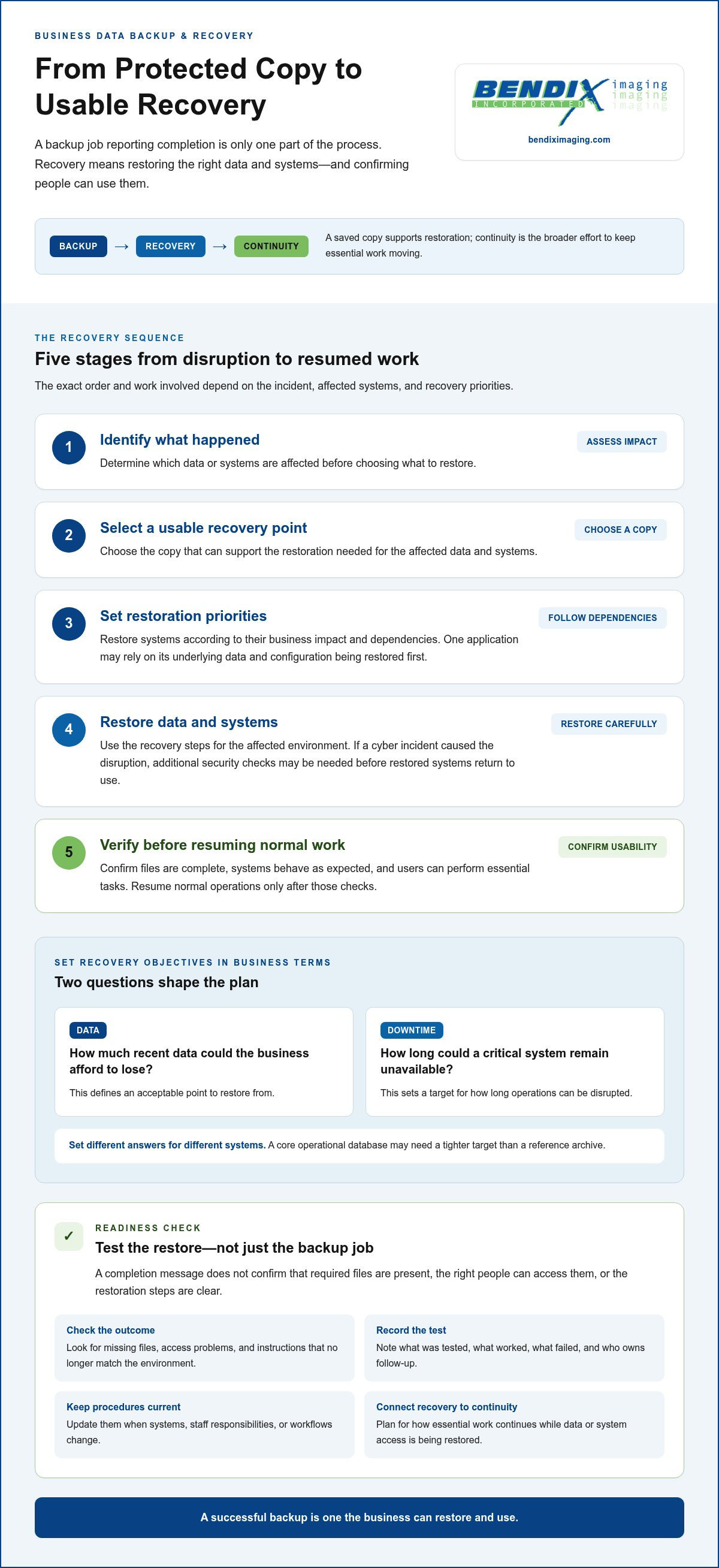
A successful backup is one the business can restore and use. A completion message only shows that a backup job ran. It doesn’t confirm that the required files are present, the right people can access them, or the restoration steps are clear. Data backup and recovery services should account for the full path from protected copy to usable business data.
Set recovery objectives in business terms
Two questions help turn recovery priorities into practical goals: How much recent data could the business afford to lose? How long could a critical system remain unavailable? The first defines an acceptable point to restore from, while the second sets a target for how long operations can be disrupted. Different systems may need different answers. A core operational database, for instance, may warrant a tighter target than a reference archive.
What happens during a data recovery?
Recovery begins by identifying what happened and which data or systems are affected. The team then selects a usable recovery point and prioritizes systems according to their business impact and dependencies. For example, restoring a business application may depend on recovering its underlying data and configuration first.
After restoration, the relevant team should confirm that files are complete, systems behave as expected, and users can perform essential tasks. Normal operations should resume only after those checks. The precise sequence depends on the cause of the incident, the affected systems, and the organization’s recovery priorities. A cyber incident may call for additional security checks before restored systems are put back into use.
Why backup testing matters
Restore tests reveal whether a backup is usable, not just whether a job reported completion. They can uncover missing files, access problems, unclear ownership, or recovery instructions that no longer match the business environment.
Record what was tested, what worked, what failed, and who is responsible for follow-up. Update procedures when systems, staff responsibilities, or workflows change. This keeps the recovery plan aligned with how the business actually operates instead of relying on assumptions made when it was first written.
For a more coordinated approach, businesses can use BENDIX imaging’s data backup and recovery services as part of managed IT and cybersecurity support.
How to Compare Business Backup Options Without Mistaking Features for Readiness
Storage location is only one part of a backup decision. A local copy, cloud copy, or combination of the two can each support recovery, but none proves on its own that the right data is protected, accessible, and restorable. Compare approaches against your business’s systems, dependencies, security needs, and recovery priorities.
Cloud, local, and hybrid backup approaches
Local backups are stored within the business environment, which can make them accessible there. But a site-level event, such as physical damage, could affect both business systems and nearby backup copies. Cloud backups are stored remotely, but restoring them may depend on internet access and secure access to the relevant accounts. Hybrid approaches use both local and remote locations, adding options while also requiring coordination and clear oversight.
Compare what matters in practice
Use this framework to look beyond feature lists. The right details depend on what your business needs to protect and how it plans to restore that information.
| Approach | Scope to assess | Restore method | Administrative responsibility | Key trade-off |
|---|---|---|---|---|
| Local | Which files, applications, and systems are copied locally? | Restore from a copy within the business environment. | Who monitors access, backup results, and restore readiness? | Direct access may be useful, but site-level risks matter. |
| Cloud | Are business-critical applications and user files covered? | Retrieve data through the cloud service and available connection. | Who manages account security, access, and monitoring? | Remote storage separates the copy from the site, but access and connectivity are dependencies. |
| Hybrid | Which data is held locally, remotely, or in both places? | Restore from the suitable copy based on the incident and priorities. | Who coordinates protection, access, and testing across locations? | Combines locations, but adds management and coordination needs. |
Don’t let a long feature list distract from the fundamentals. Confirm that coverage includes the applications, data, and configuration information your workflows depend on. Then assess access controls, monitoring, retention needs, restore testing, and documented ownership. Security features matter, but they must support a recovery process people understand and can carry out.
There’s no universally best approach. A business with systems tied to a particular site may weigh location risks differently from one whose teams rely on remote access. When assessing data backup and recovery services, ask whether the approach matches business requirements and provides clear, tested steps for restoring priority operations.
How to Prepare Your Business for a Reliable Data Recovery
A recovery plan is useful only if people know what to restore, who makes decisions, and where to find the instructions. Build it around real business workflows, then keep it current. This checklist gives your team a practical starting point.
Build a business-focused recovery priority list
Rank systems by the work they support, their effect on customers, and their dependencies on other technology. A customer-facing application, for example, may rely on a database, network access, and user accounts. Document those connections so restoration priorities reflect how systems work together, not just which one seems most visible.
- List critical systems and data: Include applications, databases, shared files, email, and configuration information your operations rely on.
- Name owners and decision-makers: Record who understands each system, who approves recovery priorities, and who communicates updates to affected staff.
- Document dependencies and order: Note what must be available before each priority system can function.
- Set business recovery limits: Agree with leaders and workflow owners on acceptable downtime and data loss for each critical service. Different teams may have different needs, so make the trade-offs explicit.
- Keep instructions accessible: Store the plan where responsible personnel can reach it during a disruption, and identify who can access backup systems and recovery information.
Create a repeatable review and test routine
Use a review cadence that fits your organization’s risk, operations, and rate of change. There’s no single interval that suits every business. During each review, check whether backup coverage still matches critical systems, access permissions remain appropriate, and restoration instructions are clear.
Test restoration in a planned way and record what was covered, what succeeded, and what needs follow-up. A test may reveal an undocumented dependency, a permission issue, or a step that no one currently owns. Assign each action to a responsible person and track it through completion.
Revisit the plan after major technology, staffing, or business-process changes. A new application, a changed workflow, or a shift in staff responsibilities can make old instructions unreliable. Treat the recovery document as an operational tool, not a file to create once and forget.
BENDIX imaging connects data backup and recovery with managed IT and cybersecurity support. Explore data backup and recovery support as a step toward a clearer, business-focused recovery plan.
Data Backup and Recovery Services for Eastern South Dakota Businesses
For a business in Watertown, Brookings, Sioux Falls, Huron, or Montevideo, protecting data takes more than choosing a backup location. Systems change, new applications enter daily workflows, employees take on different responsibilities, and recovery priorities shift as the business grows. A plan that once matched operations can develop gaps if no one reviews it.
BENDIX imaging provides data backup and recovery as part of its managed IT and cybersecurity services for businesses across Eastern South Dakota. Connecting these areas keeps backup oversight in view alongside the broader IT environment, including network security and business operations. The goal is to make protection and recovery planning part of ongoing technology management, not a one-time setup task.
Why ongoing support matters after setup
Backup visibility helps decision-makers understand what’s covered and whether the process is completing as intended. Recovery planning adds another layer: identifying important systems, clarifying responsibilities, and keeping restoration steps aligned with business priorities. Managed IT and cybersecurity support helps frame those questions within the organization’s changing systems and risks.
No plan stays accurate by default. A new business application may create a dependency, a staffing change may leave a recovery task without a clear owner, or a revised workflow may change which systems need priority. Ongoing attention helps surface changes that deserve review.
A practical next step for local business leaders
Before reviewing your current approach, gather a simple picture of your situation:
- List critical data and the systems or applications your team relies on.
- Note what you believe is covered by existing backups and where uncertainty remains.
- Identify known recovery concerns, such as unclear ownership, untested restoration, or changing business priorities.
That snapshot gives you a useful starting point for a focused discussion. For more context on ongoing technology oversight, read the managed IT support guide. You can also explore the Eastern South Dakota cybersecurity guide to consider how backup fits within broader protection.
BENDIX imaging supports businesses across the region with managed IT, cybersecurity, and data backup services. If you’re ready to review how your business protects critical information and plans for recovery, talk with BENDIX imaging about protecting your business data.
Make Recovery Readiness Part of Your Business Plan
Reliable protection isn’t measured by whether a backup exists. It depends on whether critical data is covered, restoration steps are clear, and your team knows what to prioritize. Define acceptable downtime and data loss, document system owners and dependencies, and review restoration tests as your business changes.
Choosing local, cloud, or hybrid storage is only one decision. The right approach must fit your operations and support a recovery process your people can follow. That’s how data backup and recovery services contribute to business continuity, rather than simply storing copies of files.
BENDIX imaging provides data backup and recovery as part of managed IT and cybersecurity services for businesses throughout Eastern South Dakota. If you’re ready to discuss your current coverage, recovery priorities, or areas of uncertainty, talk with BENDIX imaging about protecting your business data.
Start with a clear view of what matters most. Practical priorities and ongoing attention help your organization take a more confident step toward protecting its data and keeping essential work moving.
Frequently Asked Questions
What are data backup and recovery services?
Data backup and recovery services help businesses create protected copies of important information and restore access after data is lost or systems are disrupted. A complete approach considers which data is covered, who can access backups, and how restoration will be carried out. BENDIX imaging provides data backup and recovery as part of managed IT and cybersecurity services for businesses in Watertown, Brookings, Sioux Falls, Huron, and Montevideo.
How often should a business back up its data?
Choose backup frequency based on how much recent data the business can afford to lose. If a critical system changes constantly, losing even a short period of updates may disrupt work; less frequently changed records may have different needs. Set priorities with business stakeholders, consider each system’s role, and review the schedule as workflows change. Test restoration, too, since frequency alone doesn’t show whether a usable copy is available.
Is cloud backup enough to protect business data?
Cloud backup can provide a copy stored away from the business site, but cloud storage alone doesn’t establish recovery readiness. Consider whether all critical data and applications are covered, how staff securely access the backup account, and whether internet availability affects restoration. Also decide who monitors backup activity and tests restores. Depending on business needs and site risks, local or hybrid copies may also be part of the protection plan.
Can ransomware affect backup files?
Yes. Ransomware may affect backup files if attackers can access the systems or accounts that hold them. Reduce exposure by limiting backup access to authorized users, protecting administrative accounts, monitoring backup activity, and testing recovery procedures. Don’t assume that a completed backup is safe or usable after a cyber incident. Recovery planning should account for investigation and security checks before affected systems or restored data return to normal use.
What is the difference between data backup and disaster recovery?
Data backup creates a protected copy; disaster recovery is the broader process of restoring data, systems, and technology services after a disruptive event. For example, a backup may preserve files, while disaster recovery also addresses the steps and priorities for bringing systems back into operation. Business continuity goes further by planning how essential work can continue during disruption. Backup supports recovery, but it isn’t a complete response plan by itself.
How do businesses know whether their backups will work?
Test restoration instead of relying only on a message that a backup job completed. A restore test can show whether the expected files are present, access permissions work, and staff understand their responsibilities. Record what was tested, the outcome, and any gaps that need follow-up. Repeat reviews when technology, staff roles, or business processes change, so recovery instructions don’t become outdated or disconnected from how the organization operates.
Does a business need to back up cloud-based applications?
Businesses should assess backup needs for cloud applications instead of assuming the application provider’s service automatically meets their recovery needs. Identify what information the organization relies on, what could be lost through deletion or user error, and how that data could be restored. Include cloud-based files, email, and business records in a coverage review. Confirm responsibilities, access controls, retention needs, and restoration procedures for each critical application.
{"@context":"https://schema.org","@type":"FAQPage","mainEntity":[{"@type":"Question","name":"What data should a business protect?","acceptedAnswer":{"@type":"Answer","text":"Start with the information and systems that keep essential workflows running. These may include business-critical files, databases, email, applications, and configuration data needed to restore systems. Set priorities according to how your teams work, what customers rely on, and which systems depend on one another. Separate records that would be difficult or impossible to recreate from material that can be rebuilt or restored later. For example, a customer transaction database may be central to daily operations, while an older internal draft may be less urgent. This distinction helps focus protection and recovery planning on what matters most."}},{"@type":"Question","name":"Backup, recovery, and business continuity: what is the difference?","acceptedAnswer":{"@type":"Answer","text":"Backup is the protected copy. Recovery is the restoration process. Business continuity is the broader effort to sustain essential operations during a disruption. The concepts are connected, but they aren’t interchangeable. A useful overview of data backup explains its purpose and common approaches. For a business, the practical question is whether those copies support a workable restoration process. Consider an employee who accidentally deletes a shared project folder. A backup may contain an earlier copy. Recovery means restoring the folder and confirming the team can access the files it needs. Continuity includes decisions about keeping the project moving while access is restored, such as assigning urgent tasks or using another approved workflow. That distinction matters during larger incidents, too. A cyber incident may require investigation and security measures before systems are brought back into use. Backup and recovery are important parts of preparation, but they don’t replace incident response or a complete continuity plan. Data backup and recovery services should be considered within that wider operational context. A dependable backup process connects preparation to action. Teams identify the data and systems that matter, create protected copies, monitor whether backups are completing, test restoration, and follow documented steps if data is lost. Each part supports the next. An incomplete backup scope, unclear access controls, missed alerts, or outdated instructions can all complicate recovery. A successful backup is one the business can restore and use. A completion message only shows that a backup job ran. It doesn’t confirm that the required files are present, the right people can access them, or the restoration steps are clear. Data backup and recovery services should account for the full path from protected copy to usable business data."}},{"@type":"Question","name":"What happens during a data recovery?","acceptedAnswer":{"@type":"Answer","text":"Recovery begins by identifying what happened and which data or systems are affected. The team then selects a usable recovery point and prioritizes systems according to their business impact and dependencies. For example, restoring a business application may depend on recovering its underlying data and configuration first. After restoration, the relevant team should confirm that files are complete, systems behave as expected, and users can perform essential tasks. Normal operations should resume only after those checks. The precise sequence depends on the cause of the incident, the affected systems, and the organization’s recovery priorities. A cyber incident may call for additional security checks before restored systems are put back into use."}},{"@type":"Question","name":"What are data backup and recovery services?","acceptedAnswer":{"@type":"Answer","text":"Data backup and recovery services help businesses create protected copies of important information and restore access after data is lost or systems are disrupted. A complete approach considers which data is covered, who can access backups, and how restoration will be carried out. BENDIX imaging provides data backup and recovery as part of managed IT and cybersecurity services for businesses in Watertown, Brookings, Sioux Falls, Huron, and Montevideo."}},{"@type":"Question","name":"How often should a business back up its data?","acceptedAnswer":{"@type":"Answer","text":"Choose backup frequency based on how much recent data the business can afford to lose. If a critical system changes constantly, losing even a short period of updates may disrupt work; less frequently changed records may have different needs. Set priorities with business stakeholders, consider each system’s role, and review the schedule as workflows change. Test restoration, too, since frequency alone doesn’t show whether a usable copy is available."}},{"@type":"Question","name":"Is cloud backup enough to protect business data?","acceptedAnswer":{"@type":"Answer","text":"Cloud backup can provide a copy stored away from the business site, but cloud storage alone doesn’t establish recovery readiness. Consider whether all critical data and applications are covered, how staff securely access the backup account, and whether internet availability affects restoration. Also decide who monitors backup activity and tests restores. Depending on business needs and site risks, local or hybrid copies may also be part of the protection plan."}},{"@type":"Question","name":"Can ransomware affect backup files?","acceptedAnswer":{"@type":"Answer","text":"Yes. Ransomware may affect backup files if attackers can access the systems or accounts that hold them. Reduce exposure by limiting backup access to authorized users, protecting administrative accounts, monitoring backup activity, and testing recovery procedures. Don’t assume that a completed backup is safe or usable after a cyber incident. Recovery planning should account for investigation and security checks before affected systems or restored data return to normal use."}},{"@type":"Question","name":"What is the difference between data backup and disaster recovery?","acceptedAnswer":{"@type":"Answer","text":"Data backup creates a protected copy; disaster recovery is the broader process of restoring data, systems, and technology services after a disruptive event. For example, a backup may preserve files, while disaster recovery also addresses the steps and priorities for bringing systems back into operation. Business continuity goes further by planning how essential work can continue during disruption. Backup supports recovery, but it isn’t a complete response plan by itself."}},{"@type":"Question","name":"How do businesses know whether their backups will work?","acceptedAnswer":{"@type":"Answer","text":"Test restoration instead of relying only on a message that a backup job completed. A restore test can show whether the expected files are present, access permissions work, and staff understand their responsibilities. Record what was tested, the outcome, and any gaps that need follow-up. Repeat reviews when technology, staff roles, or business processes change, so recovery instructions don’t become outdated or disconnected from how the organization operates."}},{"@type":"Question","name":"Does a business need to back up cloud-based applications?","acceptedAnswer":{"@type":"Answer","text":"Businesses should assess backup needs for cloud applications instead of assuming the application provider’s service automatically meets their recovery needs. Identify what information the organization relies on, what could be lost through deletion or user error, and how that data could be restored. Include cloud-based files, email, and business records in a coverage review. Confirm responsibilities, access controls, retention needs, and restoration procedures for each critical application."}}]}


