

What if your technology’s biggest risk isn’t one failing device, but gaps between systems that don’t work well together? Separate tools can obscure security weaknesses, interrupt daily work, and make it harder to see whether technology spending supports business goals. A business technology audit Watertown organizations can use starts with the whole environment, not just the most visible problem.
You may already know something needs attention. The challenge is deciding what matters most: security, backups, network reliability, compliance, or systems that no longer fit how your team works. This guide explains what to review, how to recognize meaningful risks and opportunities, and how to prioritize next steps without treating every issue as equally urgent.
We’ll cover what to examine and how to turn observations into a business-focused plan. BENDIX imaging serves businesses in Watertown and Eastern South Dakota with managed IT, cybersecurity, network security, data backup and recovery, regulatory compliance, and AI consulting. A focused review can clarify what you have, what needs attention, and which support areas align with your priorities.
Key Takeaways
- A business technology audit Watertown companies can use connects technology choices to security, continuity, and day-to-day business needs.
- Review systems by purpose, including network protection, data recovery, devices, applications, and business communications.
- Rank findings by impact, urgency, exposure, and dependencies to distinguish immediate risks from planned improvements.
- Prepare for a focused review by outlining business goals and gathering system records, vendor details, incident notes, and backup procedures where available.
- Use the findings to identify suitable next steps, from managed IT and cybersecurity to backup, compliance, print, or VoIP support.
Business technology audit in Watertown: what it evaluates and why it matters
A business technology audit is a structured review of a company’s technology, the risks attached to it, and how well it supports business operations. It looks beyond whether equipment turns on. The aim is to understand whether systems protect essential information, support employees’ work, and fit the organization’s current needs.
A business technology audit Watertown business owners undertake can be especially useful before a disruption, a period of growth, a major technology purchase, or a change in how the team operates. A growing staff may need consistent access to shared systems. Adding a location can raise questions about communication and access between sites. A workflow change may expose duplicate tools or a process that depends on one person’s knowledge.
Don’t wait for a visible failure to assess whether your technology is fit for purpose. A review can help decision-makers identify risks and mismatches while there’s still room to plan, rather than make rushed choices during downtime. It’s more than a device inventory: a list shows what’s present, but not whether it is secure, useful, or aligned with business priorities. The Information technology audit overview describes the broader purpose of assessing technology systems and controls.
What belongs in a business technology audit?
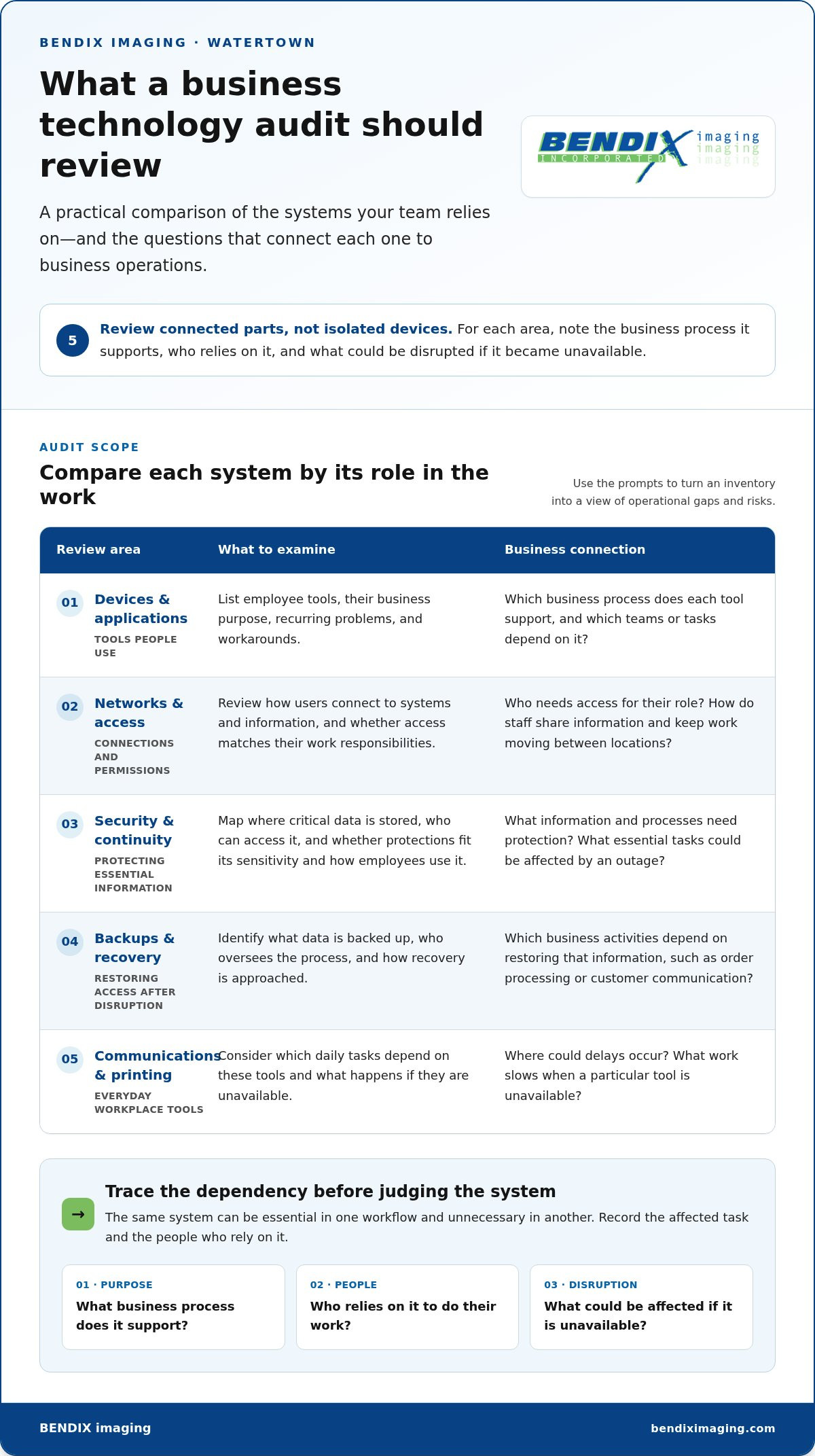
Review the environment as connected parts: devices, networks, business applications, communications, and printing. For each, note what business process it supports, who relies on it, and what could be disrupted if it became unavailable. Then consider how cybersecurity and access controls affect who can reach systems and information, and how backups and recovery planning affect the ability to restore access after data loss or disruption.
- Devices and applications: List the tools employees use, their business purpose, and any recurring problems or workarounds.
- Networks and access: Review how users connect to business systems and information, and whether access matches their work responsibilities.
- Backups and recovery: Identify what is backed up, who oversees the process, and how recovery is approached.
- Communications and printing: Consider which daily tasks depend on these tools and what happens if they are unavailable.
Context matters. The same system can be essential in one workflow and unnecessary in another. Ask where delays occur, which processes rely on specific technology, and what employees need to serve customers or complete core work. For example, if a shared application is needed to process orders, record the teams and tasks that depend on it. Those details turn a general inventory into a useful view of operational gaps and risks.
Why Watertown businesses should connect technology to business goals
Watertown businesses don’t all have the same systems, customers, or obligations. Local decision-makers should weigh continuity, security, efficiency, and future needs against their own plans. For a growing team, review access and communication as roles change. For a business with multiple locations, examine how staff share information and keep work moving between sites.
Start with the business outcome, then assess whether technology supports it. This keeps the review grounded in how your organization works today and helps you decide what deserves attention next. The same approach applies to businesses in Brookings, Sioux Falls, Huron, and Montevideo: focus on your workflows and priorities, not a generic checklist.
What a business technology audit should review across systems and risks
A useful review groups technology by what it does for the business, rather than treating each device as an isolated item. The scope should reflect the company’s operations and risks. For a business technology audit Watertown organizations can apply to their own environment, trace how information, communications, and daily work depend on connected systems.
Review security, access, backups, and continuity
Start with the information and processes the business needs to protect. Map where critical data is stored, which roles can access it, and how users connect through the network. Then consider whether protections align with the sensitivity of the information and the way employees use it. A staff member who needs customer records for their role has different access needs from someone who only uses a shared printer.
Backups are one part of a recovery plan. Identify what data is backed up, where the process fits into the operating routine, and which business activities depend on restoring that information. If an outage would stop order processing, customer communication, or another essential task, record that dependency. A review of cybersecurity in Eastern South Dakota can offer additional context for thinking about protection and business risk.
Check infrastructure, communications, and workplace tools
Examine whether the technology people rely on supports the work they actually do. Network performance, devices, and business applications can affect how staff share information, serve customers, and complete routine tasks. Look for practical friction: repeated manual steps, tools that don’t connect well, or work that slows when a particular device or application is unavailable. Note the affected task and who experiences the problem.
Business communications deserve the same attention. Consider whether VoIP systems and other communication tools fit how employees handle internal and customer conversations, including how work moves between locations when relevant. Connect each tool to the task it supports and identify where a weakness could interrupt that task.
Include printing where it’s part of the workflow. Review print devices, supplies, and document processes. A recurring delay around shared printing may point to an efficiency issue, while a print process tied to essential paperwork may matter to continuity. A Watertown managed IT services guide can help put infrastructure and ongoing technology support in context.
- Protect: Map important information, network safeguards, and access.
- Recover: Connect backups and recovery practices to essential business processes.
- Enable work: Assess devices, applications, communications, and print workflows based on how employees use them.
These connections turn a scattered list of systems into a clearer picture of business exposure and operational needs. When findings point to managed IT, cybersecurity, backup, or print support, BENDIX imaging’s business technology support can help address those needs.
How to prioritize technology audit findings without chasing every issue
An audit can surface several concerns at once. Treating every item as equally urgent can waste attention and lead to rushed decisions. Prioritize findings by business impact and urgency, while weighing exposure and dependencies before deciding what to address.
Use these questions to guide discussion, not as a universal scoring system. A finding’s priority depends on the organization’s operations, information, and tolerance for disruption.
- Business impact: What work, customer service, or business objective could be affected?
- Urgency: Does the issue need attention now, or can it be handled through planned work?
- Exposure: Could the weakness put important systems, information, or operations at risk?
- Dependencies: Does another process or planned change rely on resolving this issue first?
For example, a weakness affecting access to a business-critical system may call for prompt review, while an application that causes avoidable manual steps could be a planned efficiency improvement. The circumstances matter. Don’t assign a finding high priority just because it sounds technical, and don’t assume every concern requires immediate replacement.
Distinguish urgent exposure from planned improvement
Separate potential security or continuity weaknesses from opportunities to improve convenience, efficiency, or future capacity. For each finding, record the affected process, the possible business consequence, and the person responsible for setting its priority. This makes ownership clear and connects technical observations to business action.
Then group findings into practical time horizons:
- Immediate review: Potential exposure or disruption that could affect an essential process.
- Planned improvement: A fix or adjustment that can be scheduled without treating it as an emergency.
- Longer-term decision: A broader technology choice that depends on business plans, other systems, or future investment.
These categories support discussion; they aren’t rigid deadlines. A planned improvement may move up if business conditions change, while a larger technology decision may need more context before action. The goal is deliberate sequencing, not a blanket replacement list.
Connect findings to compliance and strategic oversight
Compliance considerations depend on the organization’s circumstances, the information it handles, and any obligations that apply to it. Avoid assuming the same rules or priorities fit every business. Document which obligations are relevant, identify who owns related decisions, and connect technical findings to the organization’s risk-management approach. A business regulatory compliance guide can help frame that review.
For a business technology audit Watertown leaders can act on, the useful outcome is a reasoned order of operations: what needs attention first, what belongs in a planned improvement, and what should wait for a broader decision. When findings point to managed IT, cybersecurity, backup, or compliance needs, BENDIX imaging provides relevant business technology support.
How Watertown businesses can prepare for a focused technology audit
A focused review starts with the business, not a checklist. Before a business technology audit, Watertown leaders should identify what they need technology to support, what concerns prompted the review, and which workflows must keep running. A little preparation helps keep the assessment relevant to the organization’s priorities and day-to-day realities. The review’s findings, timing, and report should follow the scope and needs.
Set the audit scope around business needs
Agree on the outcomes that matter most. Is the priority protecting information, maintaining continuity, supporting compliance efforts, improving operational efficiency, or preparing for growth? Several goals may matter, but naming the primary concerns helps focus the discussion.
Next, note which teams, locations, and technology-dependent workflows fall within scope. A business with more than one location may want to understand how employees coordinate work across sites. A team changing how it serves customers may want to examine the systems and communications that support that process. Keep the scope proportional to your organization. Another company’s checklist may include systems or concerns that don’t apply to your operations.
Use this sequence to get aligned:
- Define business goals. State what the organization needs technology to help protect or accomplish.
- Map systems and workflows. Note the tools and locations involved in essential work.
- Identify concerns. Gather examples of interruptions, uncertainty, recurring friction, or planned changes.
- Agree on priorities. Decide which questions the review should address first.
Gather context and plan for minimal disruption
Collect what the business already has, even if records are incomplete. Useful context may include system inventories, vendor information, access records, incident notes, and written backup procedures. Also list known pain points, such as recurring delays, employee workarounds, or uncertainty about who is responsible for a system. These details connect the review to actual work instead of assumptions.
Identify essential workflows and operational constraints before assessment activities begin. Note busy periods, staff availability, and processes that can’t be interrupted casually. Coordinate conversations with the people who understand how tools are used, including managers and employees who handle routine tasks. Their input can reveal where documented procedures differ from everyday practice.
- Gather available records: Organize existing system and vendor details without delaying preparation to make every record perfect.
- Capture operational context: Describe important workflows, known concerns, and constraints that may affect review activities.
- Set expectations: Align on areas of focus and coordinate around normal business operations.
Preparation improves focus, but the organization’s environment should shape the review’s activities and timing. If you’re ready to discuss your priorities and technology environment, BENDIX imaging provides business technology support.
Take the next step with BENDIX imaging in Watertown
A technology review is useful when it leads to clear decisions. First, understand the environment and how people depend on it. Next, rank priorities by business impact and urgency. Then decide which actions fit the organization’s needs, resources, and operating conditions. You don’t need to solve every issue at once, but you do need a practical direction and clear ownership for what happens next.
BENDIX imaging serves businesses in Watertown and Eastern South Dakota with managed IT, cybersecurity, network security, data backup and recovery, regulatory compliance, managed print, VoIP, and vCSO services. These capabilities can support businesses as they assess findings and decide what fits their priorities.
Match support to the priorities the review reveals
Use the review’s business context to guide next steps. If concerns center on protecting systems or managing network risk, cybersecurity and network security may be relevant. If continuity is a priority, data backup and recovery connect to how the business approaches restoring important information and operations.
Other findings may point to different needs. Managed print relates to print devices and workplace workflows; VoIP systems support business communications; managed IT addresses broader technology operations. For leadership seeking strategic oversight, vCSO is another available capability. The right starting point depends on what the review surfaces, not on adopting every service area at once.
- Security concerns: Consider how cybersecurity and network security align with the risks identified.
- Continuity needs: Connect backup and recovery discussions to the business processes that rely on technology.
- Operational fit: Look at managed IT, print, and VoIP in relation to how the team works.
- Leadership oversight: Consider whether vCSO support fits the organization’s strategic needs.
Move from assessment to a practical conversation
Bring the priorities into a focused discussion. Describe the business goals behind the review, the concerns that prompted it, and the workflows employees rely on. Share which findings feel urgent, which changes are already planned, and what operating constraints could shape next steps. You don’t need a perfect inventory or technical vocabulary. Clear examples of where work slows, systems feel exposed, or responsibilities are uncertain provide useful context.
Then align support with the organization’s priorities and operating environment. A business technology audit Watertown leaders use should make the next decision more grounded, whether it concerns security, continuity, communications, printing, or broader IT needs. BENDIX imaging serves businesses in Watertown, Brookings, Sioux Falls, Huron, and Montevideo, providing a local point of connection as your business considers its options.
Ready to discuss your technology priorities? Talk with BENDIX imaging about your business technology needs.
Make your next technology decision with confidence
A technology review can be more than a one-time exercise. Revisit its priorities when your business changes, adds systems, or considers a major purchase. That way, new decisions can be weighed against what your operations actually need instead of being made in isolation.
A business technology audit Watertown leaders can use is most valuable when it turns uncertainty into a clear conversation about what matters now and what can wait. You don’t need every answer before taking that step. Bring your questions, concerns, and business goals to shape a practical discussion about support.
Start a conversation with BENDIX imaging about your technology needs and put your business priorities at the center of the next decision.
Frequently Asked Questions
How often should a business conduct a technology audit?
Review technology when business operations, risks, systems, or priorities change, and set a recurring cadence that fits your environment. A growing team, a new location, a major system change, or a security concern can justify revisiting your setup. For example, adding a new sales process may change which employees need access to customer information. There’s no single schedule for every organization, so let business needs guide the timing.
What is the difference between a technology audit and a cybersecurity audit?
A technology audit considers how systems support business operations, while a cybersecurity audit focuses more closely on security risks and protective practices. Their scopes can overlap, but they answer different questions. If you’re deciding whether to replace business software, a broader review may help assess workflows and system dependencies. If your concern is who can access sensitive information or assess vulnerabilities across broader operations, organizations with overseas operations often engage a managed security service provider UK to uncover hidden exposures. Define the decision first to set the scope.
Can a technology audit help before buying new business software or equipment?
Yes. A review can clarify what your current systems support and what a proposed purchase needs to accomplish. Before choosing new software, map the tasks it must handle and the tools or information it needs to work with. Findings can also highlight access, continuity, or staff-process questions to resolve. Treat the assessment as decision support, not an instruction to buy or replace technology. Tie any investment to a documented business need.
Will a business technology audit interrupt daily operations?
It depends on the organization, the systems in scope, and the review activities. Leaders can help limit disruption by identifying busy periods, essential tasks, and staff whose work shouldn’t be interrupted casually. Before activities begin, discuss what will be reviewed and how it may affect employees’ routines. For example, a team handling customer calls may need conversations scheduled around its operating demands. Setting expectations helps the review account for normal work.
Does a technology audit replace a regulatory compliance audit?
No. A technology review can surface systems or practices that may be relevant to compliance, but it doesn’t automatically replace a formal audit or establish that every requirement is met. Applicable obligations depend on the organization and the information it handles. If a finding raises a compliance question, record the system involved and route it to the appropriate decision-maker or qualified compliance resource. Keep technical observations distinct from formal legal or regulatory determinations.
Can a small business in Watertown benefit from a technology audit?
Yes. A focused review can help a small business see whether its technology fits its actual work, without borrowing the scale or complexity of a large enterprise checklist. Even a single application or shared device may be central to a small team’s daily operations, so understanding its role can inform sensible priorities. Businesses in Watertown, Brookings, Sioux Falls, Huron, and Montevideo can use a business technology audit to frame practical next steps around their own needs.
{"@context":"https://schema.org","@type":"FAQPage","mainEntity":[{"@type":"Question","name":"What belongs in a business technology audit?","acceptedAnswer":{"@type":"Answer","text":"Review the environment as connected parts: devices, networks, business applications, communications, and printing. For each, note what business process it supports, who relies on it, and what could be disrupted if it became unavailable. Then consider how cybersecurity and access controls affect who can reach systems and information, and how backups and recovery planning affect the ability to restore access after data loss or disruption. Context matters. The same system can be essential in one workflow and unnecessary in another. Ask where delays occur, which processes rely on specific technology, and what employees need to serve customers or complete core work. For example, if a shared application is needed to process orders, record the teams and tasks that depend on it. Those details turn a general inventory into a useful view of operational gaps and risks."}},{"@type":"Question","name":"How often should a business conduct a technology audit?","acceptedAnswer":{"@type":"Answer","text":"Review technology when business operations, risks, systems, or priorities change, and set a recurring cadence that fits your environment. A growing team, a new location, a major system change, or a security concern can justify revisiting your setup. For example, adding a new sales process may change which employees need access to customer information. There’s no single schedule for every organization, so let business needs guide the timing."}},{"@type":"Question","name":"What is the difference between a technology audit and a cybersecurity audit?","acceptedAnswer":{"@type":"Answer","text":"A technology audit considers how systems support business operations, while a cybersecurity audit focuses more closely on security risks and protective practices. Their scopes can overlap, but they answer different questions. If you’re deciding whether to replace business software, a broader review may help assess workflows and system dependencies. If your concern is who can access sensitive information, a security-focused review may be more relevant. Define the decision first to set the scope."}},{"@type":"Question","name":"Can a technology audit help before buying new business software or equipment?","acceptedAnswer":{"@type":"Answer","text":"Yes. A review can clarify what your current systems support and what a proposed purchase needs to accomplish. Before choosing new software, map the tasks it must handle and the tools or information it needs to work with. Findings can also highlight access, continuity, or staff-process questions to resolve. Treat the assessment as decision support, not an instruction to buy or replace technology. Tie any investment to a documented business need."}},{"@type":"Question","name":"Will a business technology audit interrupt daily operations?","acceptedAnswer":{"@type":"Answer","text":"It depends on the organization, the systems in scope, and the review activities. Leaders can help limit disruption by identifying busy periods, essential tasks, and staff whose work shouldn’t be interrupted casually. Before activities begin, discuss what will be reviewed and how it may affect employees’ routines. For example, a team handling customer calls may need conversations scheduled around its operating demands. Setting expectations helps the review account for normal work."}},{"@type":"Question","name":"Does a technology audit replace a regulatory compliance audit?","acceptedAnswer":{"@type":"Answer","text":"No. A technology review can surface systems or practices that may be relevant to compliance, but it doesn’t automatically replace a formal audit or establish that every requirement is met. Applicable obligations depend on the organization and the information it handles. If a finding raises a compliance question, record the system involved and route it to the appropriate decision-maker or qualified compliance resource. Keep technical observations distinct from formal legal or regulatory determinations."}},{"@type":"Question","name":"Can a small business in Watertown benefit from a technology audit?","acceptedAnswer":{"@type":"Answer","text":"Yes. A focused review can help a small business see whether its technology fits its actual work, without borrowing the scale or complexity of a large enterprise checklist. Even a single application or shared device may be central to a small team’s daily operations, so understanding its role can inform sensible priorities. Businesses in Watertown, Brookings, Sioux Falls, Huron, and Montevideo can use a business technology audit to frame practical next steps around their own needs."}}]}


